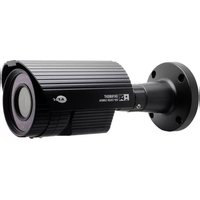
KPC-N701NU18B - Security Camera KT&C - Free user manual and instructions
Find the device manual for free KPC-N701NU18B KT&C in PDF.


| Product Type | Security Camera |
| Brand | KT&C |
| Model | KPC-N701NU18B |
| Image Sensor | 1/3" 960H SONY EXVIEW HAD CCD III |
| Resolution | 700 TV Lines |
| Minimum Illumination | 0.1 Lux (IR on) |
| Electronic Shutter | 1/50 to 1/100,000 sec |
| Video Output | 1.0 Vp-p Composite (75 Ohms) |
| S/N Ratio | Greater than 50 dB (AGC OFF) |
| Lens | Varifocal, 2.8-12mm (adjustable) |
| IR Range | Up to 30m (Smart IR) |
| Power Supply | DC12V / AC24V Dual Voltage |
| Power Consumption | 10W (Max) |
| Dimensions | Approx. 70 x 60 x 110 mm |
| Weight | Approx. 900g |
| IP Rating | IP66 |
| Operating Temperature | -40°C to 50°C (with heater) |
| Storage Temperature | -20°C to 60°C |
| Special Features | 2DNR, ATR/D-WDR, Privacy Zone, Motion Detect, Smart IR, OSD |
| Communication Protocol | Pelco D |
| Heater | Built-in |
| Color | Black |
| Mount Type | Bracket mount |
Frequently Asked Questions - KPC-N701NU18B KT&C
User questions about KPC-N701NU18B KT&C
0 question about this device. Answer the ones you know or ask your own.
Ask a new question about this device
Download the instructions for your Security Camera in PDF format for free! Find your manual KPC-N701NU18B - KT&C and take your electronic device back in hand. On this page are published all the documents necessary for the use of your device. KPC-N701NU18B by KT&C.
USER MANUAL KPC-N701NU18B KT&C
natural_image
Black cylindrical security camera with mounted sensor and antenna (no visible text or symbols)Thank you for choosing our high quality camera. Before attempting to connect operate this unit, please read and follow these instructions.
M117-N701-001
HIGH PERFORMANCE
Super Night Vision Camera
OPERATION MANUAL
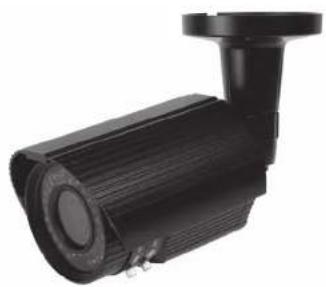
natural_image
Black cylindrical security camera with mounted sensor and antenna (no visible text or symbols)Thank you for choosing our high quality camera. Before attempting to connect operate this unit, please read and follow these instructions.
CAUTION
These servicing instructions are for use by qualified service personnel only. To reduce the risk of electric shock do not perform any servicing other than that contained in the operating instructions unless you are qualified to do so. In USA and Canada, Use Class 2 Power Supply Only
CONTENTS
- CAUTIONS
- IMPORTANT SAFETY INSTRUCTIONS
- FEATURES
- COMPONENTS
- NAME AND FUNCTION
- INSTALLATION
- DIMENSIONS
- SPECIFICATION
- OSD MANUAL
- COMMUNICATION PROTOCOL
1. CAUTIONS
This device complies with Part 15 of the FCC Rules.
Operation is subject to the following two conditions;
-
This device may not cause harmful interference.
-
This device must accept any interference received, including
Interference that may cause undesired operation
Note
This equipment has been tested and found to comply with the limits for a Class A digital device, pursuant to part 10 of the FCC Rules. These limits are designed to provide reasonable protection against harmful interference when the equipment is operated in a commercial environment. This equipment generates, uses, and can radiate radio frequency energy and, if not installed and used in accordance with the instruction manual, may cause harmful interference to radio communications. Operation of this equipment in a residential area is likely to cause harmful interference in which case the user will be required to correct the interference at his own expense."
WARNING
This is a class A product. In a domestic environment this product may cause radio interference in which case the user may be required to take adequate measures.
Caution
Any changes or modifications in construction of this device which are not expressly approved by the party responsible for compliance could void the user's authority to operate the equipment.
CAUTION
- A regulated DC12V 1A power supply is recommended for use with this camera.
for the best picture and the most elastic operation.
An unregulated power supply can cause damage to the camera.
When unregulated power supply is applied, product warranty will be
out of subject.
- It is recommended that the camera is used with a monitor that has a CCTV qualify
75 video impedance level.
If your similar is suffered to high impedance then please equal scratchly.
- DO NOT attempt to disassemble the cameras to gain access to the internal companies.
Refer servicing to your exterior.
-
Never since the canals towards the sun of any light of receive light, which may
-
Do not remove the serial sticker for the warranty service.
1. CAUTIONS

Correct Disposal of This Product (Waste Electrical & Electronic Equipment)
(Applicable in the European Union and other European countries with separate collection systems)
This marking shown on the product or its literature, indicates that it should not be disposed with other household wastes at the end of its working life. To prevent possible harm to the environment or human health from uncontrolled waste disposal, please separate this from other types of wastes and recycle it responsibly to promote the sustainable reuse of material resources.
This product should not be mixed with other commercial wastes purchased this product, or their local government office, for details of where and how they can take them for environmentally safe recycling.
Business users should contact their supplier and check the terms and conditions of the purchase contract. Household users should contact either the retailer where they for disposal.

This symbol is intended to alert the user to the presence of uninsulated "dangerous voltage" within the product's enclosure that may be of sufficient magnitude to constitute a risk of electric shock to persons.

This symbol is intended to alert the user to the presence of important operating and maintenance(servicing) instructions in the literature accompanying the appliance
2. IMPORTANT SAFETY INSTRUCTION
1) Read these instructions.
2) Keep these instructions.
3) Heed all warnings.
4) Follow all instructions.
5) Do not use this apparatus near water.
6) Clean only with dry cloth.
7) Do not block any ventilation openings. Install in accordance with the manufacturer's instructions.
8) Do not install near any heat sources such as radiators, heat registers, sleeves, or other apparatus (including amplifiers) that produce heat.
9) Do not defeat the safety purpose of the polarized or grounding-type plug. A polarized plug has two blades with one wider than the other. A grounding type plug has two blades and a third grounding prong. The wide blade or the third prong are provided for your safety. If the provided plug does not fit into your outlet, consult an electrician for replacement of the obsolete outlet.
10) Protect the power cord from being walked on or pinched particularly at plugs, convenience receptacles, and the point where they exit from the apparatus.
11) Only use attachments/accessories specified by the manufacturer.
12) Use only with the car, stand, tripod, bracket, or table specified by the manufacturer, or sold with the apparatus. When a car is used, use caution when moving the car/apperatus combination to avoid injury from tip-over.
13) Unplug this apparatus during lightning storms or when unused for long periods of time.
14) Refer all servicing to qualified service personnel. Servicing is required when the apparatus has been damaged in any way, such as power-supply core or plug is damaged. Liquid has been spilled or objects have fallen into the apparatus, the apparatus has been exposed to rain or moisture, does not operate normally, or has been dropped.

3. FEATURES
• 1/3" 960H SONY EXVIEW HAD CCD III
+High Resolution of 700TV Lines
- OSD Function
• Multi Language
(ENGLISH CHINESE RUSSIAN, SPANISH GERMAN, FRENCH, PORTUGUESE JAPANESE)
-2DNR
• Privacy Zone / Motion Detect
- Smart IR
• DC12V / AC24V Dual Voltage
• ATR/Adaptive Tone-curve Reproduction / Digital WDR)
The function provides gradation compensation to improve the contrast of subjects both
log-contrast areas and high latencies areas exist in the same picture
- COMPONENTS
5. NAME AND FUNCTION
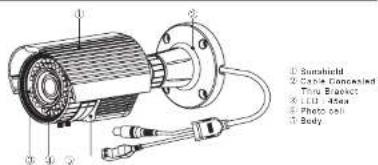
• Service Video connector & OSD Joystick
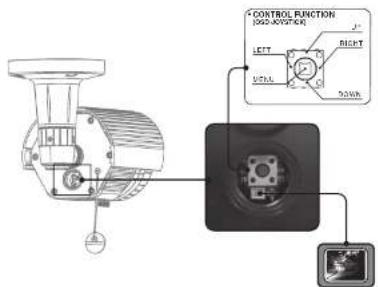
B
5. NAME AND FUNCTION
- Heater
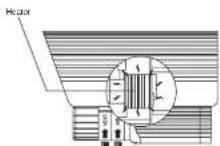
Built in heater protects the camera from low temperature. (Operating temperature with Heater, -40 °C)
• External Zoom & Focus Adjustable
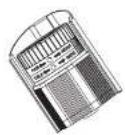
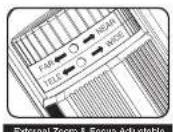
9
6. INSTALLATION
- MOUNTING POSITION
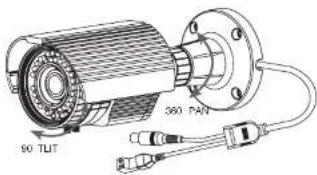
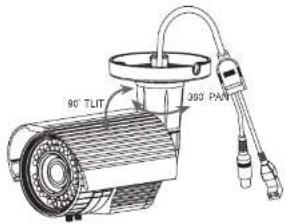
6. INSTALLATION
■ MONITOR CONNECTION
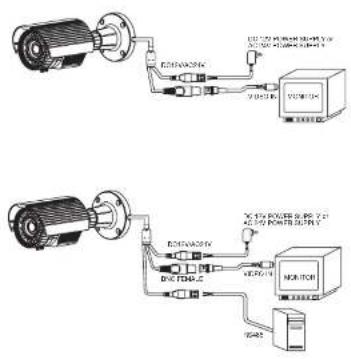

7. DIMENSIONS
Unit mm
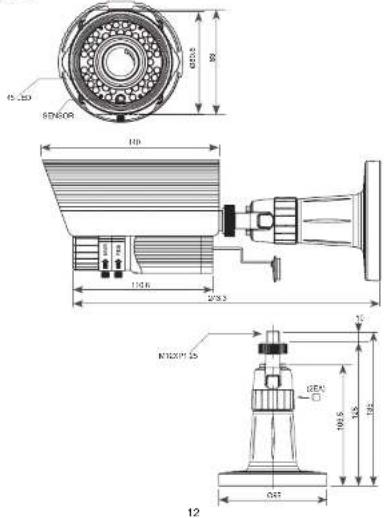
- SPECIFICATION
| Signal format: H2C2V | ||
| Image Device: 126"66H-500V (Extrax H2O) OCH II | ||
| Scanning System 2.1 Inertage | ||
| Scanning Frequency to /48Hz(H), 10 Hz(H), to 62Hz(H), MHz(A) | ||
| Total Packs: 1000(H) X 1000(V) (1000H) X 100V | ||
| Effective Flux: 9x100H X 40Hz (9x100H x 50Hz) | ||
| Electronic Shutter Speed: 150cc/s / 100 sec | ||
| H Power: 100% TV Linear | ||
| 20% Rate More than 20%(A/GC OFF) | ||
| Min Dimension LED On: 0.1 Bus | ||
| Type System: Inverter | ||
| Current | 0.45 | |
| Video Output: Level | 1.0 V=0.5 Compact (750) | |
| O2D | Full in Unpacked | |
| ELO | OFF / ELO / HLC | |
| 2018 OFF/OFF/Level adjustment | ||
| ATR | OFF/OFF/Level (up to 20Hz) | |
| SMART IR | On / Off | |
| With a Balance | ATW / PUSH / ANN/ML / PUSH/LOCK | |
| Primary Timing | A Zones | |
| Main Duration | A Zones | |
| Day & Night(24) | AUDI + Outer / AW | |
| Language | ENGLISH, CHINESE, RUSSEAN, SPARSEST, CEPIKAS, FRENGITPORTUGuese, JAPANESE | |
| IP Rating | 1972 (Under posts) | |
| IR I/O | 1000 cm, 4bps | |
| IR I/O Balance | Up to NM | |
| Counting Temperature | 14°F - 122°F; 12°C = 40°C / House On; 40°F - 122°F; 40°C = 50°C) | |
| Storage Temperature | 4°F - 140°F; 20°C = 80°C) | |
| Tempidity | Less than 10% | |
| Power Consumption | DC35V (10Pa) Mass (10mA, 1.1kJ) lower DsgDC35V (10Pa) Max (10W, 21kJ) lower Dsg | |
| Lone | Vertical Lane | |
| Dimensions | 66.8"x2" at 64°C (112.45") | |
| Weight | Approx. 90Hz | |
| Color | RS 48s, Holar | |
Specifications and designs are subject to change for improving the functionality of this product without notice.
9. OSD MANUAL
GENERAL STRUCTURE
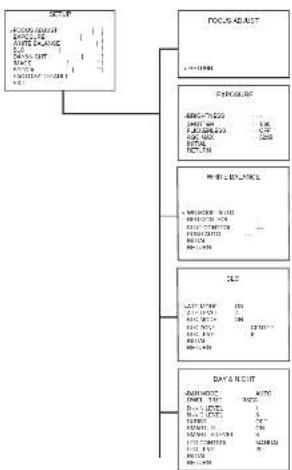
flowchart
graph TD
    A["输入数据"] --> B["LOGS LABT"]
    B --> C["数据采集"]
    C --> D["数据处理"]
    D --> E["数据输出"]
    E --> F["数据分析"]
    F --> G["数据存储"]
    G --> H["数据归档"]
    H --> I["结束"]
14
9. OSD MANUAL

flowchart
graph TD
    A["IMAGE"] --> B["TITLE"]
    A --> C["DATA INPUT"]
    C --> D["DATA Validation"]
    D --> E["Validation"]
    E --> F["OUTPUT"]
    F --> G["RESULT"]
    G --> H["TITLE"]
- OSD MANUAL
| SABY KONK SAB YAKU SAB YAKU | ||||
| MELIP | ||||
| POTATO MELIP RUTTER | ||||
| LVC GROUP | LVC GROUP 20-3 | |||
| LVC GROUP 10-15 | VOLK, LVC GROUP, LVC, LVC, LVC, LVC, LVC, LVC, LVC, LVC, LVC, LVC, LVC, LVC, LVC, LVC, LVC, LVC, LVC, LVC, LVC, LVC, LVC, LVC, LVC, LVC, LVC, LVC, LVC, LVC, LVC, LVC, LVC, LVC, LVC, LVC | |||
| LVC GROUP 20-3 | LVC, LVC, LVC, LVC, LVC, LVC, LVC, LVC, LVC, LVC, LVC, LVC, LVC, LVC, LVC, LVC, LVC, LVC, LVC, LVC, LVC, LVC, LVC, LVC, LVC, LVC, LVC, LVC, LVC, LVC, LVC, LVC, LVC, Lvc, LVC, LVC, LVC, LVC, LVC, LVC, LVC, LVC, LVC, LVC, LVC, LVC, LVC, LVC, LVC, LVC, LVC, LVC, LVC, LVC, LVC, LVC, LVC, LVC, LVC, LVC, LVC, LVC, LVC, LVC, LVC, LVC, LVC | LVC, LVC, LVC, LVC, LVC, LVC, LVC, LVC, LVC, LVC, LVC, LVC, LVC, LVC, LVC, LVC, LVC, LVC, LVC, LVC, LVC, LVC, LVC, LVC, LVC, LVC, LVC, LVC, LVC, LVC, LVC, LVC, LVC | ||
| R. TOTAL | ||||
| R. TOTAL | ||||
| R. TOTAL | ||||
| R. TOTAL | ||||
| R. TOTAL | ||||
| R. TOTAL | ||||
| R. TOTAL | ||||
| R. TOTAL | ||||
| R. TOTAL | ||||
| R. TOTAL | ||||
| R. TOTAL | ||||
| R. TOTAL | ||||
| R. TOTAL | ||||
| R. TOTAL | ||||
| R. TOTAL | ||||
| R. TOTAL | ||||
| R. TOTAL | ||||
| R. TOTAL | ||||
| R. TOTAL | ||||
| R. TOTAL | ||||
| R. TOTAL | ||||
| R. TOTAL | ||||
| R. TOTAL | LVC, LVC, LVC, LVC, LVC, LVC, LVC, LVC, LVC, LVC, LVC, LVC, LVC, LVC, LVC, LVC, LVC, LVC, LVC, LVC, LVC, LVC, LVC, LVC, LVC, LVC, LVC, LVC, LVC, LVC, LVC, LVC, LVC | LPC, LPC, LPC, LPC, LPC, LPC, LPC, LPC, LPC, LPC, LPC, LPC, LPC, LPC, LPC, LPC, LPC, LPC, LPC, LPC, LPC, LPC, LPC, LPC, LPC, LPC, LPC, LPC, LPC, LPC, LPC, LPC, LPC, LPC, Lpc | ||
- OSD MANUAL
| SALADY | LTRR27016 | B: 5.5-5.8; C: 5.5-5.9; D: 5.5-6.0; E: 5.5-5.9; F: 5.5-6.0; G: 5.5-6.0; H: 5.5-6.0; I: 5.5-6.0; J: 5.5-6.0; K: 5.5-6.0; L: 5.5-6.0; M: 5.5-6.0; N: 5.5-6.0; O: 5.5-6.0; P: 5.5-6.0; Q: 5.5-6.0; R: 5.5-6.0; S: 5.5-6.0; T: 5.5-6.0; U: 5.5-6.0; V: 5.5-6.0; W: 5.5-6.0; X: 5.5-6.0; Y: 5.5-6.0; Z: 5.5-6.0; AA: 5.5-6.0; AB: 5.5-6.0; AC: 5.5-6.0; AD: 5.5-6.0; AE: 5.5-6.0; AF: 5.5-6.0; AG: 5.5-6.0; AH: 5.5-6.0; AI: 5.5-6.0; AJ: 5.5-6.0; AK: 5.5-6.0; AL: 5.5-6.0; AM: 5.5-6.0; AN: 5.5-6.0; AO: 5.5-6.0; AP: 5.5-6.0; AQ: 5.5-6.0; AR: 5.5-6.0; AS: 5.5-6.0; AT: 5.5-6.0; AU: 5.5-6.0; AV: 5.5-6.0; AW: 5.5-6.0; AX: 5.5-6.0; AY: 5.5-6.0; AZ: 5.5-6.0; BA: 5.5-6.0; BB: 5.5-6.0; BC: 5.5-6.0; BD: 5.5-6.0; BE: 5.5-6.0; BF: 5.5-6.0; BG: 5.5-6.0; BH: 5.5-6.0; BI: 5.5-6.0; BJ: 5.5-6.0; BK: 5.5-6.0; BL: 5.5-6.0; BM: 5.5-6.0; BN: 5.5-6.0; BO: 5.5-6.0; BP: 5.5-6.0; BP: 5.5-6.0; BP: 5.5-6.0; BP: 5.5-6.0; BP: 5.5-6.0; BP: 5.5-6.0; BP: 5.5-6.0; BP: 5.5-6.0; BP: 5.5-6.0; BP : 5.5-6.0; BP : 5.5-6.0; BP : 5.5-6.0; BP : 5.5-6.0; BP : 5.5-6.0; BP : 5.5-6.0; BP : 5.5-6.0; BP : 5.5-6.0; BP : 5.5-6.0; BP : | ||
| DTRR27017 | B: 5.5-5.8; C: 5.5-5.9; D: 5.5-6.0; E: 5.5-6.0; F: 5.5-6.0; G: 5.5-6.0; H: 5.5-6.0; I: 5.5-6.0; J: 5.5-6.0; K: 5.5-6.0; L: 5.5-6.0; M: 5.5-6.0; N: 5.5-6.0 | B: 5.5-5.8; C: 5.5-5.9; D: 5.5-6.0; E: 5.5-6.0; F: 5.5-6.0; G: 5.5-6.0; H: 5.5-6.0; I: 5.5-6.0; J: 5.5-6.0 | B: 5.5-5.8; C: 5.5-5.9; D: 5.5-6.0; E: 5.5-6.0; F: 5.5-6.0; G: 5.5-6.0; H: 5.5-6.0; I: 5.5-6.0; J : 5.5-6.0; K: 5.5-6.0; L: 5.5-6.0; M: 5.5-6.0; N: 5.5-6.0; O: 5.5-6.0; P: 5.5-6.0; Q: 5.5-6.0; R: 5.5-6.0; B: 5.5-6.0; B: 5.5-6.0; B: 5.5-6.0; B: 5.5-6.0; B: 5.5-6.0; B: 5.5-6.0; B: 5.5-6.0; B: 5.5-6.0; B: 5.5-6.0; B : 5.5-6.0; B : 5.5-6.0; B : 5.5-6.0; B : 5.5-6.0; B : 5.5-6.0; B : 5.5-6.0; B : 5.5-6.0; B : 5.5-6.0; B : 5.5-6.0; B : |
9. OSD MANUAL
OSD FUNCTION DESCRIPTION
- FOCUS ADJUST
: According to the brightness of light to minimize the depth of locus, to be more accurate to focus
- EXPOSURE
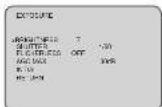
1 Enact cover to set up the function of BRIGHTNESS, SHUTTER, FLICKERLESS, AGO. Set up using LEFT, RIGHT KEY at each menu.
- BRIGHTNESS
: Enable user to control the image brightness (0-15steps).
- SHUTTER
: Ensole user to set up the Shutter Speed.
≈ 1.80(50) , 1/100(120) , 1/250 , 1/500 , 1/1K , 1/2K , 1/4K , 1/8K , 1/10K , 1/50K , 1/100K 10 is for PAL TYPE
-FLICKERLESS
: Enable user to set up the FICKERLESS ON/OFF.
二、备查文件
- AGC MAX : Enable user to make image bright to amplify the Gain.
0dB-42dB
- INITIAL
: Enable user to initialize the Exposure menu set up.
9. OSD MANUAL
3. WHITE BALANCE
: Enable user to represent the accurate white color by controlling the R,G,B level. Setting up
LEFT, RIGHT KEY on each menu.
- WRODE
□ATW: Enable user to trace the White Balance
automatically in the range of 2,300K-10,000K.
② PUSH: Inshan user to search for White Balance
Automotive. In this mode, color temperature range is linear times ATdI.
③ PUSH LOCK:
according to the color temperature in the certain
B. A. C. D. E. F. G. H. I. J. K. L. M. N. O. P. Q. R. S. T. U. V. W. X. Y. Z.
H MANUAL : Enable user to set the 'While Balance
according to the circumstance.
RED CONTROL
- In the MANUAL setting of WB MODE, available part to set the RED GAIN.
BLUE CONTROL
: In the MANUAL setting of WB MODE, enable user to set the BLUE GAIN.
附件二附注:表三及附注
- PUSH AUTO - In the FLUSH OFF sales of IMI-MORE, possible year in by the Yihlin Balance in
. In THE PUSH LOCK SETTING OF MS MODE, 600000 user to TX drive White Balance IN
- INITIAL
: Enable user to reset the WHITE BALANCE menu setting.
4. BLC
: Use the condition which Image doesn't figure out with BLC such as place surrounded windows
and lobby. Set the BLC using the LEFT, RIGHT KEY on the cash menu.
-ATB MODE
: In this mode, the brightness of a single image is
compensated using the gamma curve.
452 LEVEL
- AIN LEVEL
: Enable user to set ATR Level(0-4 level).
- BLC(Back Light Compensation)
□ CFF: BLO mode off
① ON: BLC mode on.
⑤ H.E.: High Light Compensation Mode and
| PERIOD BA-ANCE | |
| REV. RATE OF | AU 75 |
| RBC CONTROL | ---- |
| RE RBC CONTROL | ---- |
| PUSH CASH | ---- |
| BL SW | |
| RE L WM | |
*High Light Compensation (HLC) is a function that improves the visual recognition of
License plates and other such objects by suppressing or masking strong light sources (such as
the Headlights of Automobiles
| BLU | |
| SAPK HOUSE | ON |
| GIM LEVEL | 4 |
| BLU VOLUME | ON |
| BLU ZONE | CENTER |
| BLU LEVEL | 5 |
| R.TAW | |
| RETURN | |
9. OSD MANUAL
- BLC ZONE : Enable once to set the BLC axis - TOP, BOTTOM, CENTER, LEFT, RIGHT.
- BLC LEVEL : Enabre user to set BLC in selected arcall6-15 level.
INITIAL: Enable user to misimize the BLC selling.

5. DAY&NIGHT
Conversion of output image COLOR / BW depending on exterior environment. Enable user to set the LEFT, RIGHT KEY in menu.
TOMATO
- D&N MODE ○ COLOR: Enable user to find the output image in color.
(2) BOW: Crude oil to 10 Lbs crop, l/mage in GBV.
Enable user to convert in ECR 12.0.1967 automatically
- DWELL TIME: Fr DAN MOOE AUTO, encodes user to set to delay time for charging COLOR:FWILL-1660
2016 Survey time for one week 30:05:18, 19:10:30
D-N LEVEL
Day(Color) to NightBW) a Sensor level(0-19).
N-XD LEVEL
Night(BW) to Day(Color) a Sensor level (1-20).
M-25T
- BURST In BW media. Color burst signal ON/OFF
SALES: 2
- SMART-SR By the IP LED into, the screen is asso-rated, and automatically adjust the brightness.
so you can see the screen.
ONEST LEVEL
- SMART-IN LEVEL : Enable user to control the Level (0, -1 step).
- 深圳市人民政府
LED CONTROL
☐ MANUAL: IR LED brightness is adjusted manually.
(2) AUTO IR LED Engineers is using a mechanical system.
- LED LEVEL
Enable user to control the IR-LED Level (0-15 steps).
INITIAL
- INITIAL Enable user to navigate ice selling in DAYSNICA or more.
9. OSD MANUAL
- IMAGE
: MIRROR, DVR, SHARPNESS function set up by pressing LEFT, RIGHT KEY.


- MIRROR: Enable user to reverse the image.
- DNR: This function reduces noise by undertaking spatial filtering for one image
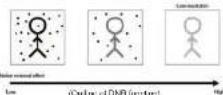
- DNA LEVEL: Enable user to set level(3-15 steps).
- SHARPNESS : Enable user to control the image sharpress (0-15 steps).
- INITIAL : Enable user to initiate the setting on IMAGE menu.
7 SPECIAL
Selling up the CAM TITLE, LANGUAGE, COMM ADJUST, PRIVACY, MOTION DETECT.
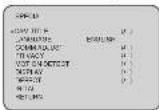
9. OSD MANUAL
- CAM TITLE : Environ une 10 tonnes euro word in screen (Maximum 13 inches is non-dots)
A wife: Griffs from the screen using menukey
② Enclose user to move to next menu using LEFT, RIGHT, KEY IN LOCATION. ③ By using UP, D'AM, LEFT, RE3+T KEY, walk up to throw you, listen it
LOCATION and free gel back to previous elec.
① Enable user to finish words choice and position by using LEFT, RIGHT KEY in RETURN
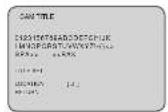

- LANGUAGE : Enable user to set up an OED language
- English Chinese, Russian, Spanish, German, British Portuguese, Japanese
COMM ADJUST
Enable user to set up CAMERA ID, BAUCRATE.
© CAMID: Encke user to add Camera ID (N=255).
(2) IBADRATE: A communication speed to Communications with external design (2407, 4800, 3650, 19200).
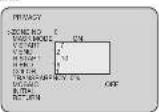
- PRIVACY. Privacy is the leading that covers the
some part on screen to prevent private life
(Maximum 4 point covered).
- ZARE: Enable user to send a packet from 5 to 340. - HASK: Enable user to send a packet output or share packet.
(1) V START: Marks Vertical grant position
① V LND: Mock Vertical and position.
H START: Mark Horizontal start position
HEND. Main Horizontal and vertical,
① DITCH: 50 PARELLA ② TRANSPERENCY: 20%
① MCSALG: Mexico is a key factor.
- PITTAL: Enable user to initiate selling of
PRIVACY MENU

9. OSD MANUAL
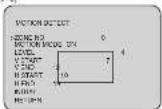
- MOTION DETECT : Motion detection function.
LEVEL: Enable user to setup a motion direct sensitivity (0-3)
- V END: Motion axis Vertical end position.
C: H START : Motion area Horizontal stay position.
© HUNI: Menon Kuen Hen'sia and pach
(1) INITIAL: Enable use to improve the setting of MOTION DETECT.
AQUISCE'S
- DISPLAY: Enable user to set up a screen morning of CAM ID, CAM TITLE,
MOTION DETECT
Enable user to set up current on Camera ID screen
② CAMTI
Enable user to set up output in limit CAM TITLE
(3) MOTION DETECT: Enable user to set up out part of
ACTION on PROVISION AND ONION TO ELECT ON LINE (1) INITIAL: Enable user to initiate of DISPLAY menu.
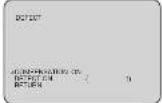
- DEFECT: The white pine detection and compensation function can automatically detect and communicate up to 84 white pools.
comps 6012, do 8-94 (min. p.m.)
COMPENSATION, DETECT COMPENSATION ON-01.
- DUTCHN: "As pixel detection"
U. FACTORY DEFAULT
: Enable user to reset all of the status as the factory default Selling up using LEFT, RIGHT KEY
- EXIT
: Enable user to EXIT the OSD menu Setting up using LEFT, RIGHT KEY
10. Communication Protocol
Pelco "D" Protocol Commands
- Most widely used Commands
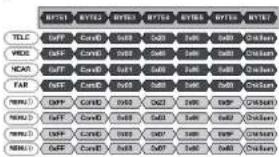
■ MENU: : Polco Keyboard Menu On/OII [85(=0x5F) + Pattern]
■ MENU: V/D Keyboard Menu On/Off [ Set Preset + 86(=0x62) ]
- MENU: Another Menu On/Off [Go To Praset + 95(=0xSF) or 96(=0x60)]
* C=ID: 0x00 - 0xFF
- ChkSum: The Check Sum is the 8 bit (modulo256) sum of the payload bytes.
(BYTE2-BYTE6) in the command.
- TELE - UP KEY
WIDE - DOWN KEY
NEAR - LEFT KEY
- DOWE (ED)
MENI MENUKEY
CAUTION
These servicing instructions are for use by qualified service personnel only. To reduce the risk of electric shock do not perform any servicing other than that contained in the operating instructions unless you are qualified to do so. In USA and Canada, Use Class 2 Power Supply Only
CONTENTS
- CAUTIONS
- IMPORTANT SAFETY INSTRUCTIONS
- FEATURES
- COMPONENTS
- NAME AND FUNCTION
- INSTALLATION
- DIMENSIONS
- SPECIFICATION
- OSD MANUAL
- COMMUNICATION PROTOCOL
1. CAUTIONS
This device complies with Part 15 of the FCC Rules.
Operation is subject to the following two conditions;
-
This device may not cause harmful interference.
-
This device must accept any interference received, including
Interference that may cause undesired operation
Note
This equipment has been tested and found to comply with the limits for a Class A digital device, pursuant to part 10 of the FCC Rules. These limits are designed to provide reasonable protection against harmful interference when the equipment is operated in a commercial environment. This equipment generates, uses, and can radiate radio frequency energy and, if not installed and used in accordance with the instruction manual, may cause harmful interference to radio communications. Operation of this equipment in a residential area is likely to cause harmful interference in which case the user will be required to correct the interference at his own expense."
WARNING
This is a class A product. In a domestic environment this product may cause radio interference in which case the user may be required to take adequate measures.
Caution
Any changes or modifications in construction of this device which are not expressly approved by the party responsible for compliance could void the user's authority to operate the equipment.
CAUTION
- A regulated DC12V 1A power supply is recommended for use with this camera.
for the best picture and the most stable operation.
An unregulated power supply can cause damage to the camera.
When unregulated power supply is applied, product warranty will be out of subject. - It is recommended that the camera is used with a monitor that has a CCTV quality
75 video impedance levels.
If your monitor is switched to high impedance then please adjust accordingly. - Do not attempt to disassemble the camera to gain access to the internal components.
Refer servicing to your dealer. - Never face the camera towards the sun or any bright or reflective light, which may
cause smear on the picture and possible damage to the CCD. - Do not remove the serial sticker for the warranty service.
1. CAUTIONS

Correct Disposal of This Product (Waste Electrical & Electronic Equipment)
(Applicable in the European Union and other European countries with separate collection systems)
This marking shown on the product or its literature, indicates that it should not be disposed with other household wastes at the end of its working life. To prevent possible harm to the environment or human health from uncontrolled waste disposal, please separate this from other types of wastes and recycle it responsibly to promote the sustainable reuse of material resources.
This product should not be mixed with other commercial wastes purchased this product, or their local government office, for details of where and how they can take them for environmentally safe recycling.
Business users should contact their supplier and check the terms and conditions of the purchase contract. Household users should contact either the retailer where they for disposal.


This symbol is intended to alert the user to the presence of uninsulated "dangerous voltage" within the product's enclosure that may be of sufficient magnitude to constitute a risk of electric shock to persons.

This symbol is intended to alert the user to the presence of important operating and maintenance(servicing) instructions in the literature accompanying the appliance
2. IMPORTANT SAFETY INSTRUCTION
1) Read these instructions.
2) Keep these instructions.
3) Heed all warnings.
4) Follow all instructions.
5) Do not use this apparatus near water.
6) Clean only with dry cloth.
7) Do not block any ventilation openings. Install in accordance with the manufacturer's instructions.
8) Do not install near any heat sources such as radiators, heat registers, sleeves, or other apparatus (including amplifiers) that produce heat.
9) Do not defeat the safety purpose of the polarized or grounding-type plug. A polarized plug has two blades with one wider than the other. A grounding type plug has two blades and a third grounding prong. The wide blade or the third prong are provided for your safety. If the provided plug does not fit into your outlet, consult an electrician for replacement of the obsolete outlet.
10) Protect the power cord from being walked on or pinched particularly at plugs, convenience receptacles, and the point where they exit from the apparatus.
11) Only use attachments/accessories specified by the manufacturer.
12) Use only with the car, stand, tripod, bracket, or table specified by the manufacturer, or sold with the apparatus. When a car is used, use caution when moving the car/apperatus combination to avoid injury from tip-over.
13) Unplug this apparatus during lightning storms or when unused for long periods of time.
14) Refer all servicing to qualified service personnel. Servicing is required when the apparatus has been damaged in any way, such as power-supply core or plug is damaged. Liquid has been spilled or objects have fallen into the apparatus, the apparatus has been exposed to rain or moisture, does not operate normally, or has been dropped.

3. FEATURES
• 1/3" 960H SONY EXVIEW HAD CCD III
+High Resolution of 700TV Lines
- OSD Function
• Multi Language
(ENGLISH CHINESE RUSSIAN, SPANISH GERMAN, FRENCH, PORTUGUESE JAPANESE)
-2DNR
• Privacy Zone / Motion Detect
- Smart IR
• DC12V / AC24V Dual Voltage
• ATR/Adaptive Tone-curve Reproduction / Digital WDR)
The function provides gradation compensation to improve the contrast of subjects both
Lay-attentness areas and high latencies areas exist in the same picture
- COMPONENTS
5. NAME AND FUNCTION
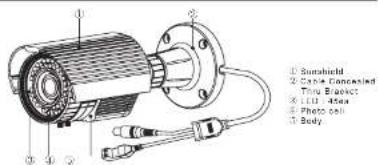
• Service Video connector & OSD Joystick

B
5. NAME AND FUNCTION
- Heater

Built in heater protects the camera from low temperature. (Operating temperature with Heater, -40 °C)
• External Zoom & Focus Adjustable

9
6. INSTALLATION
- MOUNTING POSITION
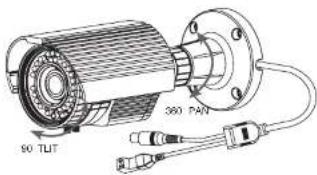

6. INSTALLATION
■ MONITOR CONNECTION


7. DIMENSIONS
Unit mm

- SPECIFICATION
| Signal format: H2C2V | ||
| Image Device: 126"66H-500V (Extrax H2O) OCH II | ||
| Scanning System 2.1 Inertage | ||
| Scanning Frequency to /48Hz(H), 10 Hz(H), to 62Hz(H), MHz(A) | ||
| Total Packs: 1000(H) X 1000(V) (1000H) X 100V | ||
| Effective Flux: 9x100H X 40Hz (9x100H x 160V) | ||
| Electronic Shutter Speed: 1500cc / 100 sec | ||
| H Power: 100% TV Linear | ||
| 2GHz Rate: More than 2GHz (OFF) | ||
| Min Dimension LED On: 0.1 Bus | ||
| Type System: Inverter | ||
| Current | A, A, B | |
| Video Output: Level | 1.0 Vcc (Compass/750) | |
| O2D | Bull in Usualizer | |
| ELO | OFF / ELO / HLC | |
| 2018 OFF/OFF/Level adjustment | ||
| ATR | OFF/OFF/Level (up/2018) | |
| SMART IR | On / Off | |
| With a Balance | ATW / PUSH / ANNUL / PUSHLOCK | |
| Primary Timing | A Zones | |
| Main Duration | A Zones | |
| Day & Night (EUR) | AUDI - Center / I/W | |
| Language | ENGLISH, CHINESE, RUSSELL, SPARSEST, CEPIKAS, FRNCH Portugal, ESPRIKSE, JAPANESE | |
| IP Rating | LWD (Underpods) | |
| IR I/O | 100 cm, 4bps | |
| IR I/O Balance | Up to NM | |
| Counting Temperature | 14°F - 122°F; 12°C = +90°C / House On; -40°F - 122°F; -40°C = +50°C) | |
| Storage Temperature | 4°F - 140°F; (20°C = +80°C) | |
| Tempidity | Less than 10% | |
| Power Consumption | DC35V (10Pa) Mass (10mA, 1.1kJ) lower Dq (625V) (10Pa) Max (10W, 21kJ) lower Dq | |
| Lone | Vertical Lane | |
| Dimensions | 66ft/2w x 61ft x 116ft x 1 | |
| Weight | Approx. 90Hz | |
| Color | RS 48s, Holar | |
Specifications and designs are subject to change for improving the functionality of this product without notice.
9. OSD MANUAL
GENERAL STRUCTURE
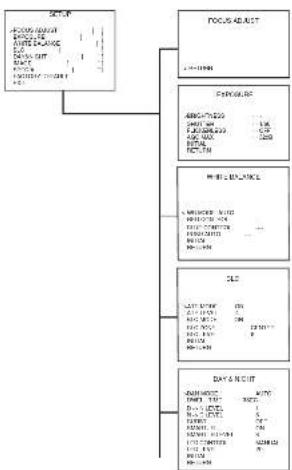
flowchart
graph TD
    A["输入数据"] --> B["LOGS LABT"]
    B --> C["数据采集"]
    C --> D["数据处理"]
    D --> E["数据输出"]
    E --> F["数据分析"]
    F --> G["数据存储"]
    G --> H["数据归档"]
    H --> I["结束"]
9. OSD MANUAL

flowchart
graph TD
    A["IMAGE"] --> B["TITLE"]
    A --> C["DATA Collection"]
    C --> D["DATA Analysis"]
    D --> E["Analysis"]
    E --> F["Analysis"]
    F --> G["Analysis"]
    G --> H["Analysis"]
    H --> I["Analysis"]
    I --> J["Analysis"]
    J --> K["Analysis"]
    K --> L["Analysis"]
    L --> M["Analysis"]
    M --> N["Analysis"]
    N --> O["Analysis"]
    O --> P["Analysis"]
    P --> Q["Analysis"]
    Q --> R["Analysis"]
    R --> S["Analysis"]
    S --> T["Analysis"]
    T --> U["Analysis"]
    U --> V["Analysis"]
    V --> W["Analysis"]
    W --> X["Analysis"]
    X --> Y["Analysis"]
    Y --> Z["Analysis"]
    Z --> AA["Analysis"]
    AA --> AB["Analysis"]
    AB --> AC["Analysis"]
    AC --> AD["Analysis"]
    AD --> AE["Analysis"]
    AE --> AF["Analysis"]
    AF --> AG["Analysis"]
    AG --> AH["Analysis"]
    AH --> AI["Analysis"]
    AI --> AJ["Analysis"]
    AJ --> AK["Analysis"]
    AK --> AL["Analysis"]
    AL --> AM["Analysis"]
    AM --> AN["Analysis"]
    AN --> AO["Analysis"]
    AO --> AP["Analysis"]
    AP --> AQ["Analysis"]
    AQ --> AR["Analysis"]
    AR --> AS["Analysis"]
    AS --> AT["Analysis"]
    AT --> AU["Analysis"]
    AU --> AV["Analysis"]
    AV --> AW["Analysis"]
    AW --> AX["Analysis"]
    AX --> AY["Analysis"]
    AY --> AZ["Analysis"]
    AZ --> BA["Analysis"]
    BA --> BB["Analysis"]
    BB --> BC["Analysis"]
    BC --> BD["Analysis"]
    BD --> BE["Analysis"]
    BE --> BF["Analysis"]
    BF --> BG["Analysis"]
    BG --> BH["Analysis"]
    BH --> BI["Analysis"]
    BI --> BJ["Analysis"]
    BJ --> BK["Analysis"]
    BK --> BL["Analysis"]
    BL --> BM["Analysis"]
    BM --> BN["Analysis"]
    BN --> BO["Analysis"]
    BO --> BP["Analysis"]
    BP --> BQ["Analysis"]
    BQ --> BR["Analysis"]
    BR --> BS["Analysis"]
    BS --> BT["Analysis"]
    BT --> BU["Analysis"]
    BU --> BV["Analysis"]
    BV --> BW["Analysis"]
    BW --> BX["Analysis"]
    BX --> BY["Analysis"]
    BY --> BZ["Analysis"]
    BZ --> CA["Analysis"]
    CA --> CB["Analysis"]
    CB --> CC["Analysis"]
    CC --> CD["Analysis"]
    CD --> CE["Analysis"]
    CE --> CF["Analysis"]
    CF --> CG["Analysis"]
    CG --> CH["Analysis"]
    CH --> CI["Analysis"]
    CI --> CJ["Analysis"]
    CJ --> CK["Analysis"]
    CK --> CL["Analysis"]
    CL --> CM["Analysis"]
    CM --> CN["Analysis"]
    CN --> CO["Analysis"]
    CO --> CP["Analysis"]
    CP --> CQ["Analysis"]
- OSD MANUAL
| SABY KONK SAB YAKU SAB YAKU | ||||
| MELIP | ||||
| POTATO MELIP RUTTER | ||||
| LVC GROUP | LVC GROUP 20-3 | |||
| LVC GROUP 10-15 | VOLK, LVC GROUP, LVC, LVC, LVC, LVC, LVC, LVC, LVC, LVC, LVC, LVC, LVC, LVC, LVC, LVC, LVC, LVC, LVC, LVC, LVC, LVC, LVC, LVC, LVC, LVC, LVC, LVC, LVC, LVC, LVC, LVC, LVC, LVC, LVC, LVC | |||
| LVC GROUP 20-3 | LVC, LVC, LVC, LVC, LVC, LVC, LVC, LVC, LVC, LVC, LVC, LVC, LVC, LVC, LVC, LVC, LVC, LVC, LVC, LVC, LVC, LVC, LVC, LVC, LVC, LVC, LVC, LVC, LVC, LVC, LVC, LVC, LVC, Lvc, LVC, LVC, LVC, LVC, LVC, LVC, LVC, LVC, LVC, LVC, LVC, LVC, LVC, LVC, LVC, LVC, LVC, LVC, LVC, LVC, LVC, LVC, LVC, LVC, LVC, LVC, LVC, LVC, LVC, LVC, LVC, LVC, LVC | LVC, LVC, LVC, LVC, LVC, LVC, LVC, LVC, LVC, LVC, LVC, LVC, LVC, LVC, LVC, LVC, LVC, LVC, LVC, LVC, LVC, LVC, LVC, LVC, LVC, LVC, LVC, LVC, LVC, LVC, LVC, LVC, LVC | ||
| R. TOTAL | ||||
| R. TOTAL | ||||
| R. TOTAL | ||||
| R. TOTAL | ||||
| R. TOTAL | ||||
| R. TOTAL | ||||
| R. TOTAL | ||||
| R. TOTAL | ||||
| R. TOTAL | ||||
| R. TOTAL | ||||
| R. TOTAL | ||||
| R. TOTAL | ||||
| R. TOTAL | ||||
| R. TOTAL | ||||
| R. TOTAL | ||||
| R. TOTAL | ||||
| R. TOTAL | ||||
| R. TOTAL | ||||
| R. TOTAL | ||||
| R. TOTAL | ||||
| R. TOTAL | ||||
| R. TOTAL | ||||
| R. TOTAL | LVC, LVC, LVC, LVC, LVC, LVC, LVC, LVC, LVC, LVC, LVC, LVC, LVC, LVC, LVC, LVC, LVC, LVC, LVC, LVC, LVC, LVC, LVC, LVC, LVC, LVC, LVC, LVC, LVC, LVC, LVC, LVC, LVC | LPC, LPC, LPC, LPC, LPC, LPC, LPC, LPC, LPC, LPC, LPC, LPC, LPC, LPC, LPC, LPC, LPC, LPC, LPC, LPC, LPC, LPC, LPC, LPC, LPC, LPC, LPC, LPC, LPC, LPC, LPC, LPC, LPC, LPC, Lpc | ||
- OSD MANUAL
| SALADY | LTRR27016 | B: 5.5-5.8; C: 5.5-5.9; D: 5.5-6.0; E: 5.5-5.9; F: 5.5-6.0; G: 5.5-6.0; H: 5.5-6.0; I: 5.5-6.0; J: 5.5-6.0; K: 5.5-6.0; L: 5.5-6.0; M: 5.5-6.0; N: 5.5-6.0; O: 5.5-6.0; P: 5.5-6.0; Q: 5.5-6.0; R: 5.5-6.0; S: 5.5-6.0; T: 5.5-6.0; U: 5.5-6.0; V: 5.5-6.0; W: 5.5-6.0; X: 5.5-6.0; Y: 5.5-6.0; Z: 5.5-6.0; AA: 5.5-6.0; AB: 5.5-6.0; AC: 5.5-6.0; AD: 5.5-6.0; AE: 5.5-6.0; AF: 5.5-6.0; AG: 5.5-6.0; AH: 5.5-6.0; AI: 5.5-6.0; AJ: 5.5-6.0; AK: 5.5-6.0; AL: 5.5-6.0; AM: 5.5-6.0; AN: 5.5-6.0; AO: 5.5-6.0; AP: 5.5-6.0; AQ: 5.5-6.0; AR: 5.5-6.0; AS: 5.5-6.0; AT: 5.5-6.0; AU: 5.5-6.0; AV: 5.5-6.0; AW: 5.5-6.0; AX: 5.5-6.0; AY: 5.5-6.0; AZ: 5.5-6.0; BA: 5.5-6.0; BB: 5.5-6.0; BC: 5.5-6.0; BD: 5.5-6.0; BE: 5.5-6.0; BF: 5.5-6.0; BG: 5.5-6.0; BH: 5.5-6.0; BI: 5.5-6.0; BJ: 5.5-6.0; BK: 5.5-6.0; BL: 5.5-6.0; BM: 5.5-6.0; BN: 5.5-6.0; BO: 5.5-6.0; BP: 5.5-6.0; BP: 5.5-6.0; BP: 5.5-6.0; BP: 5.5-6.0; BP: 5.5-6.0; BP: 5.5-6.0; BP: 5.5-6.0; BP: 5.5-6.0; BP: 5.5-6.0; BP : 5.5-6.0; BP : 5.5-6.0; BP : 5.5-6.0; BP : 5.5-6.0; BP : 5.5-6.0; BP : 5.5-6.0; BP : 5.5-6.0; BP : 5.5-6.0; BP : 5.5-6.0; BP : | ||
| DTRR27017 | B: 5.5-5.8; C: 5.5-5.9; D: 5.5-6.0; E: 5.5-6.0; F: 5.5-6.0; G: 5.5-6.0; H: 5.5-6.0; I: 5.5-6.0; J: 5.5-6.0; K: 5.5-6.0; L: 5.5-6.0; M: 5.5-6.0; N: 5.5-6.0 | B: 5.5-5.8; C: 5.5-5.9; D: 5.5-6.0; E: 5.5-6.0; F: 5.5-6.0; G: 5.5-6.0; H: 5.5-6.0; I: 5.5-6.0; J: 5.5-6.0 | B: 5.5-5.8; C: 5.5-5.9; D: 5.5-6.0; E: 5.5-6.0; F: 5.5-6.0; G: 5.5-6.0; H: 5.5-6.0; I: 5.5-6.0; J : 5.5-6.0; K: 5.5-6.0; L: 5.5-6.0; M: 5.5-6.0; N: 5.5-6.0; O: 5.5-6.0; P: 5.5-6.0; Q: 5.5-6.0; R: 5.5-6.0; B: 5.5-6.0; B: 5.5-6.0; B: 5.5-6.0; B: 5.5-6.0; B: 5.5-6.0; B: 5.5-6.0; B: 5.5-6.0; B: 5.5-6.0; B: 5.5-6.0; B : 5.5-6.0; B : 5.5-6.0; B : 5.5-6.0; B : 5.5-6.0; B : 5.5-6.0; B : 5.5-6.0; B : 5.5-6.0; B : 5.5-6.0; B : 5.5-6.0; B : |
9. OSD MANUAL
OSD FUNCTION DESCRIPTION
- FOCUS ADJUST
: According to the brightness of light to minimize the depth of locus, to be more accurate to focus

- EXPOSURE
1 Enact cover to set up the function of BRIGHTNESS, SHUTTER, FLICKERLESS, AGO. Set up using LEFT, RIGHT KEY at each menu.

- BRIGHTNESS
: Enable user to control the image brightness (0-15steps).
- SHUTTER
: Ensole user to set up the Shutter Speed.
≈ 1.80(50) , 1/100(120) , 1/250 , 1/500 , 1/1K , 1/2K , 1/4K , 1/8K , 1/10K , 1/50K , 1/100K 10 is for PAL TYPE
-FLICKERLESS
: Enable user to set up the FICKERLESS ON/OFF.
二、备查文件
- AGC MAX : Enable user to make image bright to amplify the Gain.
0dB-42dB
- INITIAL
: Enable user to initialize the Exposure menu set up.
9. OSD MANUAL
3. WHITE BALANCE
: Enable user to represent the accurate white color by controlling the R,G,B level. Setting up
LEFT, RIGHT KEY on each menu.
- WRODE
□ATW: Enable user to trace the White Balance
automatically in the range of 2,300K-10,000K.
② PUSH: Inshan user to search for White Balance
Automotive. In this mode, color temperature range is linear times ATdI.
③ PUSH LOCK:
according to the color temperature in the certain
B. A. C. D. E. F. G. H. I. J. K. L. M. N. O. P. Q. R. S. T. U. V. W. X. Y. Z.
H MANUAL : Enable user to set the 'While Balance
according to the circumstance.
RED CONTROL
- In the MANUAL setting of WB MODE, available part to set the RED GAIN.
BLUE CONTROL
: In the MANUAL setting of WB MODE, enable user to set the BLUE GAIN.
附件二附注:表三及附注
- PUSH AUTO - In the FLUSH OFF sales of IMI-MORE, possible year in by the Yihlin Balance in
. In THE PUSH LOCK SETTING OF MS MODE, 600000 user to TX drive White Balance IN
- INITIAL
: Enable user to reset the WHITE BALANCE menu setting.
4. BLC
: Use the condition which Image doesn't figure out with BLC such as place surrounded windows
and lobby. Set the BLC using the LEFT, RIGHT KEY on the cash menu.
-ATB MODE
: In this mode, the brightness of a single image is
compensated using the gamma curve.
452 LEVEL
- AIN LEVEL
: Enable user to set ATR Level(0-4 level).
- BLC(Back Light Compensation)
□ CFF: BLO mode off
① ON: BLC mode on.
⑤ H.E.: High Light Compensation Mode and
| PERIOD BA-ANCE | |
| REV. RATE OF | AU 75 |
| RBC CONTROL | ---- |
| RE RBC CONTROL | ---- |
| PUSH CASH | ---- |
| BL SW | |
| RE L WM | |
*High Light Compensation (HLC) is a function that improves the visual recognition of
License plates and other such objects by suppressing or masking strong light sources (such as
the Headlights of Automobiles
| BLU | |
| SAPK HOUSE | ON |
| GIM LEVEL | 4 |
| BLU VOLUME | ON |
| BLU ZONE | CENTER |
| BLU LEVEL | 5 |
| R.TAW | |
| RETURN | |
9. OSD MANUAL
- BLC ZONE : Enable once to set the BLC axis - TOP, BOTTOM, CENTER, LEFT, RIGHT.
- BLC LEVEL : Enabre user to set BLC in selected arcall6-15 level.
INITIAL: Enable user to misimize the BLC selling.
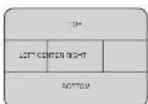
5. DAY&NIGHT
Conversion of output image COLOR / BW depending on exterior environment. Enable user to set the LEFT, RIGHT KEY in menu.
TOMATO
- D&N MODE ○ COLOR: Enable user to find the output image in color.
(2) BOW: Crude oil to 10 Lbs crop, l/mage in GBV.
Enable user to convert in ECR 12.0.1967 automatically
- DWELL TIME: Fr DAN MOOE AUTO, encodes user to set to delay time for charging COLOR:FWILL-1660
2016 Survey time for one week 30:05:18, 19:10:30
D-N LEVEL
Day(Color) to NightBW) a Sensor level(0-19).
N-XD LEVEL
Night(BW) to Day(Color) a Sensor level (1-20).
M-25T
- BURST In BW media. Color burst signal ON/OFF
SALES: 2
- SMART-SR By the IP LED into, the screen is asso-rated, and automatically adjust the brightness.
so you can see the screen.
ONEST LEVEL
- SMART-IN LEVEL : Enable user to control the Level (0, -1 step).
- 深圳市人民政府
LED CONTROL
☐ MANUAL: IR LED brightness is adjusted manually.
(2) AUTO IR LED Engineers is using a mechanical system.
- LED LEVEL
Enable user to control the IR-LED Level (0-15 steps).
INITIAL
- INITIAL Enable user to navigate ice selling in DAYSNICA or more.
9. OSD MANUAL
- IMAGE
: MIRROR, DVR, SHARPNESS function set up by pressing LEFT, RIGHT KEY.
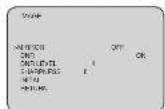

- MIRROR: Enable user to reverse the image.
- DNR: This function reduces noise by undertaking spatial filtering for one image
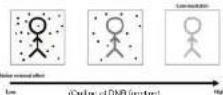
- DNA LEVEL: Enable user to set level(3-15 steps).
- SHARPNESS : Enable user to control the image sharpress (0-15 steps).
- INITIAL : Enable user to initiate the setting on IMAGE menu.
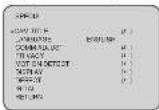
7 SPECIAL
Selling up the CAM TITLE, LANGUAGE, COMM ADJUST, PRIVACY, MOTION DETECT.
9. OSD MANUAL
- CAM TITLE : Environ une 10 tonnes euro word in section (Maximum 13 inches is non-diction)
A wife: Grina from the screen using menu by
② Enclose user to move to next menu using LEFT, RIGHT, KEY IN LOCATION. ③ By using UP, D'AM, LEFT, RE3+T KEY, walk up to throw you, listen it
LOCATION and free gel back to previous elec.
① Enable user to finish words choice and position by using LEFT, RIGHT KEY in RETURN


- LANGUAGE : Enable user to set up an OED language
- English Chinese, Russian, Spanish, German, British Portuguese, Japanese
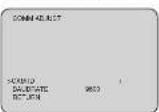
COMM ADJUST
Enable user to set up CAMERA ID, BAUCRATE.
© CAMID: Encke user to add Camera ID (N=255).
(2) IBADRATE: A communication speed to Communications with external design (2407, 4800, 3650, 19200).
- PRIVACY. Privacy is the leading that covers the
some part on screen to prevent private life
(Maximum 4 point covered).
- ZARE: Enable user to send a packet from 5 to 340. - HASK: Enable user to send a packet output or share packet.
(1) V START: Marks Vertical grant position
① V LND: Mock Vertical and position.
H START: Mark Horizontal start position
HEND. Main Horizontal and vertical,
① DITCH: 50 PARELLA ② TRANSPERENCY: 20%
① MCSALG: Mexico is a key factor.
- PITTAL: Enable user to initiate selling of
PRIVACY MENU

9. OSD MANUAL
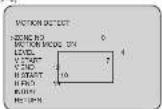
- MOTION DETECT : Motion detection function.
LEVEL: Enable user to setup a motion direct sensitivity (0-3)
- V END: Motion axis Vertical end position.
C: H START : Motion area Horizontal stay position.
© HUNI: Menon, Women, Menon, Women and other
(1) INITIAL: Enable use to improve the setting of MOTION DETECT.
A. RONDE-EST
- DISPLAY: Enable user to set up a screen morning of CAM ID, CAM TITLE,
MOTION DETECT
Enable user to set up current on Camera ID screen
② CAMTI
Enable user to set up output in limit CAM TITLE
(3) MOTION DETECT: Enable user to set up out part of
② EDITAL: Focus: 16 to initiate of 215BL-1X menu
(1) 2014. End of the following:
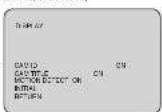
- DEFECT: The white pine detection and compensation function can automatically detect and communicate up to 84 white pools.
comps 6012, do 8-94 (min. p.m.)
COMPENSATION, DETECT COMPENSATION ON-01.
- DUTCHN: "As pixel detection"

U. FACTORY DEFAULT
: Enable user to reset all of the status as the factory default Selling up using LEFT, RIGHT KEY
a.EXT
: Enable user to EXIT the OSD menu Setting up using LEFT, RIGHT KEY
10. Communication Protocol
Pelco "D" Protocol Commands
- Most widely used Commands
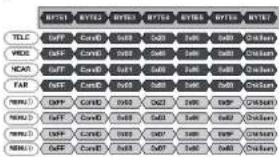
■ MENU: : Polco Keyboard Menu On/OII [85(=0x5F) + Pattern]
■ MENU: V/D Keyboard Menu On/Off [ Set Preset + 86(=0x62) ]
- MENU: Another Menu On/Off [Go To Praset + 95(=0xSF) or 96(=0x60)]
* C=ID: 0x00 - 0xFF
- ChkSum: The Check Sum is the 8 bit (modulo256) sum of the payload bytes.
(BYTE2-BYTE6) in the command.
- TELE - UP KEY
WIDE - DOWN KEY
NEAR - LEFT KEY
- DOWE (ED)
MENI MENUKEY
- CAUTION
- CONTENTS
- CAUTIONS
- This device complies with Part 15 of the FCC Rules.
- Operation is subject to the following two conditions;
- Note
- WARNING
- Correct Disposal of This Product (Waste Electrical & Electronic Equipment)
- IMPORTANT SAFETY INSTRUCTION
- FEATURES
- NAME AND FUNCTION
- INSTALLATION
- DIMENSIONS
- OSD MANUAL
- OSD FUNCTION DESCRIPTION
- WHITE BALANCE
- - WRODE
- RED CONTROL
- BLUE CONTROL
- 附件二附注:表三及附注
- - INITIAL
- BLC
- -ATB MODE
- LEVEL
- DAY&NIGHT
- Communication Protocol
Brand : KT&C
Model : KPC-N701NU18B
Category : Security Camera