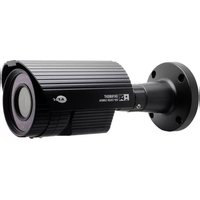
KPC-E700NUP3 - Security Camera KT&C - Free user manual and instructions
Find the device manual for free KPC-E700NUP3 KT&C in PDF.


Pick your language and provide your email: we'll send you a specifically translated version.
| Product Type | Security Camera |
| Brand | KT&C |
| Model | KPC-E700NUP3 |
| Resolution | 5MP (2592x1944) |
| Lens Type | Fixed focal, 2.8mm |
| Night Vision | Up to 30m IR |
| Power Supply | PoE (IEEE 802.3af) |
| Power Consumption | Max 7W |
| Mounting Type | Wall or ceiling mount |
| Dimensions | 120 x 70 x 60 mm |
| Weight | 350g |
| Weatherproof Rating | IP67 |
| Video Compression | H.265+, H.265, H.264 |
| Field of View | 106° |
| Minimum Illumination | 0.01 Lux (color), 0 Lux (IR) |
| Storage | MicroSD card up to 128GB, NVR |
| Network Interface | 10/100Mbps Ethernet (RJ45) |
| Operating Temperature | -30°C to 60°C |
| Warranty | 2 years |
Frequently Asked Questions - KPC-E700NUP3 KT&C
How do I reset the camera to factory defaults?
Press and hold the reset button on the camera for 10 seconds until the indicator blinks. The camera will reboot to factory settings.
What is the default IP address of the KPC-E700NUP3?
The default IP is 192.168.1.168. You can change it using the KT&C IP utility or web interface.
Can I use this camera with a third-party NVR?
Yes, the camera supports ONVIF (Profile S) and RTSP protocols, making it compatible with most NVRs.
How do I clean the camera lens?
Use a soft, dry microfliber cloth. For stubborn dirt, slightly dampen with water. Avoid solvents or abrasive materials.
What is the maximum microSD card supported?
The camera supports microSD cards up to 128GB (Class 10 or higher). Format the card in the camera menu before use.
How do I enable motion detection?
Access the camera web interface, go to Events > Motion Detection, enable it, and set sensitivity and zones.
Is the camera weatherproof?
Yes, it has an IP67 rating, meaning it is dust-tight and can withstand water immersion up to 1 meter for 30 minutes.
Can I mount the camera outdoors?
Yes, the camera is designed for outdoor use with IP67 protection. Ensure the mounting surface is secure and the cable connection is sealed.
How do I update the firmware?
Download the latest firmware from KT&C's website. In the camera web interface, go to Maintenance > Upgrade, select the file, and click 'Upgrade'. Do not power off during update.
The camera shows no image. What should I check?
Verify power (PoE or DC) and network connection. Check if the camera is accessible via its IP address. Reboot the camera and check the web interface or NVR configuration.
User questions about KPC-E700NUP3 KT&C
0 question about this device. Answer the ones you know or ask your own.
Ask a new question about this device
No questions yet. Be the first to ask one.
Download the instructions for your Security Camera in PDF format for free! Find your manual KPC-E700NUP3 - KT&C and take your electronic device back in hand. On this page are published all the documents necessary for the use of your device. KPC-E700NUP3 by KT&C.
USER MANUAL KPC-E700NUP3 KT&C
Manual assistant
Powered by Anthropic
Waiting for your message
Product information
Brand : KT&C
Model : KPC-E700NUP3
Category : Security Camera