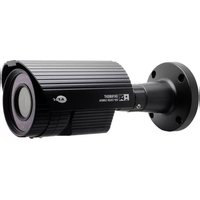
K9-a1600 - Security Camera KT&C - Free user manual and instructions
Find the device manual for free K9-a1600 KT&C in PDF.


Pick your language and provide your email: we'll send you a specifically translated version.
| Product Type | Security Camera |
| Brand | KT&C |
| Model | K9-a1600 |
| Sensor | 1/2.8" CMOS |
| Resolution | 2MP (1920x1080) |
| Lens | 2.8-12mm varifocal |
| IR Range | 30m |
| Power Supply | PoE (IEEE 802.3af) / DC 12V |
| Power Consumption | < 8W |
| Weatherproof Rating | IP66 |
| Dimensions | 200 x 70 x 70 mm (approx) |
| Weight | 0.8 kg |
| Video Compression | H.265 / H.264 |
| Storage | MicroSD card up to 128GB |
| Motion Detection | Yes |
| Night Vision | Yes, up to 30m |
| Remote Access | Via mobile app (KT&C View) |
| Operating Temperature | -30°C to 60°C |
| Housing | Aluminum alloy |
| Installation | Wall or ceiling mount |
| Warranty | 2 years |
Frequently Asked Questions - K9-a1600 KT&C
How do I reset the camera to factory settings?
Press and hold the reset button on the camera for about 10 seconds using a paperclip until the LED flashes. The camera will reboot with default settings.
What mobile app do I use to view the camera remotely?
Use the KT&C View app, available for iOS and Android. Download it from the respective app store, then add the camera by scanning its QR code or entering the device ID.
How do I install the camera outdoors?
Mount the camera using the included bracket and screws. Ensure it is securely attached to a wall or ceiling. Connect the Ethernet cable for PoE power and data, or use a DC adapter. The camera is rated IP66 for outdoor use.
Can I use the camera without an NVR?
Yes, the camera supports onboard storage via a MicroSD card (up to 128GB). You can also access it directly through the mobile app without an NVR. Alternatively, it can be integrated with an NVR for centralized recording.
What is the maximum storage capacity for the MicroSD card?
The camera supports MicroSD cards up to 128GB. For best performance, use a high-speed card (Class 10 or UHS-I).
How do I update the firmware?
Download the latest firmware from the KT&C official website. Save it to a MicroSD card, insert it into the camera, and reboot. The camera will automatically detect and install the update. Alternatively, update via the web interface.
Why is the camera not displaying video?
Check the network connection (Ethernet cable or Wi-Fi). Ensure the camera is powered on and the LED indicator is lit. Verify that you are using the correct IP address and port in the app. Also, check if the lens cap is removed.
How do I clean the camera lens?
Use a soft, lint-free cloth lightly dampened with water or a lens cleaning solution. Gently wipe the lens in a circular motion. Avoid touching the lens with fingers.
Is the camera compatible with third-party NVRs?
Yes, the camera supports ONVIF (Profile S) standard, making it compatible with most third-party NVRs that follow the same protocol. Check your NVR's compatibility list for ONVIF support.
What are the recommended operating conditions?
The camera operates best between -30°C and 60°C with humidity below 90% non-condensing. Ensure it is installed in a location with adequate ventilation and away from direct heat sources.
User questions about K9-a1600 KT&C
0 question about this device. Answer the ones you know or ask your own.
Ask a new question about this device
No questions yet. Be the first to ask one.
Download the instructions for your Security Camera in PDF format for free! Find your manual K9-a1600 - KT&C and take your electronic device back in hand. On this page are published all the documents necessary for the use of your device. K9-a1600 by KT&C.
USER MANUAL K9-a1600 KT&C
Manual assistant
Powered by Anthropic
Waiting for your message
Product information
Brand : KT&C
Model : K9-a1600
Category : Security Camera