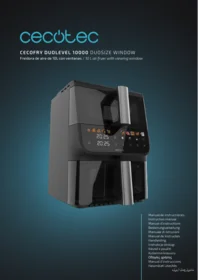
Cecofry Duolevel 10000 Duosize Window - Deep fryer CECOTEC - Free user manual and instructions
Find the device manual for free Cecofry Duolevel 10000 Duosize Window CECOTEC in PDF.


| Product Type | Oil-free Fryer (Air Fryer) |
| Brand | Cecotec |
| Model | Cecofry Duolevel 10000 Duosize Window |
| Capacity | 10 liters |
| Power | 1800 W |
| Temperature Range | 80 °C to 200 °C |
| Timer | Up to 60 minutes |
| Dimensions (L × W × H) | 40 × 35 × 35 cm |
| Weight | 7 kg |
| Material | Stainless steel and ABS plastic |
| Display Type | LED touch screen |
| Viewing window | Yes |
| Cooking levels | 2 (Duolevel system) |
| Baskets included | 2 baskets of different sizes (Duosize) |
| Non-stick coating | Yes |
| Preset programs | 8 programs (fries, chicken, meat, fish, vegetables, cakes, reheating, dehydration) |
| Keep warm function | Yes |
| Safety | Automatic shut-off, overheat protection, cool-touch handle |
| Cleaning | Baskets and drum dishwasher safe |
| Cable length | 1 m |
| Included accessories | 2 baskets, 2 racks, user manual |
Frequently Asked Questions - Cecofry Duolevel 10000 Duosize Window CECOTEC
User questions about Cecofry Duolevel 10000 Duosize Window CECOTEC
0 question about this device. Answer the ones you know or ask your own.
Ask a new question about this device
Download the instructions for your Deep fryer in PDF format for free! Find your manual Cecofry Duolevel 10000 Duosize Window - CECOTEC and take your electronic device back in hand. On this page are published all the documents necessary for the use of your device. Cecofry Duolevel 10000 Duosize Window by CECOTEC.
USER MANUAL Cecofry Duolevel 10000 Duosize Window CECOTEC
- Parts and components 18
- Before use 18
- Operation 19
- Cleaning and maintenance 26
- Troubleshooting 27
- Copyright 29
- Simplified EU Declaration of Conformity 29
SOMMAIRE
EN • The coding in this manual is generic and applies to all code variants of the appliance.
- Control panel
- Basket handle
- Air outlet
- Air inlet
- Power cord
- Upper basket
- Upper basket rack
- Lower basket
- Lower basket rack
NOTE:
The graphics in this manual are schematic representations and may not exactly match the product.
2. BEFORE USE
- This appliance comes in a packaging designed to protect it during transport. Take the appliance out of its box and remove all packaging materials. You can keep the original box and other packaging materials in a safe place to prevent damage to the appliance if you need to transport it in the future. If you wish to dispose of the original packaging, make sure all items are recycled properly.
- Check that all parts and components are included and in good condition. If any of them are missing or damaged, please contact Cecotec's Official Technical Support Service immediately.
Box content
- Air fryer
- 2 grills
- Instruction manual
-
Do not remove the product's serial number in order to keep proper traceability if technical assistance is required.
-
Remove all packaging material, stickers or labels.
- Thoroughly clean the basket and rack with hot water, dishwashing liquid, and a non-
abrasive sponge. These parts are dishwasher safe.
- Clean the inside and outside of the appliance with a cloth.
3. OPERATION
Control panel
Fig. 2
- Power on/off touch icon
- Upper basket indicator
- Lower basket indicator
- Synchronised cooking touch icon
- Dual cooking touch icon
- Upper basket touch icon
- Lower basket touch icon
- Light touch icon
- Increase touch icon
- Temperature touch icon
- Time touch icon
- Decrease touch icon
- Start/Pause touch icon
- Functions touch icons
| Touch icon | Name | Description |
 | Power on/off touch icon | Press this touch icon to turn the air fryer on or off. |
 | Synchronised cooking touch icon | Press this touch icon to activate the synchronised cooking function. After choosing this function, the touch icon light will flash. Press this touch icon again to deactivate the synchronised cooking function. |
 | Dual cooking touch icon | Press this touch icon to activate the dual cooking function. After choosing this function, the dual cooking touch icon light will flash. With this function, both the upper and lower baskets will start to cook simultaneously. |
 | Upper basket touch icon | Press this touch icon to enter the upper basket cooking mode. You can select a specific programme for the upper basket and customize the time and temperature. |
| Lower basket touch icon | Press this touch icon to enter the lower basket cooking mode. You can select a specific programme for the upper basket and customize the time and temperature. | |
| Light touch icon | Press this touch icon to turn on the interior light. Touch this touch icon again and the light will turn off. | |
| Temperature touch icon | During the cooking process, if you wish to adjust the temperature, you can increase or decrease it in 5 °C intervals by continuously touching the touch icons ◀ and ▷ on either side of the icon, or by scrolling rapidly by holding down the key to set the desired cooking temperature. | |
| Time touch icon | During the cooking process, if you wish to adjust the time, you can increase or decrease it in 1-minute intervals by continuously touching the touch icons ◀ and ▷ on either side of the icon, or by scrolling rapidly by holding down the key to set the desired Cooking Time. | |
| Start/Pause touch icon | During the hot air cooking process, the unselected menu icons will be turned off. Press this touch icon, the appliance will stop cooking, and all icons will light up. Here, this icon acts as a pause function. In the paused state, you can change the menu to choose another preset. Then press this icon again, the air fryer will continue cooking. At this time, this icon acts as a resume function. |
- Plug the appliance to an earthed outlet.
- Remove the basket carefully from the air fryer.
- Place the rack in the basket.
Preheating function
When selecting "Pizza" and "Steak" modes, the preheating function will activate automatically. It will run for 5 minutes at 200^ .
During preheating, the display will show a moving line. Once preheating is complete, it will beep 3 times and then display the message "Add Food" on the screen.
After placing the ingredients in the basket, cooking will begin. If no ingredients are placed in the basket within 5 minutes, the appliance will enter standby mode.
Dual cooking
This function is designed to cook different foods that require the same cooking programme, temperature and time in both zones of the fryer simultaneously. Follow these steps for correct use:
- Put the ingredients in the baskets. Make sure the baskets are correctly positioned in the fryer. Slide the basket into the air fryer to close it.
- Press the ☐ touch icon and then select the desired cooking programme. This programme will be applied to both cooking zones simultaneously.
Note: During the cooking process, if you wish to adjust the temperature or time, you can increase or decrease it by selecting the touch icons 📊 and Ⓧ in 5 °C and 1-minute intervals by continuously touching the touch icons ◀ and ▷ on either side of the icon, or by scrolling rapidly by keeping the key pressed. - Then click on the ▷II icon. The fryer will start cooking in both zones using the selected programme, temperature and time.
Note: The stirring indicator (SHAKE) will flash and beep 5 times when the cooking cycle has reached the halfway point. This point allows you to shake or rotate the food in the fryer, which helps ensure even cooking. If you do not remove the basket and shake the food, the shake indicator light on the control panel will continue to flash. To do this, remove the basket. During the dual cooking process, if you remove one of the baskets, the panel of both the upper and lower baskets will show "OPEN" (Fig. 4).
- Once cooking is complete, the fryer will beep 5 times to signal completion. "OFF" will appear on the display.
- Remove the ingredients from the basket. To do this, you can carefully tip the basket or use tongs or silicone-tipped utensils for more precise removal and to avoid damaging the coating.
Synchronised cooking
This function allows both zones to end at the same time, even if the selected temperature, time or programme are different.
- Place the ingredients in each fryer basket. Make sure the baskets are correctly positioned in the fryer. Slide the basket into the air fryer to close it.
- Press the touch icon ☐.
- Press the ☐ touch icon and then select the desired cooking programme. This programme will be applied to the upper basket.
- Press the ☐ touch icon and then select the desired cooking programme. This programme will be applied in the lower basket.
Note: During the cooking process, if you wish to adjust the temperature or time, you can increase or decrease it by selecting the touch icons 🎯 and Ⓧ in 5 °C and 1-minute intervals by continuously touching the touch icons◀ and ▷ on either side of the icon, or by scrolling rapidly by keeping the key pressed.
- Then click on the ▷|| icon. The fryer will start cooking first in the zone that requires
the longest cooking time. The other zone will show the message "HOLD" on the display, indicating that it is in standby (Fig. 3). Automatically, the standby zone will be activated later, calculating the time needed for both zones to finish cooking at the same time.
Note: The stirring indicator (I SHAKE) will flash and beep 5 times when the cooking cycle has reached the halfway point. This point allows you to shake or rotate the food in the fryer, which helps ensure even cooking. If you do not remove the basket and shake the food, the shake indicator light on the control panel will continue to flash. To do this, remove the basket. During the dual cooking process, if you remove one of the baskets, the panel of both the upper and lower baskets will show "OPEN" (Fig. 4).
- Once cooking is complete, the fryer will beep 5 times to signal completion. "OFF" will appear on the display.
- Remove the ingredients from the basket. To do this, you can carefully tip the basket or use tongs or silicone-tipped utensils for more precise removal and to avoid damaging the coating.
Single basket firing
This function is designed to cook different foods that require different cooking programme, temperature and time in both zones of the fryer. Follow these steps for correct use:
- Put the ingredients in the baskets. Make sure the baskets are correctly positioned in the fryer. Slide the basket into the air fryer to close it.
- Press the 🔔 touch icon and then select the desired cooking programme. This programme will be applied to the upper basket.
- Press the ☐ touch icon and then select the desired cooking programme. This programme will be applied in the lower basket.
Note: During the cooking process, if you wish to adjust the temperature or time, you can increase or decrease it by selecting the touch icons ⏻ and ⚙ in 5 °C and 1-minute intervals by continuously touching the touch icons ◀ and ▷ on either side of the icon, or by scrolling rapidly by keeping the key pressed.
Note: Cooking can also be done in a single basket of the fryer by skipping step 7 or 8.
- Then click on the ▷|| icon. The fryer will start cooking in both zones using the selected programme, temperature and time.
Note: The stirring indicator (I SHAKE) will flash and beep 5 times when the cooking cycle has reached the halfway point. This point allows you to shake or rotate the food in the fryer, which helps ensure even cooking. If you do not remove the basket and shake the food, the shake indicator light on the control panel will continue to flash. To do this, remove the basket. During the dual cooking process, if you remove one of the baskets, the panel of both the upper and lower baskets will show "OPEN" (Fig. 4).
- Once cooking is complete, the fryer will beep 5 times to signal completion. "OFF" will appear on the display.
- Remove the ingredients from the basket. To do this, you can carefully tip the basket or
use tongs or silicone-tipped utensils for more precise removal and to avoid damaging the coating. To remove ingredients, (e.g. beef, chicken, meat, any ingredient with original oil and accumulating excess oil on the bottom of the pan), use tongs to pick them up one by one. To remove ingredients (e.g. chips, vegetables or ingredients without excess oil), please turn the pan upside down and pour the ingredients into a bowl.
Note: Do not exceed the MAX indication as this may affect the quality of the cooked food. Do not fill the basket with oil or any other liquid.
Note: There is a hole in the bottom of the upper basket for hot air circulation. Do not add any liquid into the upper basket. If any liquid or grease remains inside the upper basket after cooking, clean it promptly.
Caution: Do not touch the basket while it is in use or immediately after use, as it becomes very hot. Only hold the basket by the handle.
Note: Once the set time has elapsed, the cooking function stops, but the fan will continue to run for about 20 seconds to expel the hot air for safety. When finished, the fryer will be instantly ready to prepare another batch.
Cancelling the cooking process
Press the ▷II icon (regardless of the programme you have selected).
Then press the touch icon ⏻. The air fryer will beep 5 times and the word "OFF" will appear on the display. The appliance will switch off after 20 seconds.
Preset programmes
| Preset programme | Symbol | Temperature | Time (min) | Shake/Spin |
| Steak |  | 200 | 20 | Turn over halfway through cooking time. |
| Frozen chips |  | 200 | 25 | Shake halfway through. |
| Pizza |  | 180 | 15 | / |
| Chicken |  | 200 | 25 | Turn over halfway through cooking time. |
| Fish |  | 195 | 10 | Turn over halfway through cooking time. |
| Vegetables |  | 180 | 10 | Turn over halfway through cooking time. |
| Pastry |  | 180 | 10 | / |
| Nuts |  | 180 | 10 | Shake halfway through. |
| Bacon |  | 175 | 8 | Shake halfway through. |
| Customised |  | 180 | 15 | Shake/turn over halfway through cooking time. |
Settings
The following table will help you select the basic settings for each ingredient.
Note: Please note that these settings are estimates only. Since ingredients vary in origin, size, shape and brand, we cannot guarantee the best fit for your ingredients.
| Food | Min- Max (gr). | Time (min) | Temperature (°C) | Stir | Comments |
| Frozen chips | 300 - 700 | 9 - 16 | 200 | Yes | |
| Thin frozen French fries | 300 - 700 | 9 - 16 | 200 | Yes | |
| Thick frozen French fries | 300 - 800 | 11 - 20 | 200 | Yes | |
| Homemade potato chips (8x8mm) | 300 - 800 | 10 - 16 | 200 | Yes | Add 1/2 tablespoon of oil. |
| Homemade potato wedges | 300 - 750 | 18 - 22 | 180 | Yes | Add 1/2 tablespoon of oil. |
| Homemade potato cubes | 300 - 750 | 12 - 18 | 180 | Yes | Add 1/2 tablespoon of oil. |
| Potato gratin | 250 | 15 - 18 | 180 | Yes | |
| Steak | 500 | 15 - 18 | 200 | Yes | |
| Meat cutlets | 100- 500 | 8 - 12 | 180 | ||
| Hamburger | 100- 500 | 10 - 14 | 180 | ||
| Sausage rolls | 100- 500 | 7 - 14 | 180 | ||
| Chicken thigh | 100- 500 | 13 - 15 | 200 | ||
| Chicken breast | 100- 500 | 18 - 22 | 180 | ||
| Snacks | 100- 500 | 10 - 15 | 180 | ||
| Spring rolls | 100- 400 | 8 - 10 | 200 | Yes | Oven safe. |
| Frozen chicken nuggets | 100- 500 | 6 - 10 | 200 | Yes | Oven safe. |
| Frozen fish fingers | 100- 400 | 6 - 10 | 200 | Oven safe. | |
| Frozen dumplings | 100- 400 | 8 - 10 | 180 | Oven safe. | |
| Stuffed vegetables | 100- 400 | 1 - 10 | 160 | ||
| Sponge cake | 300 | 20 - 15 | 160 | Use a baking pan. | |
| Quiche | 400 | 20 - 22 | 180 | Use baking pan/oven safe container. | |
| Muffins | 300 | 15 - 18 | 200 | Use a baking pan. | |
| Sweet snacks | 400 | 1 - 20 | 160 | Use baking pan/oven safe container. |
Automatic shut-off
The air fryer has a built-in timer that will automatically turn the appliance off when the countdown reaches zero.
Tips
- Smaller ingredients usually require slightly less preparation time than larger ingredients.
- A larger quantity of ingredients requires a slightly longer preparation time, while a smaller quantity of ingredients requires a slightly shorter preparation time.
- Stirring smaller ingredients halfway through the preparation time optimizes the final result and can help prevent uneven frying of the ingredients.
- Add some oil to the fresh potatoes and fry them for a few more minutes for a crispy result.
- Do not cook extremely fatty ingredients such as sausages in the air fryer.
- Oven-ready snacks can also be cooked in the air fryer.
- The optimal quantity for cooking crispy French fries is 500 grams.
- Use ready-made dough to cook snacks quickly and easily. Prepared dough also requires a shorter preparation time than homemade dough.
- Please use a baking pan or oven-safe container in the fryer basket if you want to bake a cake or quiche or if you want to fry fragile ingredients or filled ingredients.
- You can also use the air fryer to reheat food. To reheat ingredients, set the temperature to 150 °C for up to 10 minutes.
- Remove the basket from the fryer after the cooking process to remove excess moisture generated by the food.
4. CLEANING AND MAINTENANCE
- Clean the appliance after every use.
- Do not clean the rack, basket or appliance's interior with metal cookware or abrasive cleaning agents, as this may damage the non-stick coating.
- Unplug the power cord from the outlet to allow the unit to cool down.
Note: Remove the basket to allow the appliance to cool down more quickly.
- Clean the appliance's housing with a damp cloth.
- Clean the rack and basket with hot water, some liquid detergent and a non-abrasive
sponge. You can remove any remaining dirt by using a grease-removing liquid soap.
Tip: If the dirt is stuck to the basket or the bottom of the basket, fill the basket with hot water, add a little dishwashing soap. Place the rack in the basket and leave to soak for about 10 minutes.
- Clean the inside of the appliance with hot water and a non-abrasive sponge.
- Clean the heating elements with a cleaning brush to remove food residues.
Storage
- Unplug the unit and allow it to cool completely before storing it.
- Make sure all parts are clean and completely dry.
- Store the appliance in a dry, clean and stable place.
- Avoid storing the appliance near heat sources, under direct sunlight, or in moist environments.
- Keep the appliance out of the reach of children and pets.
- Do not place heavy objects on top of the appliance.
-
Coil the power cord neatly and do not bend it sharply to avoid damage.
-
TROUBLESHOOTING
| Problem | Possible cause | Possible solution |
| The air fryer does not turn on. | It is not plugged in correctly. | Make sure that the plug is properly connected to the power socket. |
| Food is not cooked properly. | Wrong cooking time or temperature. | Refer to the recommended function table or adjust the temperature and time according to the type and quantity of food. |
| The basket is too full. | Cook food in smaller batches to ensure even cooking. | |
| Food not placed correctly. | Make sure that the food is evenly distributed in the basket, without crowding. | |
| Some food items need to be turned over during the cooking process. | For some foods (such as French fries or nuggets), it is necessary to flip them halfway through cooking so that they brown evenly. | |
| The food is burnt on the outside and raw on the inside. | The temperature is too high. | Reduce the temperature and increase the cooking time slightly. |
| Food too thick. | Cut food into smaller or finer pieces to ensure thorough cooking. | |
| White smoke comes out of the air fryer. | Excess fat in the basket. | Drain excess fat from the basket. In cooking with fatty foods, it may be necessary to drain the fat accumulated during the process. |
| Food residue burned in the fryer. | Clean the fryer regularly to avoid the accumulation of burnt residues. | |
| Dark smoke or a burning smell. | Food burning. | Turn off the fryer immediately. Check if the food has burned and reduce the time or temperature for future cooking. |
| Food residues burned inside. | Thoroughly clean the fryer, including the interior and heating element, to remove any burnt residue. | |
| The fryer makes a lot of noise. | The air fryer is not on a stable surface. | Place the air fryer on a stable, flat surface. |
| The basket does not slide smoothly. | Food or grease residues on the rails. | Clean the rails and edges of the basket and fryer to remove any debris that may hinder sliding. |
| The basket is not placed correctly. | Ensure that the basket is correctly aligned and locked into position. | |
| Smell of new plastic the first few times. | This is normal in the first few uses. | This odour usually disappears after the first few uses. You can do a preheating cycle with lemon or vinegar to help remove it. |
Error codes
| Error code | Description |
| E1 | Fault or open circuit in the internal cable. Please contact Cecotec's Official Technical Support Service. |
| E2 | Fault or open circuit in the internal cable. Please contact Cecotec's Official Technical Support Service. |
6. COPYRIGHT
The intellectual property rights over the texts in this manual belong to CECOTEC INNOVACIONES, S.L. All rights reserved. The content of this publication may not, either in part or in its entirety, be reproduced, stored in a retrieval system, transmitted or distributed by any means (electronic, mechanical, photocopying, recording or similar) without prior authorisation from CECOTEC INNOVACIONES, S.L.
7. SIMPLIFIED EU DECLARATION OF CONFORMITY
CE Cecotec Innovaciones hereby declares that this product complies with the essential requirements and other relevant provisions of the regulations applicable in the European Union. This product has been designed, manufactured and tested in compliance with the required safety and quality standards. The full text of the EU Declaration of Conformity can be found on the following website: https://cecotec.es/es/information/declaration-of-conformity.
1. PIÈCES ET COMPOSANTS
Image 1
Programs preestablerts
https://cecotec.es/es/information/declaration-of-conformity
www.cecotec.es
- SOMMAIRE
- NOTE:
- BEFORE USE
- Box content
- OPERATION
- Fig. 2
- Preheating function
- Dual cooking
- Synchronised cooking
- Single basket firing
- Cancelling the cooking process
- Settings
- Automatic shut-off
- Tips
- CLEANING AND MAINTENANCE
- Storage
- COPYRIGHT
- SIMPLIFIED EU DECLARATION OF CONFORMITY
- PIÈCES ET COMPOSANTS
- Image 1
Brand : CECOTEC
Model : Cecofry Duolevel 10000 Duosize Window
Category : Deep fryer