XC0C-iA - Uncategorized X-Sense - Free user manual and instructions
Find the device manual for free XC0C-iA X-Sense in PDF.


Pick your language and provide your email: we'll send you a specifically translated version.
| Product Type | Combination Smoke and Carbon Monoxide Alarm |
| Brand | X-Sense |
| Model | XC0C-iA |
| Dimensions | Approximately 5.2 x 5.2 x 1.6 inches (13.2 x 13.2 x 4.1 cm) |
| Weight | Approximately 0.55 lbs (250 g) including batteries |
| Power Source | 2 x AA alkaline batteries (included) or sealed lithium battery (model dependent) |
| Sensor Types | Photoelectric smoke sensor and electrochemical CO sensor |
| Battery Life | Up to 10 years (sealed lithium) or 1 year (alkaline) |
| Operating Temperature | 40°F to 100°F (4°C to 38°C) |
| Humidity Range | 10% to 95% relative humidity (non-condensing) |
| Audible Alarm | 85 dB at 10 feet (3 meters) |
| Test/Silence Button | Yes, for testing and silencing false alarms |
| End-of-Life Warning | 10-year end-of-life timer with chirp |
| Installation Type | Ceiling or wall mount with included mounting bracket |
| Interconnectivity | Wireless interconnect with compatible X-Sense alarms (up to 24 units) |
| Certifications | UL (Underwriters Laboratories) listed for smoke and CO detection |
| Warranty | 10-year limited warranty |
| Maintenance | Test weekly; clean monthly with a soft brush; replace battery as needed |
| Spare Parts | No user-replaceable parts; entire unit must be replaced after 10 years |
| Repairability | Not repairable; unit must be replaced at end of life or if faulty |
Frequently Asked Questions - XC0C-iA X-Sense
What is the X-Sense XC0C-iA?
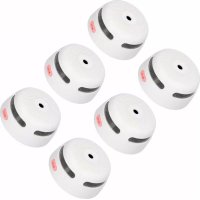
The X-Sense XC0C-iA is a combination smoke and carbon monoxide alarm designed for residential use. It features dual sensors to detect both smoke and CO, providing comprehensive safety.
How do I install the XC0C-iA alarm?
Install the alarm on a ceiling or wall using the included mounting bracket. For ceilings, place it at least 4 inches from the wall. For walls, mount it 6-12 inches from the ceiling. Avoid corners, vents, and high-humidity areas like kitchens or bathrooms.
What causes the alarm to beep or chirp intermittently?
Intermittent chirping typically indicates a low battery, end-of-life warning, or sensor malfunction. Replace the batteries immediately. If using sealed lithium, the chirp signals the end of the unit's 10-year life, and the alarm must be replaced.
How do I silence a false alarm?
Press the Test/Silence button to temporarily silence the alarm for about 10 minutes. Ensure there is no actual threat. If false alarms persist, check for steam, dust, or cooking fumes and relocate the alarm if necessary.
How often should I test the alarm?
Test the alarm weekly by pressing and holding the Test button until the alarm sounds (3 beeps for smoke, 4 beeps for CO). Release the button. If the alarm does not sound, replace the batteries or the unit.
What is the lifespan of the XC0C-iA?
The alarm has a 10-year lifespan from the date of manufacture. A low battery chirp or end-of-life signal (10-year timer) indicates it must be replaced. Write the replacement date on the alarm in permanent marker.
What should I do if the CO alarm sounds?
Immediately evacuate the building and call emergency services. Do not re-enter until the source of carbon monoxide is identified and fixed. If you feel symptoms like headache or dizziness, seek medical attention.
Can I interconnect multiple X-Sense alarms?
Yes, the XC0C-iA supports wireless interconnection with other compatible X-Sense alarms. When one alarm detects a threat, all interconnected alarms will sound. Up to 24 units can be linked.
How do I clean the alarm?
Clean the alarm monthly using a soft brush or vacuum cleaner hose to remove dust from the vents. Do not use water, solvents, or spray cleaners, as they may damage the sensors.
Is the XC0C-iA suitable for use in RVs or mobile homes?
Yes, the alarm is suitable for RVs and mobile homes, but avoid installing near combustion sources (e.g., stoves, heaters). Follow standard installation guidelines for ceiling or wall mounting.
User questions about XC0C-iA X-Sense
0 question about this device. Answer the ones you know or ask your own.
Ask a new question about this device
No questions yet. Be the first to ask one.
Download the instructions for your Uncategorized in PDF format for free! Find your manual XC0C-iA - X-Sense and take your electronic device back in hand. On this page are published all the documents necessary for the use of your device. XC0C-iA by X-Sense.
USER MANUAL XC0C-iA X-Sense


Manual assistant
Powered by Anthropic
Waiting for your message
Product information
Brand : X-Sense
Model : XC0C-iA
Category : Uncategorized