
WG-2 - Wireless gateway X-Sense - Free user manual and instructions
Find the device manual for free WG-2 X-Sense in PDF.


| Product Type | Wireless Gateway |
| Brand | X-Sense |
| Model | WG-2 |
| Dimensions | 100 x 100 x 25 mm |
| Weight | 150 g |
| Power Input | DC 5V 1A via Micro USB |
| Wireless Frequency | 2.4 GHz Wi-Fi (802.11 b/g/n) |
| Wireless Protocol | Wi-Fi, proprietary RF for sensors |
| Supported Devices | Up to 32 X-Sense sensors |
| Main Function | Bridge sensors to smartphone app via Wi-Fi |
| App Compatibility | X-Sense Home app (iOS/Android) |
| Notification Type | Push alerts on smartphone |
| Operating Temperature | 0°C to 40°C |
| Humidity Range | 10% to 90% non-condensing |
| LED Indicators | Power, Wi-Fi status, device pairing |
| Reset Button | Yes |
| Mounting | Tabletop with non-slip feet |
| Maintenance | Clean with dry cloth; avoid liquids |
| Safety | Low voltage device; no user-serviceable parts |
| Spare Parts | Not applicable; replace unit if faulty |
| Included Accessories | Gateway, Micro USB cable, power adapter, user manual |
| Compliance | FCC, CE, RoHS |
Frequently Asked Questions - WG-2 X-Sense
User questions about WG-2 X-Sense
0 question about this device. Answer the ones you know or ask your own.
Ask a new question about this device
Download the instructions for your Wireless gateway in PDF format for free! Find your manual WG-2 - X-Sense and take your electronic device back in hand. On this page are published all the documents necessary for the use of your device. WG-2 by X-Sense.
USER MANUAL WG-2 X-Sense
FireAngel Safety Technology Limited takes your privacy seriously. Our devices and products collect data to enable us to provide services (including product support and notifications) and to enable us to predict fire risks and create statistics. Details of the data we collect, how we use and how long we keep that data are contained in our privacy notice which is available at https://www.fireangel.co.uk/FACTPP. If you have any queries about how we use your personal data or would like to exercise any of your rights, including your right to object where we rely on legitimate interests, please contact us at specification@fireangeltech.com or call 0330 094 5830.
Technical Support
Online: www.fireangeltech.com/support E-mail: specification@fireangeltech.com Phone: 0330 094 5830 Fire & Rescue Customers: 0800 141 2561 www.fireangeltech.com
© FireAngel Safety Technology Limited, Vanguard Centre, Coventry CV4 7EZ, UK
Note: This user manual is also available in large text and other formats.

GN5804R1
1. INSTALLATION INSTRUCTIONS
- The Gateway is designed to lie flat or be secured to a wall.
- If required, use the supplied plastic anchors and screws to fit the Gateway to the wall.
Mounting on a wall: Please ensure that you use the screws provided, as they were chosen specifically for use with this product.
- Connect Power cable here 🔒
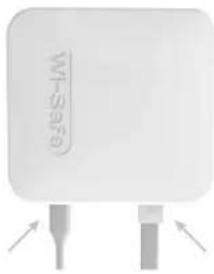
Use the template provided (see below) for guidance on marking hole positions. Drill holes into the wall. Insert the plastic wall plugs. Screw in the screws. Ensure screws are protruding from the wall by 3mm to allow the Gateway to slot onto screws.
- Connect Ethernet cable here
Note: Make a note of the MAC address prior to permanent installation as you will need this when activating the Gateway for the first time.
To remove the Gateway from a wall: Insert a small screwdriver into the hole on the side and use it to slide the Gateway up. The Gateway will lift off the screws that attach it to the wall.
3. WG-2 GATEWAY INDICATORS (LEDs)
NOTE: The LEDs on the front of the WG-2 Gateway are used to indicate when it is powered-up, connected to the internet, in fault mode or requiring registration - as detailed below. If the Gateway is mounted on a wall, the LED descriptions located on the back of the device will not be visible. You can still learn about the status of the Gateway using the icons featured in table below.
| STAT U S | COMMUNICATION GREEN | FA U LT RED | POWER GREEN | ACTION NEEDED |
| Initial Gateway power-up | Illuminated | Connect Gateway to the internet via the ethernet cable | ||
| Gateway unregistered | Illuminated Illuminated Illuminated | Register the Gateway online | ||
| Gateway connected | Illuminated Illuminated None required | |||
| Connection fault | Illuminated Illuminated | Check your internet connection is working | ||
WG-2 Gateway Rear Panel Guide
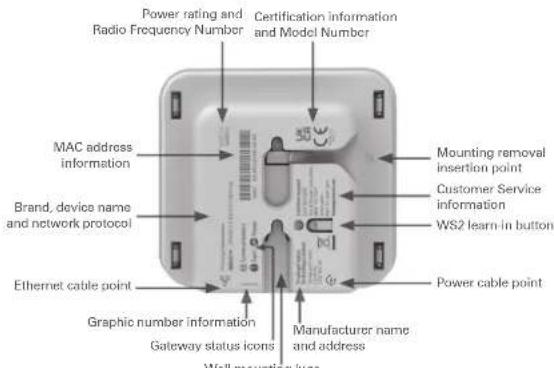
2. SETTING UP YOUR GATEWAY
Follow the set-up instructions at: www.fireangeltech.com

natural_image
Three electronic devices: desktop, laptop, and smartphone, all showing interface elements (no readable text or symbols)(Please refer to the 'WG-2 Gateway Indicators' section for the Gateway status information.)
The WG-2 Gateway allows for Smart RF compatible devices to connect to the internet. The FireAngel Connected app works in conjunction with the Gateway to enable real time alerts, networking and testing of your safety alarm system.
Smart RF operates on FireAngel's Wi-Safe 2 networking protocol and is compatible with other Wi-Safe 2 products.
Please note: An internet connection is required when setting up an alarm network for the first time, in conjunction with the Gateway.
When you interlink the Gateway with the rest of the alarm network, as directed in the online set-up instructions, you will need to access the 'WS2 learn-In button' (_) located on the rear of the WG-2 Gateway.
LIMITATIONS
Wi-Safe 2 is not a life safety protocol and should not be relied upon for life safety. If your internet connection is lost, communication from the WG-2 (i.e. to cloud or mobile devices) may not be possible. The local Smart RF alarm network will still continue to operate as a stand-alone system and does not rely on an internet connection to do so.
TECHNICAL SPECIFICATION
The WG-2 Gateway is designed to be installed in conjunction with Smart RF compatible devices (Wi-Safe 2 protocol) For more information visit:
www.fireangeltech.com
The WG-2 is powered by an AC Adaptor. Input: 100-240V AC 50/60Hz
Output: 5V DC 1A
AC Adaptor Model Number: KSAS0050500100VKD
Storage and transportation conditions: 0°C to +35°C
Independently tested to RF standard:
EN 300 220-2, EN 301 489-3, EN 301 489-1
Max RF power: +10dBm Frequency 868MHz
Hereby, FireAngel Safety Technology Limited declares that this product is in compliance with the essential requirements and other relevant provisions of Directive 2014/53/EU. The declaration of conformity may be consulted at http://spru.es/WG-2
Manufacturer:
FireAngel Safety Technology Limited, Vanguard Centre, Sir William Lyons Rd, Coventry, CV4 7EZ, UK
WARRANTY
For information on individual alarm warranty please refer to the main alarm manual.
FireAngel Safety Technology Limited warrants to the original purchaser that its enclosed WG-2 to be free from defects in materials and workmanship under normal residential use and service for a period of 5 (five) years from the date of purchase. Provided it is returned with proof of purchase date, FireAngel Safety Technology Limited hereby warrants that during the 5 (five) year period commencing from the date of purchase FireAngel Safety Technology Limited, at its discretion, agrees to replace the unit free of charge.
The warranty on any replacement WG-2, will last for the remainder of the period of the original warranty in respect of the wireless module originally purchased – that is from the date of original purchase and not from the date of receipt of the replacement product.
FireAngel Safety Technology Limited reserves the right to offer an alternative product similar to that being replaced if the original model is no longer available or in stock. This warranty applies to the original retail purchaser from the date of original retail purchase and is not transferable. Proof of purchase is required. This warranty does not cover damage resulting from accident, mlsuse, disassembly, abuse or lack of reasonable care of the product, or applications not in accordance with the user manual. It does not cover events and conditions outside of FireAngel Safety Technology Limited's control, such as Acts of God (fire, severe weather etc.). It does not apply to retail stores, service centres or any distributors or agents. FireAngel Safety Technology Limited will not recognise any changes to this warranty by third parties.
FireAngel Safety Technology Limited shall not be liable for any incidental or consequential damages caused by the breach of any expressed or implied warranty. Except to the extent prohibited by applicable law, any implied warranty of merchantability or fitness for a particular purpose is limited in duration for 5 (five) years. This warranty does not affect your statutory rights. Except for death or personal injury, FireAngel Safety Technology Limited shall not be liable for any loss of use, damage, cost or expense relating to this product or for any indirect or consequential loss, damages or costs incurred by you or any other user of this product.
DISPOSAL
Waste electrical products should not be disposed of with your other household waste, but within the waste electronic and electrical equipment (WEEE) recycling scheme.
WARNING: Do not attempt to disassemble.
Do not burn or dispose of in fire.
Drill hole spacing


Brand : X-Sense
Model : WG-2
Category : Wireless gateway