XP02-WR - Uncategorized X-Sense - Free user manual and instructions
Find the device manual for free XP02-WR X-Sense in PDF.


Pick your language and provide your email: we'll send you a specifically translated version.
| Product Type | Wireless Interconnected Smoke Alarm |
| Brand | X-Sense |
| Model | XP02-WR |
| Dimensions | Approx. 120 mm (diameter) x 40 mm (height) |
| Weight | Approx. 150 g (including batteries) |
| Power Source | 3 V DC (2 x AA batteries) |
| Battery Life | Up to 1 year under normal use |
| Sensor Type | Photoelectric |
| Wireless Range | Up to 100 m (open area) |
| Maximum Alarms Interconnected | 20 units |
| Sound Output | 85 dB at 3 m |
| Operating Temperature | 0°C to 50°C |
| Operating Humidity | 10% to 90% RH (non-condensing) |
| Alarm Test/Silence Button | Yes |
| Low Battery Warning | Chirp every 60 seconds |
| End-of-Life Warning | Chirp every 60 seconds after 10 years |
| Safety Certification | UL 217 listed |
| Installation | Ceiling mounting only |
| Maintenance | Test weekly; vacuum every month; replace batteries annually or when low |
| Warranty | 10 years limited |
| Manufacturer | X-Sense Innovations Co., Ltd. |
Frequently Asked Questions - XP02-WR X-Sense
How do I install the XP02-WR smoke alarm?
Mount the alarm on the ceiling using the included mounting bracket. Insert 2 AA batteries ensuring correct polarity. Press the test button to confirm operation. For wireless interconnections, ensure all alarms are within range and press the pair button.
Can the XP02-WR be interconnected with other X-Sense alarms?
Yes, the XP02-WR supports wireless interconnection with up to 20 compatible X-Sense alarms. When one alarm detects smoke, all interconnected alarms will sound.
How often should I test the alarm?
Test the alarm weekly by pressing the test/silence button. Hold for a few seconds until the alarm sounds. Release to stop.
What does a chirping sound mean?
A chirp every 60 seconds indicates a low battery. Replace both batteries immediately. A chirp every 60 seconds after 10 years indicates end-of-life; replace the entire alarm.
How do I silence a false alarm?
Press the test/silence button to temporarily silence the alarm. It will rearm automatically in about 10 minutes. Identify and remove the source of smoke or steam.
What should I do if the alarm goes off while cooking?
Ventilate the area by opening windows or doors. Do not remove the battery. Press the silence button to stop the alarm temporarily. Relocate the alarm further from the kitchen if persistent.
How do I clean the XP02-WR?
Gently vacuum the outside vents monthly using a soft brush attachment to remove dust. Do not use water, solvents, or sprays. Do not paint the alarm.
What type of batteries does the XP02-WR use?
It uses two AA 1.5 V alkaline batteries. Only use fresh batteries of the same brand and type. Do not use rechargeable batteries.
Can I install the XP02-WR in a mobile home or RV?
Yes, the alarm is suitable for use in mobile homes and RVs. Follow the same installation guidelines as for standard homes. Ensure proper ventilation to avoid false alarms.
What is the service life of the XP02-WR?
The alarm has a service life of 10 years from the date of manufacture. A replacement reminder will chirp at end-of-life. Replace the entire unit immediately.
User questions about XP02-WR X-Sense
0 question about this device. Answer the ones you know or ask your own.
Ask a new question about this device
No questions yet. Be the first to ask one.
Download the instructions for your Uncategorized in PDF format for free! Find your manual XP02-WR - X-Sense and take your electronic device back in hand. On this page are published all the documents necessary for the use of your device. XP02-WR by X-Sense.
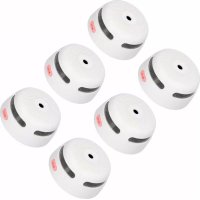
USER MANUAL XP02-WR X-Sense


Manual assistant
Powered by Anthropic
Waiting for your message
Product information
Brand : X-Sense
Model : XP02-WR
Category : Uncategorized