55US800AN - Television Aconatic - Free user manual and instructions
Find the device manual for free 55US800AN Aconatic in PDF.


Pick your language and provide your email: we'll send you a specifically translated version.
| Type of product | LED Smart Television |
| Screen size (diagonal) | 55 inches (139.7 cm) |
| Screen resolution | 4K UHD (3840 x 2160 pixels) |
| Refresh rate | 60 Hz (native) |
| Smart TV platform | Built-in (proprietary or Android TV) |
| Wi-Fi connectivity | IEEE 802.11ac dual-band |
| Ethernet port | 1 x RJ45 |
| HDMI inputs | 3 x HDMI 2.0 |
| USB ports | 2 x USB 2.0 |
| Composite video input | 1 x AV (shared with component via adapter) |
| Digital audio output | 1 x optical (Toslink) |
| Headphone output | 1 x 3.5 mm jack |
| TV tuner | ATSC / DVB-T2 / ISDB-T (depending on region) |
| Power supply | AC 100-240 V, 50/60 Hz |
| Power consumption (typical) | 120 W |
| Standby power consumption | Less than 0.5 W |
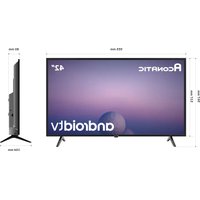
| Dimensions without stand (W x H x D) | 1230 x 713 x 76 mm |
| Dimensions with stand | 1230 x 776 x 232 mm |
| Weight without stand | Approx. 14.2 kg |
| Weight with stand | Approx. 14.5 kg |
| VESA mount pattern | 300 x 200 mm |
| Remote control included | Yes (infrared / Bluetooth) |
| Energy efficiency class | A+ (EU scale) |
| Cleaning recommendations | Use a dry soft cloth; avoid liquids and abrasive cleaners. |
Frequently Asked Questions - 55US800AN Aconatic
How do I set up my Aconatic 55US800AN TV for the first time?
Connect the TV to power and press the power button. Follow the on-screen wizard to select language, connect to Wi-Fi, and scan for channels. If using a set-top box, connect via HDMI and select the correct input.
How can I connect external devices like a gaming console or Blu-ray player?
Use one of the 3 HDMI ports on the back or side of the TV. Press the 'Input' or 'Source' button on the remote to select the corresponding HDMI input.
What should I do if the remote control stops working?
First, check the batteries and replace them if needed. Ensure there are no obstacles between the remote and the TV sensor. If using Bluetooth, re-pair the remote by holding the 'Home' and 'Back' buttons for 5 seconds until the LED flashes.
How do I access smart apps like Netflix or YouTube?
Press the 'Smart' or 'Home' button on the remote to open the smart TV menu. Navigate to the app store or installed apps section. If an app is not pre-installed, search for it in the store and download it.
Can I mount this TV on the wall?
Yes, the TV supports VESA 300x200 mm mounts. Use a compatible wall mount and follow the instructions. Ensure the wall can support the weight (about 14.5 kg with stand removed).
How do I clean the TV screen safely?
Turn off the TV and let it cool. Use a soft, dry microfiber cloth to gently wipe the screen. Do not spray any liquid directly; if needed, slightly dampen the cloth with water. Avoid alcohol, ammonia, or abrasive cleaners.
Why is there no sound from the TV speakers?
Check the volume level and mute status. Ensure no headphones are connected. If using external speakers, verify the audio output setting is on 'TV Speaker'. Also, try a different HDMI source or restart the TV.
How do I perform a factory reset?
Go to 'Settings' > 'System' > 'Reset' (or 'General' > 'Reset'). Enter the PIN (default is 0000 or 1234). Confirm the reset. This erases all personal data and returns the TV to original settings.
What type of warranty does the Aconatic 55US800AN have?
Typically, Aconatic TVs come with a 2-year warranty for manufacturing defects. Keep your purchase receipt and contact the retailer or Aconatic support for service. Wall-mount installation may not be covered.
How can I update the TV firmware?
Go to 'Settings' > 'Support' > 'Software Update' (or 'About TV' > 'Update'). Select 'Update Now'. Ensure the TV is connected to the internet. Alternatively, download the update from the Aconatic website onto a USB drive and follow the on-screen instructions.
User questions about 55US800AN Aconatic
0 question about this device. Answer the ones you know or ask your own.
Ask a new question about this device
No questions yet. Be the first to ask one.
Download the instructions for your Television in PDF format for free! Find your manual 55US800AN - Aconatic and take your electronic device back in hand. On this page are published all the documents necessary for the use of your device. 55US800AN by Aconatic.
USER MANUAL 55US800AN Aconatic


Manual assistant
Powered by Anthropic
Waiting for your message
Product information
Brand : Aconatic
Model : 55US800AN
Category : Television