65US700AN - Television Aconatic - Free user manual and instructions
Find the device manual for free 65US700AN Aconatic in PDF.


Pick your language and provide your email: we'll send you a specifically translated version.
| Product Type | Television |
| Brand | Aconatic |
| Model | 65US700AN |
| Screen Size | 65 inches (165 cm) |
| Display Resolution | 4K UHD (3840 x 2160) |
| Display Technology | LED |
| Smart TV | Yes, with built-in Wi-Fi |
| Refresh Rate | 60 Hz |
| HDMI Ports | 3 |
| USB Ports | 2 |
| Ethernet Port | 1 |
| Audio Output | Optical, headphone jack |
| Power Consumption (Typical) | 150 W |
| Standby Power Consumption | < 0.5 W |
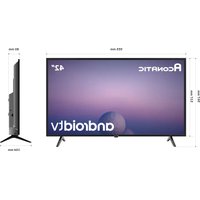
| Dimensions (Without Stand) | 144.6 x 83.0 x 8.0 cm |
| Dimensions (With Stand) | 144.6 x 89.5 x 25.0 cm |
| Weight (Without Stand) | 20.0 kg |
| Weight (With Stand) | 21.5 kg |
| VESA Mount Pattern | 400 x 200 mm |
| Power Supply | AC 100-240 V, 50/60 Hz |
| Cleaning Instructions | Wipe with a soft, dry cloth. Do not use harsh chemicals. |
| Safety Warnings | Do not expose to moisture or extreme temperatures. |
| Spare Parts Availability | Remote control, stand, screws available from manufacturer |
Frequently Asked Questions - 65US700AN Aconatic
How do I connect external devices to the TV?
Use the HDMI or USB ports on the side or back of the TV. For older devices, use the AV input with an adapter.
Can I wall mount this TV?
Yes, it supports VESA 400 x 200 mm mounting. Use appropriate screws and ensure the wall can support the weight.
Why is there no picture but sound works?
Check if the input source is correct. Try pressing the 'Input' button on the remote. Also verify the cable connections.
How do I access the smart features?
Press the 'Smart' or 'Home' button on the remote to open the smart hub. You can install apps from the store.
What is the refresh rate of this TV?
The refresh rate is 60 Hz, suitable for most content including movies and standard gaming.
How do I clean the screen?
Turn off the TV and let it cool. Use a soft microfiber cloth slightly dampened with water. Gently wipe in circular motions. Do not spray liquid directly.
Can I connect Bluetooth headphones?
Yes, if the TV supports Bluetooth. Go to Settings > Bluetooth and pair your headphones. Check the manual for compatibility.
What do I do if the remote stops working?
Replace the batteries first. If still not working, try using the buttons on the TV itself. If persistent, contact support for a replacement remote.
How do I update the TV software?
Go to Settings > Support > Software Update. Ensure the TV is connected to the internet. Select 'Update Now'.
Is there a built-in tuner for over-the-air channels?
Yes, it includes a digital tuner (ATSC). Connect an antenna and go to Channel Tuning to scan for channels.
User questions about 65US700AN Aconatic
0 question about this device. Answer the ones you know or ask your own.
Ask a new question about this device
No questions yet. Be the first to ask one.
Download the instructions for your Television in PDF format for free! Find your manual 65US700AN - Aconatic and take your electronic device back in hand. On this page are published all the documents necessary for the use of your device. 65US700AN by Aconatic.
USER MANUAL 65US700AN Aconatic


Manual assistant
Powered by Anthropic
Waiting for your message
Product information
Brand : Aconatic
Model : 65US700AN
Category : Television