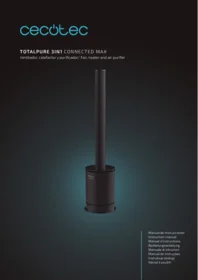
Total Pure 3in1 Connected Max - Air purifier CECOTEC - Free user manual and instructions
Find the device manual for free Total Pure 3in1 Connected Max CECOTEC in PDF.


| Product type | 3-in-1 air purifier with Wi-Fi connectivity |
| Brand | Cecotec |
| Model | Total Pure 3in1 Connected Max |
| Dimensions (L × W × H) | 25 × 25 × 45 cm |
| Weight | 4.5 kg |
| Power supply | 220-240 V, 50 Hz |
| Power | 45 W |
| Recommended coverage area | Up to 40 m² |
| Airflow rate | 200 m³/h |
| Noise level | 25-50 dB depending on speed |
| Main functions | Purification, ventilation, ionization, timer, automatic mode, Wi-Fi connectivity, app control |
| Filtration | Pre-filter + HEPA filter + activated carbon filter |
| Maintenance and cleaning | Clean the pre-filter every 2-4 weeks with a vacuum or damp cloth; replace the HEPA/carbon filter every 6-12 months depending on use |
| Safety | Automatic shut-off if tipped over, overheating protection, child lock via app |
| Spare parts and repairability | Replacement filters available (ref. Cecotec); repairability index of 6.5/10 |
| General information | Connected purifier compatible with voice assistant; air quality LED; 1-8 h timer; 3 speeds + night mode |
Frequently Asked Questions - Total Pure 3in1 Connected Max CECOTEC
User questions about Total Pure 3in1 Connected Max CECOTEC
0 question about this device. Answer the ones you know or ask your own.
Ask a new question about this device
Download the instructions for your Air purifier in PDF format for free! Find your manual Total Pure 3in1 Connected Max - CECOTEC and take your electronic device back in hand. On this page are published all the documents necessary for the use of your device. Total Pure 3in1 Connected Max by CECOTEC.
USER MANUAL Total Pure 3in1 Connected Max CECOTEC
TOTALPURE 3IN1 CONNECTED MAX
Ventilador, calefactor y purificador/ Fan, heater and air purifier

Safety instructions 7
-
Parts and components 35
-
Before use 36
-
Operation 36
-
Connectivity 38
-
Cleaning and maintenance 38
-
Technical specifications 39
-
Disposal of old electrical appliances 41
-
Technical support and warranty 41
SOMMAIRE
Read these instructions thoroughly before using the appliance. Keep this instruction manual for future reference or new users.
Make sure that the mains voltage matches the voltage stated on the rating label of the appliance and that the wall outlet is grounded.
This product is intended for household and indoor use, not commercial.
Do not leave the product unsupervised during operation.
Always unplug the product from the electrical outlet when it is not use.
Place the product on a flat, steady, stable, heat-resistant surface.
Do not use the device in areas where gasoline, paint, or flammable liquids are used or stored, as there may be a risk of fire or explosion.
Check the power cord regularly for visible damage. If the cord is damaged, it must be replaced by the official Technical Support Service of Cecotec in order to avoid any type of danger.
Use the product in a well-ventilated area.
The device will reach high temperatures during use. To avoid burns, do not let bare skin touch a hot surface.

Keep combustible materials, such as furniture, pillows, bedding, paper, clothes, and curtains at least 1.5 m from all sides of the heater. Avoid exposure to direct sunlight.
Do not place the appliance close to heat sources, flammable substances, wet surfaces where it can fall or be pushed into water or allow it to come into contact with water or other liquids.
To prevent a possible fire, do not block air intake or exhaust in
any manner. Do not use on soft surface, such as a bed, where air outlet may become blocked.
Wipe the air openings clean if they become clogged.
Do not use this product to dry or heat clothing, shoes or any other items.

This heater is not intended for use in bathrooms, laundry areas, or other damp/wet locations.
To disconnect it, pull directly on the plug; do not pull on the power cord.
Do not share the socket with other high-power appliances.
Do not handle the element with bare or wet hands.
Do not insert or allow objects to enter any ventilation or exhausted opening as this may cause an electric shock, fire or product damage.
Keep the packaging materials out of the reach of children, they could be dangerous.
The appliance is not intended to be used by children under the age of 8. It can be used by children over the age of 8, as long as they are given continuous supervision.
This appliance can be used by children aged 8 and above, and persons with reduced physical, sensory or mental capabilities or lack of experience and knowledge, as long as they have been given supervision or instruction concerning the use of the appliance in a safe way and understand the hazards involved.
Do not allow children to play with the appliance.
Supervise children, they shall not play with the appliance. Close supervision is necessary when the appliance is being used by or near children.
Battery instructions.
Keep batteries away from children and animals, they could be deadly if swallowed. In case of ingestion, seek medical
assistance immediately.
Should a battery have leaked, do not allow your skin, eyes or mucous membranes to come into contact with the battery acid. In case of contact with acid, rinse the affected areas with abundant fresh water immediately and contact a doctor as soon as possible.
Make sure the battery contacts in the device are clean before inserting batteries; if they are not, clean them.
Use only the battery types specified in the technical specifications.
Always replace all the batteries at the same time. Do not use different types of batteries or of different capacities.
When replacing batteries, note the correct polarity (+/-).
Take the batteries out of the device when they are discharged or when the device is not going to be used in a long time.
Batteries must not be recharged or reactivated, dismantled, thrown into fire, immersed in fluids or short-circuited.
INSTRUCTIONS DE SECURITE
- Cover
- Air outlet
- Air duct
- Control panel
- Air inlet
- Main body
- Air inlet
- Base
- Switch
- Power cord
Filter
Fig. 13.
-
Top cover
-
Filter (x2)
Control panel
Fig. 17.
- Heat/Cool mode
- Display
- Power button
Remote control
Fig. 2.
- Cool mode
- Oscillation
- On/off
- Fan speed increase
- Fan speed decrease
- Heat mode
- Fan
- Timer
- Sleep mode
- Temperature increase
- Sound
- Temperature decrease
- Turbo mode
*The remote control should be pointed at the remote control signal receiver on the display to maximise the remote control signal.
Effective distance: 5 m
2. BEFORE USE
Take the product out of the box.
Remove all packaging material and save the original box.
Make sure all parts and components are included and in good conditions. If any visible signs of damage are observed, contact the Technical Support Service immediately.
Fig. 18.
When installing the device at home, remember to keep a safety distance from the device to the walls and other objects. Do not cover it.
3. OPERATION
Fig. 3.
Press the On/off button to turn the device on and off.
Fig. 4.
Press the Sleep mode button on the remote control to turn the fan speed to minimum, the display will show L. To exit the Sleep mode, press the Sleep mode button again or the fan speed increase button.
Fig. 5.
Press the Turbo mode button on the remote control to activate the Turbo mode, the display will show H, and the fan speed will turn to maximum. To exit the Turbo mode, press the Turbo mode button again or the fan speed increase button.
Fig. 6.
Press the Oscillation button to activate the oscillation function. The device can swing left and right up to 80°. Press the Oscillation button again to stop this function.
Fig. 7.
Press the sound button to activate or deactivate the device's sound.
Fig. 8.
Under Cool mode, the LED light indicator will turn on blue.
Press the Cool mode button to activate or deactivate this mode.
Note: The default start mode is the Cool mode.
Fig. 9.
Press the "+" button on the remote control to increase the fan speed. Press the "-" button to decrease the fan speed.
The Cool mode has 9 speed levels. The Heat mode has 4 speed levels.
Fig. 10.
When the Heat mode is activated, the numbers will be displayed in orange colour.
Press the Heat mode button to activate this mode.
Note: There is no Turbo or Sleep function under Heat mode.
Fig. 9.
Under the Heat mode, use the "+" and "-" buttons on the remote control to set the desired temperature (1 °C-30 °C).
Note: These buttons will not work under the Cool mode.
Fig. 11.
Press the Timer button on the remote control to program the device from 1 to 8 hours.
Filter replacement
This device is equipped with a purifying air filter.
To replace it, follow the below instructions.
Fig. 15.
Fig. 12.
Rotate the top cover of the main body anticlockwise to unlock it and pull the filter out.
Fig. 14.
Separate the assembled top cover from the filter.
Assemble the new filter to the top cover of the main body.
Fig. 16.
Assemble the new filter and the cover back onto the main body and turn it clockwise until fixed.
Using the device from the control panel
Fig. 17.
Connect the device to a power supply and turn the power switch on. The device will enter standby mode.
Press the power button to activate the fan mode. Press and hold the power button for 2 seconds to stop the fan mode.
While the device is operating, press the power button to select the desired fan speed level, from 1 to 9.
Oscillation
Press and hold the power button on the control panel for 1 second, the device will beep once, and the fan will start oscillating.
Press and hold the power button on the control panel for 1 second, the device will beep once, and the fan will stop oscillating.
Heat mode
Press the Heat mode button on the remote control or set it on the main panel, the display will show the room temperature.
Use the "+" and "-" buttons on the remote control to set the desired temperature from 1 °C to 30 °C. The temperature digits will blink.
Note: The set temperature should be higher than the room temperature one in order for the Heat mode to operate properly.
Once the set temperature has been reached, the Heat mode will turn off and the device will switch to a cool breeze.
If the room temperature falls below the set temperature, the Heat mode will be automatically activated again.
The maximum operating time of the Heat mode is 9 hours. After this time, the device will automatically turn off. To restart it, press the power button or use the remote control.
Note:
The default operating temperature is 25^ C.
The device panel does not display temperature values below 0 °C . If the room temperature is lower than 0 °C , the display will show 01.
Safety system
This product features an overheat protection sensor and a tip-over safety feature that cuts power to the unit if it is accidentally tipped over or in case of overheating. If this sensor is triggered, unplug the machine and allow the fan to cool down. Check and remove any obstructions before restarting the device and be sure to place it on a hard, stable surface.
4. CONNECTIVITY
Connect your phone to the Wi-Fi network.
Download the app: Find "EnergySilence" App on Google Play or on the APP Store.
If this is your first time using the app, you'll need to create an account, otherwise sign in with your existent account.
Once inside the app, click on the "+" in the upper right corner and look for your TotalPure 3in1. Once you have selected your device, press the power button for 5 seconds (it will beep three times) when an "F" appears and flashes. Press "confirm" to continue. Select your Wi-Fi network and enter the password. Press "confirm".
The app will automatically connect to your device. In case the automatic connection fails, press the power button until "F" flashes slowly to start the manual linking. After this, introduce the password to your Wi-Fi network and search for "TotalPure 3in1's Wi-Fi. Pair it and go back to the app to finish the linking.
5. CLEANING AND MAINTENANCE
Turn off and unplug the device from the power supply before cleaning or storing it.
Do not wet or allow water to come inside the device.
Use a soft, damp cloth to clean the device's surface. If a deeper cleaning is required, dilute
mild detergent in water and wipe it with a soft cloth.
Do not use chemical or harsh abrasive cleaning agents.
Air inlet/outlet
Use a soft brush or a vacuum cleaner to clean the dust in the air inlet and outlet. Clean it regularly in order to prevent too much dust from accumulating.
Too much dust will reduce product efficiency.
Remote control
Gently wipe the surface of the remote with a soft, dry cloth.
If it is not to be used for a long time, avoid battery consumption. Remove the batteries inside the remote control.
Storage
Fig. 19.
If the device is not going to be used for a long time, clean it and place it in a plastic bag.
Store the device in a safe, fry place when not used for a long time.
Avoid storing it in places with vibrations or other electrical appliances.
Avoid storing it where it is exposed to direct sunlight, high temperatures or humidity.
Keep out the reach of children.
6. TECHNICAL SPECIFICATIONS
Product: TotalPure 3in1 Connected Max
Product reference: 05299
220-249 V\~, 50/60 Hz
Rated power: 2000 W
Cooling power: 45 W
Oscillating angle: 80°
Wi-Fi frequency band: 2.412\~2.484 GHz
Maximum Wi-Fi emission power: +20 dBm
| Model: 05299 TotalPure 3in1 Vision | |||||
| Item | Symbol | Value | Unit | Item | Unit |
| Heat output | Type of heat input, for electric storage local space heaters only (single select) | ||||
| Nominal heat output | Pnom | 2.0 | kW | Manual heat charge control with integrated thermostat | [no] |
| Minimum heat output (indicative) | Pmin | 1.0 | kW | Manual heat charge control with room and/or outdoor temperature feedback | [no] |
| Maximum continuous heat output | Pmax | 2.0 | kW | Electronic heat charge control with room and/or outdoor temperature feedback | [no] |
| Auxiliary electricity consumption | Fan assisted heat output | [no] | |||
| At nominal heat output | elmax | 1.956 | kW | Type of heat output/room temperature control (single select) | |
| At minimum heat output | elmin | 1.100 | kW | Single stage heat output and no room temperature control | [no] |
| In standby mode | eISB | 0.0002 | kW | Two or more manual stages, no room temperature control | [no] |
| With mechanic thermostat room temperature control | [no] | ||||
| With electronic room temperature control | [no] | ||||
| Electronic room temperature control plus day timer | [no] | ||||
| Electronic room temperature control plus week timer | [no] | ||||
| Other control options (multiple selections possible) | |||||
| Room temperature control, with presence detection | [no] | ||||
| Room temperature control, with open window detection | [yes] | ||||
| With distance control option | [no] | ||||
| With adaptive start control | [no] | ||||
| With working time limitation | [no] | ||||
| With black bulb sensor | [no] | ||||
| Contact details: | Grupo Cecotec Innovaciones S.L. - C/de la Pinadeta s/n 46930 Quart de Poblet, Valencia (SPAIN) | ||||
Model: 05299 TotalPure 3in1 Vision
7. DISPOSAL OF OLD ELECTRICAL APPLIANCES

The European directive 2012/19/EU on Waste Electrical and Electronic Equipment (WEEE), specifies that old household electrical appliances must not be disposed of with the normal unsorted municipal waste. Old appliances must be collected separately, in order to optimize the recovery and recycling of the materials they contain and reduce the impact on human health and the environment.
The crossed out “wheeled bin” symbol on the product reminds you of your obligation to dispose of the appliance correctly. If the product has a built-in battery or uses batteries, they should be removed from the appliance and disposed of appropriately. Consumers must contact their local authorities or retailer for information concerning the correct disposal of old appliances and/or their batteries.
8. TECHNICAL SUPPORT AND WARRANTY
This product is under warranty for 2 years from the date of purchase, as long as the proof of purchase is submitted, the product is in perfect physical condition, and it has been given proper use, as explained in this instruction manual.
The warranty will not cover the following situations:
The product has been used for purposes other than those intended for it, misused, beaten, exposed to moisture, immersed in liquid or corrosive substances, as well as any other fault attributable to the customer.
The product has been disassembled, modified, or repaired by persons, not authorised by the official Technical Support Service of Cecotec.
Faults deriving from the normal wear and tear of its parts, due to use.
The warranty service covers every manufacturing defects of your appliance for 2 years, based on current legislation, except consumable parts. In the event of misuse, the warranty will not apply.
If at any moment you detect any problem with your product or have any doubt, do not hesitate to contact Cecotec Technical Support Service at +34 963 210 728.
1. PIECES ET COMPOSANTS
Img. 1.
TOTALPURE 3IN1 CONNECTED MAX
2. AVANT UTILISATION
Fig./Img./Abb./Afb./ Rys./Obr. 12

Fig./Img./Abb./Afb./Rys./Obr. 13
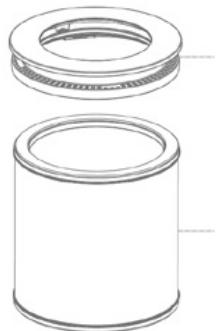
Fig./Img./Abb./Afb./Rys./Obr. 14

Fig./Img./Abb./Afb./ Rys./Obr. 15

Fig./Img./Abb./Afb./Rys./Obr. 16

Fig./Img./Abb./Afb./Rys./Obr. 17
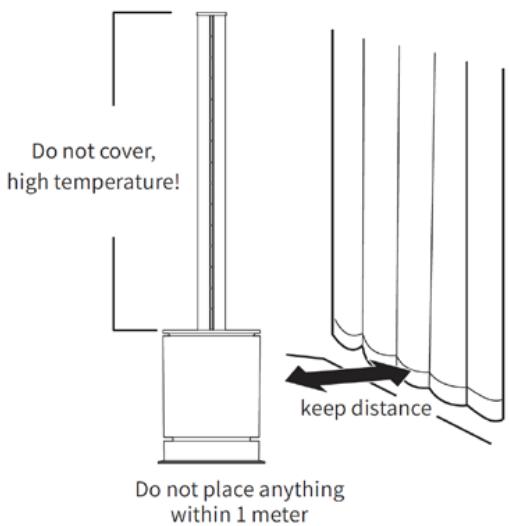
Fig./Img./Abb./Afb./Rys./Obr. 18

Fig./Img./Abb./Afb./ Rys./Obr. 19
www.cecotec.es
Quart de Poblet, Valencia (Spain)
IC01200623
Brand : CECOTEC
Model : Total Pure 3in1 Connected Max
Category : Air purifier