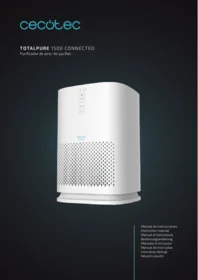
Totalpure 1500 Connected - Air purifier CECOTEC - Free user manual and instructions
Find the device manual for free Totalpure 1500 Connected CECOTEC in PDF.


| Product type | Connected air purifier |
| Brand | Cecotec |
| Model | Totalpure 1500 Connected |
| Dimensions (L x W x H) | 39.5 x 23.5 x 56.5 cm |
| Weight | 6.8 kg |
| Color | White |
| Power supply | 220-240 V ~ 50/60 Hz |
| Power consumption | 55 W |
| Recommended area | Up to 40 m² |
| Filtration type | Pre-filter, HEPA H13 filter, activated carbon filter |
| Air quality sensor | PM2.5, temperature, humidity |
| Connectivity | Wi-Fi, Cecotec app |
| Speed levels | 3 speeds + auto mode |
| Timer | Programmable (1-8 hours) |
| Noise level | 24 - 48 dB(A) |
| CADR (Clean Air Delivery Rate) | 280 m³/h |
| Display | Touch LED screen |
| Maintenance and cleaning | Clean the pre-filter every 2 weeks; replace the HEPA filter every 6-12 months |
| Safety | Automatic shut-off in case of tipping, child lock |
| Spare parts and repairability | Replacement filter available from Cecotec |
| Warranty | 2 years |
Frequently Asked Questions - Totalpure 1500 Connected CECOTEC
User questions about Totalpure 1500 Connected CECOTEC
0 question about this device. Answer the ones you know or ask your own.
Ask a new question about this device
Download the instructions for your Air purifier in PDF format for free! Find your manual Totalpure 1500 Connected - CECOTEC and take your electronic device back in hand. On this page are published all the documents necessary for the use of your device. Totalpure 1500 Connected by CECOTEC.
USER MANUAL Totalpure 1500 Connected CECOTEC
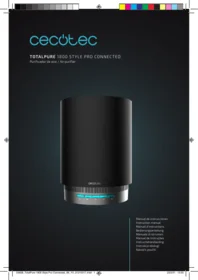
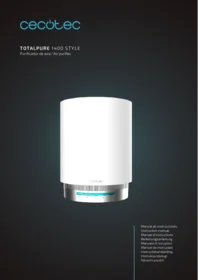
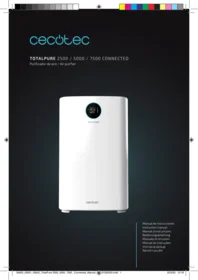
TOTALPURE 1500 CONNECTED
Purificador de aire/ Air purifier

Safety instructions 5
-
Parts and components 21
-
Before use 21
-
Operation 21
-
Cleaning and maintenance 23
-
Technical specifications 23
-
Disposal of old electrical appliances 23
-
Technical support and warranty 24
SOMMAIRE
Read these instructions thoroughly before using the appliance. Keep this instruction manual for future reference or new users.
Make sure that the mains voltage matches the voltage stated on the rating label of the appliance and that the wall outlet is grounded.
This product is designed only for household use.
Check the power cord regularly for visible damage. If the cord is damaged, it must be replaced by the official Technical Support Service of Cecotec in order to avoid any type of danger.
To avoid electric shocks, do not clean with or allow to get inside the product: water, liquid or any flammable substance.
Do not immerse the cord, plug, or any non-removable part of the appliance in water or any other liquid, nor expose the electrical connections to water. Make sure your hands are dry before handling the plug or switching on the appliance.
Switch off the device immediately in the event of defects or malfunctions.
Do not shake or drop the product.
Do not use the device if its cord or any other part is damaged. In this case, contact the official Technical Support Service of Cecotec.
Do not install the device near heat-generating appliances, flammable, dangerous materials, or in places where temperature or humidity levels are high.
This product does not replace normal ventilation or extraction products.
Make sure the product is kept and stored in well-ventilated areas.
The device must be placed so that the plug is accessible.
Do not sit or stand on the device.
Do not use the device outdoors or expose it to rain or direct sunlight.
Do not insert fingers or other objects in the air inlet or outlet to prevent injuries and product damage.
Do not twist, bend, strain, or damage the power cord in any way. Protect it from sharp edges and heat sources. Do not let it touch hot surfaces. Do not let the cord hang over the edge of the surface.
Regularly clean the plug with a dry cloth to prevent dust from building up and to avoid product damage.
This appliance cannot be used by children or persons with reduced physical, sensory or mental capabilities or lack of experience and knowledge. Do not allow children to play with the appliance.
INSTRUCTIONS DE SÉCURITÉ
-
Control panel
-
Light indicator
Control panel
Fig. 2.
- Sleep mode light indicator
- Auto mode light indicator
- Speed 1 light indicator
- Speed 2 light indicator
- Mode/speed button
- Wi-Fi button
- ON/OFF button
2. BEFORE USE
Take the product out of the box.
Remove all packaging material Keep the original box.
Make sure all parts and components are included and in good conditions. If any sign of visible damage is observed, contact immediately with our official Technical Support Service.
3. OPERATION
Connect the appliance to the power supply. All light indicators will turn on. After 1 second, the device will enter standby mode.
On/off
Press the on/off button, the light indicator will light up and, after 3 seconds, the air purifier will switch to Auto speed mode. The blue light indicator will turn on.
Fig. 3
Speed
Press the Speed/Mode button consecutively to select the desired speed: Auto (A), Sleep (S), Low (1) or High (2).
The device will operate at high speed for 2 seconds and then will switch to low speed.
Auto mode
The device will automatically set the most suitable speed according to the air quality:
When air quality is bad, the device will automatically activate high speed, while the air quality light indicator turns on red;
When air quality is good, the device will automatically activate low speed, while the air quality light indicator turns on yellow;
When air quality is optimum, the device will automatically activate Sleep mode, while the air quality light indicator turns on blue.
Sleep mode
Press the Speed button to enter the Sleep mode. All light indicators will turn off except for the Sleep icon. Press any button to quit Sleep mode.
Filter reset
Once the air purifier is turned on, the Filter reset will start counting down. If the air purifier is turned off and restarted, it will continue to count down.
The filter is designed to be reset after 2000 hours of use. Once it has been used for this time, the Filter reset indicator will blink.
Once the filter has been replaced, press Filter reset for 3 seconds, the light indicator will turn on.
loniser
Press the Ioniser button to switch the ionising function on and off. The corresponding light indicator will light up.
Wi-Fi
In order to link your product with our App, please follow the below steps.
Download the EnergySilence App from Google Play or App Store.
If it is the first time you use it, register an account. If not, log in.
Once you have entered the App, press "+" on the top right-hand corner and tap "TotalPure 1500".
Turn your device on, press the Wi-Fi button until the device beeps. Check that the button light indicator is blinking quickly and if it is not, press the button again.
Enter your Wi-Fi password and press confirm.
The robot linking process will start automatically.
If the automatic linking process fails, press the Wi-Fi button again until the device beeps.
Check that the button light indicator is blinking slowly.
Confirm the Wi-Fi password again and follow the instructions indicated by the App.
4. CLEANING AND MAINTENANCE
Turn off and unplug the product from the power supply before cleaning or repairing it.
Use a soft, dry (or slightly damp) cloth with some neutral cleaning agent to clean the product's outside and prevent the accumulation of dust and dirt.
If the product is not going to be used for a long time, store it in a safe and well-ventilated place.
Do not use detergent, scouring pads, chemically-treated cloths, gasoline, benzene, alcohol, thinner, or other solvents, as these can scratch and damage the tank and cause water leakage. Do not immerse the product in water or other liquid.
Maintenance and repair
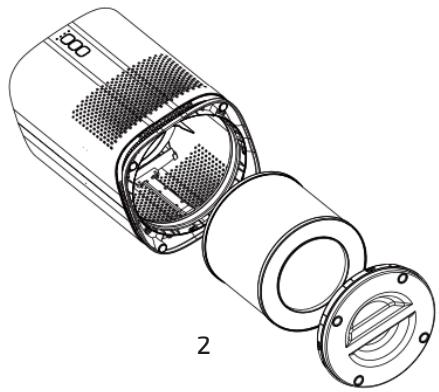
Rotate the base all the way anticlockwise and then remove it.
Take the high-efficiency filter out and clean it or replace it.
Fig. 4.
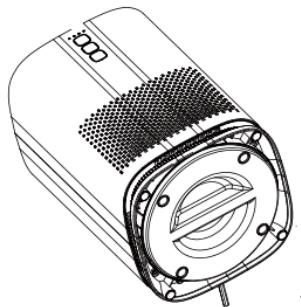
Assemble the product back by replacing the base and turning it clockwise.
Fig. 5.
Hold down the light button for 5-7 seconds in order to reset the filter reposition countdown.
The light will stop blinking and turn off.
Do not wash the filter.
Note: If the device no longer eliminated odours, the filter must be cleaned or replaced with a new one.
5. TECHNICAL SPECIFICATIONS
Product reference: 05625
Product: TotalPure 1500 Connected
26 W, 220-240 V\~, 50 Hz
Wi-Fi frequency band (GHz): 2.2 GHz
6. DISPOSAL OF OLD ELECTRICAL APPLIANCES

The European directive 2012/19/EU on Waste Electrical and Electronic Equipment (WEEE), specifies that old household electrical appliances must not be disposed of with the normal unsorted municipal waste. Old appliances must be collected separately, in order to optimize the recovery and recycling of the materials they contain, and reduce the impact on human health and the environment.
The crossed out “wheeled bin” symbol on the product reminds you of your obligation to dispose of the appliance correctly. If the product has a built-in battery or uses batteries, they should be removed from the appliance and disposed of appropriately.
Consumers must contact their local authorities or retailer for information concerning the correct disposal of old appliances and/or their batteries.
7. TECHNICAL SUPPORT AND WARRANTY
This product is under warranty for 2 years from the date of purchase, as long as the proof of purchase is submitted, the product is in perfect physical condition, and it has been given proper use, as explained in this instruction manual.
The warranty will not cover the following situations:
The product has been used for purposes other than those intended for it, misused, beaten, exposed to moisture, immersed in liquid or corrosive substances, as well as any other fault attributable to the customer.
The product has been disassembled, modified, or repaired by persons, not authorised by the official Technical Support Service of Cecotec.
Faults deriving from the normal wear and tear of its parts, due to use.
The warranty service covers every manufacturing defects of your appliance for 2 years, based on current legislation, except consumable parts. In the event of misuse, the warranty will not apply.
If at any moment you detect any problem with your product or have any doubt, do not hesitate to contact Cecotec Technical Support Service at +34 963 210 728.
1. PIÈCES ET COMPOSANTS
Purificateur d'air
Img. 1.

The Ground Truth image displays a single, solid horizontal line. According to Rule 2 (UNDERSCORE & LINE RULES), this is a stylistic or background line, not a placeholder underscore. Therefore, the OCR result must ignore it and output nothing or only meaningful text. The provided OCR content is "____", which consists of four underscores. This is an incorrect interpretation of the line as a placeholder, violating the rule that stylistic lines must be ignored. The OCR has hallucinated underscores where none should exist based on the GT's visual context. Hence, the OCR result is inconsistent with the Ground Truth.
Fig./Img./Abb./Afb./Rys./Obr. 1




Fig./Img./Abb./Afb./Rys./Obr. 2

Fig./Img./Abb./Afb./Rys./Obr. 3

Fig./Img./Abb./Afb./Rys./Obr. 4

1
3
Fig./Img./Abb./Afb./Rys./Obr. 5
www.cecotec.es
Quart de Poblet, Valencia (Spain)
LB01191029
- TOTALPURE 1500 CONNECTED
- SOMMAIRE
- INSTRUCTIONS DE SÉCURITÉ
- BEFORE USE
- OPERATION
- Auto mode
- Sleep mode
- Filter reset
- loniser
- Wi-Fi
- CLEANING AND MAINTENANCE
- Maintenance and repair
- Fig. 4.
- Fig. 5.
- TECHNICAL SPECIFICATIONS
- DISPOSAL OF OLD ELECTRICAL APPLIANCES
- TECHNICAL SUPPORT AND WARRANTY
- PIÈCES ET COMPOSANTS
Brand : CECOTEC
Model : Totalpure 1500 Connected
Category : Air purifier