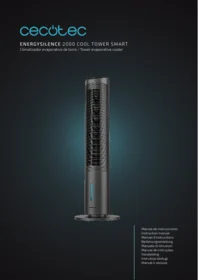
Energysilence 2000 Cool Tower Smart - Air Conditioning CECOTEC - Free user manual and instructions
Find the device manual for free Energysilence 2000 Cool Tower Smart CECOTEC in PDF.


| Product Type | Connected Cooling Tower Fan |
| Brand | Cecotec |
| Model | Energysilence 2000 Cool Tower Smart |
| Dimensions (H x W x D) | 76 x 30 x 30 cm |
| Weight | 5.2 kg |
| Power Supply | 220-240 V ~ 50/60 Hz |
| Power | 65 W |
| Maximum Airflow | 1,200 m³/h |
| Speed Levels | 3 speeds (low, medium, high) |
| Functions | Ventilation, horizontal oscillation (60°), programmable timer (1-9h), cooling mist |
| Control | Touch panel, RF remote control, Cecotec Smart Home mobile app |
| Connectivity | Wi-Fi 802.11 b/g/n, compatible with Alexa and Google Home |
| Display | Digital LED with ambient temperature display |
| Water Tank | 4 liters (for mist function) |
| Noise Level | 35-52 dB(A) depending on speed |
| Maintenance and Cleaning | Clean the rear grille with a soft cloth; replace the water filter every 3 months |
| Safety | Automatic shut-off in case of tip-over, overheat protection, anti-slip base |
| Spare Parts | Water filter, remote control (CR2025), water tank |
| Repairability | Repairability index: 7.5/10 (according to French decree) |
| Warranty | 2 years (excluding consumable parts) |
| Included Accessories | Remote control, water tank, water filter, user manual |
Frequently Asked Questions - Energysilence 2000 Cool Tower Smart CECOTEC
User questions about Energysilence 2000 Cool Tower Smart CECOTEC
0 question about this device. Answer the ones you know or ask your own.
Ask a new question about this device
Download the instructions for your Air Conditioning in PDF format for free! Find your manual Energysilence 2000 Cool Tower Smart - CECOTEC and take your electronic device back in hand. On this page are published all the documents necessary for the use of your device. Energysilence 2000 Cool Tower Smart by CECOTEC.
USER MANUAL Energysilence 2000 Cool Tower Smart CECOTEC
- Parts and components 39
- Before use 39
- Product assembly 39
- Operation 40
- Cleaning and maintenance 41
- Technical specifications 42
- Disposal of old electrical appliances 43
- Technical support and warranty 43
- Copyright 43
SOMMAIRE
Read these instructions thoroughly before using the appliance. Keep this instruction manual for future reference or new users.
- Make sure that the mains voltage matches the voltage stated on the rating label of the appliance and that the wall outlet is grounded.
- Check the power cord regularly for visible damage. If the cord is damaged, it must be replaced by the official Technical Support Service of Cecotec in order to avoid any type of danger.
- Do not immerse the cord, plug or any non-removable part of the appliance in water or any other liquid, nor expose electrical connections to water. Make sure your hands are completely dry before handling the plug or switching on the appliance.
- If the appliance falls accidentally into water, unplug it immediately. Do not reach into the water!
- Do not operate the device if any fault or unusual sign is detected.
- Do not operate the product next to combustible or explosive gas.
- The appliance must not be placed immediately below a socket.
-
Keep hair, loose clothing, fingers, and other parts of the body away from the openings and moving parts of the appliance.
-
Make sure the appliance is placed on a flat and stable surface and do not move it during operation.
- Do not use the appliance near windows or places where there is risk of getting wet (at least 2 meters away), as water could cause an electric shock.
- Do not operate the product below or next to curtains.
- Do not cover the air inlet and outlet and do not place the product's cord under carpets or other objects during operating. Keep a minimum safety distance on each side, front and back of the product.
- Do not leave the appliance unattended while in use.
- It is not recommended to use the product with an extension cord.
- Always turn off and unplug the appliance when not in use and before assembling, disassembling or moving it. Pull from the plug, not the cord, to disconnect it from the outlet.
- This product is designed only for household use. It is not suitable for commercial or industrial use. Do not operate it outdoors.
- Cleaning and maintenance tasks should be carried out according to this manual to ensure correct operation of the device.
- This appliance can be used by children aged 8 and above, and persons with reduced physical, sensory or mental capabilities or lack of experience and knowledge, as long as they have been given supervision or instruction concerning the use of the appliance in a safe way and understand the hazards involved. Children must not play with the appliance. The cleaning and maintenance of the appliance should not be carried out by children without supervision.
- Do not try to repair the device by yourself. This product can only be assembled, disassembled and repaired by qualified
personnel.
- Do not touch the device with wet hands.
- Turn off the appliance when you do not plan to use it again.
- Do not operate the device on an unstable surface. Do not use the device outdoors.
- The water amount inside the water tank should not exceed the "Max" mark. When you wish to add moisture to the air, the water amount must be filled in the water tank until the "Min" mark.
- Do not lean the water tank to avoid any spills.
- Do not turn the device upside down. If the device falls on the floor with water inside, unplug it from the mains and have it repaired.
- The appliance must not be covered.
- Do not shake the device while it is working, as it could cause it to stop working.
- Replace the water inside the water tank frequently.
- Do not use the device in the bath, shower, swimming pool, above a sink with water or areas with extremely high humidity levels.
- Do not use the device with an exterior timer or any other device which can turn it on automatically, as it could cause a fire if is covered.
- This product has undergone a quality control previous to its commercialisation with the aim of ensuring its correct operating. After the quality control testing, the appliance is cleaned thoroughly, therefore, although it is unlikely to occur, there could be rests of water drops inside it.
Battery instructions
- The remote control includes a battery. Do not burn or expose the battery to high temperatures, as it may explode.
- Leaks from the batteries can occur under extreme conditions. Do not touch any liquid that leaks from the battery. If the liquid gets into contact with skin, wash immediately with soap and water. If the liquid gets into the eyes, flush them immediately with clean water for a minimum of 10 minutes and seek medical attention. Wear gloves to handle the battery and dispose of it immediately in accordance with local regulations.
INSTRUCTIONS DE SÉCURITÉ
- Control panel
- Air outlet
- Front part
- Water level control window
- Maintenance
- Power cord
- Back
- Handle
- Water tank screw
- Rack/filter
- Rotating element
- Water tank
- Pump
- Coolers
- Power cord
(*) The graphics in this manual are schematic representations and may not exactly match the product.
2. BEFORE USE
- Take the product out of the box. Remove all packaging material.
- Save the original box.
- Make sure all parts and components are included and in good conditions. If any visible signs of damage are observed, contact the Cecotec official Technical Support Service immediately.
3. PRODUCT ASSEMBLY
- The air cooler is divided into 2 parts. Put them together making sure that they match properly and ensure they are tightly fixed. Fig. 2
- Fix the base to the lower part of the air cooler main body.
- Use the 4 screws provided to screw the base to the air cooler main body. Fig. 3
- Fix it with two side screws.
- Place the device on a stable and level surface.
4. OPERATION
Fig. 4
- Power button
- Speed control button
- Mode button
- Oscillation button
- Timer button
- Cool Mode button
Fig. 5
- Power button
- Speed control button
- Mode button
- Oscillation button
- Timer button
- Cool Mode button
- Display
- Low speed indicator
- Medium speed indicator
- High speed indicator
- Normal mode indicator
- Natura mode indicator
- Night mode indicator
Filling the water tank
- Remove the water tank, to do so, loosen the screw on the water tank and turn the tab.
- Fill the water tank with natural and cold water. Make sure the water level is between the marks 'Min' and 'Max'.
- To increase the cooling effect, insert the ice bucket with ice cubes into the water tank.
- Close the water tank.
- Warnings:
- Make sure that the product is unplugged from the power supply before refilling the water tank.
- Fill the water tank with water. Do not use chemical products, oils or other additives.
- Fill the water tank only with cold water (previously boiled).
- Make sure the water level is between the 'Min' and 'Max' marks.
- Place the device on a stable surface and connect it to the mains. The indicator light indicates that the device is in standby mode. Press the power button and the appliance will start operating at medium speed by default. Press once more and the device will enter the Standby mode.
Speed button
Press this button to choose from high, medium or low speed. The speed by default is medium.
Mode button
Press this button to choose from normal airflow, natural airflow and night mode. The airflow by default is normal.
Oscillation button
- Press this button to choose the air direction.
- Press it again to cancel.
- Direct the blades transversely with your hands, choosing the direction of the air upwards or downwards.
Timer button
Press this button to set the desired operating time from 0 to 8 hours. Every time you press the button, the time will add.
Cool mode button
Press this button to activate the cool mode. If you add the coolers to the water tank, the air will come out cooler. If you press the button again, you will cancel the function. Make sure the water level is between the 'Min' and 'Max' marks.
Battery
The remote control requires a button cell (CR2025, 3V).
5. CLEANING AND MAINTENANCE
- Use a soft, damp cloth to clean the device surface. Do not use abrasive or corrosive products.
- Do not immerse any part of the air cooler in water or other liquids.
- After cleaning, carefully dry the appliance and make sure that all the electrical parts are completely dry.
- Make sure the air inlet and outlet are clean and protected from dust and dirt.
- If the product is not going to be used for a long period, unplug it and store it in a dry and safe place.
-
You should clean the device once every week. Dry the water tank completely and refill it with fresh water. This will reduce the amount of mineral deposits and help extend the life of the appliance. Clean and store the device in a safe, dry place if it is not going to be used for a long period of time.
-
To ensure that all parts of the appliance are dry, switch it on and only put it in normal mode for 30 minutes before storing it (the time will depend on the humidity conditions). Switch it off and disconnect it from the mains. Empty the water tank. Clean the water tank with a damp cloth to remove dust or mineral deposits. Remove the water tank and rinse it with natural water to remove dirt and dust.
- To remove the rack, press both superior tabs and pull gently. Do not clean the rack by hand, as it could deform, use a soft cloth and clean it with extreme care. Clean the filter with a soft cloth, careful not to deform it. Place it back in place. Cover the device with a clean cloth or a plastic bag before storing it to protect it from dust and scratches. Wind the cord properly to avoid possible falls.
Cleaning and maintenance of the water tank
- Before cleaning the appliance, switch it off and disconnect it from the mains. Loosen the screw on the water tank, turn the plastic tab and remove the tank. Clean the water tank and place it again in place. Tighten the screw again in place.
- Use fresh water to clean and dry it completely. Refill the tank up to the "Max" mark with fresh water. Use a dampen cloth to clean the dirt and dust on the surface of the device. Do not use abrasive or corrosive detergents to clean the product. When the device is not in use, store it in a dry place away from sunlight.
6. TECHNICAL SPECIFICATIONS
Product reference: 05289
Product: EnergySilence 2000 Cool Tower Smart
Power: 60 W, 220-230 V\~, 50/60 Hz
Manufactured in China | Designed in Spain
| Description | Symbol | Value | Unit |
| Air cooler maximum flow | F | 13.5 | m^3/min |
| Air cooler power consumption | P | 44.3 | W |
| Service value | SV | 0.3 | (m^3/min)/W |
| Power consumption on standby mode | PSB | 0.4 | W |
| Air cooler sound power level | LWA | 59 | dB (A) |
| Maximum air speed | C | 2.7 | m/seg |
| Service value measurement standard | IEC 60879_1986 (corr. 1992) |
| Contact details to obtain more information | Cecotec Innovaciones S.L.C/ de la Pinadeta s/n, 46930Quart de Poblet, Valencia (Spain) |
(*) Technical specifications may change without prior notification to improve product quality.
7. DISPOSAL OF OLD ELECTRICAL APPLIANCES
This symbol indicates that, according to the applicable regulations, the product and/or battery must be disposed of separately from household waste. When this product reaches the end of its shelf life, you should dispose of the batteries/accumulators and take them to a collection point designated by the local authorities.
Consumers must contact their local authorities or retailer for information
concerning the correct disposal of old appliances and/or their batteries.
Compliance with the above guidelines will help to protect the environment.
8. TECHNICAL SUPPORT AND WARRANTY
Cecotec shall be liable to the end user or consumer for any lack of conformity that exists at the time of delivery of the product under the terms, conditions and deadlines established by the applicable regulations.
It is recommended that repairs be carried out by qualified personnel.
If at any moment you detect any problem with your product or have any doubt, do not hesitate to contact Cecotec official Technical Support Service at +34 963 210 728.
9. COPYRIGHT
The intellectual property rights over the texts in this manual belong to CECOTEC INNOVACIONES, S.L. All rights reserved. The contents of this publication may not, in whole or in part, be reproduced, stored in a retrieval system, transmitted or distributed by any means (electronic, mechanical, photocopying, recording or similar) without the prior authorization of CECOTEC INNOVACIONES, S.L.
1. PIÈCES ET COMPOSANTS
Img. 1 (\*)
Fig./Img./Abb./Afb./Rys./Obr. 2

Fig./Img./Abb./Afb./Rys./Obr. 3
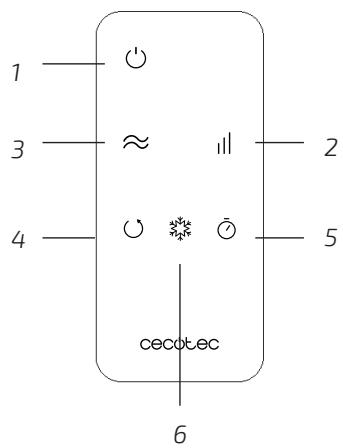
Fig./Img./Abb./Afb./Rys./Obr. 4

Fig./Img./Abb./Afb./Rys./Obr. 5

Fig./Img./Abb./Afb./Rys./Obr. 6

Fig./Img./Abb./Afb./Rys./Obr. 7
www.cecotec.es
Cecotec Innovaciones S.L. C/ de la Pinadeta s/n, 46930 Quart de Poblet, Valencia (Spain)
EA02211221
- SOMMAIRE
- personnel.
- Battery instructions
- INSTRUCTIONS DE SÉCURITÉ
- BEFORE USE
- PRODUCT ASSEMBLY
- OPERATION
- Fig. 4
- Fig. 5
- Filling the water tank
- Speed button
- Mode button
- Oscillation button
- Timer button
- Cool mode button
- Battery
- CLEANING AND MAINTENANCE
- Cleaning and maintenance of the water tank
- TECHNICAL SPECIFICATIONS
- DISPOSAL OF OLD ELECTRICAL APPLIANCES
- TECHNICAL SUPPORT AND WARRANTY
- COPYRIGHT
- PIÈCES ET COMPOSANTS
- Img. 1 (\*)
Brand : CECOTEC
Model : Energysilence 2000 Cool Tower Smart
Category : Air Conditioning