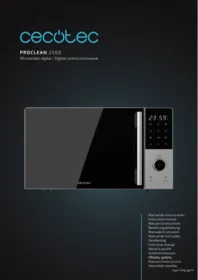
Proclean 2500 - Microwave CECOTEC - Free user manual and instructions
Find the device manual for free Proclean 2500 CECOTEC in PDF.


| Product Type | Microwave |
| Brand | Cecotec |
| Model | Proclean 2500 |
| Capacity | 25 liters |
| Microwave power | 800 W |
| Grill power | 1000 W |
| Dimensions (W x H x D) | 45 x 26 x 36 cm |
| Net weight | 10 kg |
| Power supply | 230 V / 50 Hz |
| Power consumption | 1200 W |
| Control type | Mechanical (dial) |
| Cooking modes | Microwave, Grill, Combi |
| Special functions | Quick defrost, Keep warm |
| Timer | Up to 60 minutes |
| Turntable | Yes, diameter 24 cm |
| Child safety | Button lock |
| Maintenance and cleaning | Easy-to-clean enamel interior with a damp cloth |
| Spare parts | Turntable, ring, grill available |
| Repairability | Repairability score 8.0/10 |
Frequently Asked Questions - Proclean 2500 CECOTEC
User questions about Proclean 2500 CECOTEC
0 question about this device. Answer the ones you know or ask your own.
Ask a new question about this device
Download the instructions for your Microwave in PDF format for free! Find your manual Proclean 2500 - CECOTEC and take your electronic device back in hand. On this page are published all the documents necessary for the use of your device. Proclean 2500 by CECOTEC.
USER MANUAL Proclean 2500 CECOTEC
- Parts and components 18
- Before use 18
- Installation 19
- Operation 19
- Tips 26
- Cleaning and maintenance 28
- Troubleshooting 29
- Copyright 30
- Simplified EU Declaration of Conformity 30
SOMMAIRE
EN • The coding in this manual is generic and applies to all code variants of the appliance.
- Door lock
- Door
- Turntable ring
- Turntable shaft
- Turntable
- Control panel
- Rack
- Mica plate
NOTE:
The graphics in this manual are schematic representations and may not exactly match the product.
2. BEFORE USE
- This appliance is packaged in a way as to protect it during transport. Take the appliance out of its box and remove all packaging materials. You can keep the original box and other packaging materials in a safe place to prevent damage to the appliance if you need to transport it in the future. If you wish to dispose of the original packaging, make sure all items are recycled properly.
- Check that all parts and components are included and in good condition. If any of them are missing or damaged, please contact the official Cecotec Technical Support Service immediately.
- Do not remove the serial number of the appliance in order to keep a correct traceability of it in case of assistance.
Box content
- Microwave
- Turntable
- Grill rack
- Instruction manual
3. INSTALLATION
- Remove all packaging materials. If the microwave is protected with any protective film, remove it before use and check if the appliance is damaged. If it is, please contact the official Cecotec Technical Support Service.
- Place the appliance on a flat, stable and dry surface, away from any corrosive material, and avoid exposure to heat or moisture.
- To ensure proper ventilation, the distance from the rear of the microwave to the wall must be at least 20 cm; from the side, at least 5 cm; from the top, at least 20 cm. In addition, the microwave must be placed at a minimum height of 85 cm.
- The appliance must be placed at least 5 m away from TVs, radios, or antennas.
- The microwave must be positioned so that the plug is accessible and must be properly earthed.
- The microwave must be operated with the door closed.
- Do not place the microwave inside a cabinet. This appliance is not designed for built-in installation.
- After leaving the factory, there may be some oil residue in the microwave's interior cavity or on the heating elements, which may produce a slight smell, or even some smoke, the first few times it is used. This is normal and will disappear with use. However, we recommend keeping doors and windows open to ensure good ventilation. To eliminate this issue, it is recommended to heat a glass of water in the microwave several times at maximum power.
4. OPERATION
Control panel. Fig. 2
| Indicator light | Description |
| Microwave function | |
| Defrost function | |
| ≡ | Preset programmes |
| Timer | |
| Reheat function | |
| Clock | |
| Grill function | |
| Combination function | |
| Convection function | |
| Mute function | |
| Cleaning function | |
| ECO mode |
1. Before use
When the microwave is connected to the mains, the display will switch on and then enter standby mode and show "1:00".
2. Setting the power level
- This microwave has the following 5 power level settings: 100 %, 80 %, 50 %, 30 % and 10 %.
- When the microwave is in standby mode, turn the knob to choose the desired function and then press it to confirm the selection. Then turn the knob again to adjust the power level.
- Once you have chosen the desired power level, press the knob to confirm the setting. Then turn the knob to set the desired cooking time. The adjustable time value ranges from 0:10 to 60:00.
- After setting the time, press START to begin the cooking process. When the time is up, the microwave will beep once.
| HIGH (high/ maximum power) | 100% power output | For fast and thorough cooking |
| Medium-high power | 80% power output | For express cooking |
| Medium power | 50% power output | For steam cooking |
| Medium-low power | 30% power output | For defrosting food |
| LOW | 10% power output | For keeping food warm |
Warnings
a. The maximum programmable time is 60 minutes.
b. Never operate the microwave while empty.
c. At maximum microwave power, the appliance will automatically reduce power after a certain cooking time to extend its service life.
d. If you turn the food over while it is cooking, you will need to press START for the microwave to resume cooking.
e. If you wish to remove the food before the programmed time is up, press STOP to prevent the microwave from restarting unintentionally.
3. Defrosting
- This microwave has two defrosting modes: dEF1, for defrosting by weight, and dEF2, for defrosting by time.
- When the microwave is in standby mode, turn the knob to choose the Defrost function and then press it to confirm the selection.
- Turn the knob to select defrost by weight ("dEF1" will appear on the display) or by time ("dEF2" will appear on the display). Once you have chosen the desired defrosting mode, press the knob to confirm the setting.
- Then turn the knob again to choose the defrosting weight or time. The weight range of dEF1 is from 100 to 1500 g, and the time range of dEF2 is from 0:10 to 60:00. After setting the defrosting mode, press START to begin the defrosting process. When the time is up, the microwave will beep once. If you choose the dEF1 defrost mode, the microwave will beep to remind you to turn the food over during the defrosting process.
Warning
a. It is necessary to turn the food during operation to ensure even results.
b. Defrosting normally takes longer than cooking food.
c. When the food can be easily cut with a knife, it means that it is completely defrosted.
d. Microwaves penetrate about 4 cm into most foods.
e. Defrosted food should be consumed as soon as possible. It is not recommended to put them back in the fridge and freeze them again.
4. Preset programmes
- This microwave has the following 8 preset programmes (A1-A8): Potatoes, Pasta, Pizza, Popcorn, Vegetables, Beverages, Meat and Fish.
- When the microwave is in standby mode, turn the knob to choose the Menu function (Preset programmes) and then press it to confirm the selection.
- Then turn the knob again to choose the desired programme. The display will show the code of the selected programme ("A.1"-"A.8").
- Once selected, press the knob to confirm the selection. After selecting the desired programme, turn the knob again to adjust the weight of the food items to be cooked in the microwave; this value will be shown on the display.
- Finally, press START to begin the cooking process. When the time is up, the microwave will beep once.
| Display | Type | Method |
| A.1 | French fries | The weight you can select in this programme is 250 g, 500 g or 750 g. |
| A.2 | Pasta | The weight you can select in this programme is 50 g, 100 g or 150 g. |
| A.3 | Pizza | The weight you can select in this programme is 200 g or 400 g. |
| A.4 | Popcorn | The weight you can select in this programme is 100 g. |
| A.5 | Vegetables | The weight you can select in this programme is 200 g, 400 g or 600 g. |
| A.6 | Drinks | The options you can select in this programme are 1, 2 or 3 cups of approximately 250 ml each. |
| A.7 | Meat | The weight you can select in this programme is 200 g, 400 g or 600 g. |
| A.8 | Fish | The weight you can select in this programme is 200 g, 400 g or 600 g. |
WARNINGS:
a. The temperature of the food before cooking would be 20-25 °C. A higher or lower food temperature before cooking would require increasing or decreasing the cooking time.
b. The temperature, weight and shape of the food will greatly influence the cooking result. If
any deviation from the factor indicated in the above menu is detected, you can adjust the cooking time for optimal results.
5. Timer
- When the microwave is in standby mode, turn the knob to choose the timer function, and then press it to enter the timer function setting interface.
- When doing so, the value "0:00" will be displayed on the timer function icon.
- To set the countdown time, use the knob. Please note that the maximum time you can select is 60 minutes.
- Finally, press START to begin the countdown. When the countdown is up, the microwave will beep once.
6. Reheat
- This function allows you to reheat food by weight.
- When the microwave is in standby mode, turn the knob to choose the Reheat function and then press it to confirm the selection.
- Then turn the knob to adjust the weight of the food items to be cooked in the microwave. The available weight options are as follows: 200 g, 400 g, 600 g, 800 g and 1000 g.
- After selecting the desired value, press START to begin the reheating process. When the time is up, the microwave will beep once.
7. Clock (24 hours)
- When the microwave is in standby mode, turn the knob to choose the Clock function and then press it to confirm the selection.
- When entering this interface, the hour value will start flashing. To set it, turn the knob.
- Once you have chosen the correct hour value, press START to confirm the settings and switch to the minute setting mode.
- To set the minutes, turn the knob. Once you have chosen the correct minute value, press START to confirm the settings and and exit the clock setting mode.
8. Grill function
- The Grill function has the three following modes: G., G-1 and G-2.
- Note: These modes are explained in detail below.
- When the microwave is in standby mode, turn the knob to choose the Grill function and then press it to confirm the selection.
- Then turn it again to select the desired mode. The display will show the corresponding mode code ("G", "G-1" or "G-2").
- After selecting the mode, press START to confirm the setting.
- Turn the knob to set the cooking time (up to a maximum of 60 minutes). Then press START to begin the cooking process. When the time is up, the microwave will beep once.
| G | If you choose this mode, the heating element will start operating. This mode is suitable for browning thin beef steaks, sausages or chicken wings. |
| G-1 | If you choose this mode, the Microwave function will run at a 30% power setting and the Grill function at a 70% power setting. |
| G-2 | If you choose this mode, the Microwave function will run at a 55% power setting and the Grill function at a 45% power setting. |
WARNINGS:
When the Convection function is on, all internal parts of the microwave, as well as the grill rack and cooking containers, reach high temperatures. Be careful when removing any items from the microwave.
To avoid burns, use thick cloths or oven mitts.
9. Combination function
- The combination function has the two following modes: C-1 and C-2.
- Note: These modes are explained in detail below.
- When the microwave is in standby mode, turn the knob to choose the Combi function and then press it to confirm the selection.
- Then turn it again to select the desired mode. The display will show the corresponding mode code ("C-1" or "C-2").
- After selecting the mode, press the knob to confirm the setting. Turn the knob to set the cooking time (up to a maximum of 60 minutes).
- Then press START to begin the cooking process. When the time is up, the microwave will beep once.
| C-1 | If you choose this mode, the Microwave function will run at a 30% power setting and the Convection function at a 70% power setting. |
| C-2 | If you choose this mode, the Microwave function will run at a 55% power setting and the Convection function at a 70% power setting. |
Warning
When the Combi function is on, all internal parts of the microwave, as well as the grill rack and cooking containers, reach high temperatures. Be careful when removing any items from the microwave.
To avoid burns, use thick cloths or oven mitts.
10. Convection function
- When the microwave is in standby mode, turn the knob to choose the Convection function and then press it to confirm the selection.
- Turn the knob to select the desired temperature, then press the knob to confirm the setting.
- Turn the knob to set the cooking time (up to a maximum of 60 minutes). Then press START to begin the cooking process. When the time is up, the microwave will beep once.
11. Mute function
- When the microwave is in standby mode, turn the knob to choose the Mute function and then press it to confirm the selection.
- Turn the knob to turn the microwave sound on or off.
- Then press it to confirm the setting.
12. Cleaning function
- After using the Cleaning function, when the microwave has cooled down completely, you can clean the inside of the appliance with a damp cloth.
- To select the Cleaning function, follow the steps below.
- When the microwave is in standby mode, turn the knob to choose the Cleaning function and then press it to confirm the selection.
- After this step, place a glass with 250 ml of water in the microwave. Press START to start the appliance. When the time is up, the microwave will beep once.
13. ECO mode
- When the microwave is in standby mode, turn the knob to select this mode, and then press it to confirm the setting.
- When doing so, the display will turn off. If the microwave is in ECO mode, and you want the display to turn back on, press any button.
14. STOP
- While adjusting the cooking settings, you can press STOP to cancel the current selection and the microwave will return to standby mode.
- To pause the cooking process, press STOP while the microwave is in operation. If you press STOP again when the cooking process is paused, the programme will be cancelled, and the microwave will return to standby mode.
15. START
- After setting the cooking time or the weight of the food, press START to begin the cooking process.
- While the microwave is working, you can press START once to increase the time by 30 seconds. You will not be able to do this if you have selected the Defrost by weight function or one of the preset programmes.
-
When the microwave is paused, you can press START to resume cooking.
-
Child Lock function
-
Use this function to lock the control panel when cleaning or to prevent children from using the microwave without supervision.
- When the child lock is activated, all buttons will be disabled.
1) To activate the child lock: When the microwave is in standby mode, press and hold STOP for 3 seconds.
2) To deactivate the child lock: Press and hold STOP again for 3 seconds.
5. TIPS
Placing food
Place the thicker parts of the food to be cooked towards the outside of the base and the thinner parts towards the inside. Make sure that the food is properly distributed, i.e. that no food is too close together or stuck together.
Setting the cooking time
Select a short time setting and, once cooking is complete, add more minutes if necessary. If you overheat food, it may burn and smoke.
Cooking food evenly
If you are cooking chicken, burgers or steaks, turn them over halfway through the cooking process. There are some foods that need to be stirred (from the outside to the inside) once or twice during the cooking process.
Do not remove the food from the microwave immediately after cooking is complete
After the cooking time has elapsed, do not remove the food from the microwave immediately. In this way, it will finish cooking thoroughly and cool gradually.
Knowing if the food has been cooked correctly
The colour and hardness of the food help to determine whether it is properly cooked. The following cases indicate good cooking:
- Steam comes out evenly from the food, not just from the edges.
- Bird parts are movable and not stiff.
- There is no trace of blood on meat or poultry pieces.
- Fish pieces can be cut with a fork.
Using a browning pan
When using a specific browning pan or a self-heating pan, always place a heat insulator underneath (e.g. a porcelain plate).
Microwave-safe plastic film
When cooking foods with a high fat content, do not let the cling film come into contact with the food to prevent it from melting.
Microwave-safe plastic cookware
Some microwave-safe plastic cookware may not be suitable for cooking foods with a high fat or sugar content. In addition, it must always be ensured that the preheating time specified in the cookware's instruction manual is not exceeded.
Microwave-safe containers
Only use containers that are suitable for the microwave. In general, heat-resistant ceramic, glass or plastic ones are. Never use metal containers, as sparks may be produced. If you are in doubt as to whether or not a container is suitable for the microwave, please refer to the table below.
| Container material | Microwave-safe | Grill function | Combination function | Comments |
| Heatproof ceramics | Yes | Yes | Yes | Never use ceramics decorated with metallic or enamelled elements. It is recommended to use ceramic, heat-resistant glass or plastic containers that can withstand temperatures above 120 °C. |
| Heatproof plastic | Yes | No | No | Avoid using this type of container for long cooking times. |
| Heat-resistant glass | Yes | Yes | Yes | |
| Plastic film | Yes | No | No | It must not be used for cooking meat, as excessive heat can damage the film. |
| Rack | No | Yes | Yes | The rack can only be used with the Grill and Combi functions. |
| Metal container | No | No | No | Do not put metal containers in the microwave. Metals hinder microwave penetration. |
| Lacquer | No | No | No | These materials are not very heat resistant. Not suitable for high temperature cooking. |
| Cannot be used for high-temperature cooking | No | No | No | These materials are not very heat resistant. Therefore, they are not suitable for high temperature cooking. |
6. CLEANING AND MAINTENANCE
Warning
The appliance, as well as food remains, must be cleaned and removed regularly.
a. Disconnect the power cable from the socket before cleaning the appliance. Do not immerse in water or any other liquid when cleaning.
b. If you do not clean the microwave regularly, its service life will be affected.
c. Do not use abrasive cleaning products or scouring pads to clean the microwave.
d. Do not remove the mica plate.
e. If you notice that the microwave is emitting unpleasant odours, follow one of the 3 cleaning methods below:
1) Place several lemon slices in a cup and heat them at high power for 2 to 3 minutes.
2) Place a cup of red tea and heat it on high power.
3) Put in some orange peels and heat on high power for 1 minute.
f. When the microwave is not in use, place it in a dry and ventilated place.
When you have finished using the microwave, wipe the inside surfaces that have come into contact with food with a damp cloth to remove any residue and then dry them thoroughly. Accumulated grease can overheat and start to smoke or catch fire.
Also clean the exterior, door, seals, viewing window and adjacent parts.
Exterior: use a soft, damp cloth to clean the surface of the appliance.
Door: clean the door and window with a soft damp cloth. Clean the door seals and adjacent parts to remove any spills or splashes. Clean the control panel with a soft, slightly damp cloth.
Interior walls: clean the inner surfaces with a soft, damp cloth. Clean the waveguide cover to remove any food splashes.
Turntable / Turntable ring / Turntable shaft: wash these parts with soap and water. Rinse and dry them thoroughly.
7. TROUBLESHOOTING
To check that the microwave is working properly, carry out the following checks:
- Place a cup of water (approx. 150 ml) inside and close the door. The microwave light should turn off if the door is properly closed. Let the microwave work for 1 minute.
- Does the light turn on?
- Does the cooling fan work?
(Place your hand over the rear ventilation openings).
- Does the turntable rotate?
(The turntable can rotate clockwise or counterclockwise. This is quite normal.)
- Is the glass of water in the microwave hot?
If the answer to any of the above questions is "No", check the socket and the fuse in the meter box.
If both the socket and the fuse are not working properly, please contact Cecotec's Official Technical Support Service.
8. COPYRIGHT
The intellectual property rights over the texts in this manual belong to CECOTEC INNOVACIONES, S.L. All rights reserved. The contents of this publication may not, in whole or in part, be reproduced, stored in a retrieval system, transmitted, or distributed by any means (electronic, mechanical, photocopying, recording or similar) without the prior authorization of CECOTEC INNOVACIONES, S.L.
9. SIMPLIFIED EU DECLARATION OF CONFORMITY
Cecotec Innovaciones hereby declares that this appliance complies with the essential requirements and other relevant provisions of the regulations applicable in the European Union. This appliance has been designed, manufactured and tested in compliance with required safety and quality standards. The full text of the EU Declaration of Conformity can be found on
the following website: https://cecotec.es/es/information/declaration-of-conformity
1. PIÈCES ET COMPOSANTS
Image 1
indirizzo web: https://storececotec.it/it/information/declaration-of-conformity
1. PEÇAS E COMPONENTES
Figura 1
7. PROBLEEMOPLOSSING
https://cecotec.es/es/information/declaration-of-conformity
1. PARÇALAR VE BILEŞENLER
Şekil 1
Fig./Img./Abb./Afb./Rys.1

Fig./Img./Abb./Afb./Rys. 2
www.cecotec.es
- SOMMAIRE
- NOTE:
- BEFORE USE
- Box content
- INSTALLATION
- OPERATION
- Before use
- Setting the power level
- Warnings
- Defrosting
- Warning
- Preset programmes
- WARNINGS:
- Timer
- Reheat
- Clock (24 hours)
- Grill function
- Combination function
- Convection function
- Mute function
- Cleaning function
- ECO mode
- STOP
- START
- TIPS
- Placing food
- Setting the cooking time
- Cooking food evenly
- Do not remove the food from the microwave immediately after cooking is complete
- Knowing if the food has been cooked correctly
- Using a browning pan
- Microwave-safe plastic film
- Microwave-safe plastic cookware
- Microwave-safe containers
- CLEANING AND MAINTENANCE
- TROUBLESHOOTING
- COPYRIGHT
- SIMPLIFIED EU DECLARATION OF CONFORMITY
- PIÈCES ET COMPOSANTS
- Image 1
- PEÇAS E COMPONENTES
- Figura 1
- PROBLEEMOPLOSSING
- PARÇALAR VE BILEŞENLER
- Şekil 1
Brand : CECOTEC
Model : Proclean 2500
Category : Microwave