IWBT5B - Radio IHOME - Free user manual and instructions
Find the device manual for free IWBT5B IHOME in PDF.


Pick your language and provide your email: we'll send you a specifically translated version.
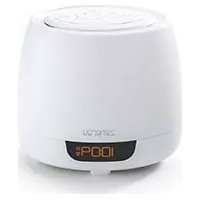
| Product Type | Clock Radio with Bluetooth |
| Brand | iHome |
| Model | IWBT5B |
| Dimensions (approx.) | 6.3 x 4.2 x 3.1 inches (16 x 10.7 x 7.9 cm) |
| Weight (approx.) | 0.55 lbs (250 g) |
| Power Source | 5V DC adapter (included); Battery backup: CR2032 coin cell |
| Radio Bands | FM (87.5-108 MHz) |
| Bluetooth Version | 4.2 |
| Alarm Features | Dual alarm with snooze; wake to radio, buzzer, or Bluetooth |
| Display | 0.9-inch LED with dimmer |
| USB Charging Port | Yes, 1A output for charging devices |
| Audio Output | Built-in mono speaker (3W) |
| Headphone Jack | 3.5mm stereo |
| Color | Black (or as per variant) |
| Maintenance | Clean with a soft, dry cloth. Do not use liquids or abrasives. |
| Safety Notes | Keep away from water and heat sources. Use only supplied adapter. |
| Spare Parts / Repairability | No user-serviceable parts. Contact iHome support for assistance. |
Frequently Asked Questions - IWBT5B IHOME
How do I set the alarm?
Press and hold the Alarm button until the hours flash. Use +/- to adjust, press Alarm again to set minutes, then press Alarm to save. Repeat for second alarm.
How do I pair my phone via Bluetooth?
Press the Bluetooth button to enter pairing mode. On your phone, select 'iHome IWBT5B' from the list. If prompted, enter PIN 0000.
How do I tune to a specific FM station?
Switch to radio mode using the Mode button. Press and hold the Scan button for auto tuning, or press +/- to manually adjust frequency.
What does the snooze button do?
When the alarm sounds, press the Snooze bar (or button) to silence it for 9 minutes. The alarm will repeat until dismissed.
How do I reset the unit?
Unplug the AC adapter and remove the backup battery for 30 seconds. Reconnect power and reinsert the battery. This will clear all settings.
Can I use the USB port to charge my phone?
Yes, the USB port provides 1A charging for smartphones and other devices. Connect your phone's charging cable.
How do I clean the clock radio?
Unplug the unit. Use a soft, slightly damp cloth to wipe the exterior. Do not use chemical cleaners or allow moisture into openings.
Does the battery backup preserve alarms?
Yes, a CR2032 coin cell retains time and alarm settings during power outages. If the battery is dead, you may need to reset the time after power loss.
What is the sleep timer function?
Press the Sleep button to set a timer (60, 90, 120 minutes). The radio will play and then automatically turn off.
Why is my Bluetooth connection dropping?
Ensure your device is within 33 feet (10 meters) and no large obstacles are in between. Try re-pairing or resetting the radio. Also avoid interference from other devices.
User questions about IWBT5B IHOME
0 question about this device. Answer the ones you know or ask your own.
Ask a new question about this device
No questions yet. Be the first to ask one.
Download the instructions for your Radio in PDF format for free! Find your manual IWBT5B - IHOME and take your electronic device back in hand. On this page are published all the documents necessary for the use of your device. IWBT5B by IHOME.
USER MANUAL IWBT5B IHOME
Manual assistant
Powered by Anthropic
Waiting for your message
Product information
Brand : IHOME
Model : IWBT5B
Category : Radio