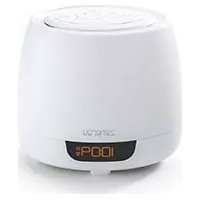
Timebase II iBTW22B - Radio IHOME - Free user manual and instructions
Find the device manual for free Timebase II iBTW22B IHOME in PDF.


Pick your language and provide your email: we'll send you a specifically translated version.
| Product Type | Clock Radio with Bluetooth |
| Brand | iHome |
| Model | Timebase II iBTW22B |
| Dimensions (Approx.) | 6.5 x 3.5 x 5 inches (16.5 x 8.9 x 12.7 cm) |
| Weight (Approx.) | 1.2 lbs (0.54 kg) |
| Power Supply | AC adapter (5V DC, included); battery backup (CR2032, not included) |
| Radio Bands | AM / FM, with digital tuning |
| Bluetooth Version | Bluetooth 4.0 or later, A2DP profile |
| Audio Output | Built-in speaker, 2x 3W |
| Display Type | LED with adjustable brightness (3 levels) |
| Alarm Functions | Dual alarms with wake to radio, buzzer, or Bluetooth audio |
| Snooze Duration | 9 minutes (default), adjustable |
| Sleep Timer | Set to 30, 60, 90, or 120 minutes |
| Additional Inputs | 3.5mm auxiliary input |
| Controls | Touch-sensitive top panel and side buttons |
| Maintenance | Clean with a soft, dry cloth; avoid solvents and liquids |
| Safety Warnings | Use only supplied AC adapter; keep away from water; no user-serviceable parts inside |
| Spare Parts / Repairability | CR2032 battery is user-replaceable; other parts not available for repair |
Frequently Asked Questions - Timebase II iBTW22B IHOME
How do I set the clock on my iHome Timebase II iBTW22B?
Press and hold the Clock button until the hour flashes, then use the + and - buttons to adjust. Press Clock again to set minutes, and repeat. Finally, press Clock to confirm.
How do I pair my phone via Bluetooth?
Press the Bluetooth button on the top of the radio until the indicator flashes. On your phone, go to Bluetooth settings and select iHome iBTW22B. The indicator will remain solid when connected.
How do I set alarm 1 and alarm 2?
Press and hold the Alarm 1 or Alarm 2 button. The hour will flash; adjust with +/-. Press the same alarm button again to set minutes. Then choose wake source (radio, buzzer, Bluetooth) with the Source button.
Why is my alarm not sounding?
Ensure the alarm is turned on (the alarm icon appears on the display). Check that the volume is set high enough (Volume button). If using radio, verify the station is tuned properly.
How do I change the display brightness?
Press the Dim button on top of the unit repeatedly to cycle through high, medium, low, and off (if supported). The setting applies to both active and standby modes.
Can I use my own AC adapter?
No, only use the supplied 5V DC adapter. Using a different adapter may damage the device and void the warranty.
How do I perform a factory reset?
With the unit powered on, press and hold the Bluetooth and Alarm 1 buttons simultaneously for 5 seconds. The display will reset to default settings.
What battery does the backup use?
The clock uses a CR2032 coin cell battery for time and alarm backup. Open the battery compartment on the bottom to install or replace.
How do I clean the device?
Unplug the radio and wipe with a soft, dry cloth. Do not use liquid cleaners or abrasive materials. Avoid getting moisture into the speaker grille.
The display is dim even on highest setting. What can I do?
Check if the Dim setting is on a lower level by pressing the button. If it's at max and still dim, the unit may need service. Contact iHome customer support.
User questions about Timebase II iBTW22B IHOME
0 question about this device. Answer the ones you know or ask your own.
Ask a new question about this device
No questions yet. Be the first to ask one.
Download the instructions for your Radio in PDF format for free! Find your manual Timebase II iBTW22B - IHOME and take your electronic device back in hand. On this page are published all the documents necessary for the use of your device. Timebase II iBTW22B by IHOME.
USER MANUAL Timebase II iBTW22B IHOME
Manual assistant
Powered by Anthropic
Waiting for your message
Product information
Brand : IHOME
Model : Timebase II iBTW22B
Category : Radio