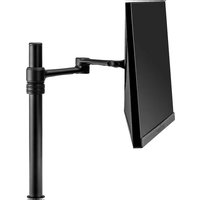
ADB-P80-B - Mount Atdec - Free user manual and instructions
Find the device manual for free ADB-P80-B Atdec in PDF.


Pick your language and provide your email: we'll send you a specifically translated version.
| Product Type | Monitor Mount |
| Brand | Atdec |
| Model | ADB-P80-B |
| Category | Support |
| VESA Compatibility | 75x75mm, 100x100mm |
| Maximum Screen Size | 32 inches |
| Weight Capacity | Up to 25 kg (55 lbs) |
| Mounting Type | Desk clamp or grommet mount |
| Articulation | Full motion (tilt, swivel, rotate, extend) |
| Material | Steel and aluminum |
| Weight (mount only) | Approximately 2.5 kg |
| Warranty | 5 years |
| Power Supply | None (mechanical mount) |
| Color | Black |
| Installation Type | Easy DIY, tools included |
| Cable Management | Integrated cable routing channels |
| Maintenance | Wipe with dry cloth; avoid solvents |
| Safety | UL listed, weight tested |
| Spare Parts | Available through Atdec support |
Frequently Asked Questions - ADB-P80-B Atdec
Is the Atdec ADB-P80-B mount compatible with VESA 200x200mm?
No, the ADB-P80-B is designed for VESA patterns 75x75mm and 100x100mm only. For larger patterns, consider other Atdec models.
What is the maximum monitor weight the ADB-P80-B can hold?
The mount supports monitors up to 25 kg (55 lbs). Always verify your monitor's weight before installation.
Does the mount come with installation hardware?
Yes, all necessary screws, bolts, and tools for desk clamp and grommet mounting are included in the box.
Can I tilt and rotate my monitor with this mount?
Absolutely. The ADB-P80-B offers full motion: tilt, swivel, rotation (portrait/landscape), and height adjustment.
What is the desk thickness requirement for clamp mounting?
The clamp fits desks with thickness up to 75 mm. For thicker desks, use the grommet mount option.
How do I manage cables with this mount?
The mount features integrated cable management clips along the arm to keep cords organized and out of sight.
Is the ADB-P80-B suitable for a curved monitor?
Yes, as long as the monitor's VESA pattern and weight are within specifications. The mount's adjustable head accommodates curvature.
Can I install this mount on a glass desk?
It is not recommended for glass desks due to stress risks. Use on solid wood, metal, or composite desks only.
What should I do if the mount feels loose after installation?
Tighten all bolts and screws; ensure the desk clamp is securely fastened. If issues persist, contact Atdec support.
Where can I find replacement parts or instructions?
Visit the Atdec support page for manuals and spare parts. The product manual is also available for free download at notice-facile.com.
User questions about ADB-P80-B Atdec
0 question about this device. Answer the ones you know or ask your own.
Ask a new question about this device
No questions yet. Be the first to ask one.
Download the instructions for your Mount in PDF format for free! Find your manual ADB-P80-B - Atdec and take your electronic device back in hand. On this page are published all the documents necessary for the use of your device. ADB-P80-B by Atdec.
USER MANUAL ADB-P80-B Atdec



Manual assistant
Powered by Anthropic
Waiting for your message
Product information
Brand : Atdec
Model : ADB-P80-B
Category : Mount