
ADVANTIX F600 - Film camera KODAK - Free user manual and instructions
Find the device manual for free ADVANTIX F600 KODAK in PDF.


| Product Type | APS Film Camera (Advanced Photo System) |
| Brand | KODAK |
| Model | ADVANTIX F600 |
| Dimensions | 119 mm x 64 mm x 39 mm |
| Weight | 205 g (without battery or film) |
| Power Supply | 1 KODAK K123LA (or equivalent) 3-volt lithium battery |
| Lens | 30-60 mm hybrid aspherical zoom lens |
| Focusing | 87-zone autofocus, from 0.6 m to infinity |
| Viewfinder | Real image with C, H, and P format display |
| Flash | KODAK SENSALITE flash, range 0.6 m to 7.7 m (wide-angle) / 0.6 m to 4.1 m (telephoto) for ISO 200 |
| Aperture | f/4.5 to f/8.5 |
| Shutter | Preprogrammed electronic, 1/4 to 1/360 second |
| Photo Formats | Classic (C), Group/HDTV (H), Panoramic (P) |
| Special Features | Motorized zoom, automatic flash with red-eye reduction, self-timer, focus lock, date imprinting |
| Maintenance and Cleaning | Clean the lens with a soft lint-free cloth; do not use solvents or abrasive products |
| Safety | Film compartment lock prevents opening before complete rewinding; double exposure protection |
| Spare Parts and Repairability | Replacement battery KODAK K123LA; contact KODAK customer service (1 800 242-2424 in the US) for repairs |
| General Information | Category: Film Camera; Brand: KODAK; Model: ADVANTIX F600 |
Frequently Asked Questions - ADVANTIX F600 KODAK
User questions about ADVANTIX F600 KODAK
0 question about this device. Answer the ones you know or ask your own.
Ask a new question about this device
Download the instructions for your Film camera in PDF format for free! Find your manual ADVANTIX F600 - KODAK and take your electronic device back in hand. On this page are published all the documents necessary for the use of your device. ADVANTIX F600 by KODAK.
USER MANUAL ADVANTIX F600 KODAK
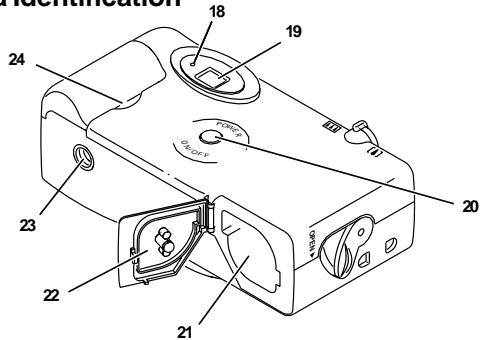
Camera Identification
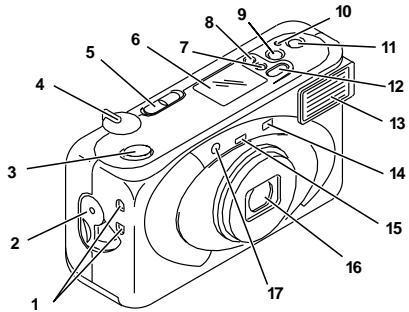
Camera Identification
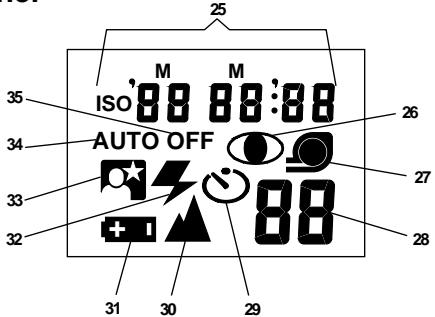
LCD Panel
| This device complies with part 15 of the FCC Rules. Operation is subject to the following two conditions: (1) this device may not cause harmful interference, and (2) this device must accept any interference received, including interference that may cause undesired operation. |
| NOTE: Your model camera has been tested and found to comply with the limits for a Class B digital device, pursuant to Part 15 of the FCC Rules. These limits provide reasonable protection against interference in residential use. The camera generates, uses and can radiate radio frequency energy and, if not used in accordance with the instructions, may cause interference to radio communications. There is no guarantee that interference will not occur. If this camera does cause interference to radio or television reception, which can be determined by turning the camera off and on, you may reduce the interference by the following: — Reorient or relocate the receiving antenna. — Increase the separation between the camera and the receiver. — Consult the dealer or an experienced radio/television technician for help. Changes or modifications not approved by the party responsible for compliance could void the user's authority to operate the equipment. |
| This Class B digital apparatus meets all requirements of the Canadian Interference-Causing Equipment Regulations. |
NEED HELP WITH YOUR CAMERA OR MORE INFORMATION ABOUT THE ADVANCED PHOTO SYSTEM?
Visit our web site at http://www.kodak.com or call: Kodak (USA only) from 9:00 a.m. to 7:00 p.m. (Eastern time) Monday through Friday at 1 (800) 242-2424.
Kodak (Canada only) from 8:00 a.m. to 5:00 p.m. (Eastern time) Monday through Friday at 1 (800) 465-6325, ext. 36100; for the Toronto area, call (416) 766-8233, ext. 36100. When you call, please have your camera available.
For warranty purposes, please keep your sales receipt as proof of the date of purchase.
ADVANCED PHOTO SYSTEM FEATURES AVAILABLE WITH THIS CAMERA
Triple format selection
- You can take three different size pictures: Classic (C), Group/HDTV (H), and Panoramic (P) pictures from the same film cassette. The frame within the viewfinder changes to match each format selection.
Date and time imprinting
- You can choose to have date and time information printed on the back of your prints. See your photofinisher for a full description of available services.
Double exposure protection (DEP)
- You don't need to worry about accidentally re-exposing your film. Your camera reads the Film Status Indicator (FSI) on the film cassette to prevent re-exposure.
Picture quality information exchange (PQix)
- Your camera features magnetic information exchange that records information about lighting conditions and exposure on the film cassette to assist the photofinishing lab with color correction and exposure adjustments, to provide you with the best possible results.
Safety-interlock film door
- The safety interlock on the film door prevents the door from opening before the film is completely rewound.


Look for this logo to be certain that the film you buy is made for this camera.
Look for this logo to select a certified photofinishing service for developing your film and to assure that you get all the features of the Advanced Photo System.
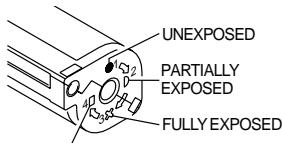
Film Status Indicator (FSI)
A highlighted indicator advances from one symbol to another to identify the status of the film inside the cassette.
PROCESSSED NEGATIVES
CONTENTS
CAMERAIDENTIFICATION 6
ATTACHING THE STRAP 7
Control-button activator. 7
LOADING THE BATTERY 8
Low-battery indicator 9
Battery tips 9
Power shutdown 10
LOADING THE FILM 10
TAKING PICTURES 12
Typical print sizes (forms) 13
Using the focus lock 14
Using the zoom lens 15
Tips for better pictures 16
TAKING FLASH PICTURES 17
Flash-to-subject distance 18
SELECTING THE FLASH AND
INFINITY-FOCUS MODES 19
Red-eye reduction 19
Auto flash without red-eye reduction 20
Fill flash 21
Flash off 22
Infinity focus 23
Night-view 24
USING THE SELF-TIMER 24
DATE AND TIME IMPRINTING 26
Setting the date and time 26
UNLOADING THE FILM 27
Automatic rewind 27
Manual rewind 28
CARING FOR YOUR CAMERA 29
TROUBLESHOOTING 30
SPECIFICATIONS 32
CAMERA IDENTIFICATION (see inside cover flaps for camera diagrams)
1 STRAP POST
2 FILM-DOOR LATCH
3 SHUTTER BUTTON
4 ZOOM-DIAL LEVER
5 FORMAT-SELECTOR SWITCH
6 LCD PANEL
7 DATE-SELECT BUTTON
8 DATE-SET BUTTON
9 SELF-TIMER BUTTON
10 FILM-REWIND BUTTON
11 FLASH-SELECT BUTTON
12 DATE-MENU BUTTON
13 FLASH
14 VIEWFINDER
15 LIGHT SENSOR
16 LENS
17 SELF-TIMER/ RED-EYE-REDUCTION LAMP
18 FLASH-INDICATOR LAMP
19 VIEWFINDER EYEPIECE
20 ON/OFF BUTTON
21 FILM CHAMBER
22 FILM DOOR
23 TRIPOD SOCKET
24 BATTERY DOOR
LCD PANEL
25 DATE & TIME/ISO FILM-SPEED DISPLAY
26 RED-EYE-REDUCTION INDICATOR
27 FILM-PRESENCE INDICATOR
28 FRAME COUNTER
29 SELF-TIMER INDICATOR
30 INFINITY-FOCUS INDICATOR
31 BATTERY SYMBOL
32 FILL-FLASH INDICATOR
33 NIGHTVIEW INDICATOR
34 AUTO-FLASH INDICATOR
35 FLASH-OFF INDICATOR
ATTACHING THE STRAP
- Insert one end of the strap under the bottom STRAP POST (1) and pull it up through the top strap post.
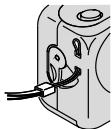

- Thread the longer end of the strap through the shorter loop.
- Pull the strap tight.
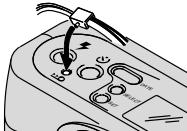
Control-button activator
Use the knob on the clasp of the camera strap to activate the smaller-sized control buttons on the camera.
LOADING THE BATTERY
This camera uses one 3-volt lithium KODAK K123LA (or equivalent) Battery that supplies power for all camera operations.
- Open the BATTERY DOOR (24).
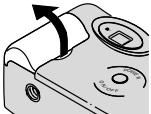
Before you remove the old battery, turn the camera off.
- Insert the battery into the chamber as shown.
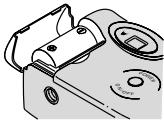
- Snap the battery door closed.
After you load a new battery into the camera, you will need to reset the date and time.
Low-battery indicator
It's time to replace the battery when
the BATTERY SYMBOL (31) "blinks" on the LCD PANEL (6) or
- all indicators on the LCD panel disappear and the SHUTTER BUTTON (3) cannot be released.
Battery tips
- Discard dead batteries with your normal household trash, unless your community offers a battery-collection program (check with the
sponsors of that program for details).
Remember to keep a spare battery with you at all times.
- Read and follow all warnings and instructions supplied by the battery manufacturer.
- Keep batteries away from children.
- Do not try to take apart, recharge or short circuit the battery, or subject it to high temperature or fire.
- Store batteries in their original packaging prior to use.
Power shutdown
To reduce battery power, the camera will automatically go into a sleep mode when it is not operated for more than 3 minutes. You can press the SHUTTER BUTTON (3), ZOOM-DIAL LEVER (4), DATE-SELECT BUTTON (7), DATE-MENU BUTTON (12), DATE-SET BUTTON (8), FLASH-SELECT BUTTON (11), or the FILM-REWIND BUTTON (10) to awaken the camera.
- Use the on/off button to turn the camera completely off when it is not being used for an extended time.
LOADING THE FILM
You can load film into the camera with the camera ON or OFF.
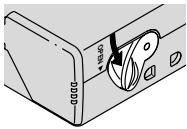
- Turn the FILM-DOOR LATCH (2) to open the FILM DOOR (22).
- Insert the film cassette completely into the FILM CHAMBER (21).
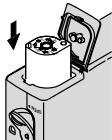
Make sure the Film Status Indicator (FSI) on the film cassette is at (#1 position) for a new cassette.
- Do not force the film cassette into the film chamber.
- Close the film door to start the auto-film advance. The FRAME COUNTER (28) on the LCD PANEL (6) will show the number of frames remaining on the film cassette.
After you close the safetyinterlocked film door, you cannot open the door until the film is completely rewound into the film cassette.
TAKING PICTURES
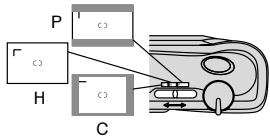
You can take Classic (C), Group/HDTV (H*), and Panoramic (P) pictures on the same film cassette. Your photo-processing cost may be based on the format size(s) that you use to expose the film.
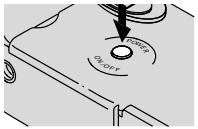
- Press the ON/OFF BUTTON (20) to turn the camera on and to uncover the LENS (16).
- Move the FORMAT-SELECTOR SWITCH (5) to select desired format (C, H, or P). The viewfinder will change to show the selected field of view.
-
High Definition Television (HDTV) prints are the same aspect ratio as the TV for CD interface capabilities.
-
Frame your subject within the VIEWFINDER EYEPIECE (19). For a sharp picture, stand at least 2 ft (0.6m) from your subject.
-
If you stand closer than 2 ft (0.6 m), the camera will lock and the flash-indicator lamp will blink.
-
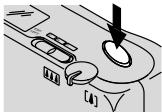
Press the SHUTTERT BUTTON (3) to take the picture.
Typical print sizes (formats)
C
H
P
| Classic | Group(HDTV) | Panoramic |
| 3.5 x 5 in. or 4 x 6 in. | 3.5 x 6 in. or 4 x 7 in. | 3.5 x 8.5 in. to 4 x 11.5 in. |
| (88.9 x 127 mm or 102 x 152 mm) | (88.9 x 152 mm or 102 x 178 mm) | (88.9 x 216 mm to 102 x 292.7 mm) |
NOTE: Your photofinisher will generally provide 4 × 6, 4 × 7 , and 4 × 11.5 in. (102 x 152, 102 x 178, and 102 x 292.7 mm) sizes. Some local printers may offer 3.5 × 5, 3.5 × 6 , and 3.5 × 8.5 in. (88.9 x 127, 88.9 x 152, and 88.9 x 216 mm) sizes.
Using the focus lock
This camera automatically focuses on whatever is within the auto-focus (AF) circle of the viewfinder eyepiece. To get a sharp picture, make sure the AF circle is on your main subject. If you want to take a picture with the subject positioned outside of the AF circle, use the focus lock as follows:
- Place the AF circle on the subject that you want focused in the picture.
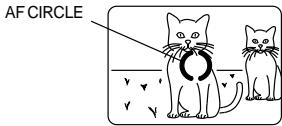
VIEWFINDER
-
Partially depress and hold the SHUTTER BUTTON (3) to lock the focus position.
-
While still partially depressing the shutter button, move the camera until your subject is where you want it within the VIEWFINDER EYEPiece (19).
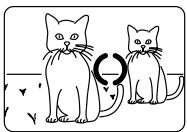
VIEWFINDER
- Press the shutter button completely down to take the picture.
Using the zoom lens
This camera has a motorized zoom lens that lets you select the ideal lens-focal length for taking pictures. When you turn the camera on, it is initially set to the wide-angle position.
- Press the ON/OFF BUTTON (20) to turn the camera on and to uncover the LENS (16).
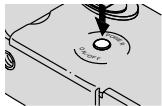
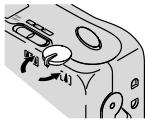
- Move the ZOOM-DIAL LEVER (4) to the right to the telephoto position to zoom closer to the subject. Move the lever to the left to the wide-angle position to zoom away from the subject.
-
Frame your subject within the VIEWFINDER EYEPiece (19).
-
Press the SHUTTER BUTTON (3) to take the picture.
The lens barrel will automatically return to the wide-angle position after approximately 3 minutes.
Tips for better pictures
- Move close enough to your subject so it fills the view finder but not closer than 2 ft (0.6 m).
Take pictures at the subject's level. Kneel down to take pictures of children and pets. - Hold your camera vertically to capture tall, narrow subjects,
such as a waterfall, skyscraper, or a single person.
- Add interest to your picture by framing it with a tree branch, a window, or even the rails of a fence.
- Keep the sun behind you to provide the best subject illumination.
TAKING FLASH PICTURES
In dim light, such as indoors or outdoors in heavy shade, or on dark overcast days, you need flash. Your camera features an automatic flash that fires when you need it.
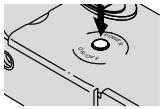
- Press the ON/OFF BUTTON (20) to turn the camera on and to uncover the LENS (16).
-
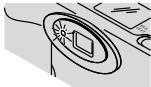
The flash-indicator lamp "blinks" when the flash is not ready.
-
Frame your subject within the VIEWFINDER EYEPiece (19).
-
Partially depress the SHUTTER BUTTON (3). When the FLASH-INDICATOR LAMP (18) glows green, fully depress the shutter button to take the picture.
- Keep the subject within the distance range for the speed of film in your camera (see Flash-to-subject distance table). Don't take pictures beyond the maximum distance or your pictures will be dark. 18
Flash-to-subject distance
| ISO film speed | Wide (30 mm) | Telephoto (60 mm) |
| 50 | 2 to 13 ft (0.6 to 3.9 m) | 2 to 7 ft (0.6 to 2.1 m) |
| 100 | 2 to 18 ft (0.6 to 5.5 m) | 2 to 10 ft (0.6 to 2.9 m) |
| 200 | 2 to 25 ft (0.6 to 7.7 m) | 2 to 14 ft (0.6 to 4.1 m) |
| 400 | 2 to 36 ft (0.6 to 11 m) | 2 to 19 ft (0.6 to 5.8 m) |
| 800 | 2 to 51 ft (0.6 to 15.5 m) | 2 to 27 ft (0.6 to 8.2 m) |
| 1600 | 2 to 72 ft (0.6 to 21.9 m) | 2 to 38 ft (0.6 to 11.6 m) |
SELECTING THE FLASH AND INFINITY-FOCUS MODES
Besides the auto-flash mode with red-eye reduction, you can select auto-flash without red-eye reduction, fill-flash, flash-off, infinity-focus, and night-view modes. Press the FLASH-SELECT BUTTON (11) continuously until the desired indicator appears on the LCD PANEL (6).
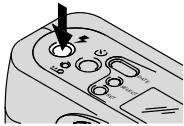
The flash modes will remain selected after you take the picture. To change the flash-mode selection, press the flash-select button, or turn the camera off then back on to return to the flash-default mode.
Red-eye reduction


Some people's eyes (and some pets') can reflect flash with a red glow. This camera features automatic flash with red-eye reduction which is the initial default setting for this camera. To minimize red eyes in flash pictures, turn on all room lights and follow these steps:
- Press the ON/OFF BUTTON (20) to turn the camera on and to uncover the LENS (16).
- Press the FLASH-SELECT BUTTON (11) repeatedly until the AUTO-FLASH (34) and RED-EYE-REDUCTION (26) INDICATORS appear on the LCD PANEL (6).
- Disregard step 2 if the default setting is already set for red-eye reduction.
- Frame your subject within the VIEWFINDER EYEPIECE (19).
-
Have your subject look directly at the RED-EYE-REDUCTION LAMP (17).
-
Partially depress the SHUTTER BUTTON (3). When the FLASH-INDICATOR LAMP (18) glows green, fully depress the shutter button to take the picture.
-
In this mode there will be a slight delay in the shutter release.
Auto flash without red-eye reduction

Use this mode for taking pictures without people. You can change the default setting to auto flash without red-eye reduction by following these steps:
- Press the ON/OFF BUTTON (20) to turn the camera on and to uncover the LENS (16).
- Press the FLASH-SELECT BUTTON (11) repeatedly until the AUTO-FLASH INDICATOR (34) appears on the LCD PANEL (6).
- Frame your subject within the VIEWFINDER EYEPiece (19).
- Partially depress the SHUTTER BUTTON (3). When the FLASH-INDICATOR LAMP (18) glows green, fully depress the shutter button to take the picture.
The camera will now default to the auto-flash mode without red-eye reduction.
Fill flash
When bright light indoors or outdoors comes from behind the subject (backlighting), dark shadows (especially on faces) may occur. Use fill flash to lighten these shadows.
- Press the ON/OFF BUTTON (20) to turn the camera on and to uncover the LENS (16).
- Press the FLASH-SELECT BUTTON (11) repeatedly until the FILL-FLASH INDICATOR (32) appears on the LCD PANEL (6).
-
Frame your subject within the VIEWFINDER EYEPiece (19).
-
Partially depress the SHUTTER BUTTON (3). When the FLASH-INDICATOR LAMP (18) glows green, fully depress the shutter button to take the picture.
OFF
Flash off

When you do not want to use the flash, especially indoors where flash is prohibited, such as in theaters and museums, or when you want to take twilight scenes or distant subjects that are beyond the flash range, or capture the ambiance of existing light, use the flash-off mode.
Use a tripod or place the camera on other firm support, and use high-speed film because the shutter speed in these situations will most likely be slow.
- Press the ON/OFF BUTTON (20) to turn the camera on and to uncover the LENS (16).
- Press the FLASH-SELECT BUTTON (11) repeatedly until the FLASH-OFF INDICATOR (35) appears on the LCD PANEL (6).
- Frame your subject within the VIEWFINDER EYEPiece (19).
- Press the SHUTTER BUTTON (3) to take the picture.
Infinity focus

OFF
Capture sharp, distant scenery at any zoom position (for daylight and outdoor use only).
- Press the ON/OFF BUTTON (20) to turn the camera on and to uncover the LENS (16).
-
Press the FLASH-SELECT BUTTON (11) repeatedly until the FLASH-OFF (35) and INFINITY-FOCUS (30) INDICATORS appear on the LCD PANEL (6).
-
Frame your subject within the VIEWFINDER EYEPiece (19).
- Press the SHUTTER BUTTON (3) to take the picture.
Night-view

In this mode, the Camera balances the flash and existing light exposure so you can take beautiful pictures of people at sunset or at night. Use a tripod or place the camera on other firm support, and use high-speed film because the shutter speed at night will most likely be slow.
- Press the ON/OFF BUTTON (20) to turn the camera on and to uncover the LENS (16).
-
Press the FLASH-SELECT BUTTON (11) repeatedly until the NIGHTVIEW INDICATOR (33) appears on the LCD PANEL (6).
-
Frame your subject within the VIEWFINDER EYEPiece (19).
- Partially depress the SHUTTERT BUTTON (3). When the FLASHINDICATOR LAMP (18) glows green, fully depress the shutter button to take the picture.
USING THE SELF-TIMER

Use this feature to include yourself in pictures.
-
Use the TRIPOD SOCKET (23) to attach the camera to a tripod or place it on other firm support.
-
Press the ON/OFF BUTTON (20) to turn the camera on and to uncover the LENS (16).
- Press the SELF-TIMER BUTTON (9).
- Frame your subject within the VIEWFINDER EYEPiece (19).
-
Press the SHUTTER BUTTON (3). The SELF-TIMER LAMP (17) on the front of the camera will blink for 8 seconds and then glow during the last 2 seconds of countdown.
-
To cancel the self-timer selection before the shutter releases, turn the camera off.
- The self-timer automatically turns off after the shutter releases and returns to the auto-flash start position.
DATE AND TIME IMPRINTING
Traditional cameras print date and/or time information directly onto the film. Your camera uses the film's magnetic data-recording capability to record date and time information which your photofinisher can imprint on the back of your photographs. This camera has a quartz clock (24-hour time display) and automatic calendar through the year 2039. You can record the date in one of three date formats (year/month/day, month/day/year or day/month/year) and one time format (hour/minute).
Setting the date and time
- Press the DATE-MENU BUTTON (12) repeatedly to scroll and select desired date or time format.
- Press the DATE-SELECT BUTTON (7) in succession to select the "blinking" month, day, or year, or hour or minute.
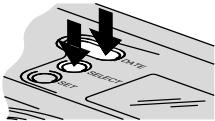
- Press the DATE-SET BUTTON (8) to change the "blinking" number(s).
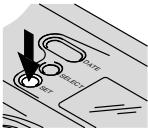
- Press the date-select button to store the selected number(s) and to activate the next "blinking" number(s).
- Follow steps 3 through 5 to continue your selection, or to end further options, press the date-select button repeatedly until the blinking stops.
UNLOADING THE FILM
Automatic rewind
The camera automatically rewinds the film into the cassette after the last exposure.
- Wait for the film to completely rewind into the film cassette.
- When the motor stops running, the FRAME COUNTER (28) will indicate "0."
-
Turn the FILM-DOOR LATCH (2) to open the FILM DOOR (22).
-
Remove the film cassette from the camera and reload with new KODAK ADVANTIX Film.
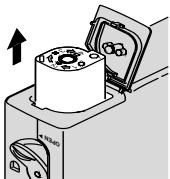
- The FSI on the fully-exposed film cassette will be at X (#3 position) and the LCD panel will display a blinking "E."
Manual rewind

If you don't want to take pictures on the entire film, you can manually activate the automatic rewind.
- Gently press the FILM-REWIND BUTTON (10) by using the control-button activator on the camera-strap clasp to start the auto-film rewind.
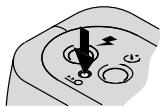
- Follow steps 1-3 from Automatic Rewind.
NOTE: You cannot reload a partially exposed film into this camera to continue picture-taking.
CARING FOR YOUR CAMERA
- Protect the camera from dust, moisture, sudden impact, and excessive heat.
CAUTION: Do not use solvents or harsh or abrasive cleaners on the camera body.
- If the lens appears dirty, breathe on it to form a mist and wipe the surface gently
with a soft, lintless cloth or a camera lens-cleaning tissue. Never wipe a dry lens.
CAUTION: Do not use solvents or solutions not designed for cleaning camera lenses. Do not use chemically treated tissues intended for cleaning eyeglasses.
- Remove the battery when you store the camera for an extended time.
CAUTION: To prevent possible damage and electrical shock, do not attempt to disassemble or repair the camera or flash unit by yourself.
TROUBLESHOOTING
| What happened | Probable cause | Solution |
| Camera will not operate | There are no more pictures remaining | Remove the film |
| Battery weak, dead, missing, or improperly loaded | Replace or reload the battery | |
| Film does not advance or rewind | Battery weak, dead, missing, or improperly loaded | Replace or reload the battery |
| LCD panel is blank | Battery weak, dead, missing, or improperly loaded | Replace or reload the battery |
| LCD panel is blank (continued) | Camera in sleep mode | Press any control button to awaken camera |
| Camera turned off | Turn on/off switch ON | |
| LCD panel flashes “E” | No film in camera | Load new film into the camera |
| Camera locks and flash-indicator lamp “blinks” | Subject too close to camera | Move beyond 2 ft (0.6 m) from your subject |
SPECIFICATIONS
Film type: KODAK ADVANTIX Films for color or black-and-white pictures
Lens: 30-60 mm zoom lens, hybrid aspheric
Focus system: 87 zones AF
Focus range: Wide/Tele: 2 ft (0.6 m) (daylight) to infinity
Viewfinder: Real image with C, H, & P format display
Film speed: DXIX (ISO) 50-1600 for color or black-and-white films
Flash unit: KODAK SENSALITE™ Flash
Flash range (ISO 200):
Wide: 2 to 25 ft (0.6 to 7.7m )
Tele: 2 to 14 ft (0.6 to 4.1 m)
Apertures: f / 4.5 - f / 8.5
Shutter: Programmed electronic shutter, 1/4 to 1/360 seconds
Power source: Main power: one 3 V lithium KODAK K123LA (or equivalent) Battery
Dimensions: 119 × 64 × 39 ~mm
Weight: 7.2 oz. (205 g) without film and battery
Kodak, Sensalite, "e" mark, Advantix, and the
Advanced Photo System symbol and logotype are trademarks.
KODAK ADVANTIX
Cámara Zoom F600
CERCLE DE MISE AU POINT
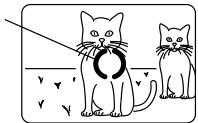
VISEUR
EASTMAN KODAK COMPANY
Rochester, NY 14650
© Eastman Kodak Company, 1999
Pt.No.9181157
Printed in U.S.A.
- Camera Identification
- NEED HELP WITH YOUR CAMERA OR MORE INFORMATION ABOUT THE ADVANCED PHOTO SYSTEM?
- ADVANCED PHOTO SYSTEM FEATURES AVAILABLE WITH THIS CAMERA
- Triple format selection
- Date and time imprinting
- Double exposure protection (DEP)
- Picture quality information exchange (PQix)
- Safety-interlock film door
- Film Status Indicator (FSI)
- CONTENTS
- CAMERA IDENTIFICATION (see inside cover flaps for camera diagrams)
- LCD PANEL
- ATTACHING THE STRAP
- Control-button activator
- LOADING THE BATTERY
- Low-battery indicator
- Battery tips
- Power shutdown
- LOADING THE FILM
- TAKING PICTURES
- Typical print sizes (formats)
- Using the focus lock
- Using the zoom lens
- Tips for better pictures
- TAKING FLASH PICTURES
- SELECTING THE FLASH AND INFINITY-FOCUS MODES
- Red-eye reduction
- Auto flash without red-eye reduction
- Fill flash
- Flash off
- Infinity focus
- Night-view
- USING THE SELF-TIMER
- Setting the date and time
- UNLOADING THE FILM
- Automatic rewind
- Manual rewind
- CARING FOR YOUR CAMERA
- SPECIFICATIONS
- KODAK ADVANTIX
- Cámara Zoom F600
Brand : KODAK
Model : ADVANTIX F600
Category : Film camera