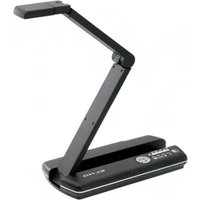
PX-30E - Document Camera Elmo - Free user manual and instructions
Find the device manual for free PX-30E Elmo in PDF.


Pick your language and provide your email: we'll send you a specifically translated version.
| Product Type | Document Camera |
| Brand | Elmo |
| Model | PX-30E |
| Image Sensor | 1/2.7-inch CMOS |
| Resolution | 1920 x 1080 (Full HD) |
| Optical Zoom | 12x |
| Digital Zoom | Up to 8x |
| Frame Rate | 30 fps |
| Field of View | A3 portrait size |
| Output Interfaces | HDMI, USB, VGA |
| Dimensions (W x H x D) | 380 x 340 x 490 mm (folded) |
| Weight | 2.5 kg |
| Power Supply | AC 100-240V, 50/60 Hz |
| Power Consumption | 15 W (max) |
| Lighting | LED lamps (adjustable) |
| Storage | Internal memory for image capture |
| Functions | Live image, freeze, split screen, annotation |
| Maintenance | Clean lens with soft cloth; avoid solvents |
| Safety | CE, RoHS compliant |
| Spare Parts | AC adapter, USB cable, remote control |
| Reparability | User-replaceable lamp; contact support for other repairs |
| Warranty | 2 years limited |
Frequently Asked Questions - PX-30E Elmo
How do I connect the Elmo PX-30E to a computer?
Connect the USB cable from the Elmo PX-30E to your computer. Install the provided software or use standard UVC drivers. The device will appear as a webcam.
What resolution does the PX-30E support?
The PX-30E outputs Full HD 1080p (1920 x 1080) at 30 fps via HDMI and USB.
How do I zoom in and out?
Use the optical zoom lever on the camera head or the remote control. Press the ‘+’ or ‘-’ button for digital zoom.
Can I capture still images?
Yes, press the Capture button on the remote or the device to save images to internal memory or an SD card (if available).
How do I clean the lens?
Use a soft, dry microfiber cloth. Avoid liquid cleaners. For stubborn dirt, slightly dampen the cloth with water.
What is the recommended distance to the document?
Position the camera 10-15 inches (25-38 cm) above the document for optimal focus and coverage of an A3 page.
Does the PX-30E work with third-party software?
Yes, it is compatible with most software that supports UVC cameras, such as Zoom, Teams, and OBS.
How do I adjust the brightness?
Use the +/- buttons on the remote or control panel to adjust LED brightness. Settings are saved automatically.
What should I do if the image is blurry?
Ensure the document is flat and the camera is at the correct distance. Use the Auto Focus button or manually adjust the focus ring.
Where can I download the user manual?
Visit the Elmo support website or use the link on notice-facile.com. Enter your model (PX-30E) to download the PDF manual.
User questions about PX-30E Elmo
0 question about this device. Answer the ones you know or ask your own.
Ask a new question about this device
No questions yet. Be the first to ask one.
Download the instructions for your Document Camera in PDF format for free! Find your manual PX-30E - Elmo and take your electronic device back in hand. On this page are published all the documents necessary for the use of your device. PX-30E by Elmo.
USER MANUAL PX-30E Elmo


Manual assistant
Powered by Anthropic
Waiting for your message
Product information
Brand : Elmo
Model : PX-30E
Category : Document Camera