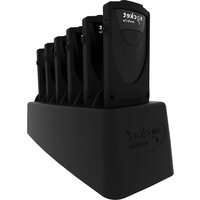
CHS 7Mi - Barcode scanners Socket Mobile - Free user manual and instructions
Find the device manual for free CHS 7Mi Socket Mobile in PDF.


Pick your language and provide your email: we'll send you a specifically translated version.
| Product Type | Handheld Barcode Scanner |
| Brand | Socket Mobile |
| Model | CHS 7Mi |
| Dimensions (H x W x D) | 4.5 x 2.5 x 1.5 in (114 x 64 x 38 mm) |
| Weight | 5.0 oz (142 g) |
| Power Source | Rechargeable lithium-ion battery (850 mAh) |
| Charging Interface | Micro USB |
| Connectivity | Bluetooth 4.0 (Class 2) |
| Scan Capability | 1D and 2D barcodes (including QR, Data Matrix) |
| Scan Engine | CMOS sensor with aiming laser |
| IP Rating | IP54 (dust and splash resistant) |
| Drop Resistance | 5 ft (1.5 m) to concrete |
| Operating Temperature | 32°F to 104°F (0°C to 40°C) |
| Battery Life | Up to 8 hours continuous scanning |
| Standby Time | Up to 15 days |
| Indicators | LED (green/red) and audible beeper |
| Data Storage (Batch Mode) | Up to 100,000 barcodes |
| Supported Operating Systems | iOS, Android, Windows |
| Cleaning Instructions | Wipe with a soft, damp cloth; avoid solvents |
| Safety Certifications | FCC, CE, RoHS |
| Spare Parts Available | Replacement battery, charging cable, holster |
| Warranty | 1 year limited |
Frequently Asked Questions - CHS 7Mi Socket Mobile
How do I pair the Socket Mobile CHS 7Mi with my device?
Turn on the scanner. On your device, go to Bluetooth settings and select CHS 7Mi from the list. Enter the default PIN 0000 if prompted.
What types of barcodes can the CHS 7Mi read?
It can read 1D barcodes (like UPC, EAN) and 2D barcodes (like QR, Data Matrix, PDF417).
How do I charge the scanner?
Connect the supplied micro USB cable to the scanner and a USB power source. The LED will turn red while charging and green when fully charged.
What is the battery life of the CHS 7Mi?
The battery lasts up to 8 hours of continuous scanning and up to 15 days on standby.
How do I clean the scanner?
Use a soft, lint-free cloth slightly dampened with water. Do not use solvents, alcohol, or abrasive cleaners. Avoid getting moisture into the charging port.
Can I use the scanner in batch mode without a Bluetooth connection?
Yes. In batch mode the scanner stores up to 100,000 barcodes in memory. They are transferred to your device once Bluetooth is reconnected.
What does the error tone mean?
A double beep or error beep usually indicates a failed scan. Ensure the barcode is intact and clean. If the scanner makes a constant error sound, the battery may be low or there is a hardware issue.
Is the CHS 7Mi water or dust resistant?
It has an IP54 rating, meaning it is protected against limited dust ingress and splashing water. It is not submersible.
How do I reset the scanner to factory settings?
Scan the Factory Reset barcode from the user manual. Alternatively, press and hold the trigger button for 10 seconds until the LED flashes rapidly.
Where can I find replacement parts or accessories?
Visit the Socket Mobile website or contact authorized dealers. Common spare parts include replacement batteries, charging cables, and carrying holsters.
User questions about CHS 7Mi Socket Mobile
0 question about this device. Answer the ones you know or ask your own.
Ask a new question about this device
No questions yet. Be the first to ask one.
Download the instructions for your Barcode scanners in PDF format for free! Find your manual CHS 7Mi - Socket Mobile and take your electronic device back in hand. On this page are published all the documents necessary for the use of your device. CHS 7Mi by Socket Mobile.
USER MANUAL CHS 7Mi Socket Mobile



Manual assistant
Powered by Anthropic
Waiting for your message
Product information
Brand : Socket Mobile
Model : CHS 7Mi
Category : Barcode scanners