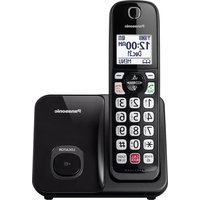
KX-TG3834M - Desk Phone PANASONIC - Free user manual and instructions
Find the device manual for free KX-TG3834M PANASONIC in PDF.


Pick your language and provide your email: we'll send you a specifically translated version.
| Product Type | Cordless DECT Desk Phone |
| Model | KX-TG3834M |
| Brand | Panasonic |
| Frequency Band | DECT 6.0 (1.9 GHz) |
| Range (Outdoor) | Up to 300 meters |
| Range (Indoor) | Up to 50 meters |
| Display | Backlit LCD |
| Caller ID | Yes |
| Phonebook Capacity | Up to 100 entries |
| Speakerphone | Yes (handset) |
| Intercom | Yes |
| Number of Handsets Supported | Up to 6 |
| Power Supply | AC 100-240V, 50/60 Hz |
| Battery Type | Ni-MH AAA, 2 pcs |
| Battery Life (Talk Time) | Up to 15 hours |
| Battery Life (Standby) | Up to 200 hours |
| Dimensions (Base) | Approx. 100 x 100 x 50 mm |
| Weight (Base) | Approx. 150 g |
| Wall Mountable | Yes |
| Warranty | 1 year |
| Maintenance | Clean with a soft dry cloth; avoid liquids |
| Safety | Use only supplied AC adapter; keep away from water |
| Spare Parts | Replacement battery (KX-TGAXXX), charger |
Frequently Asked Questions - KX-TG3834M PANASONIC
How do I set up the Panasonic KX-TG3834M desk phone?
Connect the base unit to a power outlet and phone line. Insert the batteries into the handset and charge for at least 12 hours before first use.
Can I add multiple handsets to this model?
Yes, the KX-TG3834M supports up to 6 handsets. Additional handsets can be purchased separately.
How do I adjust the ringer volume?
Press the Volume up/down button on the handset while idle to adjust ringer volume.
What should I do if the handset is not charging?
Ensure the handset is properly placed on the charger. Clean the charging contacts with a dry cloth. If issues persist, try a new battery.
How long does the battery last on a full charge?
Battery life is up to 15 hours talk time and up to 200 hours standby.
Can I use this phone with VoIP services?
No, the KX-TG3834M is designed for traditional analog phone lines and does not support VoIP directly.
What is the maximum range of this cordless phone?
Indoor range is up to 50 meters; outdoor range up to 300 meters. Obstructions like walls may reduce range.
How do I store contacts in the phonebook?
Press Phonebook, then Add. Enter the name and number using the keypad, then save.
Is there a speakerphone function?
Yes, press the Speaker button on the handset to use hands-free calling.
What should I do if the display shows 'No link'?
Move the handset closer to the base unit. If the issue continues, reset the phone by unplugging the base for a few seconds, then reconnecting.
User questions about KX-TG3834M PANASONIC
0 question about this device. Answer the ones you know or ask your own.
Ask a new question about this device
No questions yet. Be the first to ask one.
Download the instructions for your Desk Phone in PDF format for free! Find your manual KX-TG3834M - PANASONIC and take your electronic device back in hand. On this page are published all the documents necessary for the use of your device. KX-TG3834M by PANASONIC.
USER MANUAL KX-TG3834M PANASONIC
Manual assistant
Powered by Anthropic
Waiting for your message
Product information
Brand : PANASONIC
Model : KX-TG3834M
Category : Desk Phone