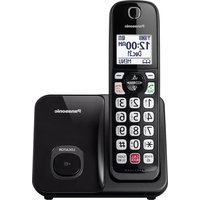
KX-TGD810 - Desk Phone PANASONIC - Free user manual and instructions
Find the device manual for free KX-TGD810 PANASONIC in PDF.


Pick your language and provide your email: we'll send you a specifically translated version.
| Product Type | Cordless Desk Phone with Answering Machine |
| Brand | Panasonic |
| Model | KX-TGD810 |
| Dimensions (Base Unit) | Approx. 10.5 × 11.5 × 7.5 cm |
| Dimensions (Handset) | Approx. 4.8 × 17.5 × 2.8 cm |
| Weight (Base Unit) | Approx. 180 g |
| Weight (Handset) | Approx. 130 g (with battery) |
| Power Supply (Base) | AC 120 V, 60 Hz (adapter included) |
| Power Supply (Handset) | Rechargeable Ni-MH battery (2.4 V, 550 mAh) |
| Display | 1.8-inch backlit LCD (handset) |
| Technology | DECT 6.0 (1.9 GHz) |
| Range (Outdoor) | Up to 300 m (line of sight) |
| Range (Indoor) | Up to 50 m |
| Phonebook Capacity | Up to 50 entries |
| Caller ID | Yes, with call history (up to 50) |
| Speakerphone | Yes (handset speakerphone) |
| Answering Machine | Digital, up to 18 min recording time |
| Talk Time | Up to 12 hours |
| Standby Time | Up to 7 days |
| Expandable | Up to 6 handsets (additional sold separately) |
| Key Features | Call block, redial, mute, intercom, paging |
| Maintenance & Cleaning | Wipe with a soft, dry cloth; avoid liquids and abrasives |
| Safety | Use only Panasonic AC adapter; keep away from water and heat sources |
| Spare Parts & Repairability | Battery and handset available; contact Panasonic support for repairs |
Frequently Asked Questions - KX-TGD810 PANASONIC
How do I set up the Panasonic KX-TGD810?
Connect the base unit to a power outlet and phone line using the supplied cables. Insert the rechargeable batteries into the handset and place it on the base to charge for 12 hours before first use. The handset will automatically register.
How do I block unwanted calls?
Press the MENU button, select Call Block, and add numbers to the block list. You can block up to 30 numbers. The phone will automatically reject calls from those numbers.
How do I use the answering machine?
Press the ANSWER button on the base to activate the answering machine. To listen to messages, press PLAY. You can set a personal greeting by pressing GREETING and recording.
Can I expand the system to multiple handsets?
Yes, you can register up to 6 handsets to the same base. Buy additional KX-TGD810 handsets (model KX-TGA810) and follow the registration procedure in the manual.
How do I change the time and date?
Press MENU, scroll to Set Time/Date, then enter the current time and date using the keypad. Press SAVE to confirm.
Why is my handset not charging?
Ensure the handset is properly seated on the base and the charging contacts are clean. The battery may be defective; replace it with a Panasonic approved battery (model HHR-4EPT).
What is the range of the phone?
The DECT 6.0 technology provides a range up to 50 meters indoors and up to 300 meters outdoors (line of sight). Concrete walls may reduce range.
Can I use the phone without a landline?
No, the KX-TGD810 requires a traditional analog phone line (PSTN) to function. It does not support VoIP or cellular networks.
How do I reset the phone to factory settings?
Press MENU, then scroll to Settings > Reset. Confirm the reset to erase all settings and return to defaults.
Where can I find the user manual?
Download the PDF from notice-facile.com or the Panasonic support website. The manual covers detailed setup, troubleshooting, and features.
User questions about KX-TGD810 PANASONIC
0 question about this device. Answer the ones you know or ask your own.
Ask a new question about this device
No questions yet. Be the first to ask one.
Download the instructions for your Desk Phone in PDF format for free! Find your manual KX-TGD810 - PANASONIC and take your electronic device back in hand. On this page are published all the documents necessary for the use of your device. KX-TGD810 by PANASONIC.
USER MANUAL KX-TGD810 PANASONIC
Manual assistant
Powered by Anthropic
Waiting for your message
Product information
Brand : PANASONIC
Model : KX-TGD810
Category : Desk Phone