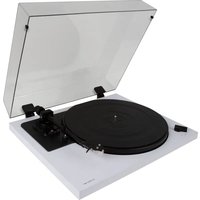
SpinDeck Max - Turntable Andover - Free user manual and instructions
Find the device manual for free SpinDeck Max Andover in PDF.


Pick your language and provide your email: we'll send you a specifically translated version.
| Product Type | Turntable (Vinyl Record Player) |
| Brand | Andover |
| Model | SpinDeck Max |
| Dimensions (W x D x H) | 17.5 x 13.8 x 5.5 inches (approx.) |
| Weight | 12.5 lbs (approx.) |
| Power Supply | DC 12V external adapter |
| Speed Settings | 33 1/3, 45 RPM |
| Drive System | Belt drive |
| Platter Material | Aluminum |
| Tonearm | Straight, dynamically balanced |
| Cartridge | Moving magnet (MM) pre-installed |
| Output | RCA line level (with built-in phono preamp) |
| Phono Preamp | Built-in, switchable ON/OFF |
| Anti-Skate | Adjustable via dial |
| Pitch Control | ±8% fine adjustment |
| Warranty | 1 year limited |
| Maintenance | Clean stylus with soft brush; dust cover recommended |
| Safety | Automatic stop at end of record |
| Spare Parts & Repairability | Stylus replacement, belt replacement, customer service support |
| General Features | USB output for digitizing vinyl; included dust cover |
Frequently Asked Questions - SpinDeck Max Andover
How do I set up the SpinDeck Max turntable?
Unbox the turntable and place it on a level surface. Remove the shipping screw from the tonearm. Install the platter and belt, then place the record on the platter. Connect power and speakers or amplifier. Finally, adjust tracking force and anti-skate.
Can I change the speed from 33 to 45 RPM?
Yes, use the speed selector switch on the front panel to toggle between 33 1/3 and 45 RPM. For 78 RPM records, this model does not support 78 RPM.
How do I connect the turntable to speakers?
The SpinDeck Max has built-in phono preamp. Connect using the RCA cables to powered speakers or an amplifier. If your speakers have a phono input, set the preamp switch to LINE. Otherwise, set to PHONO and use a receiver's phono input.
What should I do if the turntable is not producing sound?
Ensure the power adapter is plugged in and the turntable is turned on. Check that the RCA cables are securely connected to speakers/amplifier and that the correct input is selected. Verify the stylus is properly seated and not worn.
How do I clean the stylus and records?
Clean the stylus gently with a carbon fiber brush or stylus cleaning fluid. For records, use a record cleaning brush in a circular motion. Avoid touching the stylus with fingers.
Can I replace the stylus or cartridge?
Yes, the stylus is replaceable. Remove the old stylus by pulling it forward. Install a new one by sliding it into place. The cartridge is also replaceable; consult the manual for compatibility.
How do I adjust the anti-skate?
Locate the anti-skate dial on the tonearm base. Set it to the same value as the tracking force. For example, if tracking force is 2.0g, set anti-skate to 2.
What is the purpose of the USB port?
The USB port allows you to connect the turntable to a computer to digitize vinyl records. Use included software or any recording application to capture audio.
Does the turntable have an automatic stop?
Yes, the SpinDeck Max features an auto-stop function that lifts the tonearm at the end of the record. You can disable this feature if desired.
Where can I find replacement parts?
Replacement parts such as stylus and belts are available through Andover customer service or authorized dealers. Check the product page for accessories.
User questions about SpinDeck Max Andover
0 question about this device. Answer the ones you know or ask your own.
Ask a new question about this device
No questions yet. Be the first to ask one.
Download the instructions for your Turntable in PDF format for free! Find your manual SpinDeck Max - Andover and take your electronic device back in hand. On this page are published all the documents necessary for the use of your device. SpinDeck Max by Andover.
USER MANUAL SpinDeck Max Andover


Manual assistant
Powered by Anthropic
Waiting for your message
Product information
Brand : Andover
Model : SpinDeck Max
Category : Turntable