
Songbird HRA - Unspecified Andover - Free user manual and instructions
Find the device manual for free Songbird HRA Andover in PDF.


| Product Type | Network Audio Receiver with Built-in Amplifier |
| Brand | Andover |
| Model | Songbird HRA |
| Amplifier Power | 75W per channel into 4 ohms (typical <0.1% THD) |
| DAC Type | ESS Sabre 32-bit |
| Max Sample Rate | 24-bit / 192kHz |
| Wireless Connectivity | Wi-Fi 802.11 a/b/g/n/ac (2.4 & 5 GHz), Bluetooth 5.0 |
| Ethernet | 10/100BT (RJ45) |
| Streaming Protocols | AirPlay 2, Spotify Connect, TIDAL Connect, DLNA, MQA, Chromecast, Alexa Cast |
| Supported Services | Qobuz, Tidal, Amazon Music, Spotify, iHeartRadio, vTuner, TuneIn, and more |
| Audio Inputs | Analog (RCA), Optical (TOSLINK), Coaxial (RCA), USB Type-A (thumb drive) |
| Audio Outputs | Speaker terminals (2-8 ohm), Analog (RCA), Optical (TOSLINK), Subwoofer (RCA), Headphone (3.5mm) |
| Multiroom | Yes, with additional Songbird units or AirPlay 2 compatible devices |
| Voice Control | Works with Alexa (via separate Echo device) and Siri (via AirPlay 2) |
| Signal-to-Noise Ratio (Amplifier) | 111 dB A-weighted |
| THD+N (Amplifier at 1W) | <0.005% |
| Power Supply | 32V/6A DC adapter (included) |
| Remote Control | IR remote (included) |
| Warranty | 2 years limited |
Frequently Asked Questions - Songbird HRA Andover
User questions about Songbird HRA Andover
0 question about this device. Answer the ones you know or ask your own.
Ask a new question about this device
Download the instructions for your Unspecified in PDF format for free! Find your manual Songbird HRA - Andover and take your electronic device back in hand. On this page are published all the documents necessary for the use of your device. Songbird HRA by Andover.
USER MANUAL Songbird HRA Andover
natural_image
Line drawing of a portable electronic device labeled 'andover' with two control buttons (MINT and FAUSE) on the side (no additional text or symbols)

andover
IMPORTANT NOTE:
At this time, unexpected delays in the certification process of Songbird HR and Songbird HRA have postponed the rollout of some features and services in the final app.
As soon as the certification process is complete, the Songbird HR and HRA devices will be automatically updated over the air, the Apps will be updated in the App Store and Google Play, and this manual will be updated to reflect the final status.
There is no performance degradation in the current configuration, but additional services and new features will add to your satisfaction and operating convenience when updated.
We are sorry for this inconvenience and are working to resolve this as soon as possible.
Use these QR codes to Download Songbird Control from the App Store or Google Play.


Apple - iOS Google - Android
Introduction
Thank you for choosing your Songbird HR or HRA.
Your Songbird will deliver bit-perfect High Resolution output from AirPlay 2, Spotify Connect, TIDAL Connect, DLNA, MQA (Beta), Alexa Cast for Amazon Music, and features gapless playback of Hi-Res lossless audio up to 24Bit/192kHz. It streams music directly from the cloud or your local music library. Songbird delivers high-resolution audio streams from some of the best Internet music sources such as Qobuz, Tidal, Amazon Music, and Spotify. As more services become available, they will be added through Over-the-Air updates. In addition, thousands of Internet radio stations may be enjoyed via v-Tuner, I-Heart Radio and Tune-in. The Songbirds can also play files on a thumb drive and will receive or transmit Bluetooth content to or from any Bluetooth devices within range.
Control your Songbird using the free Songbird Control app on the App Store or Google Play. You can also use your favorite music apps such as Spotify, TIDAL, Amazon Music, or any Chromecast-enabled app. You may also use, HomePod, compatible Echo devices, or Apple Home App.
Songbird HR and HRA can be grouped with Homepod, Echo, AirPlay 2-enabled devices, other Alexa-compatible devices, or another Songbird device to stream music throughout your home. You may group units to play the same music throughout, or listen to separate programs on each. The Songbirds feature analog and digital outputs that allow you to connect a local source such as a turntable or CD player, and share that source wirelessly with other Songbirds.
Although some content is free, you will be required to purchase a subscription from the content supplier for specific premium services or advanced features. Configuration of your DLNA device to allow sharing may also be required in some instances.
Both Songbird models will accept analog and digital source inputs from local components, in addition to files on a thumb drive and will also receive Bluetooth content from any devices within range.
The Songbirds are capable of bit-perfect output from their digital outputs, or superb analog output via their high quality ESS Sabre DAC.
Songbird HRA adds a 75W/Ch amplifier powerful enough to drive virtually any home loudspeaker to room-filling volume levels. A mono subwoofer output replaces the coaxial digital output of the HR. It's built-in high quality headphone output will deliver powerful output for private listening.
System Requirements
- A WiFi router supporting the 2.4GHz or 5GHz dual/mode 802.11b/g/n/ac protocols. (5GHz recommended.
- A Smartphone or Tablet connected to the same WiFi network running iOS 9.0 or Android 6.0 or newer.
Setup
- Download the Songbird Control app from the App Store or Google Play.
- For Songbird HR, connect its output to your audio system and switch that system to the input used for Songbird HR. Songbird HRA may be connected directly to a pair of speakers via its speaker outputs.
- Apply power. After a few seconds a voice will say, "entering setup mode", and the status LED will begin flashing orange. If it does not, press and hold the input switch until the LED flashes orange.
- Make sure Bluetooth and WiFi are both is turned on in your phone settings.
- Open the Songbird Control app. After a few moments the app should display a list of all the new devices and ask if you want to setup the device. If it does not, press the + at the top right corner of the device screen to search again. The app will walk you through the next steps.
Setup with Apple Home
- Tap the Apple Home app on your iOS device.
- Press the + in the upper right corner. Then select "Add Accessory"
- Press "More options..."
- Select the device you wish to add.
Front Panel and Controls
Songbird HR
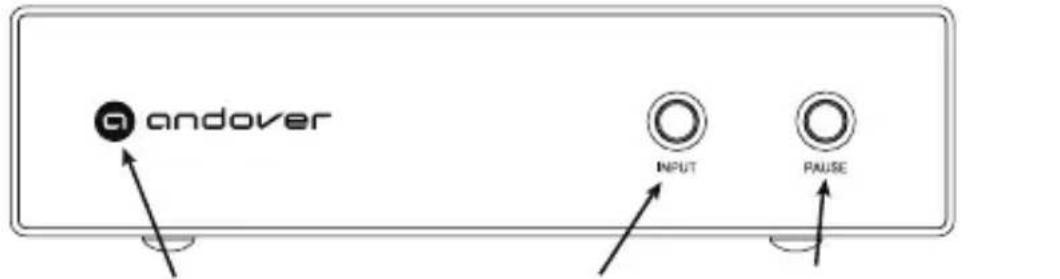
Input/Mode Switch Play/PauseStatus Indicator
Songbird HRA

Status indicator Volume/Play/Pause/Mute Input/Mode Switch Headphones
Status Indicator - Colors indicate input source and status.
White - Network Streaming mode
Blue - Bluetooth (Flashes in pairing mode)
Green - Analog Input
Teal - USB device (If no USB device is present, this will not show)
Red - Optical
Yellow - Coaxial
Flashing White - System is Booting, please wait.
Flashing Orange - Setup Mode
Flashing White/Blue - Software is updating. Please wait.
Flashing Amber - Alexa notification
Input/Mode Switch - A short press toggles to the next source.
A long press >5 seconds enters setup mode
Volume/Play/Pause/Mute (HRA)- Rotate to adjust output volume. Each press toggles between Play and Pause mode when Network streaming, or Mute and Unmute for other sources.
Play/Pause (HR) - Toggles between Play and Pause
Rear Panel and Output Connections
Songbird HR
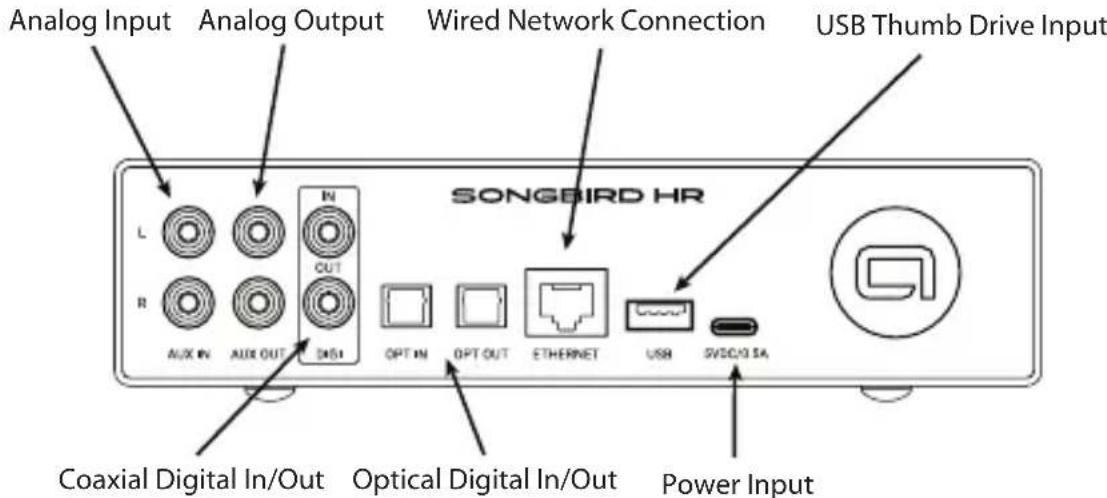
Songbird HRA

Analog Output - This is the main output to connect Songbird HR to your amplifier or powered speakers for playback.
Digital Output - Digital output is used to connect to an amplifier or separate component DAC. Songbird HR has both optical or wired (coaxial) choices. Both outputs are identical quality. Songbird HRA has replaces the coaxial digital output with an analog subwoofer output.
Speaker Connections (HRA ONLY)- Use to connect passive Stereo speakers from 2-8 Ohm impedance. The speaker terminals will accept bare wire, spade lugs, or banana plugs.
Rear Panel and Input Connections
Analog Input - Connect any Stereo Line-Level source that you wish to cast to other Songbirds in Multiroom mode, or to playback locally. You may use the app or front panel pushbutton for input selection.
Digital Inputs - Connect any digital source you wish to listen to locally or cast to other Songbirds in Multiroom mode. All Songbirds will convert Digital inputs to analog output.
Wired Network Connection - Gigabit Ethernet connection may be used for higher network reliability when WiFi is weak or susceptible to interference.
USB - Connect a USB Thumb Drive here for music playback.
Power Input (HR) - USB-C 5V/1A power input. Connect a USB-C cable from the supplied power adapter here. Then plug the adapter into the wall outlet.
Power Input (HRA) - 32V/6A power input. IMPORTANT: Connect the power adapter to the Songbird HRA first, then plug the adapter into the wall outlet. Plugging the adapter into the wall first will cause a spark when the live adapter plugged into the HRA. This is not dangerous or damaging, but can be disconcerting if you're not expecting it.
Remote Operation
The Songbirds are usually operated from the Songbird Control app you used to connect your Songbird to the network.
Once your Songbird or Songbirds have been installed on the network, the app will open to the DEVICE page, which will show a volume slider for each Songbird, or other compatible product, on your network.
Touch the volume control for the device you wish to control, then touch the BROWSE icon at the bottom of the page. This will bring you to the page where you may select the music from all of the available sources. Select the source you want, and the app will guide you through the song selection process. Please note that each provider has a different set of features, so operation may differ for various providers.
Scroll to the bottom of the page to switch inputs from WiFi to local or Bluetooth sources.
Local Operation
Typically you will operate your Songbird from the app installed on your phone. However, there are some limited controls on the front panel for convenient operation when you are near your Songbird.
On Songbird HR, press the input button to scroll through the various inputs. Press the pause button to pause a streaming source, or mute a local source. Press it again to return to play mode. Press and hold this button to enter standby mode for minimum power.
The functions work the same way on Songbird HRA except that a manual volume control is added. Pressing the volume knob duplicates the play/pause function of Songbird HR.
Bluetooth
Songbird HR and HRA may receive Bluetooth from local devices for playback, or may transmit to Bluetooth speakers or headphones for convenient playback.
To Receive: Select the Bluetooth input from either the app or the front panel pushbutton. The Blue Flashing LED indicates pairing mode. Open your phone setup screen and select the Songbird.
To Transmit: Tap the Output mode icon below the volume slider in the Now-Playing screen in the app. Make sure the Bluetooth device you wish to pair to is discoverable, and select "Connect". After a few moments you should see a list of available devices. Tap that device to initiate pairing.
Note: When playing music files from your phone library, we recommend playing from the My Music tab within the app for the best uncompressed fidelity over WiFi, instead of using Bluetooth.
Multiroom / Multizone setup.
Multiple Songbird devices may be used around the home and linked together for synchronized audio playback of either local sources, or streamed internet content.
Make sure all the Songbirds you wish to link are on the same network, then tap the "chain link" icon on the volume slider on the device page of the app. Select the various Songbirds you wish to link, and tap done.
Note: When mixing Songbird HR and HRA with original Songbird on the same network, the Songbird HR or HRA should be the originating device for a local source such as Bluetooth, a turntable, or auxiliary source. Any original Songbird devices should be used as the "receivers" for content "transmitted" from an HR or HRA. Sources sent from an original Songbird to other rooms will be delayed in the remote room, resulting in an echo. Sources sent from a Songbird HR or Songbird HRA will be in sync, avoiding echo.
There is inevitable delay sending signal over WiFi, therefore audio will not remain in sync with video sources.
Spotify Connect
Listen out loud with Spotify Connect
- Connect your Songbird to your wifi network.
- Open up the Spotify app on your phone, tablet or laptop using the same wifi network.
- Play a song and select Devices Available.
- Select your Songbird and start listening.
Tidal Connect

- Open the Tidal app on your phone, tablet or laptop using the same wifi network.
- Play a song and select Sound Output.
- Select your Songbird and start listening.
In Case of Difficulty
Unlike typical audio devices, some operating problems that may occur can be the result of WiFi or internet connection issues, and are not a hardware problem with your Songbird.
Symptoms such as pauses in the sound, and signal dropouts are often the result of a weak WiFi signal, it interference from other electrical noise sources. If you experience these symptoms, first check the WiFi signal strength from within the app by selecting the SETUP icon on the device page, then Network Status. If WiFi strength shows less than "Good", try relocating or reorienting your Songbird for a stronger signal. The WiFi antenna is directly behind the Andover logo on the front panel, so please make sure there is no metal directly in front of this area. If you cannot get adequate signal strength, then a direct Ethernet connection is recommended. You may also try a WiFi repeater connected closer to Songbird than your router.
If you are experiencing dropouts with a strong signal, try forcing an I.P address update by disconnecting Songbird, rebooting your router, then reconnecting Songbird.
If these suggestions do not work, contact us at www.andoveraudio.com/support for additional assistance.
If you have any issues with app operation, or suggestions for future improvements, please contact the app team directly by selecting Settings, then Feedback. This will send the app team an error log to better understand your issue.
Two-Year Limited Warranty
Andover Audio warrants your product against manufacturing defects and workmanship to the initial purchaser for a period of two (2) years from the date of delivery to customer. Andover Audio will repair or replace the unit as necessary at our discretion to restore proper operation. This warranty covers both parts and labor for the warranty period. For the first 60-days, during the in-home trial period, Andover will pay shipping both ways for warranty repairs or returns. After the initial 60-day period, you will pay to ship the unit to us and we will pay the return shipping back to you. The warranty excludes physical damage caused by accident or abuse outside of our control, or if the unit is damaged due to incorrect packing. The warranty also excludes normal wear items such as the turntable stylii and belts. If you think you need warranty service, please contact us to obtain an RMA (Return Merchandise Authorization) by e-mailing support@andoveraudio.com. For more information on returns and exchanges, please visit www.andoveraudio.com/pages/returns-and-exchanges.
If your unit was purchased from a local dealer, contact them first. They may be able to resolve some issues without requiring a return.
Service
Should you encounter a problem that you are unable to solve, please contact customer service at www.andoveraudio.com/support, or the dealer that sold you your unit.
If you must return your unit for any reason, it must be safely packed and shipped in its original carton and packing material. Damage that is the result of improper packaging is not covered by the warranty.
If you do not have the original packing material, please contact us to purchase replacement packing material. Returns will not be accepted if authorized shipping cartons and packaging is not used.
For turntable products, remember to fit the cartridge protection cap and the transport lock-tie for the tonearm tube, prior to carefully packaging your unit. Also remember to remove the platter and place it under the turntable or in the place provided in the packaging prior to shipping.
Compliance Statements
FCC Statement
This equipment has been tested and found to comply with the limits for a Class B digital device, pursuant to Part 15 of the FCC Rules. These limits are designed to provide reasonable protection against harmful interference in a residential installation. This equipment generates uses and can radiate radio frequency energy and, if not installed and used in accordance with the instructions, may cause harmful interference to radio communications.
However, there is no guarantee that interference will not occur in a particular installation. If this equipment does cause harmful interference to radio or television reception, which can be determined by turning the equipment off and on, the user is encouraged to try to correct the interference by one or more of the following measures:
- Reorient or relocate the receiving antenna.
-- Increase the separation between the equipment and receiver. - Connect the equipment into an outlet on a circuit different from that to which the receiver is connected.
- Consult the dealer or an experienced radio/TV technician for help.
This device complies with part 15 of the FCC Rules. Operation is subject to the following two conditions:
(1) This device may not cause harmful interference, and
(2) This device must accept any interference received, including interference that may cause undesired operation.
Changes or modifications not expressly approved by the party responsible for compliance could void the user's authority to operate the equipment.
This equipment complies with FCC radiation exposure limits set forth for an uncontrolled environment. This equipment should be installed and operated with minimum distance 20cm between the radiator & your body.
This device complies with Industry Canada licence-exempt RSS standard(s). Operation is subject to the following two conditions:
(1) This device may not cause interference, and
(2) This device must accept any interference, including interference that may cause undesired operation of the device.
IC Warning:
Local Network DLNA, Airplay 2
Streaming Sources Spotify, Qobuz, iHeartRadio, Tidal, Amazon Prime Music, Napster, Deezer, & more to come as available.
Internet Radio iHeartRadio, vTuner, TuneIn
Other "My Music" local files, USB Thumb Drive, DLNA compatible NAS or Server
Input Bitrate up to 24bit/192kHz from compatible sources
Output bitrate Streaming/Network - same as source. Auxiliary, 16Bit/48kHz
Audio Codecs MP3, AAC, ALAC, APE, FLAC, WAV, WMA, OGG
WiFi Dual band Wi-Fi supports 802.11 a/b/g/n/ac 2.4 GHz and 5 GHz network
Ethernet 10/100BT
BT Bluetooth 5.0, SBC and AAC codecs, BT receiver and transmitter
Inputs Aux(Line), Optical SPDIF, Coaxial SPDIF
Outputs Aux(Line), Optical SPDIF, Coaxial SPDIF (HR Only), Subwoofer (HRA Only), Speakers (HRA Only)
Line Output voltage 2Vrms max
THD+N Ratio 0.01%
S/N Ratio 102dB
Crosstalk 106dB
Dynamic Range 96dB
SPDIF Output -3dBFS
THD+N Ratio 0.005%
S/N Ratio 102dB
Crosstalk 103dB
Dynamic Range 97dB
Voice Control Works With Alexa (from a separate Alexa device), Siri via Airplay 2
Mulltiroom Yes, with compatible devices
HRA amplifier Specifications
RMS Power Output 75W / Ch into 4-Ohms < 1% THD (Typ <0.1%)
THD @ 1W <0.005%
S/N ratio 111dB A-Wtd
Power Supply HR: 15V/1A, HRA: 32V/6A
Features Over-the-air updates
ESS Sabre 32-bit DAC on Analog Output
ESS Sabre 32-bit ADC on Analog Input
IR remote control (HRA only)
Convenient front panel Play/Pause
10 Programmable presets
Selectable Analog, Optical and Coaxial digital inputs
Synchronized multiroom with additional Songbird HR or HRA units
Bluetooth receive and transmit
Use with SpinStage or SpinDeck 2 to transmit Phono around the house to
other Songbirds on the same network
Andover Audio, L.L.C.
15 High Street North Andover, Massachusetts 01845
www.andoveraudio.com
www.andoveraudio.com/support
Copyright 2023, Andover Audio L.L.C.
The Spotify Software is subject to third party licenses found here: www.spotify.com/connect/third-party-licenses.
Andover Audio subscribes to a program of continuous improvement. As a result, some product features and characteristics may change without prior notice.

- IMPORTANT NOTE:
- Introduction
- System Requirements
- Setup
- Setup with Apple Home
- Front Panel and Controls
- Rear Panel and Output Connections
- Rear Panel and Input Connections
- Remote Operation
- Local Operation
- Bluetooth
- Multiroom / Multizone setup.
- Spotify Connect
- Tidal Connect
- In Case of Difficulty
- Two-Year Limited Warranty
- Service
- Compliance Statements
- FCC Statement
- IC Warning:
- HRA amplifier Specifications
Brand : Andover
Model : Songbird HRA
Category : Unspecified