
ESA3055 - Fridge HAIER - Free user manual and instructions
Find the device manual for free ESA3055 HAIER in PDF.


User questions about ESA3055 HAIER
0 question about this device. Answer the ones you know or ask your own.
Ask a new question about this device
Download the instructions for your Fridge in PDF format for free! Find your manual ESA3055 - HAIER and take your electronic device back in hand. On this page are published all the documents necessary for the use of your device. ESA3055 by HAIER.
USER MANUAL ESA3055 HAIER
What The World Comes Home To
Room Air Conditioner
(ESAM055/ESA3055 0nly)
Read instructions before installing.
Call 1-877-337-3639 for questions on parts and services
Thank You for buying a dependable, energy saving and easy to operate HAIER room air conditioner. This manual contains useful information for you to maintain, operate, install and safely use your room air conditioner. Your air conditioner cleans, cools and dehumidifies the air in your room to provide you with the ultimate level of comfort.
Please read instructions carefully before using the product. Also, do not forget to fill out and mail the Product Registration Card.
Product Registration
Record Your Model and Serial Number.
For all your service calls during the warranty period the following information will be needed. Attach the sales receipt to this guide and keep for future reference. This information can be obtained from the serial plate, which is on your air conditioner. This is either on the cabinet (side or back) or you may have to remove the front grille to locate it.
Model Number:
Serial Number:
Date of Purchase:
Dealer's Name:
Dealer's Address:
Dealer's Phone Number:
| TABLE | |||||
| RECEPTACLE AND FUSE TYPES | |||||
| RATED VOLTS | 125/60 | 250/60 | |||
| AMPS | 15 | 20 | 15 | 20 | 30 |
| WALL OUTLET | |||||
| FUSE SIZE | 15 | 20* | 15 | 20* | 30 |
| TIME DELAY FUSE (or circuit braker) | Plug | Plug | Plug | ||
SAFETY PRECAUTIONS
WARNING: Following these basic precautions will reduce the

risk of fire, electrical shock, injury or death when using your air conditioner.
1) Air conditioner must be connected to proper electrical outlet with the correct electrical supply. (see table)

2) Proper grounding must be ensured to reduce the risk of shock and fire. DO NOT CUT OR REMOVE THE GROUNDING PRONG. If you do not have a three-prong electric receptacle outlet in the wall, have a certified electrician install the proper receptacle. The wall receptacle MUST be properly grounded.

3) Do not use if power cord is frayed or otherwise damaged. Also avoid using it if there are cracks or abrasion damage along the length, plug or connector.

4) DO NOT USE AN ADAPTER OR AN EXTENSION CORD.

5) When installing your air conditioner in a window, make sure the window is strong enough to hold the weight of the air conditioner. You also want to secure and correctly install your air conditioner properly to prevent it from falling. Extra brackets and or support may be required depending on your window.
6) Do not block airflow inside or outside the air conditioner with blinds, drapes, protective covers, shrubs or bushes.
7) Be careful of sharp edges on the front and rear fins of the unit that could cut and cause serious injury.
8) Be careful when lifting the air conditioner to install or remove the unit. Always use two or more people for this.
9) Always unplug the air conditioner before servicing it or moving it.
Table Of Contents
PAGE
A Word From Haier 1
Product Registration 1
Safety Precautions 2
Warnings 4
Electrical Safety 4
Tips 5
Energy Saving Guide 5
Features 6-7
Operating Guide 8-13
Normal Operating Sounds 8
Operating Instructions 8-13
Installations 14-18
Parts Supplied 15
Tools 15
Steps for Installation 16-18
Clean and Care Guide 19-20
Troubleshooting 20-21
Warranty Information 22
WARNING

Following the safety messages is very important.
These messages can save you from being injured or killed.
Warning symbols alert you to be careful and means Danger. Always follow instructions to be safe and reduce chances of injury or death.
Warning and Danger signs will precede safety messages.
Electrical Safety

Grounding: This room air conditioner must be grounded.
Grounding reduces the risk of electric shock by providing an escape wire for the electric current.
The power cord has a grounding wire with a grounding plug. Plug it into an outlet that is properly installed and grounded.
WARNING: Improper use of the grounding plug can result in a risk of electric shock. Call a qualified electrician if you don't understand the grounding instructions or if you are not sure if the air conditioner is properly grounded. If the wall outlet is not grounded, please contact an electrician to have it replaced with a properly grounded outlet.
Do not, under any circumstances, cut or remove the third (ground) prong from the power cord.
Adapter Plug: We strongly advise against using an adapter plug.
Important: Test power plug before each use:
- Press i reset i button.
- Press i test i button, unit should trip.
- Press reset button again for use.
Do not use if above test fail.
In the event this device trips, the cause of the malfunction is to be corrected before further use of the device.
Tips
- This Air Conditioner is designed for use in a double hung window.
- While installing unit be sure to tilt air conditioner 5 degree outward to have the water drip outside the house.
- Install the unit on the north side as normally that is the shaded side. This will enhance the operation of your unit.

- Window has to be strong for installation. Extra brackets and support may be required depending on your window. (Brackets and Supports not included in all models)
- Measure the window before installing, if the window is too big for the unit you may require professional installation.

- Use correct electric voltage and proper ampere for the unit to run effectively.

- Only let a certified electrician do any modifications to your electrical outlet.
- Use a dedicated line for the operation of your air conditioner to avoid the possibility of an electrical surge.
Energy Saving Guide
- When installing your air conditioner make sure to seal all areas where there is a possibility of air leakage.
- Airflow should not be blocked inside either by curtains, drapes or furniture or outside by shrubs or bushes.
- Do not needlessly use an electrical light or other appliances that produce heat.
- Keep the blinds and the drapes drawn on all the other windows.
- While cooking use an exhaust fan in the kitchen to remove the excess heat produced.
- Always use the correct BTU size air conditioner to cool the room to attain optimum efficiency.
Features
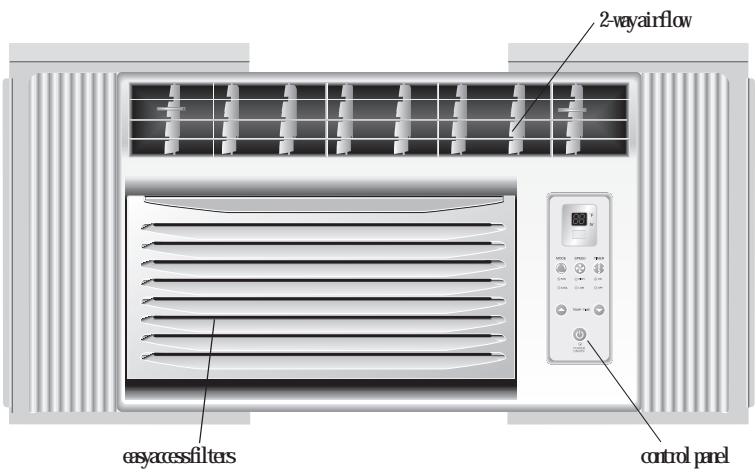
MODEL: HWR06XC5, ESA3055
- Thermostat
Tisallossoyatoqustetepnatureoftheir
Telerothetsettingthecoletheirtaperature
With this you can set the temperature to your desired comfort level. Your set the temperature
between 61^ and 86^ .
- fan Speed
You have 2 levels of Fan speed to set at your desired comfort level.
- Function.
Your air conditioner has 2 Functions.
a) COOL
hheithinaditionwillqratechopresr andthedesiredfaspedsettogveychilled cold air for your comfort.
b) Fan
You can run the fanonly on hot days. The fanahescttorun2 spedsstirebyyou
- Timer
Yurair condition canbesettogponoroffat yourdesire. This canbednupto24hours in advance.
- 2 Way Air Flow
Tessidrectionlonesleyantichhction
of the airflow in your required direction.
Their flowabadredghtside-leftside
- Window Install Kit
Etables to install the condition inbuilt
hungwindEtabradaets support needed
depending on your window. - Remote Control Thisfill fictional wireless access auto prepare your air conditioning fronadistare Yu rednathetogptudagettings the functions or to turn the unit on or off.
- LED Display Electronic Control Panel The 4 function LED displays Room Temperature, Temperature Setting, Timer Setting and Time Remaining to Stop/Start the unit. Electronic Control Panel lets you set the temperature to the Exact Temperature you desire.
- Electrostatic Filter (not all models)
Being constructed of high efficiency purifying
satisfyative cleanliness, electrostatic fabric
electrostatic空气净化 materials
it prifiesthemeffectively its way structure
increasestapability to filter dust smokes
effectively filter the pollution
it has a high purifying speed capable of strong airflow.
Features
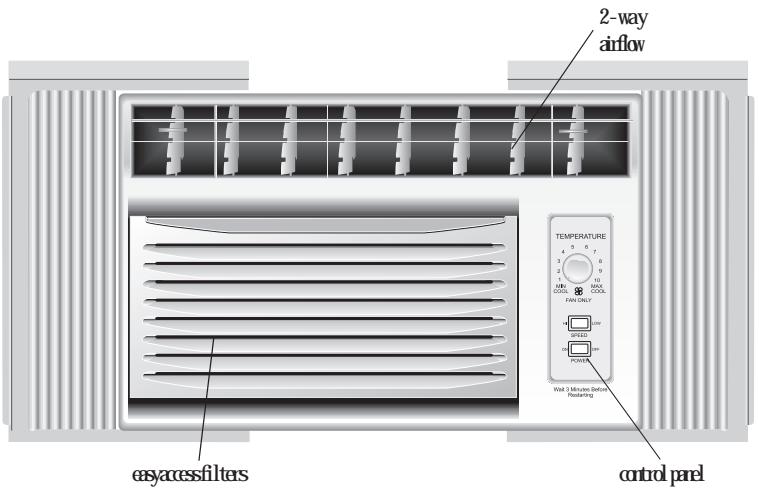
MODEL: HWF06XC5, ESAMD55
1. Temperature Set Knob
This knob adjusts the temperature of the air.
The Higher the setting the cooler the air
temperature. With this knob you can set the
temperature to your desired comfort level. Min. Cool being the warmest and Max. Cool being the coldest.
- MODE Set Switch
With this knob you can control the fan speed as well as the cooling speed.
You have 2 Fan speeds to choose from HI and LO.
3.2-Way Air Flow
The air directional louvers let you control the direction of the airflow in your required direction. The airflow can be directed right side - left side.
4. Window Install Kit.
Enables you to install the air conditioner in a double hung window. Extra brackets or support may be needed depending on your window.
Operating Guide
Normal Operating Sounds
The following sounds are normally heard during the operation of an air conditioner.
- Thermostat clicks. As the thermostat cycles on/off you will hear this sound.
Cool airflow movement as dictated by the set fan speed. - Water sounds. This is normal since your air conditioner acts as a dehumidifier also. Thus you will hear water sounds from water drops falling on the condenser.
- As the refrigerant flows through the inner sealed tubing a rushing noise may be heard.
- Rattling or vibrating noises may be heard due to poor wall or window installation.
- High pitch compressor sound may be heard.
Operating Instructions
Following are the operating instructions of your electronic air conditioner.
MODEL: HWR06XC5, ESA3055
Remote control and control panel operations
After installing your air conditioner plug it in to the proper electrical outlet in the wall. Keep the vent in the closed position. Now set the air conditioner at your comfort level. This full functional wireless remote allows you to operate your air conditioner without having to get up and go to the unit. The full function feature allows you to change the settings and turn the unit on or off from the remote itself. This control pad works the same as the control pad on the air conditioner.
(See Fig. # 1)
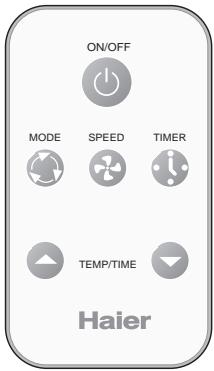
Fig.#1 Remote Control
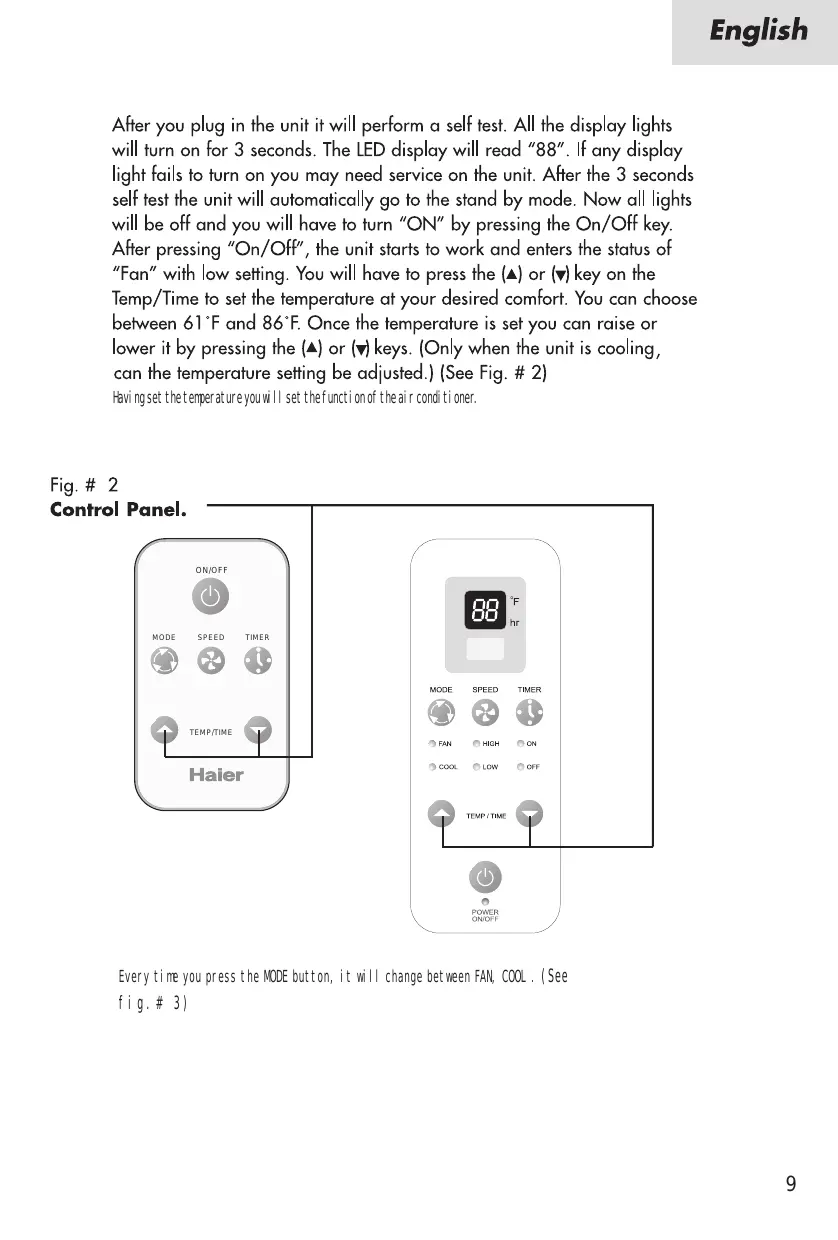
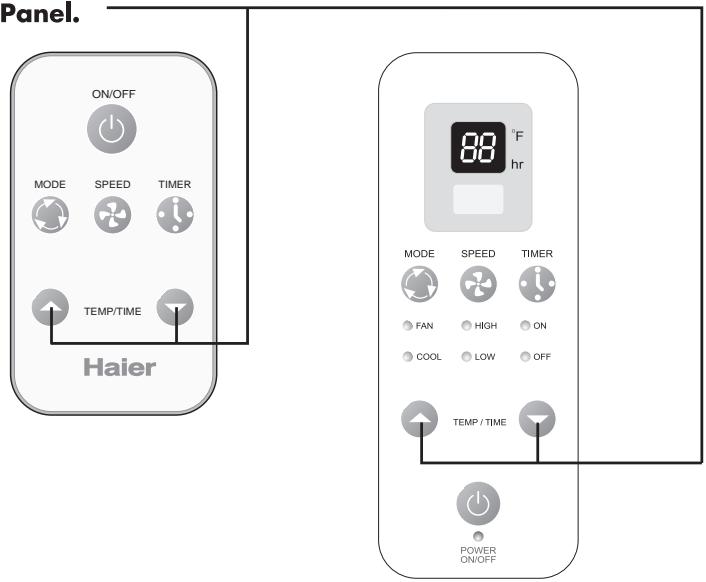
After you plug in the unit it will perform a self test. All the display lights will turn on for 3 seconds. The LED display will read "88". If any display light fails to turn on you may need service on the unit. After the 3 seconds self test the unit will automatically go to the stand by mode. Now all lights will be off and you will have to turn "ON" by pressing the On/Off key. After pressing "On/Off", the unit starts to work and enters the status of "Fan" with low setting. You will have to press the (▲) or (▼) key on the Temp/Time to set the temperature at your desired comfort. You can choose between 61^ and 86^ . Once the temperature is set you can raise or lower it by pressing the (▲) or (▼) keys. (Only when the unit is cooling, can the temperature setting be adjusted.) (See Fig. # 2)
Having set the temperature you will set the function of the air conditioner:
Fig. # 2
Control Panel.
Every time you press the MODE button, it will change between FAN, 000L. (See fig. # 3)
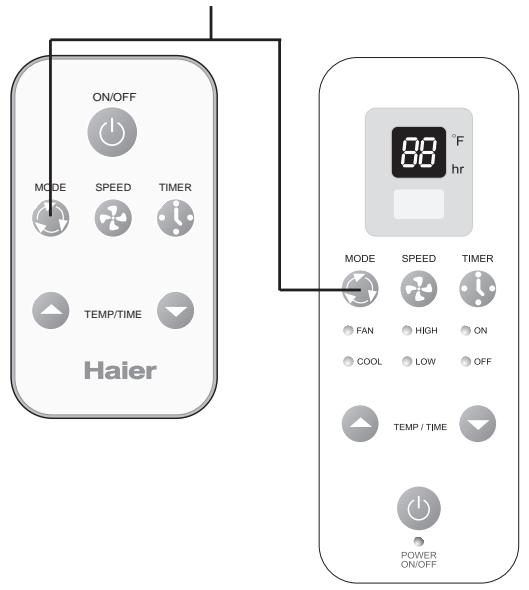
Fig.#3 Control Panel.
Once the function mode is decided you will have to set the fanspeed (See fig #4). Every time you press the SPEED button, fanspeed will change between LOW/ HIGH
1) If you choose the Cool mode you can run the fan in one of the 2 speeds HIGH, LOW
2) For cool days you may want to run the "FAN" function. Here the fan runs at one of 2 speeds, HIGH or LOW
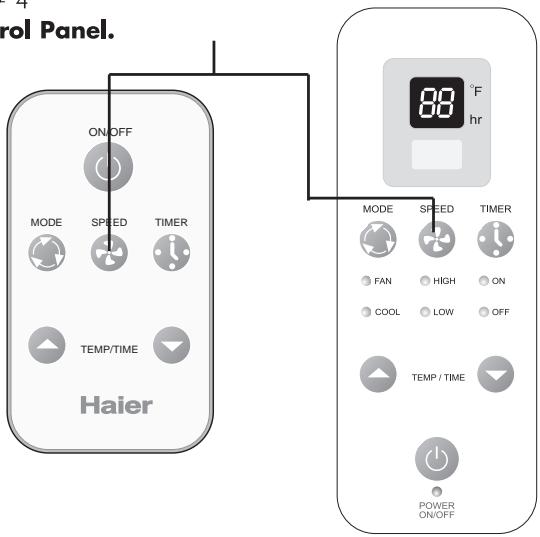
Fig. # 4 Control Panel.
Timer on or Timer off mode is used to pre-start or shut off your unit in advance. You can program this up to 24 hours in advance. You can use the Timer in functions i.e. COOL, FAN.
Timer on (See Fig. # 5)
Unitstbeontoset the tiner: Unitwill shdunautonicallyafter it acceptstsettingsin
5 seconds. Use this node to pre-set the start time of the unit 24 hours in advance.
a) PressTIMRON, LED display will show "X" (time set last time) when power is connected first time, LED display will show "01".
b) Set desired number of hours by pressing the (
pad of the Temp/Time buttons, one for each
hour. If you passed the desired time use the (
) pad key to lower the selection.
c) After set TIMER ON, LED display will show the time. This time displayed: unit will starts after X hours.
- Timer off (See Fig. # 5)
Unit must be running to set the timer off. Use this topreset the time you would like the unit to shut off.
a) PressTIMROFF LED display will show "X" (time: setlast time) when power is connected first time, LED display will show "01".
b) Set desired number by pressing the (
pad of the Temp/Time buttons.
One for each hour. If you passed the desired time, use the (
padkey to lower the selection.
c) After set TIMER OFF, LED display will show the room temperature about 5 seconds later.
When using the timer the unit will use/revert to the last 000L and fan settings when activated.
The timer must be reset every time you choose to use it.
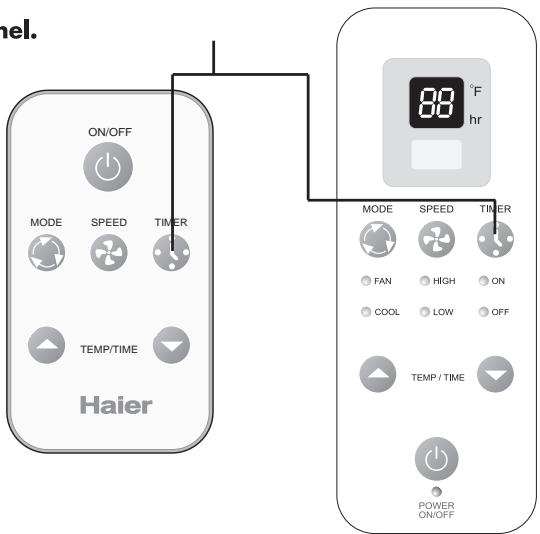
Rg #5 Control Panel.
Operating Instructions
MODEL: HWF06XC5
ESAM55
(See fig.#1)
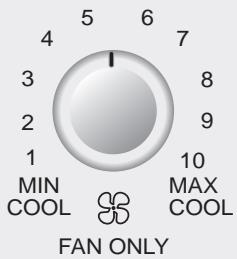
Fig #1
TEMPERATURE
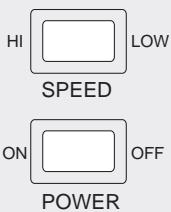
After installing your air conditioner, plug it into the proper electrical outlet in the wall.
POWER Turns air conditioner off.
SPEED "LOW" Low speed fan operation with cooling or not.
SPEED "HI" High speed fan operation with cooling or not.
This automatically controls the temperature of indoor air. Turn the knob so that arrow points to the cooler marks for more moderate cooling.
Normal Fan
- Turn the SPEED mode switch to the "HI" or the "LOW" setting.
- Set the thermostat control to the temperature mark "FAN ONLY".
Normal cooling
- Turn the SPEED mode switch to the "HI" or the "LOW" setting.
- Set the thermostat control to the desire temperature (the mid-point is a good starting position).
If the room temperature is not satisfactory after a reasonable time, adjust the control to a warmer setting, as appropriate.
Maximum cooling
- Turn the SPEED mode switch to the "HI" setting
- Set the thermostat control to the MAX COOL temperature mark.
Quieter operation
- Turn the SPEED mode switch to the "LOW" setting.
- Set the thermostat control as needed.
CAUTION:
1) Remember the compressor of your air conditioner will not work when the temperature goes below 65^ .
2] Also when you shut off the air conditioner wait for 3 minutes before turning it on again. This is the compressor cycle time.
3) If you have any trouble in operating your air conditioner please refer to the Trouble Shooting section.
Installations
Before you install your air conditioner check the following:
1) The unit is free of all obstructions inside and outside the room e.g. drapes, curtains, furniture, plants, shrubs, bushes, trees, other structures like building, garage etc. Air conditioner must have clear unobstructed airflow through the condenser to remove the heat.
2) The window is strong enough to hold the weight of the air conditioner. Extra brackets or supports may be needed depending on your windows. (Brackets or Supports not provided in all models)
3) The window sill and track are strong enough to hold the weight of the air conditioner.
4) The wall is strong enough to hold the unit. Extra brackets or supports may be needed depending on the wall. (Brackets or Supports not provided in all models).
5) There is adequate and proper power supply near the air conditioner.

6) DO NOT use adapter plugs.

7) DO NOT use extension cords.

8) DO NOT cut or remove the ground prong.

9) DO NOT modify the plug or the electrical wall outlet in any way. If plug does not fit the electrical outlet have a certified electrician do the necessary change.

10) DO NOT connect electrical power to the unit before installation.

11) DO NOT use if power cord is worn out, frayed or otherwise damaged. Avoid using if there are cracks or abrasion damage along the length, plug or connection.

12) DO NOT install into any existing cabinet or sleeve which does not have side and top air vents.

13) Be careful of exposed sharp edges of the cabinet and sharp coils (fins) on the back of the unit that could cut and cause serious injury.
Parts
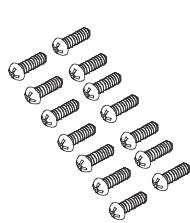
Parts Supplied
shutsnaw332
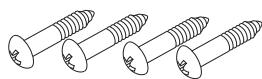
wooscrees31/32"
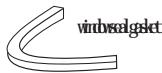
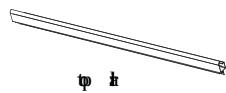
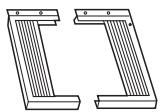
left and right side curtains
basepan angle
Model: HW06XC5, ESAM55
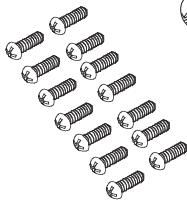
Parts Supplied
sntnss332
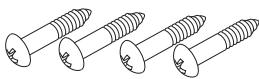
wooodscrees31/32
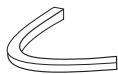
winbwalgslet
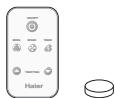
y13e 1s028C
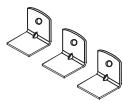
basepan angle
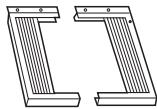
left and right side curtains
Model: H/RO605, ISA305
Tools
You will need to have the following tools to help you in the installation of your air conditioner.
- Scissors
-Phillips Screwdriver
Standard Screwdriver - Pliers
Wrench - Drill and Drill Bits
Tape Measure
Gloves - Level
- Sockets
Installing Unit into A Window
Window Opening Requirements
The air conditioner is designed to fit into double or single hung sash type windows. Each of the units comes with an installation kit that provides adjustable mounting louvers, to fill the gaps between the sides of the unit, and the window frame. The chart below reflects the dimensions of the units with, and without installation kits. Measure your window opening width and compare it to the chart below to ensure that it meets the minimum and maximum window width requirements.
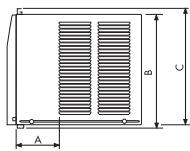
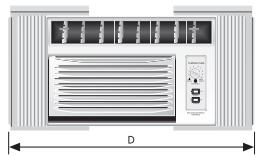
| Model Dimension | HWF06XC5, HWR06XC5, ESA3055, ESA055 |
| A(inch) | 5 3/2" |
| B(inch) | 2 3/5" |
| C(inch) | 3 2/5" |
| D(inch) Max | 3 1/5" |
| D(inch) Min | 2 1/2" |
| Case High | 2 7/61" |
| Case Width | 8 9/61" |
| Case Depth | 3 3/8" |
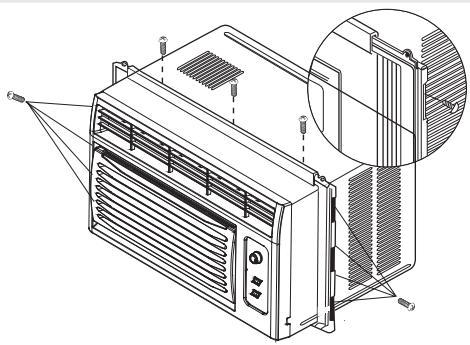
ASSEMBLE CURTAINS/TOPT RAIL
Installpailwithshot screws13/32".
Individually
tulitnalskei
Online Etatistics
tulvidBotses
13/32".
Caution: Never expose plastic front or grille to extreme temperatures.
2 PREPARE WINDOW FOR INSTALLATION
TieitkeiFstaktionaehhipods
vidatulqingidls22
nepfichiehckaeetichng!
bottom of the sash to the window stool.
261
indel(TEID)diinaiibillioBcBldf
t
tudillndlntnlndldlafoody
testonwindfian(SRWMNRA)aworkstrip
4IfthestandbetweSTMINDNMRNDMSRKP
MUNIBONIKPOFINBSIIISmehal
strip are not necessary.
"Teepadoesah
Wolfschrift
10832
fote
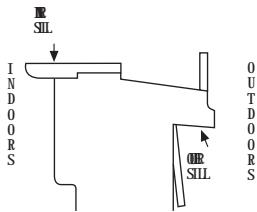
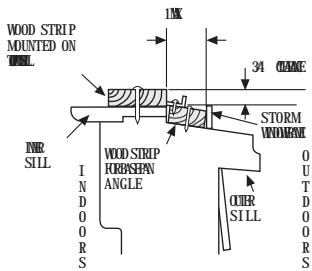
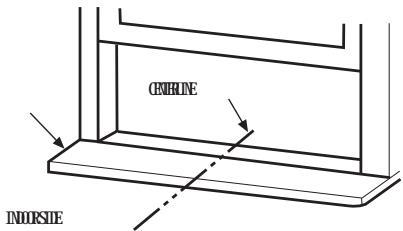
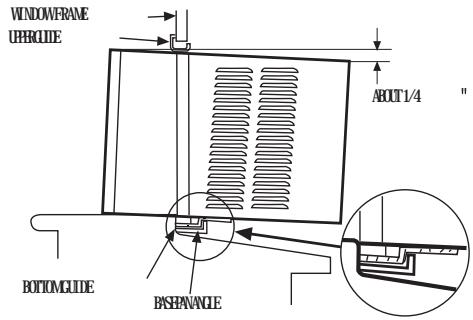
3 LOCATING UNIT IN WINDOW
Qelteinbadakataline
center of the inner sill.
INHIL
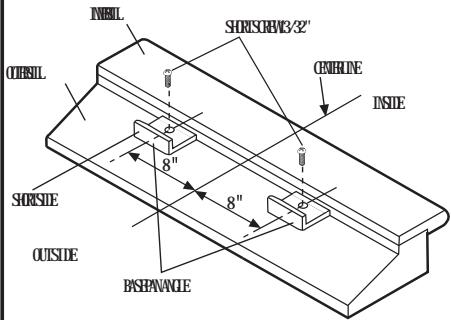
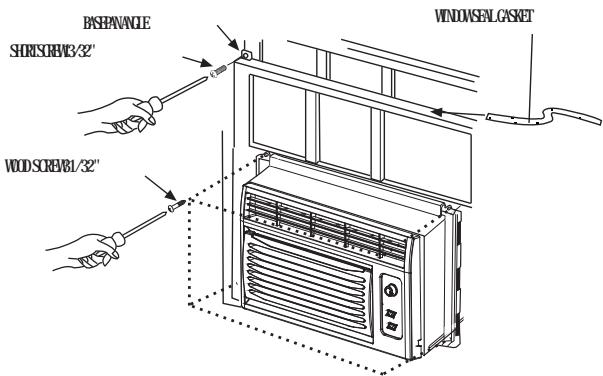
4 ATTACH BASEPAN ANGLE
Iitlllqulldidicdillil
tbsotfzqandxolst@ot
screws13/32" provided.
Tnagpdphtdthitsaeyjke
Pentapachopampajeejefhagpinbak
of inner sill.
5 INSTALL THE AIR CONDITIONER IN THE WINDOW
Gefalifliodionikatldip
viikldhtipidfieioe
dropsintotherthesofthebasarpangle
Wetadigridionzaffllige
Wvtsbalehldlepegeidfeir
conditioner.
6 INSTALL THE SEAL GASKET AND SASH LOCK
Ebeidertzindfelle
Wuhngangzhenes
31/32" to secure them
Githeszglgcttchweh
Wolfffokslake
gasolubipotet
ab
Esterhobzanggeing
short screw13/32".
Care and Cleaning Guide
- Always unplug your air conditioner before cleaning.
-
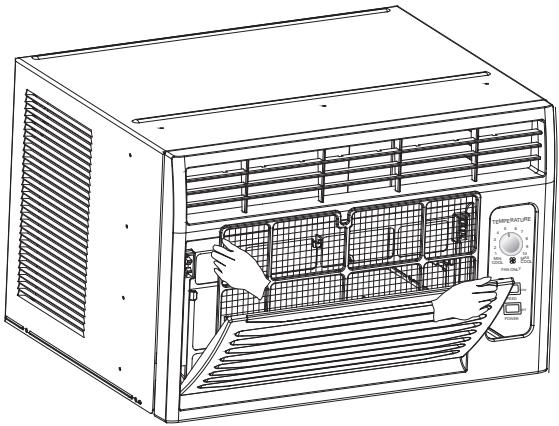
The air filter behind the front grille should be checked and cleaned at least once every 2 weeks or more often if necessary. To remove:
-
Open the inlet grille downward by pulling out the top of the inlet grille.
- Remove the air filter from the front grille assembly by pulling the air filter up slightly.
- Clean the filter with warm, soapy water below 40^(104^) .
-
Rinse and gently shake the water from the filter and let it dry before replacing it.
DO NOT use your air conditioner without the air filter in place. -
To clean the front panels or the cabinet DO NOT use harsh chemicals, abrasives, ammonia, chlorine, bleach, concentrated detergents, solvents or metal scouring pads.
Some of these chemicals may dissolve, damage and/or discolor your air conditioner.
- Always use a soft cloth dampened with water or mild soap and water solution to wipe the front of the cabinet.
Wipe dry with a soft cloth.
- To store your air conditioner, after the season, remove the unit from the window as per the installation guide. Repack the unit in its original box and store away. If you do not intend to remove it from the window then cover the outside with a winter cover.
This can be purchased from the retailer where you purchased your air conditioner or from your local hardware store.
- Before putting away your unit make sure any water left in the pan is removed and drained away. Water left in the pan could lead to Rusting or damage to the electrical connections.
Trouble-Shooting
If air conditioner does not operate:
- Check if unit is plugged in. The plug may have come loose.
- Check if the unit is in "Off" mode.
- The fan control may be in "Off" position.
Air from air conditioner is warm:
- The A/C setting may need to be raised.
- The temperature outside the room is below 65^ . The compressor will not cycle on if the temperature outside is below 65^ .
Ice formation on cooling coils:
- Outside temperature too cold. Set the unit on fan only setting to defrost ice.
- Lower temperature setting. Temperature setting may be too cold.
- Unit BTU may be too high for the room.
Air conditioner working but room not cooling:
- Room may have appliances that produce heat. Use an exhaust fan to remove excess heat.
- Redirect the airflow. Remove any obstacles.
- All doors and windows need to be closed so cool air does not escape the room.
Air filter may need cleaning. - Unit BTU may be too low for the required cooling area.
- On extreme hot & humid days air conditioners may take a little longer to cool.
Air conditioner is making noise when cooling:
You may hear sounds of air movement, water, compressor clicking on and off or window vibrations. Please read Operating Guide - Normal
Operating Sounds. (see page 8)
Water in the air conditioner cabinet:
This is normal as your air conditioner not only cools but also dehumidifies the air. If there is water dripping inside the room, check the installation of the unit. The unit may need to be reinstalled. (see page 18)
Limited Warranty
This warranty covers all defects in workmanship or materials for:
- The mechanical and electrical parts (including labor costs) contained in this Haier product, for a period of 12 months, from the date of purchase, (commercial or rental application, the warranty is 90 days).
- The sealed system and compressor contained in this Haier product is for a period of 5 years, from the date of purchase (excluding labor costs after the initial 12 month period). In commercial or rental use, the additional limited compressor warranty is for 1 year and 9 months, (excluding labor costs after the initial 90 days period).
You must keep and be able to provide your original sales receipt as proof of the date of purchase.
Who is covered?
The original retail purchaser of this Haier product.
What will be done?
Haier will repair or replace, in your home, any mechanical, electrical part or the compressor, which proves defective in normal household, use for a period of 12 months. Haier will repair or replace (excluding labor costs) the sealed system and compressor (parts only) for an additional 4 year period.
How can you get service?
- Contact your nearest Haier authorized Service Depot. For the name of the Service Depot nearest you, contact Haier at (877) 337-3639.
- All service must be performed, by an authorized Haier Service Depot.
THIS WARRANTY COVERS UNITS WITHIN THE CONTINENTAL UNITED STATES, CANADA AND PUERTO RICO.
THIS WARRANTY DOES NOT COVER:
- Damages from improper installation
- Damages in shipping
- Damages from misuse, abuse, accident, alteration, lack of proper care and maintenance
- Damages from service, by other than an authorized dealer or service center
Labor, service, transportation and shipping charges for the removal of defective parts and installation of a replacement part, beyond the initial 12 month period.
THIS LIMITED WARRANTY IS GIVEN IN LIEU OF ALL OTHER WARRANTYES, EXPRESS OR IMPLIED, INCLUDING THE WARRANTYES OF MERCHANTABILITY AND FITNESS FOR A PARTICULAR PURPOSE.
The remedy provided in this warranty is exclusive and is granted in lieu of all other remedies. This warranty does not cover incidental or consequential damages. Some states do not allow the exclusion of incidental or consequential damages, so this limitation may not apply to you. Some states do not allow limitations on how long an implied warranty lasts, so this limitation may not apply to you. This warranty gives you specific legal rights, and you may also have other rights, which vary from state to state.


