MaxModule Cerebrum - Lighting MARTIN - Free user manual and instructions
Find the device manual for free MaxModule Cerebrum MARTIN in PDF.


Pick your language and provide your email: we'll send you a specifically translated version.
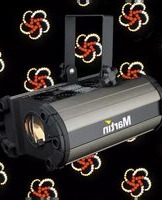
| Type de produit | Lighting fixture (moving head LED) |
| Marque | Martin |
| Modèle | MaxModule Cerebrum |
| Catégorie | Éclairage (Lighting) |
| Dimensions (L x l x H) | 450 x 300 x 200 mm |
| Poids | 8.5 kg |
| Alimentation électrique | 100-240 VAC, 50/60 Hz, 400 W max |
| Source lumineuse | LED RGBW 150 W |
| Angle du faisceau | 5° - 50° (motorized zoom) |
| Mouvement pan | 540° |
| Mouvement tilt | 270° |
| Contrôle DMX | Oui, via 5-pin XLR (16/32 bits) |
| Protocoles pris en charge | DMX512, RDM, Art-Net, sACN |
| Fonctions spéciales | Pixel mapping, stroboscope, dimmer électronique, macros intégrées |
| Refroidissement | Ventilateur axial, mode silence disponible |
| Indice de protection | IP20 (usage intérieur) |
| Température ambiante | 0°C à 40°C |
| Entretien | Nettoyer les optiques avec un chiffon doux non pelucheux et produit adapté. Vérifier la ventilation régulièrement. |
| Sécurité | Utiliser un câble de sécurité. Ne pas regarder directement le faisceau. Débrancher avant intervention. |
| Pièces détachées | Disponibles via réseau de service agréé Martin. |
| Réparabilité | Conçu pour être réparable. Contacter un technicien Martin pour pièces et maintenance. |
Frequently Asked Questions - MaxModule Cerebrum MARTIN
How do I connect the MaxModule Cerebrum to a DMX controller?
Use a standard 5-pin XLR cable to connect the fixture's DMX input to your controller. Ensure proper termination with a 120Ω resistor if needed. The fixture supports DMX512 and RDM.
What is the maximum power consumption of this fixture?
The MaxModule Cerebrum has a maximum power consumption of 400 W at full output. Check the mains voltage rating on the label before connecting.
Can I use the fixture outdoors?
No, the MaxModule Cerebrum has an IP20 rating, meaning it is only suitable for indoor use. Protect it from moisture and dust.
How do I change the zoom angle?
Use the fixture's motorized zoom via DMX control. The zoom range is from 5° (narrow) to 50° (wide). Refer to the user manual for DMX channel mapping.
What should I do if the fan stops working?
If the fan stops, the fixture may overheat. Immediately turn off the power and contact a qualified technician. Do not operate the fixture until the fan is repaired or replaced.
How do I reset the pan/tilt?
To reset pan and tilt, send a DMX reset command (usually channel 1 value 0 or via fixture menu). The head will move to center and recalibrate. Refer to the manual for exact procedure.
Can I control the fixture wirelessly?
Yes, the MaxModule Cerebrum supports Art-Net and sACN protocols over Ethernet. With a compatible wireless bridge, you can achieve wireless control.
What is the recommended cleaning method for the lenses?
Use a soft, lint-free cloth slightly dampened with a lens cleaner. Avoid abrasive cleaners. Clean the optics gently to prevent scratches and maintain light output.
How do I update the firmware?
Firmware updates are performed via the RJ45 port using Martin’s firmware upgrade tool. Download the latest firmware from the Martin website and follow the instructions.
The fixture is not responding to DMX. What could be wrong?
Check the DMX cable and connection. Ensure the controller is set to the correct universe and the fixture's DMX address matches. Try power cycling the fixture. If the problem persists, try a DMX terminator or test with a different controller.
User questions about MaxModule Cerebrum MARTIN
0 question about this device. Answer the ones you know or ask your own.
Ask a new question about this device
No questions yet. Be the first to ask one.
Download the instructions for your Lighting in PDF format for free! Find your manual MaxModule Cerebrum - MARTIN and take your electronic device back in hand. On this page are published all the documents necessary for the use of your device. MaxModule Cerebrum by MARTIN.
USER MANUAL MaxModule Cerebrum MARTIN
Manual assistant
Powered by Anthropic
Waiting for your message
Product information
Brand : MARTIN
Model : MaxModule Cerebrum
Category : Lighting