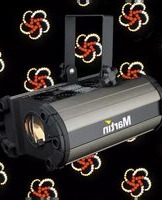
Mania EF4 - Lighting MARTIN - Free user manual and instructions
Find the device manual for free Mania EF4 MARTIN in PDF.


| Product Type | Lighting Effect |
| Brand | Martin |
| Model | Mania EF4 |
| Category | Stage Lighting |
| Light Source | LED 100W |
| Power Consumption | 150W |
| Input Voltage | 100-240V AC 50/60Hz |
| DMX Channels | 4 Channels |
| Control Modes | DMX512, Sound Active, Auto, Master/Slave |
| Dimensions (L x W x H) | 350 x 250 x 180 mm |
| Weight | 3.2 kg |
| Housing Material | Metal and Plastic |
| Color | Black |
| IP Rating | IP20 (Indoor Use Only) |
| Safety Features | Overheat Protection, CE, RoHS |
| Cooling | Fan Cooled |
| Fuse | T1A 250V |
| Operating Temperature | 0°C to 40°C |
| Suitable For | Stage, Club, Disco |
| Accessories Included | Power Cord, Mounting Bracket, User Manual |
| Certifications | CE, RoHS |
| Cleaning Instructions | Wipe with dry cloth, avoid solvents |
| Warranty | 2 Years (Limited) |
Frequently Asked Questions - Mania EF4 MARTIN
User questions about Mania EF4 MARTIN
0 question about this device. Answer the ones you know or ask your own.
Ask a new question about this device
Download the instructions for your Lighting in PDF format for free! Find your manual Mania EF4 - MARTIN and take your electronic device back in hand. On this page are published all the documents necessary for the use of your device. Mania EF4 by MARTIN.
USER MANUAL Mania EF4 MARTIN
natural_image
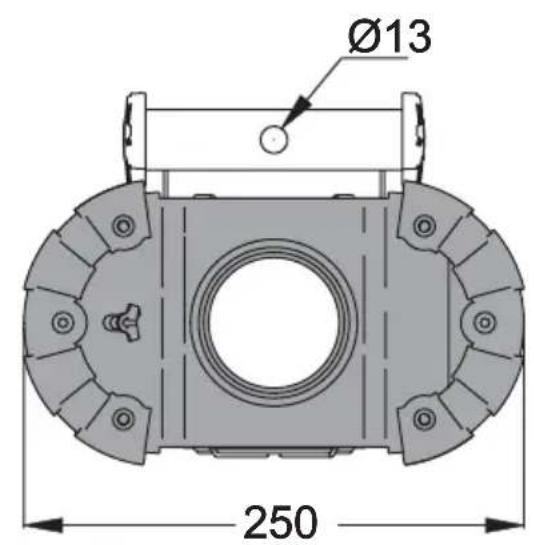
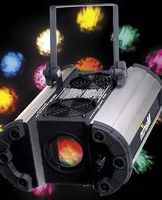
Black and silver Martin lighting fixture with adjustable handle and central lens (no text or symbols visible on body)Measurements are expressed in millimeters.

© 2007 Martin Professional A/S. All rights reserved. No part of this manual may be reproduced, in any form or by any means, without permission in writing from Martin Professional A/S. Information subject to change without notice. Martin Professional A/S and all affiliated companies disclaim liability for any injury, damage, direct or indirect loss, consequential or economic loss or any other loss occasioned by the use of, inability to use or reliance on the information contained in this manual.
P/N 35000154, Rev. B
Introduction 4
Safety information 4
Unpacking 6
Mania EF4 overview 6
Installation 7
AC power 7
Overhead mounting 8
Operation 10
Setting the trig mode 10
The gobo wheel 11
Focusing the Mania EF4 12
Basic service 13
Cleaning 13
Lamp maintenance 14
Mains fuse 16
Troubleshooting 18
Specifications 19
Thank you for selecting a Martin Mania EF4. The Mania EF4 is a pre-programmed, music-activated, DJ effect with a motorized rotating mirrored-reflector and a motorized rotating-wheel with 8 static gobos (gobos are outlines or masks placed in a light beam to create different patterns).
SAFETY INFORMATION
Warning! This product is not for household use. It presents risks of lethal or severe injury due to fire and heat, electric shock, and falls.
Read this manual before powering or installing the fixture, follow the safety precautions listed below and observe all warnings in this manual and printed on the fixture. If you have questions about how to operate the fixture safely, please contact a Martin distributor for assistance. Refer any service operation not described in this manual to a qualified technician. Do not modify the fixture or install other than genuine Martin accessories and upgrade kits.
Refer servicing to qualified personnel.
Maximum ambient temperature T_a = 40^ (104°F).
See serial label for replacement fuse size and lamp type.
Suitable for mounting on normally flammable surfaces.
Do not look directly into the light.
Risk of fire, electrical shock and burns.
Use only in dry locations.
For indoors use only.
Do not block exhaust vents.
Replace shields, lenses or ultraviolet screens if they become visibly damaged to the extent that their effectiveness is impaired, for example, by cracks or deep scratches.
Replace the lamp if it becomes damaged or thermally deformed.
If the external power cord of this luminaire is damaged, it must be replaced by a special cord exclusively available from your Martin dealer.
Avoiding electric shocks
Warning Always disconnect from mains power before replacing the lamp, fuses, or any part, and when not in use.
- Before operation ensure that factory setting of voltage and frequency match local power supply.
- Always ground (earth) the fixture electrically.
- Use only a source of AC power that complies with local building and electrical codes and has both overload and ground-fault protection.
- Do not expose the fixture to rain or moisture.
- Never operate the fixture with missing or damaged lenses and/or covers.
Protecting yourself and others from burns and fire
Warning Hot lamp. The exterior of the fixture can become hot. Allow to cool for at least 20 minutes before handling or opening.
- Surface temperature under steady state condition = 100°C (212°F).
- Minimum distance to flammable material = 0.3 m (1 ft).
- Minimum distance to illuminated surface 1.0 m (3.3 ft).
- Never attempt to bypass the thermostatic switch or fuses. Always replace defective fuses with ones of the specified type and rating.
- Ensure that the air flow through vents is free and unobstructed.
- Provide a minimum clearance of 0.1 meters (4 inches) around air vents.
- Never place filters or other materials over the lens or in the optical path.
- The exterior of the fixture can become hot. Allow the fixture to cool for at least 20 minutes before handling.
- Do not operate the fixture if the ambient temperature ( T_a ) exceeds 40° C (104° F).
- Do not stare directly into the light.
- Never operate the fixture without all lenses and covers installed: an unshielded lamp emits dangerous UV radiation that can cause burns and eye damage.
Preventing injuries due to falls
- When suspending the fixture above ground level, verify that the structure can hold at least 10 times the weight of all installed devices.
- Verify that all external covers and rigging hardware are securely fastened and use an approved means of secondary attachment such as a safety cable.
- Block access below the work area whenever installing or removing the fixture.
UNPACKING
The packing material is carefully designed to protect the fixture during shipment - always use it to transport the fixture.
The Mania EF4 comes with the following:
• 3-wire IEC power cable
- User manual
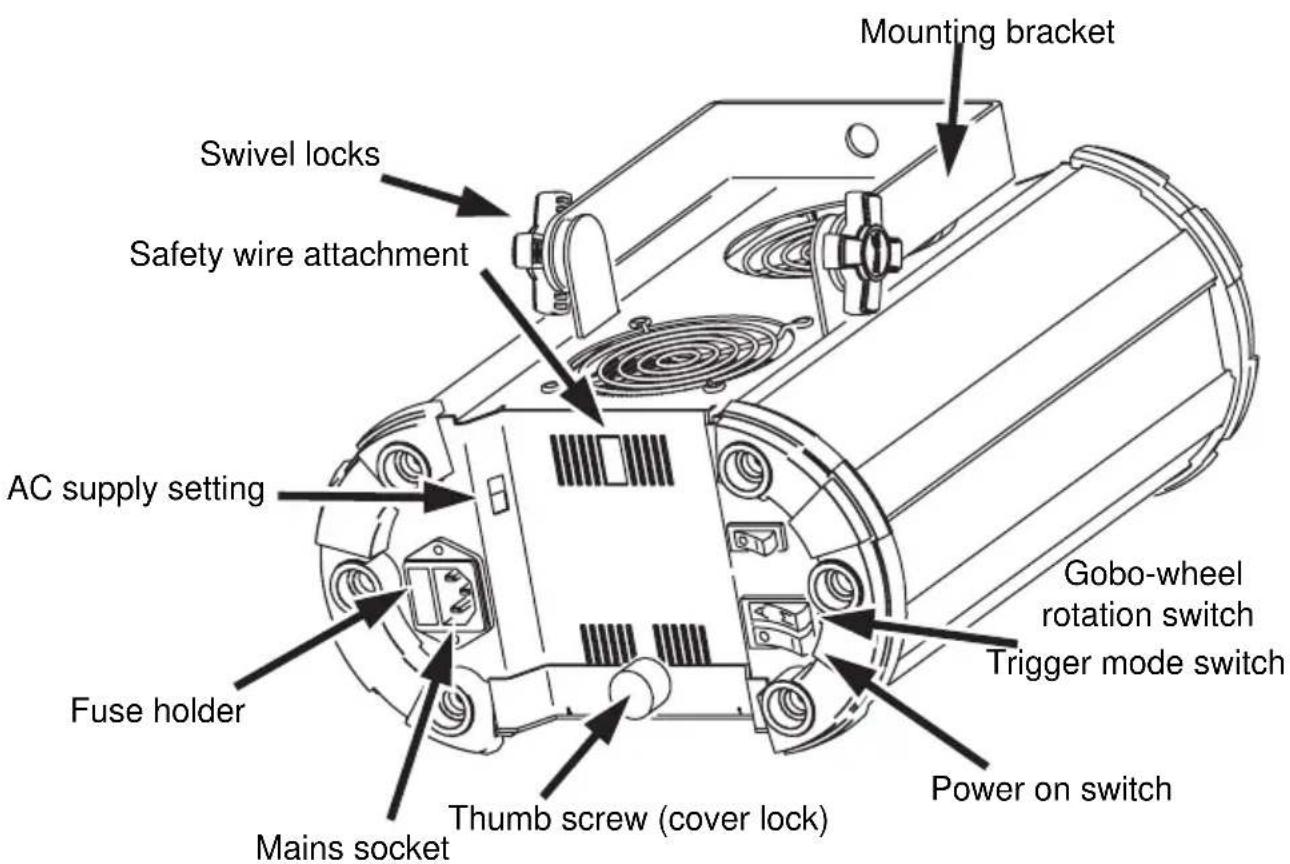
MANIA EF4 OVERVIEW
AC POWER
Before operation ensure that factory setting of voltage and frequency match local power supply.
Always ground (earth) the fixture electrically.
Use only a source of AC power that complies with local building and electrical codes and has both overload and ground-fault protection.
Note: If the external power cord of this luminaire is damaged, it shall be replaced by a special cord exclusively available from your Martin dealer.
Configuring for local mains power
The Mania EF4 has a switch-selectable power supply that can operate in the following voltage ranges at 50-60 Hz:
• 115 - 120 volts (setting 115)
• 220 - 240 volts (setting 230)
Warning Do not operate the fixture on a power supply that falls outside of these ranges.
Select the operating range using the red AC supply switch at the rear of the fixture.

Installing a plug on the mains lead
Warning! For protection from dangerous electric shock, the fixture must be grounded (earthed). The AC mains supply shall have overload and ground-fault protection.
Important! Verify that the feed cables are undamaged and rated for the current requirements of all connected devices before use.
The fixture's mains lead may require a grounding-type cord cap that fits your power distribution cable or outlet. Consult a qualified electrician if you have any doubts about proper installation.
Following the cord cap manufacturer's instructions, connect the appropriate wires to ground (earth), live, and neutral. The following table below shows some common wire identification schemes.
Function Wire (EU) Wire (US)
| live | brown | black |
| neutral blue white | ||
| ground | yellow/green | green |
Applying power
1 Connect the mains power cable to the fixture at the 3-prong IEC male input socket at the rear of the fixture.

2 Turn the lamp on using the power on switch.
OVERHEAD MOUNTING
The Mania EF4 is designed to be hung overhead with a clamp (not included).
Warning! Block access below the work area before proceeding.
Always use a secure means of secondary attachment.
For indoors use only.
To hang the Mania EF4 on an overhead support:
1 Verify that the structure can support at least 10 times the weight of all installed fixtures, clamps, cables, auxiliary equipment, and other items.
2 If hanging the fixture with a rigging clamp, verify that the clamp is undamaged and is designed for the fixture's weight. Bolt the clamp securely to the mounting bracket on the fixture with a grade 8.8 (minimum) M12 bolt and lock nut, or as recommended by the clamp manufacturer, through the clamp hole in the mounting bracket.
3 If permanently installing the fixture, verify that the hardware (not included) and mounting surface can bear at least 10 times the fixture's weight.
4 Working from a stable platform, clamp or fasten the fixture to the structure.
5 Install a safety cable that can hold at least 10 times the weight of the fixture through the safety cable attachment point on the fixture.
6 Loosen the swivel locks, tilt the fixture to the desired angle, and retighten.

7 Verify that the fixture is at least 1 meters (3.3 ft.) from the surface to be illuminated and at least 0.3 meters (1 ft.) from any combustible materials. Verify that the clearance around the air vents is at least 0.1 meters (4 in.).
OPERATION
3
The lamp will light when the power-on switch at the back of the fixture is turned on.
To achieve optimal results, the use of smoke effects together with your Mania EF4 is recommended.
SETTING THE TRIG MODE
Use the switch on the back of the fixture to set it to Auto or Music trig mode.
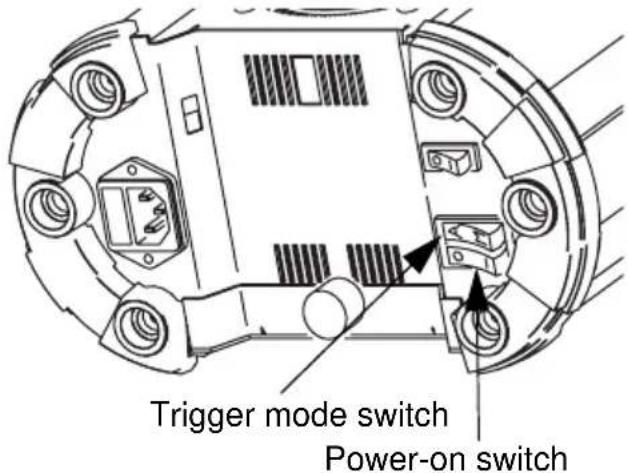
In:
- Auto Trig mode trigger signals are generated randomly. This will result in unsynchronized operation that is not in time with music.
- Music Trig mode the built-in microphone will generate trigger signals as a result of sounds that it picks up. This will result in synchronous effects in time with any music that is being played.
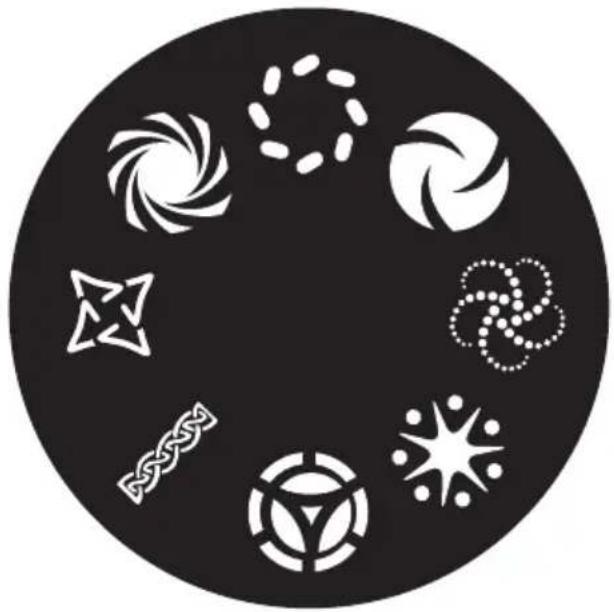
The Mania EF4 contains the following gobo wheel.
natural_image
Circular black-and-white graphic with eight white geometric and symbolic icons (no text or symbols)Gobo-wheel rotation is activated and deactivated using the gobo-wheel rotation switch:
- The wheel will stop when the switch is set to O.
- In Auto trig mode the wheel will rotate when switch is in position I or II.
- In Music trig mode the wheel will react to the beat of the music in position II, or will spin continuously in position I.

natural_image
Technical line drawing of a vehicle chassis with labeled components (no text or symbols)Gobo-wheel rotation switch
Note that it is the whole wheel, and not the individual gobos, that rotates.
The focus is adjusted using the mechanism next to the lens. This is easiest to do in Music Trig mode while no music is being played. Pull the mechanism out, or push it in, until a sharp image is acquired.

natural_image
Technical diagram of a mechanical assembly with directional arrows indicating movement or force (no text or symbols)BASIC SERVICE
This chapter describes the maintenance procedures that you can perform yourself.
Warning The exterior of the fixture can become hot. Always disconnect the fixture from AC power and allow to cool for at least 20 minutes before handling or opening.
CLEANING
Regular cleaning of the elements in the optical path, as well as the air vents, is vital to maintaining the operational quality of the Mania EF4.
Important! Excessive dust, smoke fluid, and particulate buildup degrades performance and causes overheating and damage to the fixture that is not covered by the warranty.
Cleaning the air vents
To maintain adequate cooling, dust must be cleaned from the air vents periodically. Remove dust from the air vents with a soft brush, cotton swab, vacuum, or compressed air.
Cleaning optical components
Clean the optical components regularly. The presence of smudges or dust on optical surfaces can reduce the strength of the light output and the quality of the effects.
Use care when cleaning optical components and work in a clean, well lit area. The coated surfaces are fragile and easily scratched. Do not use solvents that can damage plastic or painted surfaces.
1 Disconnect the fixture from power and allow it to cool for 20 minutes.
2 Remove the thumb screw holding the cover in place.

3 Slide the fixture cover open as far as possible (there is a physical stop point that prevents access to the power supply section).

natural_image
Technical line drawing of a mechanical device with internal components and directional arrows indicating flow or movement (no text or symbols)4 Vacuum or gently blow away dust and loose particles with compressed air.
5 Remove stuck particles with an unscented tissue or cotton swab moistened with glass cleaner or distilled water. Do not rub the surface: lift the particles off with a soft repeated press.
6 Remove smoke, and other, residues with cotton swabs or unscented tissues moistened with isopropyl alcohol. A commercial glass cleaner may be used, but residues must be removed with distilled water. Clean with a slow circular motion from center to edge. Dry with a clean, soft and lint-free cloth or compressed air.
7 Close the fixture cover and tighten the thumb screw, taking care not to trap any loose wires.
LAMP MAINTENANCE
Warning Isolate electrically before re-lamping. The lamp shall be changed if it becomes damaged or thermally deformed.
Caution Hot lamp.
Only the Philips 12V EFP/8H 100W (type No 6834) lamp is supported (Martin P/N 97000004). These lamps normally last for 800 hours of operation.
Warning Installing any other lamp may damage the fixture!
Installing a lamp in the Mania EF4
1 Disconnect the fixture from power and allow it to cool for 20 minutes.
2 Remove the thumb screw holding the cover in place.

3 Slide the fixture cover open as far as possible (there is a physical stop point that prevents access to the power supply section).

natural_image
Technical illustration of a mechanical device with internal components and directional arrows indicating motion (no text or symbols)4 Grasp the old lamp by the reflector and slide it carefully out of the lamp holder.
5 Pull the socket off the lamp. Do not pull the wires.

natural_image
Technical line drawing of a mechanical device with a bell and adjustment knob (no text or symbols)6 Push the socket fully onto the pins of the new lamp.
7 Clean the glass bulb and reflector with a cloth, particularly if your fingers touched the glass. A clean, lint-free cloth wetted with alcohol is best.
8 Gently push the lamp into the holder until it snaps into place.
9 Close the fixture cover and tighten the thumb screw.
MAINS FUSE
The Mania EF4 uses a time-delay fuse for protection against current overload. An indication that the fuse may have blown is that when power is applied and the lamp is switched on, no light is produced.
If the fuse blows repeatedly, there is a fault with the unit that requires service by a Martin technician.
Never bypass the fuse or replace it with one of another size or rating.
Replacing the main fuse
1 Unplug the mains cable from the input socket.
2 Pry open the fuse holder (located next to the mains power connector) with a flat-head screwdriver and remove the fuse.
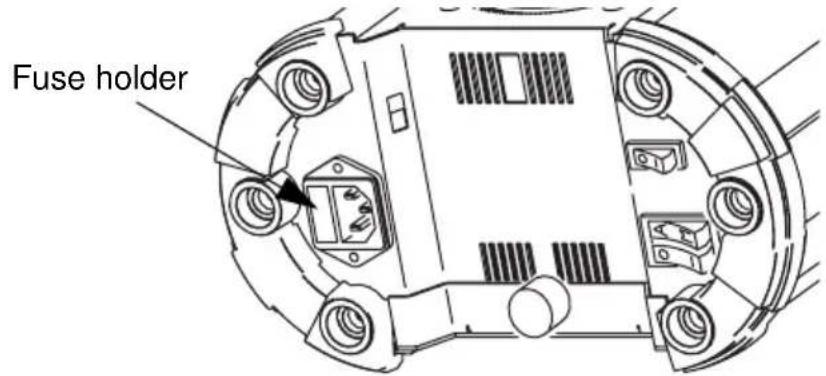
3 Replace the fuse with one of the same type. The fuse rating is listed on the serial number label and in "Specifications" on page 19.
4 Replace the fuse holder.
TROUBLESHOOTING
| problem probable cause(s) suggested remedy | ||
| No light No power to the fixture | Check connections | |
| Blown fuse If power is applied | and the lamp is switched on, but does not light, then check and replace fuse if necessary. | |
| Burned out lamp Install new lamp | ||
| Fixture to hot Allow to cool | Improve air flow around fixture | |
| No action Sound too low to activate control circuit | Increase volumeMove speakers closer | |
| Electrical malfunction Refer to a Martin service technician | ||
| Fuse blows repeatedly Electrical malfunction Refer to a Martin service technician | ||
SPECIFICATIONS
PHYSICAL
Size without mounting bracket (LxWxH). . 312 x 250 x 142mm (12.3 x 9.8 x 14.2in)
Weight. 6.5 kg (14.3lb)
CONSTRUCTION
Housing. .... steel and aluminum
THERMAL
Exterior surface temperature under steady state condition ..... 100°C (212°F)
Time required to cool before handling ....at least 20 minutes
Maximum ambient temperature ( T_a ) 40°C (104°F)
INSTALLATION
Minimum distance to flammable material 0.3 m (1ft)
Minimum distance to illuminated surface 1.0 m (3.3ft)
Minimum clearance around air vents 0.1 m (4in)
CONTROL AND PROGRAMMING
Stand-alone triggers . . . . . . . . . . . . . . . . . . . . . . . . . . . . . . . . . . . . . . . . . . . . . . . . . . . . music or auto
ELECTRICAL
Input 3-prong IEC male socket
AC Power .. switch selectable, operating ranges 115-120 V / 220-240 V, 50-60 Hz
Main fuse 2 AT (time delay),
TYPICAL POWER AND CURRENT
120 V, 50 Hz ..... 115 W, 1.0 A
120 V, 60 Hz ..... 113 W, 0.9 A
230 V, 50 Hz ..... 106 W, 0.5 A
230 V, 60 Hz .....105 W, 0.5 A
240 V, 50 Hz ..... 114 W, 0.5 A
240 V, 60 Hz 113 W, 0.5 A
APPROVALS

US Safety.....UL 1573
Canadian Safety ....CSA C22.2 No.166
EU Safety.....EN 60598-2-17 + Corr. A2
EU EMC.. EN 55015, 61547, 61000-3-2 & 61000-3-3
INCLUDED ITEMS - US VERSION
2 m (6.5 ft) US mains cable 18AWG with US male connector (UL approved) Philips 12V EFP/8H 100W lamp User manual
INCLUDED ITEMS - NON-US VERSION
3 m (9.8 ft) EU mains cable 3x1.0mm ^2 with Schuko male connector 3 m (9.8 ft) EU mains cable 3x1.0mm ^2 with no male connector Philips 12V EFP/8H 100W lamp User manual
ACCESSORIES
Philips 12V EFP/8H 100W lamp P/N 97000004 Half-coupler clamp P/N 91602005 Fuse (2 AT) P/N 05020009
ORDERING INFORMATION
Mania EF4 non-US version.... P/N 90430064 Mania EF4 US version.... P/N 90430065
natural_image
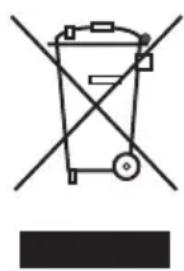
Simple line drawing of a trash bin with crossed lines indicating no waste or restriction (no text or symbols)Disposing of this product
Martin® products are supplied in compliance with Directive 2002/96/EC of the European Parliament and of the Council of the European Union on WEEE (Waste Electrical and Electronic Equipment), as amended by Directive 2003/108/EC, where applicable.
Help preserve the environment! Ensure that this product is recycled at the end of its life. Your supplier can give details of local arrangements for the disposal of Martin products.
- Introduction 4
- Installation 7
- Operation 10
- Basic service 13
- Troubleshooting 18
- Specifications 19
- SAFETY INFORMATION
- Avoiding electric shocks
- Warning Always disconnect from mains power before replacing the lamp, fuses, or any part, and when not in use.
- Protecting yourself and others from burns and fire
- Warning Hot lamp. The exterior of the fixture can become hot. Allow to cool for at least 20 minutes before handling or opening.
- Preventing injuries due to falls
- UNPACKING
- MANIA EF4 OVERVIEW
- AC POWER
- Configuring for local mains power
- Warning Do not operate the fixture on a power supply that falls outside of these ranges.
- Installing a plug on the mains lead
- OVERHEAD MOUNTING
- Always use a secure means of secondary attachment.
- For indoors use only.
- OPERATION
- 3
- SETTING THE TRIG MODE
- BASIC SERVICE
- CLEANING
- Cleaning the air vents
- Cleaning optical components
- LAMP MAINTENANCE
- Caution Hot lamp.
- Installing a lamp in the Mania EF4
- MAINS FUSE
- Replacing the main fuse
- TROUBLESHOOTING
- SPECIFICATIONS
- PHYSICAL
- CONSTRUCTION
- THERMAL
- INSTALLATION
- CONTROL AND PROGRAMMING
- ELECTRICAL
- TYPICAL POWER AND CURRENT
- APPROVALS
- INCLUDED ITEMS - US VERSION
- INCLUDED ITEMS - NON-US VERSION
- ACCESSORIES
- ORDERING INFORMATION
- Disposing of this product
Brand : MARTIN
Model : Mania EF4
Category : Lighting