
PHOTO VIEWER - Digital photo frame PARROT - Free user manual and instructions
Find the device manual for free PHOTO VIEWER PARROT in PDF.


| Product Type | Digital Photo Frame |
| Brand | Parrot |
| Model | PHOTO VIEWER |
| LCD Screen Size | 3.5 inches |
| Screen Resolution | 320 x 234 pixels (QVGA) |
| Displayable Colors | 262144 colors |
| Internal Memory | 32 MB (storage for over 100 photos) |
| Supported Image Formats | JPEG |
| Wireless Connectivity | Bluetooth (FTP, OPP, BIP profiles) |
| Maximum Number of Paired Devices | 10 |
| Power Supply | 100-240 V, 50/60 Hz (power adapter included) |
| Weight (frame only) | 250 g |
| Dimensions (W x H) | 125 x 146 mm |
| Brightness Sensor | Yes, for automatic backlight |
| Orientation | Portrait and landscape (auto rotation) |
| Main Menu Functions | Rotate clockwise/counterclockwise, thumbnails, delete, slideshow, preferences |
| Backlight Settings | Automatic, manual (via Power button), or time range |
| Software Update | Via Bluetooth (download from www.parrot.biz) |
| Cleaning | Dry cloth only |
| Intended Use | Indoor only |
Frequently Asked Questions - PHOTO VIEWER PARROT
User questions about PHOTO VIEWER PARROT
0 question about this device. Answer the ones you know or ask your own.
Ask a new question about this device
Download the instructions for your Digital photo frame in PDF format for free! Find your manual PHOTO VIEWER - PARROT and take your electronic device back in hand. On this page are published all the documents necessary for the use of your device. PHOTO VIEWER by PARROT.
USER MANUAL PHOTO VIEWER PARROT
IMPORTANT SAFETY INSTRUCTIONS

Europe
- This apparatus shall not be exposed to dripping or splashing and no object filled with liquid, such as vases, shall be placed on the apparatus.
- The AC/DC adaptor which provides disconnection from mains supply shall remain readily operable. Unplug this apparatus when unused for long periods of time.
North America
- Read these instructions
- Keep these instructions
- Heed all warnings
- Follow all instructions
- Do not use this apparatus near water
- Clean only with dry cloth
- Do not block any ventilation openings. Install in accordance with the manufacturer's instructions.
- Do not install near any heat as radiations. Heat registers, stoves or other apparatus (including amplifiers) that produce heat.
- Do not defeat the safety purpose of the polarized or grounding type plug. A polarized plug has two blades with one wider than the other. A grounding type plug has two blades and a third grounding prong. The wide blade or the third prong are provided for your safety. If the provided plug does not fit into your outlet, consult an electrician for replacement of the obsolete outlet.
- Protect the power cord from being walked on or pinched particularly at plugs, convenience receptacles, and the point where they exit from the apparatus.
- Only use attachments/accessories specified by the manufacturer
- Unplug this apparatus during lightning storms or when unused for long periods of time.
- Refer all servicing to qualified service personnel. Servicing is required when the apparatus has been damaged in any way, such as power supply cord or AC/DC adaptor is damaged, liquid has been spilled or objects have fallen into the apparatus, the apparatus has been spilled or objects have fallen into the apparatus, the apparatus has been exposed to rain or moisture, does not operate normally, or has been dropped.
- 10.
CONTENTS
IMPORTANT SAFETY INSTRUCTIONS 04
INTRODUCTION 06
KIT CONTENTS 07
QUICK START GUIDE 07
Switching On 08
SENDING PHOTOS 08
Sending from a Phone or PDA 08
Sending from a Computer 09
FRAME POSITION 10
BACKLIGHT 11
MENUS 11
Scrolling Through the Menus
Menu Description 12
MAIN MENU. 12
SETTINGS 14
UPDATING THE SOFTWARE 15
HOTLINE 15
SPECIFICATIONS 16
GENERAL INFORMATION 129
INTRODUCTION
Thank you for purchasing the Parrot PHOTO VIEWER.
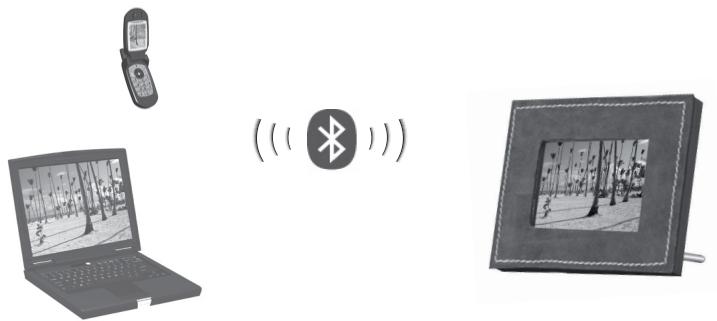
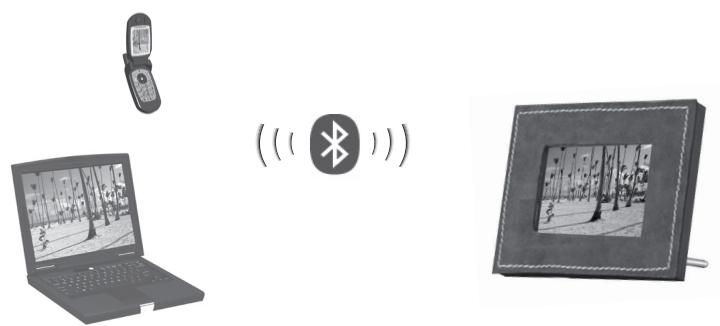
The Parrot PHOTO VIEWER is an LCD photo frame (320 x 234 pixels). Photos can be sent to the viewer from a mobile phone, PDA or computer via Bluetooth.
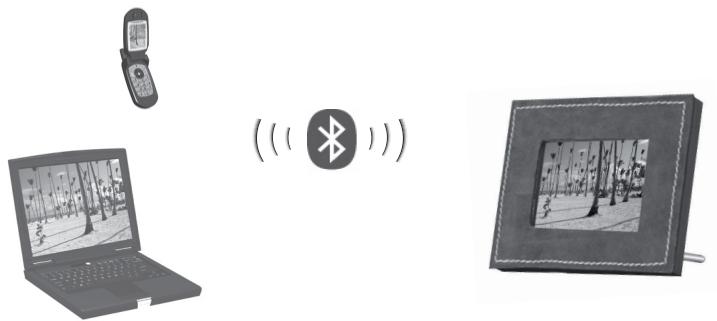
Parrot PHOTO VIEWER
KIT CONTENTS
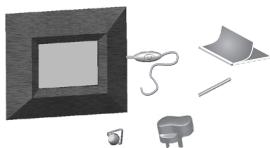
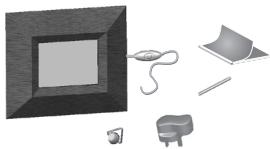
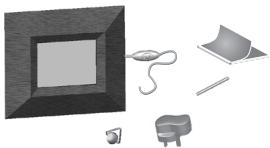
The kit contains:
An LCD frame.
A transformer.
- A metal rod to be screwed into the frame.
A wall bracket.
A user guide.
- A Parrot product guide.
QUICK START GUIDE
Switching On
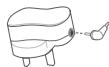
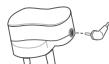
- Plug the jack into the transformer.
- Select the language that you wish to use for the Parrot PHOTO VIEWER. Scroll through the menu using the buttons on the rear of the frame.
- The Parrot PHOTO VIEWER is ready to receive your photos.

-
English
-
Français
- Espanol
-Italiano - Deutsch
- Portugués
-…
SENDING PHOTOS
Sending from a Phone or PDA
- On your phone/PDA, go to the «Pictures» menu. Select a picture and choose «Send by Bluetooth». Your device starts searching for Bluetooth peripherals.
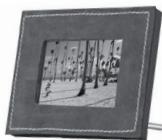
- Once your phone/PDA has finished searching, select «Parrot PHOTO». If your device prompts you to enter a code, type «0000». The picture is then sent to the viewer. Several pictures can be sent at the same time, though this feature will depend on your device.
- During transmission, the Bluetooth icon appears on the screen and the picture is displayed.
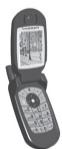
Note: if your phone/PDA is unable to detect the Parrot PHOTO VIEWER, you might have made the Bluetooth PHOTO VIEWER undetectable to other devices. Refer to «Bluetooth Visibility» in the «Settings» chapter. However, if your Bluetooth device is already paired to the frame, it can always connect to the PHOTO VIEWER.
Note: for further information on how to send photos, refer to your phone's guide or visit our website at www.parrot.biz.
Sending from a Computer
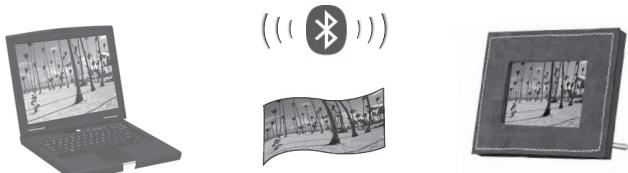
- Enable Bluetooth on your computer.
- Right-click on the picture that you wish to send and choose «Send by Bluetooth».
- Your PC will search for any nearby Bluetooth peripherals.
- Select «Parrot PHOTO». Type «0000» if your PC prompts you to enter a code.
- During transmission, the Bluetooth icon appears on the screen and the picture is displayed.
- Note: if your computer is unable to detect the Parrot PHOTO VIEWER, you might have made the Bluetooth PHOTO VIEWER undetectable to other devices. Refer to «Bluetooth Visibility» in the «Settings» chapter. However, if your Bluetooth device is already paired to the frame, it can always connect to the PHOTO VIEWER.
Note: for further information on how to send photos, refer to your phone's guide or visit our website at www.parrot.biz.
FRAME POSITION
Choose the orientation
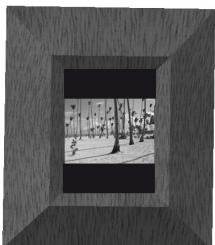
- Portrait mode.
- Landscape mode.
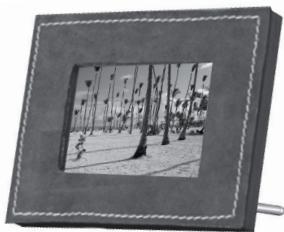
- Note: screw the metal rod into the back of the frame. You can also mount the frame on the wall, in which case, screw the hook into the back and slide the cable into the slots provided. If you rotate the frame, the photo displayed automatically changes to landscape or portrait mode.
BACKLIGHT
There are three different settings for the screen's backlight (also see p14):
- Predefined Time: define a time range during which the screen's backlight is on.
- Automatic: a light sensor built into the frame continuously detects the brightness level over 24 hours. The backlight is controlled automatically.
- Always On: use the switch on the power lead to turn the screen on or off.
MENUS
Scrolling Through the Menus
- Button :

move left
- Button :

move right
- Button :

access to selected menu
- To access the main menu, press the button

on the back of the viewer.
Menu Description
- The viewer fully controls the way in which your photos are displayed (rotation, slideshow, delete, etc.), as well as the brightness, language, date and time setting, and so on.
MAIN MENU
Main menu icons:
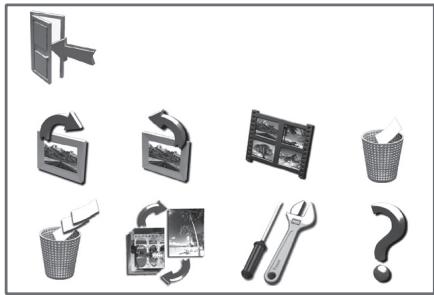
- Scroll through the menus using the arrows and the button

Description of the icons and functions

- Exit: return to the main menu.

- Rotate Clockwise: turn the photo to the right.

- Rotate Anti-clockwise: turn the photo to the left.

- Thumbsnails: display the photos as thumbnails.

- Delete Current Picture: delete the picture currently displayed.

- Delete All Pictures: delete all the pictures.

- Slideshow: choose the time interval between each photo displayed.

- Settings: adjust the settings for the display and Bluetooth.

Information.
SETTINGS
The «Settings» menu can be accessed from the main menu.

Description of the icons and functions
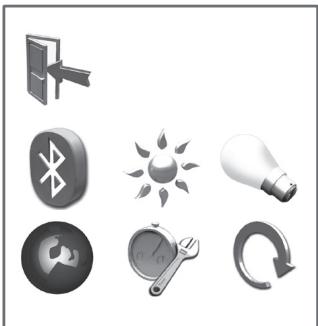
Back: return to the main menu.
Bluetooth Visibility:
-
Always Visible: your Parrot PHOTO VIEWER can be detected by and connected to all Bluetooth devices.
-
Hidden: your viewer can only be connected to those devices known by the Parrot PHOTO VIEWER.
-
Brightness: adjust the brightness of the display.
- Backlight: - Automata
Automatic: the screen's backlight level is controlled by an algorithm that uses a light sensor built into the viewer. This is the default setting.
- Always On: the backlight is always on. Use the power button to switch it off.
- Predefined Time: a predefined time range determines when the screen is backlit.


- Language: select the required language.
- Clock: set the time.
- Reset: restore the factory settings.
UPDATING THE SOFTWARE
The Parrot PHOTO VIEWER can be updated by Bluetooth. Download the utilities and the update procedure from our website at www.parrot.biz. Doing so will increase the viewer's compatibility with other Bluetooth devices.
HOTLINE
-
Our hotline is at your disposal. You can contact the hotline by email or telephone.
-
Europe: +33 (0) 148036069
UK: +44 (0) 870 112 5872
USA: (877) 9 PARROT (toll-free)
Germany: +49 900 172 7768 -
Visit our website at www.parrot.biz for further information.
SPECIFICATIONS
Screen:
- LCD screen size: 3.5''
- Screen resolution: 320 × 234 pixels (QVGA)
262 144 colours - Internal memory of 32 MB for storing over 100 photos
Light sensor for the automatic backlight mode
Weight (frame only): 250 g - Dimensions: 125 × 146 mm
Power supply: 100 - 240V,50 and 60Hz
Bluetooth:
- Bluetooth 1.2 qualified
- Bluetooth PIN code: 0000
-
Profiles supported:
-
FTP (File Transfer Profile)
- OPP (Object Push Profile)
-
BIP (Basic Imaging Profile)
-
Software updates by Bluetooth
- Image format supported: JPEG
- Up to 10 devices paired
Parrot PHOTO VIEWER
INCHPTYKUNIPOJb3OBATEJIPOBE3ONACHOCTN 60
BBEHEHNE 62
CODEPJKMoe YNAKOBKN 63
БыICTPOE BKJIIOUYEHNE 63
BkIIOueHne B ceTb. 63
IPEDAUaΦOTOrPAΦN 64
Ipeepa c TelefoHa IIN KapMaHHoro KOMnbIoTepa 64
Ipepa c KOMnbTepa 65
IIOJOXEHNE PAMKNI 66
IIOCBETKA 67
MEHIO 67
IcnoJb3OBaHne MeHIO 67
Onncahne MeHIO 68
JIABHOEMEHIO 68
HINDBUYALbHbIE HACTPOIKN
OBHOBJEHNE IPOPGAMMbI
TOPRAJIINHIA 71
TEXHNUECKHEXAPAKTEPNCNTIKN 72
OBJIAR INHΦOPMAUJRA 129
BVEDEHNE
Mbl 6nlaOapm Bac 3a npno6peTHe pamKn Parrot PHOTO VIEWER!
Pamka Parrot PHOTO VIEWER chabkeha JKK kpaHOM nIy oTo6paKeHHa foToRpaHn pa3Mepom 320 x 234 NIKcena. Ipepa afoTOrpaHn ocUeCTBJIeTc npi nOmoUsn Bluetooth c cOTOBor TenefoHa, KapMaHHoro nn ObbyHORo KOMMbIoTepa.
Parrot PHOTO VIEWER
COJEPXIMOEYNAKOBKN
Bynakobke haxoTc:
- Pamka c XXK əkpaHOM.
TpaHcΦopMaTop.
3aBnHnBaIOUINcMaTeaJIuuecknCTepKeHbIpaMKn.
KpOyOK dIg KpeJIeHnHa cTeHe.
PykoBOIOCTBO NO 3KcNnyatauIN.
Cnpabouchnk no npodukun Parrot.
БыICTPOE BKJIIOUECHNE
BkJIoueHne B CeTb
BkJIIOUHTe UTeKKeP B TpaHcOpMaTOp.
- BbIeRrTe Ra3bIK INHTepFeMeCa Parrot PHOTO VIEWER.Дяразьтс b C MeHIO NcPONb3yTe KHOKNi Ha O6paTHoN CTOpOHe pAMKn.
- Pamka Parrot PHOTO VIEWER rotoBA K npneM y 3o6paKeHn.

-
English
-
Français
-
Espanol
-
Italiano
-
Deutsch
-
Portugues
-…
PIEPEДAчAФOTOPRAФИ
Ipeepa c TelefoHa HnKapMaHHoro KOMNbTepa
OBHOBJEHNIE IPOPGAMMbI
BbMOKeTe 6OBHOBtI npOrpAMMHe o6eCneHHe PARrot PHOTO VIEWER Upe3 Bluetooth. 3aRpy3nTe c HaWoero Be6-caTaI wParrot.biz yTInbI N O3aKoMbTebc C npOeDypoi 6OBHObHNeHa. 3To n03BOINt yUynHtB CoMBeTcIMocTb C np6obapmI, cnOpN3yUOzIMn Bluetooth.
TOPRAJINHIA
-
Haа «ROPЯЯ ЛИня» BCERda B Baaem paCnopJKeHIN. Bbl MoKTe HAnuCatb HAM NcMb NIN NIO3BOHHTb
-
Ebpona: +33 (0) 148036069
- Beɪnɪkoʊbɒpɪtənɪŋ: +44 (0) 870 112 5872
- CIJIA: (877) 9 PARROT (6ecnlaTHbI 3BOHOK)
-
蕴MaHn: +49 900 172 7768
-
Д�� полочьдддддддддддддддддддддддддддддддддддддддддддддддддддддддддддддддддддддддддддддддддддддддддддддддддддд徴а http://www.parrot.biz.
TEXHNUECKNEXAPAKTEPNCIKN
3KpaH:
Pa3mep KK 3kpaHa:3,5"
- Pa3peSeHne 3KpaHa 320 x 234 nKceJe (QVGA)
262144 UBeTa
- 06bem namrtn 32 M6 no3B0n8et xpaHntb 6oJIe 100 φoTOrpαΦn
-ДатчИК OСБЕSUENHOCHTI ДЛЯ АВТOMATNUECHKOуУпавлени NOДСВETКО
Becpamkn6e3 npnHaJnxHocTe:250r
Pa3Mepbl: 125 x 146 MM
-Питане:100-240В,50и60Гц
Bluetooth:
- Bluetooth 1.2
PIN-KoD Bluetooth: 0000 -
PoiDaepxKbAeMbIe npoФИN:
-
FTP (File Transfer Profile)
-
OPP (Object Push Profile)
-BIP (Basic Imaging Profile) -
ObHOBJIeHHe nporpaMMHOrO oBecneueHn npn nomoOni Bluetooth
- Пдерхиьемы типьфайюв: JPEG
-До10coeHHeHHbIX np6oPob
Parrot PHOTO VIEWER
用户手册
汉语
用户安全使用说明

Parrot PHOTO VIEWER.
NEPIEXOMENA THΣ ΣYΣKEYAΣIAΣ
H ouokexuaia TepieXeI:
Mia kopviţa LCD
Eva eaoxuaotn
Eva eTAAIko UTOOHTPIyMa TPO BIDWETAI ETTAVW OTNV KOPVicA
Eva eTiroxO otpiyma
Evav oynoyxphotn
Evav oyny npoiovw Parrot
SYNONTIKOKOADHFOEKKINHHE
Avaum
FCC Compliance Statement
This device complies with part 15 of the FCC rules. Operation is subject to the following two conditions:
(1). this device may not cause harmful interference, and
(2). this device must accept any interference received, including interference that may cause undesired operation.
Note: The manufacturer is not responsible for any radio or tv interference caused by unauthorized modifications to this equipment. Such modifications could void the user's authority to operate the equipment.
Declaration of Conformity
CE
We, Parrot S.A. of 174 quai de Jemmapes, 75010 Paris, France, declare under our sole responsibility that our product, the Parrot PHOTO VIEWER to which this declaration relates is in conformity with appropriate standards EN300328, EN301489-1, EN60065 following the provision of Radio Equipment and Telecommunication Equipment directive, with requirements covering EMC directive 89/336/EEC
and Low Voltage directive 73/23/EEC.
Bluetooth
The Bluetooth® word mark and logos are owned by the Bluetooth® SIG, Inc. and any use of such marks by Parrot S.A. is under license. Other trademarks and trade names are those of their respective owners.
Correct Disposal of This Product ( Waste Electrical & Electronic Equipment )
(Applicable in the European Union and other European countries with separate collection systems). This marking shown on the product or its literature, indicates that it should not be disposed with other household wastes at the end of its working life. To prevent possible harm to the environment or human health from uncontrolled waste disposal, please separate this from other types of wastes and recycle it responsibly to promote the sustainable reuse of material resources. Household users should contact either the retailer where they purchased this product, or their local government office, for details of where and how they can take this item for environ, mentally safe recycling. Business users should contract their supplier and the terms and conditions of the purchase contract. This product should not be mixed with other commercial wastes for disposal.
GENERAL INFORMATION
Copyrights
Copyright © 2004 Parrot. All rights reserved. The total or even partial reproduction, transmission or storage of this guide in any form or by any process whatsoever (electronic, mechanical, photocopy, recording or otherwise) is strictly prohibited without prior consent from Parrot.
Registered trademarks
All the names and trademarks mentioned in this document are copyright-protected and are the property of their respective owners.
Modifications
The explanations and specifications in this guide are given for information purposes only and may be modified without prior notice. They are deemed to be correct at time of going to press. The utmost care has been taken when writing this guide, as part of the aim to provide you with accurate information. However, Parrot shall not be held responsible for any consequences arising from any errors or omissions in the guide, nor for any damage or accidental loss of data resulting directly or indirectly from the use of the information herein. Parrot reserves the right to amend or improve the product design or user guide without any restrictions and without any obligation to notify users.
As part of our ongoing concern to upgrade and improve our products, the product that you have purchased may differ slightly from the model described in this guide. If so, a later version of this guide might be available in electronic format at Parrot's website at www.parrot.biz.
JPEG
This software is based in part on the work of the Independent JPEG Group
www.parrot.biz
www.parrot.biz
133
Parrot PHOTO VIEWER


Parrot
Parrot S.A. - 174, quai de Jemmapes - 75010 Paris - France
Fax +33 1 48 03 06 66 / Phone +33 1 48 03 60 60
http://www.parrot.biz

PI030313AA
C E

Bluetooth

Federal
Communications
Commission
RKXWWW

13/14