
VT 2600 - Cordless phone VTECH - Free user manual and instructions
Find the device manual for free VT 2600 VTECH in PDF.


| Product Type | Additional handset for VTECH v2651/v2656 systems |
| Brand | VTECH |
| Model | VT 2600 |
| Dimensions (handset) | 171.5 mm (H) x 53 mm (W) x 45 mm (D) with antenna |
| Dimensions (charger) | 102.6 mm x 74.9 mm x 52.7 mm |
| Weight (handset, without battery) | 134 g |
| Weight (charger) | 234.8 g |
| Handset power supply | Ni-Cd 600 mAh battery |
| Charger power supply | 9 VDC @ 150 mA (AC adapter included) |
| Operating frequency | 2401.056 - 2482.272 MHz (DECT 2.4 GHz band) |
| Number of channels | 95 channels |
| Nominal range | Up to 300 m outdoors (varies with environment) |
| Main features | Speakerphone, directory (50 entries), caller ID (50 entries), intercom, conference, charging cradle, LCD display |
| Connectivity | Headset jack 2.5 mm (optional headset) |
| Compatibility | Requires a VTECH v2651 or v2656 base, up to 4 handsets max |
| Maintenance and cleaning | Clean with a soft slightly damp cloth (water or mild soap). Clean charging contacts regularly with a clean eraser. |
| Safety | Do not use near water, do not expose to moisture, unplug before cleaning |
| Spare parts and repairability | Replacement battery available (ref. VTECH). Repairs only by an authorized VTECH center. |
| General information | Limited warranty 1 year. Customer service: 1-800-595-9511 (USA), 1-800-267-7377 (Canada) |
Frequently Asked Questions - VT 2600 VTECH
User questions about VT 2600 VTECH
0 question about this device. Answer the ones you know or ask your own.
Ask a new question about this device
Download the instructions for your Cordless phone in PDF format for free! Find your manual VT 2600 - VTECH and take your electronic device back in hand. On this page are published all the documents necessary for the use of your device. VT 2600 by VTECH.
USER MANUAL VT 2600 VTECH
The v 2600 is an Accessory Handset for use with the v 2651 or v 2656 system. You must have one of these models in order to use this accessory Handset.
This manual is designed to familiarize you with the v 2600 Accessory Handset setup, registration and basic functions. For detailed operational instructions, please refer to the v 2651 or v 2656 User's Manuals.
To order additional system Handsets (model# v 2600), battery packs, or headsets, call VTech Communications, Inc. at 1-800-595-9511. In Canada, call 1-800-267-7377.
STOP!!
If you have questions about this product, or if you're having difficulty with setup or operation, do not return your phone to the store. Call our Customer Support Center at:
1-800-595-9511
In Canada, call
1-800-267-7377
Important Safety Instructions
When using your telephone equipment, basic safety precautions should always be followed to reduce the risk of fire, electric shock and injury, including the following:
- Read and understand all instructions.
- Follow all warnings and instructions marked on the product.
- Unplug this product from the wall outlet before cleaning. Do not use liquid cleaners or aerosol cleaners. Use a damp cloth for cleaning.
- Do not use this product near water (for example, near a bath tub, kitchen sink, or swimming pool).
- Do not place this product on an unstable cart, stand, or table. The product may fall, causing serious damage to the product.
- Slots and openings in the cabinet and the back or bottom are provided for ventilation. To protect it from overheating, these openings must not be blocked by placing the product on the bed, sofa, rug, or other similar surface. This product should never be placed near or over a radiator or heat register. This product should not be placed in a built-in installation where proper ventilation is not provided.
- This product should be operated only from the type of power source indicated on the marking label. If you are not sure of the type of power supply to your home, consult your dealer or local power company.
- Do not allow anything to rest on the power cord. Do not locate this product where the cord will be abused by persons walking on it.
- Never push objects of any kind into this product through cabinet slots as they may touch dangerous voltage points or short out parts that could result in a risk of fire or electric shock. Never spill liquid of any kind on the product.
- To reduce the risk of electric shock, do not disassemble this product, but take it to a VTech authorized service facility. Opening or removing cabinet parts other than specified access doors may expose you to dangerous voltages or other risks. Incorrect reassembling can cause electric shock when the appliance is subsequently used.
-
Do not overload wall outlets and extension cords as this can result in the risk of fire or electric shock.
-
Unplug this product from the wall outlet and refer servicing to VTECH under the following conditions:
A.When the power supply cord or plug is damaged or frayed.
B.If liquid has been spilled into the product.
C.If the product has been exposed to rain or water.
D.If the product does not operate normally by following the operating instructions. Adjust only those controls that are covered by the operating instructions, because improper adjustment of other controls may result in damage.
E.If the product has been dropped and the cabinet has been damaged.
F.If the product exhibits a distinct change in performance.
- Avoid using a telephone (other than a cordless type) during an electrical storm. There may be a remote risk of electric shock from lighting.
- Do not use the telephone to report a gas leak in the vicinity of the leak.
VTECH COMMUNICATIONS, INC.
Customer Service: 1-800-595-9511. In Canada, call VTech Telecommunications Canada Ltd. at 1-800-267-7377.
SAVE THESE INSTRUCTIONS
Registration And Operation Of The VTECH v 2600
Accessory Handset
Your v 2651 or v 2656 system can support up to 4 Handsets.
The accessory Handset v 2600 consists of the following:
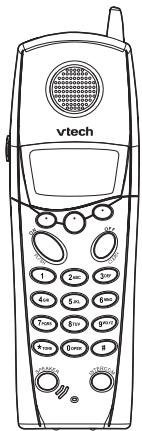
Handset
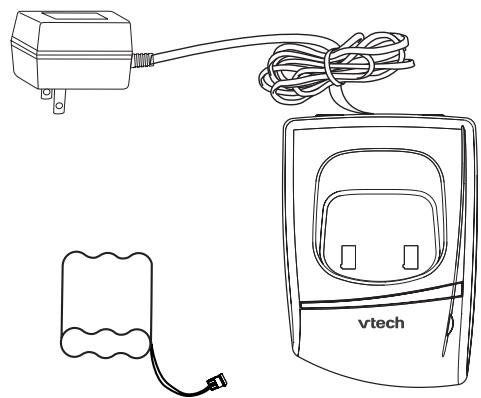
Battery Pack
Charger Unit
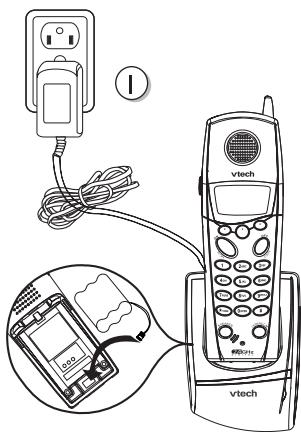
Setup Of The v 2600
Accessory Handset
- Plug the AC power adapter into an electrical outlet.
- Install the battery pack, as described on the following page.
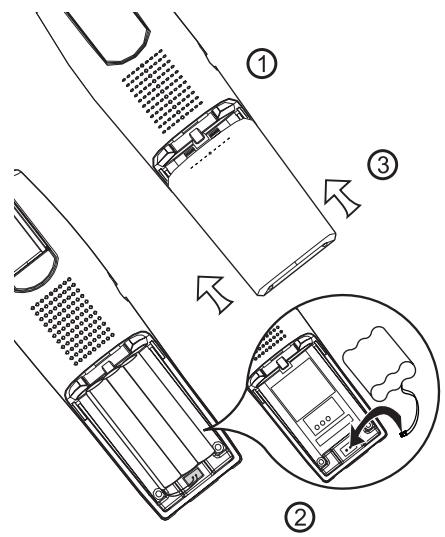
Follow the steps below:
- Remove the battery cover by pressing on the indent and sliding downward.
- Align the two holes in plug with the socket pins. Insert the plug into socket. Place the battery pack into the compartment with the wires in one of the lower corners, along the bottom of the battery pack.
- Replace the battery cover by sliding it upwards.
- If the new battery pack is not already charged, place the handset in the base unit, or a remote charging stand, and allow it to charge for 12 hours. After the first charge, a drained Handset battery pack will recharge in approximately 8 hours.
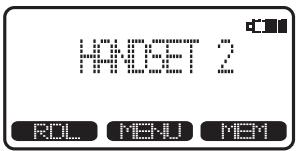
The original Handset that is shipped with your v 2651 or v 2656 will be automatically registered to the Base. This Handset is HANDSET 1.
As you register additional Handsets to the system, they will be assigned extension numbers in the following order: HANDSET 2, HANDSET 3, HANDSET 4.
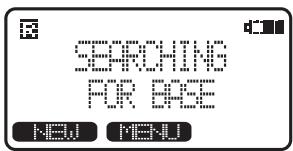
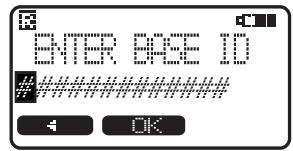
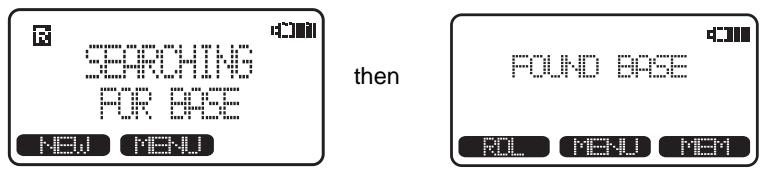
Whenever a Handset battery pack is installed, the Handset will automatically begin SEARCHING FOR BASE (if previously registered), or it will prompt you to ENTER BASE ID to register the new Handset.
BEFORE USING YOUR HANDSET(S), CAREFULLY PEEL OFF THE PROTECTIVE FILM, COVERING THE DISPLAY.
NOTE: Your Handset that comes with the v 2651/2656 system is registered to the Base at the factory. The following steps are for registration of additional Handsets (model# v 2600):
Enter Base ID Code
- After charging the Handset, remove it from its Charge Cradle. If the screen will displays SEARCHING FOR BASE, press NEW. If the screen displays ENTER BASE ID, go to step 2.
- Enter the 15 digit Base ID Code, located on the underside of the Base Unit. The ID Code can include numbers (0-9) and characters (*).
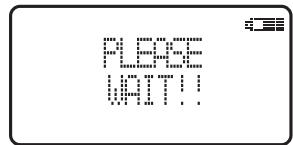
- Press OK. The Handset will display: PLEASE WAIT!!
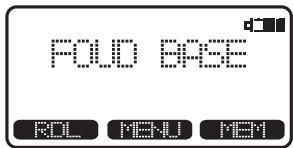
- Wait approximately 15 seconds. The Handset will display:
FOUNDBASE
NOTE: Occasionally, it will take longer than 15 second for the Handset to find the Base Unit. This is normal.
If the Handset displays: BASE BUSYTRY LATER, this indicates that the system is in use. Wait until the Base Unit is in the idle (on hook) mode, and repeat steps 2 to 4.
Congratulations! You can now enjoy the benefits of your VTech multi-Handset system.
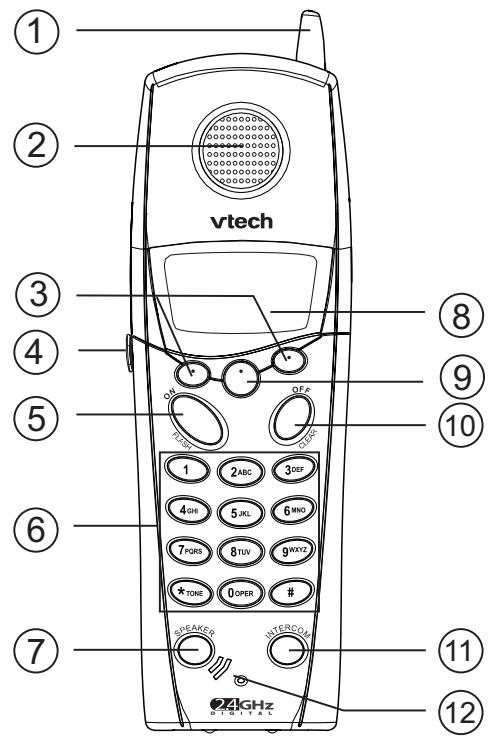
- Antenna
- Earpiece
- Scroll Keys
- Headset Jack (2.5mm)
- On (Flash)
- Dialog Keys (0-9, *, #)
-
Handsfree Speakerphone
-
LCD Display
- Select/Menu
- Off (Clear)
- Intercom
- Microphone
Handset Icons
| Icon | Description |
| Line In Use indicator On steady with no number next to it when a parallel set is in use. On steady with one or more numbers next to it, indicating which extensions are using the line. For example, 12 indicates that Handset 1 and Handset 2 are on an outside call. | |
| Intercom indicator On steady with the extension numbers currently on an intercom call. For example, 02 indicates that the Base and Handset 2 are on an intercom call. | |
| Battery indicator Cycles (Low, Medium, and High) when Handset battery is charging. Flashes when a low battery condition is detected. | |
| Mute indicator On steady when the Handset microphone is muted. | |
| Hold indicator On steady when the line is on hold. | |
| Range Extender indicator On steady when the Range Extender is on. | |
| Handset Registration indicator is displayed when a Handset is either not registered, or is searching for a Base unit. | |
Charger LED indicator
| ChargerLED Charging | Lights whenever the Handset is placed in the charger cradle. |
Additional Information
Headset Operation
Your cordless telephone is equipped with a 2.5mm Headset Jack for use with an optional accessory Headset for hands-free operation. If you choose to use the Headset option, you must obtain an optional accessory Headset, which is compatible with the Handset.
To purchase a Headset, call VTech Customer Service at 1-800-595-9511; in Canada, call 1-800-267-7377.
Once you have a compatible 2.5mm Headset, locate the Headset Jack on the Handset. Connect the plug on the Headset cord to the jack (under a small rubber flap) on the cordless Handset. The plug should fit securely. Do not force the connection.
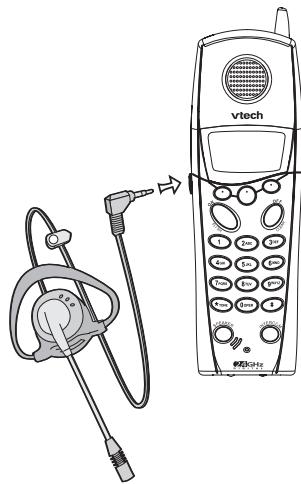
NOTE :
Whenever a compatible Headset is connected to the cordless Handset, the microphone on the Handset will be muted. This is done to limit the effect of background noise.
Belt Clip
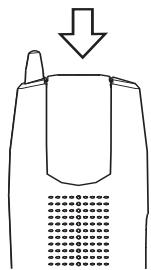
Your Handset is equipped with an attached belt clip. At the top of the Handset, slide the clip away from the body of the Handset by pushing on the indent with your finger.
CAUTION: The Belt Clip is designed to remain attached to the Handset. Do not attempt to remove it.
Taking Care Of Your Telephone
Your cordless telephone contains sophisticated electronic parts, so it must be treated with care.
Avoid rough treatment
Place the Handset down gently. Save the original packing materials to protect your telephone if you ever need to ship it.
Avoid water
Your telephone can be damaged if it gets wet. Do not use the Handset outdoors in the rain, or handle it with wet hands. Do not install your Base Unit near a sink, bathtub or shower.
Electrical storms
Electrical storms can sometimes cause power surges harmful to electronic equipment.
For your own safety, use caution when using electric appliances during storms.
Cleaning your telephone
Your telephone has a durable plastic casing that should retain its luster for many years. Clean it only with a soft cloth slightly dampened with water or a mild soap. Do not use excess water or cleaning solvents of any kind.
Remember that electrical appliances can cause serious injury if used when you are wet or standing in water. If your Base Unit should fall into water, DO NOT RETRIEVE IT UNTIL YOU UNPLUG THE POWER CORD AND TELEPHONE LINE CORDS FROM THE WALL. Then pull the unit out by the unplugged cords.
Periodic cleaning of the charge contacts
For optimum performance, regularly clean the metal charge contacts located in the Base Unit charge cradle and on the bottom of the Handset. Gently rub the contacts with a clean pencil eraser. In most environments, monthly contact maintenance is sufficient.
If you have difficulty operating your phone, the suggestions below should solve the problem. If you still have difficulty after trying these suggestions, call VTECH Communications at 1-800-595-9511. In Canada, call VTECH Telecommunications Canada Ltd at 1-800-267-7377.
The Phone Doesn't Work At All
Make sure the Power Cord is plugged
- Make sure the telephone line cord is plugged firmly into the Base Unit and the telephone wall jack.
- Make sure the batteries are properly charged. If the 'LOW BATTERY' message is shown, the battery pack needs charging.
Is the Handset registered to the Base? See Registration.
No Dial Tone
First check all the suggestions above.
- If you still don't hear a dial tone, disconnect the Base Unit from the telephone jack and connect a different phone. If there is no dial tone on that phone either, the problem is in your wiring or local service. Call your local telephone company.
You Get Noise, Static, Or A Weak Signal Even When You're Near The Base Unit
Household appliances plugged into the same circuit as the Base Unit can sometimes cause interference. Try moving the appliance or the Base Unit to another outlet.
You Get Noise, Static, Or A Weak Signal When You're Away From The Base Unit
- You may be out of range. Either move closer to the Base, or relocate the Base Unit.
- The layout of your home may be limiting the range. Try moving the Base Unit to another position.
The Handset Does Not Ring When You Receive A Call
- Make sure you have the Handset ringer activated. To set the ringer, see HANDSET SETTINGS and BASE SETTINGS in the v 2651 or v 2656 User's Manual.
-
Make sure the telephone line cord is plugged firmly into the Base Unit and the telephone jack. Make sure the power cord is plugged in.
You may be too far from the Base Unit. -
You may have too many extension phones on your telephone line to allow all of them to ring. Try unplugging some of the other phones.
You Hear Other Calls While Using Your Phone
- Disconnect your Base Unit from the telephone jack, and plug in a regular telephone. If you still hear other calls, the problem is probably in your wiring or local service. Call your local telephone company.
You Hear Noise In The Handset, And None Of The Keys Or Buttons Work
Make sure the power cord is plugged in.
Common Cure For Electronic Equipment
If the unit does not seem to be responding normally, then try putting the Handset in the cradle. If it does not seem to respond, do the following (in the order listed):
- Disconnect the power to the Base.
- Remove the Handset battery pack.
- Wait a few minutes.
- Connect power to the Base.
- Re-install the battery pack.
- Watch for Handset to display :
What does this limited warranty cover?
- The manufacturer of this VTECH product, VTECH Communications, warrants to the holder of a valid proof of purchase ("Consumer" or "you") that the product and all accessories provided by VTECH in the sales package ("Product") are free from material defects in material and workmanship, pursuant to the following terms and conditions, when installed and used normally and in accordance with operation instructions. This limited warranty extends only to the Consumer for Products purchased and used in the United States of America.
What will VTECH Communications do if the Product is not free from material defects in materials and workmanship during the limited warranty period ("Materially Defective Product")?
- During the limited warranty period, VTECH's authorized service representative will repair or replace at VTECH's option, without charge, a materially Defective Product. If we repair this product, we may use new or refurbished replacement parts. If we choose to replace this product, we may replace it with a new or refurbished product of the same or similar design. VTECH will return repaired or replacement products to you in working condition. VTECH will retain defective parts, modules, or equipment. Repair or replacement of Product, at VTECH's option, is your exclusive remedy. You should expect the repair or replacement to take approximately 30 days.
How Long is the limited warranty period ?
- The limited warranty period for the product extends for ONE(1)YEAR from the date of purchase if we repair or replace a materially Defective Product the terms of this limited warranty. This limited warranty also applies to repaired or replacement Products for a period of either (a) 90 days from the date the repaired or replacement Product is shipped to you or (b) the time remaining on the original one-year limited warranty; whichever is longer.
What is not covered by this limited warranty ?
This limited warranty does not cover
1. Product that has been subjected to misuse, accident, shipping or other physical damage, improper installation, abnormal operation or handling, neglect, inundation, fire, water or other liquid intrusion; or
2. Product that has been damaged due to repair, alteration or modification by anyone other than an authorized service representative of VTECH; or
3. Product to the extent that the problem experienced is caused by signal conditions, network reliability or cable or antenna systems; or
4. Product to the extent that the problem is caused by use with non-VTECH electrical accessories; or
5. Product whose warranty/quality stickers, Product serial numbers plates or electronic serial numbers have been removed, altered or rendered illegible; or
6. Product purchased, used, serviced, or shipped for repair from outside the United
States, or used for commercial or institutional purposes (including but not limited to Products used for rental purposes); or
- Product returned without valid proof of purchase (see 2 below); or
- Charges for installation or set up, adjustment of customer controls, and installation or repair of systems outside the unit.
How do you get warranty service?
- To obtain warranty service in the United States of America, call 1-800-595-9511 for instructions regarding where to return the Product. Before calling for service, please check the user's manual. A check of the Product controls and features may save you a service call.
Except as provided by applicable law, you assume the risk of loss or damage during transit and transportation and are responsible for delivery or handling charges incurred in the transport of Product(s) to the service location. VTECH will return repaired or replaced product under this limited warranty to you, transportation, delivery or handling charges prepaid. VTECH assumes no risk for damage or loss of the Product in transit. - If the Product failure is not covered by this limited warranty, or proof of purchase does not meet the terms of this limited warranty, VTECH will notify you and will request that you authorize the cost of repair prior to any further repair activity. You must pay for the cost of repair and return shipping costs for the repair of Products that are not covered by this limited warranty.
What must you return with the Product to get warranty service?
- Return the entire original package and contents including the Product to the VTECH service location along with a description of the malfunction or difficulty;
- Include "valid proof of purchase" (sales receipt) identifying the Product purchased (Product model) and the date of purchase or receipt; and
- Provide your name, complete and correct mailing address, and telephone number.
Other Limitations
- This warranty is the complete and exclusive agreement between you and VTECH. It supersedes all other written or oral communications related to this Product. VTECH provides no other warranties for this product. The warranty exclusively describes all of VTECH's responsibilities regarding the product.
There are no other express warranties. No one is authorized to make modifications to this limited warranty and you should not rely on any such modification.
State Law Rights: This warranty gives you specific legal rights, and you may also have other rights which vary from state to state.
Limitations: Implied warranties, including those of fitness for a particular purpose and merchantability (an unwritten warranty that the product is fit for ordinary use) are limited to one year from date of purchase. Some states do not allow limitations on how long an implied warranty lasts, so the above limitation may not apply to you.
- In no event shall VTECH be liable for any indirect, special, incidental, consequential, or similar damages (including, but not limited to lost profits or revenue, inability to use the product, or other associated equipment, the cost of substitute equipment, and claims by third parties) resulting from the use of this product. Some states do not allow the exclusion or limitation of incidental or consequential damages, so the above limitation or exclusion may not apply to you.
This equipment complies with Parts 15 of the Federal Communications Commission (FCC) rules for the United States. It also complies with regulations RSS210 and CS-03 of Industry and Science Canada. Operation is subject to the following two conditions: (1) this device may not cause interference, and (2) this device must accept any interference, including interference that may cause undesired operation of the device.
A label is located on the underside of the Base Unit containing either the FCC registration number and Ringer Equivalence Number (REN) or the IC registration number and Load Number. You must, upon request, provide this information to your local telephone company.
This equipment is compatible with inductively coupled hearing aids.
Should you experience trouble with this telephone equipment, please contact:
VTech Communications Inc
CUSTOMER SERVICE at 1-800-595-9511. In Canada, call VTech Telecommunications Canada Ltd at 1-800-267-7377.
For repair/warranty information, the telephone company may ask you to disconnect this equipment from the line network until the problem has been corrected.
FCC Part 15
Warning: Changes or modifications to this unit not expressly approved by the party responsible for compliance could void the user's authority to operate the equipment.
The equipment has been tested and found to comply with part 15 of the FCC rules. These limits are designed to provide reasonable protection against harmful interference in a residential installation. This equipment generates, uses and can radiate radio frequency energy and, if not installed and used in accordance with the instructions, may cause harmful interference to radio communications. However, there is no guarantee that interference will not occur in a particular installation. If this equipment does cause harmful interference to radio or television reception, which can be determined by turning the equipment off and on, the user is encouraged to try and correct the interference by one or more of the following measures:
Reorient or relocate the receiving antenna.
- Increase the separation between the equipment and receiver.
- Connect the equipment into an outlet or on a circuit different from that to which the receiver is connected.
- Consult the dealer or an experienced radio/TV technician for help.
To comply with FCC RF exposure requirements, the Base Unit should be installed with its antenna located at 5 cm or more from persons.
FCC and ACTA Information
If this equipment was approved for connection to the telephone network prior to July 23,2001, it was registered with the Federal Commissions (FCC) in accordance with Part 68 of its rules. If the equipment was approved after that date, it complies with the Part 68 rules and with Technical Requirements for Connection of Equipment to the Telephone Network adopted by the Administrative Council for Terminal Attachments (ACTA). We are required to provide you with the following information.
1. Connection and use with the nationwide telephone network
The plug and jack used to connect this equipmet to the premises wiring and the telephone network must comply with the applicable Part 68 rules and technical requirements adopted by ACTA. A compliant telephone cord and modular plug is provided with this product. It is designed to be connected to a compatible modular jack that is also compliant. An RJ11 jack should normally be used for connecting to a single line and an RJ14 jack for two lines. See Installation Instructions in the user's manual. This equipment may not be used with Coin Telephone Lines or with Party Lines.
2. Product identifier and REN information
The label on the back or bottom of this equipment contains, among other things, an identifier indicating product approval and the Ringer Equivalence Number (REN). This information must be provided to your local telephone company upon request, For equipment approved prior to July 23,2001, the product identifier is preceded by the phrase "FCC Reg No." and the REN is listed separately. For equipment approved after that date, the product identifier is preceded by "US" and a colon (:), and the REN is encoded in the product identifier as the sixth and seventh characters following the colon. For example, the product identifier US: AAAEQ03T123XYZ would indicate an REN of 0.3.
The REN is used to determine how many devices you may connect to your telephone line and still have them ring when you are called. In most, but not all areas, the sum of all RENS should be five (5.0) or less, You may want to connect your local telephone company for more information.
3. Repair instructions
If the equipment is malfunctioning, it must be unplugged from the modular jack until the problem has been corrected. Repairs to this telephone equipment can only be made by the manufacturer or its authorized agents. For repair procedures, follow the instructions outlined under the Limited Warranty.
4. Rights of the telephone company
If this equipment is causing harm to the telephone network, the telephone company may temporarily discontinue your telephone service. The telephone company is required to notify you before interrupting service. If advance notice is not practical, you will be notified as soon as possible. You will be given the opportunity to correct the problem and the telephone company is required to inform you of your right to file a complaint
with the FCC. Your telephone company may make changes in facilities, equipment, operation, or procedures that could affect the proper functioning of this product. The telephone company is required to notify you if such changes are planned.
5. Hearing aid compatibility
If this product is equipped with a corded or cordless handset, it is hearing aid compatible.
6. Programming/testing of emergency numbers
If this product has memory dialing locations, you may choose to store police, fire department and emergency medical service telephone number in this locations. If you do, please keep three things in mind:
a. We recommend that you also write the telephone number on the directory card, so that you can still dial the emergency number manually if the memory dialing feature doesn't work.
b. This feature is provided only as a convenience, and the manufacturer assumes no responsibility for customer reliance upon the memory feature.
c. Testing the emergency telephone numbers you have stored is not recommended. However, if you do make a call to an emergency number:
- You must remain on the line and briefly explain the reason for the call before hanging up.
- Programming/testing of emergency numbers should be performed during off-peak hours, such as in the early morning or late evening, when the emergency services tend to be less busy.
IC (Industry Canada)
This telephone is registered for use in Canada.
Notice:
This equipment meets the applicable Industry Canada Terminal Equipment Technical Specifications. This is confirmed by the registration number. The abbreviation, IC, before the registration number signifies that registration was performed based on a Declaration of Conformity indicating that Industry Canada technical specifications were met. It does not imply that Industry Canada approved the equipment.
Notice:
The Ringer Equivalence Number (REN) for this terminal equipment is 0.1. The REN assigned to each terminal equipment provides an indication of the maximum number of terminals allowed to be connected to a telephone interface. The termination on an interface may consist of any combination of devices subject only to the requirement that the sum of the Ringer Equivalence Numbers of all the devices does not exceed five.
Before installing this equipment, users should ensure that it is permissible to be connected to the facilities of the local telecommunications company. The equipment must also be installed using an acceptable method of connection. The customer should be aware that compliance with the above conditions may not prevent degradation of services in some situations.
Repairs to certified equipment should be made by an authorized Canadian maintenance facility designated by the supplier. Any repairs or alterations made by the user to this equipment, or equipment malfunctions, may give the telecommunications company cause to request the user to disconnect the equipment.
Users should ensure for their own protection that the electrical ground connections of the power utility, telephone lines and internal metallic water pipe system, if present, are connected together. This precaution may be particularly important in rural areas.
Caution :
Users should not attempt to make such connections themselves, but should contact the appropriate electrical inspection authority, or electrician, as appropriate.
Your telephone is designed to operate at the maximum power allowed by the FCC and IC. This means your Handset and Base Unit can communicate only over a certain distance - which will depend on the location of the Base Unit and Handset, weather, and the construction and layout of your home or office.
The RBRC® Seal
The RBRC Seal on the nickel-cadmium battery indicates that VTech Communications, Inc. is voluntarily participating in an industry program to collect and recycle these batteries at the end of their useful lives, when taken out of service within the United States and Canada.
The RBRC® program provides a convenient alternative to placing used nickel-cadmium batteries into the trash or municipal waste, which may be illegal in your area. VTech's participation in RBRC® makes it easy for you to drop off the spent battery at local retailers participating in the RBRC® program or at authorized VTech product service centers. Please call 1-800-8-BATTERY™ for information on Ni-Cd battery recycling and disposal bans/restrictions in your area. VTech's involvement in this program is part of its commitment to protecting our environment and conserving natural resources.
RBRC® is a registered trademark of Rechargeable Battery Recycling Corporation.
Technical Specifications
FREQUENCY CONTROL
Crystal controlled PLL synthesizer
TRANSMIT FREQUENCY
2401.056 - 2482.272 MHz
RECEIVE FREQUENCY
2401.056 - 2482.272 MHz
CHANNELS
95 Channels
NOMINAL EFFECTIVE RANGE
Maximum power allowed by FCC and IC. Actual operating range may vary according to environmental conditions at the time of use.
SIZE
Handset : 171.5mm x 53mm x 45mm (including antenna)
Charger : 102.6mm x 74.9mm x 52.7mm
WEIGHT
Handset : 134 grams
(excluding battery pack)
Charger: 234.8 grams
POWER REQUIREMENTS
Handset : 600mAh Ni-Cd Battery Pack
Charger: 9 VDC @ 150mA
MEMORY
Speed Dial : 50 Memory locations; 32 digits per location.
CID : Alphanumeric Display 50 Memory locations
SPECIFICATIONS ARE TYPICAL AND MAY CHANGE WITHOUT NOTICE.
vtech
VTECH TELECOMMUNICATIONS LTD.
A member of THE VTECH GROUP OF COMPANIES.
Distributed in the U.S.A. by VTech Communications Inc.; Beaverton, Oregon.
Distributed in Canada by VTech Telecommunications Canada Ltd., Suite 200, 7671 Alderbridge Way, Richmond, B.C. V6X 1Z9.
Copyright 2003 for VTECH TELECOMMUNICATIONS LTD. Printed in China
- Important Safety Instructions
- VTECH COMMUNICATIONS, INC.
- SAVE THESE INSTRUCTIONS
- Registration And Operation Of The VTECH v 2600
- Accessory Handset
- Setup Of The v 2600
- Enter Base ID Code
- FOUNDBASE
- Handset Icons
- Charger LED indicator
- Additional Information
- Headset Operation
- NOTE :
- Belt Clip
- Taking Care Of Your Telephone
- Avoid rough treatment
- Avoid water
- Electrical storms
- Cleaning your telephone
- Periodic cleaning of the charge contacts
- The Phone Doesn't Work At All
- No Dial Tone
- You Get Noise, Static, Or A Weak Signal Even When You're Near The Base Unit
- You Get Noise, Static, Or A Weak Signal When You're Away From The Base Unit
- The Handset Does Not Ring When You Receive A Call
- You Hear Other Calls While Using Your Phone
- You Hear Noise In The Handset, And None Of The Keys Or Buttons Work
- Common Cure For Electronic Equipment
- What does this limited warranty cover?
- What will VTECH Communications do if the Product is not free from material defects in materials and workmanship during the limited warranty period ("Materially Defective Product")?
- How Long is the limited warranty period ?
- What is not covered by this limited warranty ?
- How do you get warranty service?
- What must you return with the Product to get warranty service?
- Other Limitations
- VTech Communications Inc
- FCC Part 15
- FCC and ACTA Information
- Connection and use with the nationwide telephone network
- Product identifier and REN information
- Repair instructions
- Rights of the telephone company
- Hearing aid compatibility
- Programming/testing of emergency numbers
- IC (Industry Canada)
- Notice:
- Caution :
- The RBRC® Seal
- Technical Specifications
- FREQUENCY CONTROL
- TRANSMIT FREQUENCY
- RECEIVE FREQUENCY
- CHANNELS
- NOMINAL EFFECTIVE RANGE
- SIZE
- WEIGHT
- POWER REQUIREMENTS
- MEMORY
- SPECIFICATIONS ARE TYPICAL AND MAY CHANGE WITHOUT NOTICE.
- vtech
Brand : VTECH
Model : VT 2600
Category : Cordless phone