
DQD-6100D - DVD player DAEWOO - Free user manual and instructions
Find the device manual for free DQD-6100D DAEWOO in PDF.


User questions about DQD-6100D DAEWOO
0 question about this device. Answer the ones you know or ask your own.
Ask a new question about this device
Download the instructions for your DVD player in PDF format for free! Find your manual DQD-6100D - DAEWOO and take your electronic device back in hand. On this page are published all the documents necessary for the use of your device. DQD-6100D by DAEWOO.
USER MANUAL DQD-6100D DAEWOO
The lightning flash with arrowhead symbol, within an equilateral triangle, is intended to alert the user to the presence of uninsulated "dangerous voltage" within the product's enclosure that may be of sufficient magnitude to constitute a risk of electric shock.

The exclamation point within an equilateral triangle is intended to alert the user to the presence of important operating and servicing instructions in the literature accompanying the appliance.
WARNING : TO REDUCE THE RISK OF FIRE OR ELECTRIC SHOCK, DO NOT EXPOSE THIS APPLIANCE TO RAIN OR MOISTURE.
CAUTION : TO PREVENT ELECTRIC SHOCK, MATCH WIDE BLADE OF PLUG TO WIDE SLOT, FULLY INSERT.
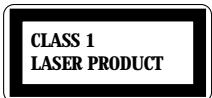
IMPORTANT FOR LASER PRODUCTS
LASER
This Digital Video Disc Player employs a Laser System. To ensure proper use of this product please read this owner's manual carefully and retain for future reference. Should the unit require maintenance, contact an authorized service location - see service procedure.
Use of control adjustments or the performance of procedures other than those specified may result in hazardous radiation exposure.
To prevent direct exposure to the laser beam, do not try to open the enclosure. Visible laser radiation when open and interlocks defeated.
DO NOT STARE INTO THE BEAM.
DANGER
Visible laser radiation when open and interlock failed or defeated.
Avoid direct exposure to beam.
CAUTION
Do not open the top cover. There are no user serviceable parts inside the Unit; leave all servicing to qualified service personnel.
FCC NOTICE : This equipment has been tested and found to comply with the limits for a Class B digital device, pursuant to part 15 of the FCC Rule. These limits are designed to provide reasonable protection against harmful interference in a residential installation. This equipment generates, uses and can radiate radio frequency energy and if not installed and used in accordance with the instructions, may cause harmful interference to radio communications. However, there is no guarantee that interference will not occur in a particular installation. If this equipment does cause harmful interference to radio or television reception; which can be determined by turning the equipment off and on, the user is encouraged to try to correct the interference by one or more of the following measures:
- Reorientate or relocate the receiving antenna.
- Increase the separation between the equipment and receiver.
- Connect the equipment to an outlet on a circuit different from that to which the receiver is connected.
- Consult the dealer or an experience radio/TV technical for help.
CAUTION : Any changes or modification in construction of this device which are not expressly approved by the party responsible for compliance could void the user's authority to operate the equipment.
This set has been designed and manufactured to assure personal safety. Improper use can result in electric shock or fire hazard. The safeguards incorporated in this unit will protect you if you observe the following procedures for installation, use and servicing. This unit is fully transistorized and does not contain any parts that can be repaired by the user.
1 Read Instructions
All the safety and operating instructions should be read before the unit is operated.
2 Retain Instructions
The safety and operating instructions should be retained for future reference.
3 HeedWarnings
All warnings on the unit and in the operating instructions should be adhered to.
4 FOLLOW INSTRUCTIONS
All operating and use instructions should be followed.
5 Cleaning
Unplug this unit from the wall outlet before cleaning. Do not use liquid cleaners or aerosol cleaners. Use a damp cloth for cleaning.
6 Attachments
Do not use attachments unless recommended by the unit's manufacturer as they may cause hazards.
7 Water and Moisture
Do not use this unit near water- for example, near a bath tub, wash bowl, kitchen sink or laundry tub, in a wet basement, or near a swimming pool. This apparatus shall not be exposed to dripping or splashing water and no objects filled with liquids, such as vases, shall be placed on the apparatus.
8 Accessories
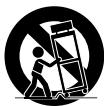
Do not place this unit on an unstable cart, stand, tripod, bracket, or table. The unit may fall, causing
serious injury to a child or adult as well as serious damage to the unit. Use this unit only with a cart, stand, tripod, bracket, or table recommended by the manufacturer.
PORTABLE CART WARNING (symbol provided by RETAC)
9 Ventilation
Slots and openings in the case are provided for ventilation to ensure reliable operation of the unit and to protect it from overheating. These openings must not be blocked or covered. These openings must not be blocked by placing the unit on a bed, sofa, rug, or other similar surface. This unit should never be placed near or over a radiator or heat radiator. This unit should not be placed in a built-in installation such as a bookcase or rack unless proper ventilation is provided or the manufacturer's instructions have been adhered to. Keep distance about minimum 10 centimeters from the wall when it is installed.
10 Power Sources
This unit should be operated only from the type of power source indicated on the marking label. If you are not sure of the type of power supply to your home, consult your video dealer or local power company. For units intended to operate from battery power, or other sources, refer to the operating instructions.
11 grounding or Polarization
This unit is equipped with a polarized alternating - current line plug (a plug having one blade wider than the other). This plug will fit into the power outlet only one way.
This is a safety feature. If you are unable to insert the plug fully into the outlet, try reversing the plug. If the plug still fails to fit, contact your electrician to replace your obsolete outlet. To prevent electric shock, do not use this polarized plug with an extension cord, receptacle, or other outlet unless the blades can be fully inserted without blade exposure. If you need an extension cord, use a polarized cord.
12 Power-Cord Protection
Power-supply cords should be routed so that they are not likely to be walked on or pinched by items placed upon or against them, paying particular attention to cords at plugs, convenience receptacles, and the point where they exit from the unit.
13 Lightning
For added protection for this unit during a lightning storm, or when it is left unattended and unused for long periods of time, unplug it from the wall outlet and disconnect the antenna or cable
system. This will prevent damage to the unit due to lightning and power line surges.
14 DISC TRAY
Keep your fingers well clear of the disc as it is closing. It may cause serious personal injury.
15 Overloading
Do not overload wall outlets of extension cords as this can result in a risk of fire or electric shock.
16 Object and Liquid Entry
Never push objects of any kind into this unit through openings as they may touch dangerous voltage points or "short-out" parts that could result in a fire or electric shock. Never spill liquid of any kind on the unit.
17 BURDEN
Do not place a heavy object on or step on the product. The object may fall, causing serious personal injury and serious damage to the product.
18 DISC
Do not use a cracked, deformed or repaired disc. These discs are easily broken and may cause serious personal injury and product malfunction.
19 Servicing
Do not attempt to service this unit yourself as opening or removing covers may expose you to dangerous voltage or other hazards. Refer all servicing to qualified service personnel.
20 Damage Requiring Service
Unplug this unit from the wall outlet and refer servicing to qualified service personnel under the following conditions.
A. When the power-supply cord or plug is damaged.
B. If liquid has been spilled, or objects have fallen into the unit.
C. If the unit has been exposed to rain or water.
D. If the unit does not operate normally by following the operating instructions. Adjust only those controls that are covered by the operating instructions. Improper adjustment of other controls may result in damage and will often require extensive work by a qualified technician to restore the unit to its normal operation.
E. If the video product has been dropped or the cabinet has been damaged.
F. When the unit exhibits a distinct change in performance this indicates a need for service.
21 Replacement Parts
When replacement parts are required, have the service technician verify that the replacements he uses have the same safety characteristics as the original parts. Use of replacements specified by the unit manufacturer can prevent fire, electric shock, or other hazards.
22 Safety Check
Upon completion of any service or repairs to this unit, ask the service technician to perform safety checks recommended by the manufacturer to determine that the unit is in safe operating condition.
23 Wall or Ceiling Mounting
The product should be mounted to a wall or ceiling only as recommended by the manufacturer.
24 Heat
The product should be situated away from heat sources such as radiators, heat registers, stoves, or other products (including amplifiers) that produce heat.
Advantages of This Product Are ....
DVD, VCD, CD, CD-R(MP3, JPEG), CD-RW playback function
- MP3, JPEG file playback function (CD-R disc having records of MP3, JPEG files)
GUI (Graphical User Interface) OSD (On Screen Display)
By using the [DISPLAY] button on the remote control, information on the DVD/VCD/CD player and disc, can be displayed on the TV screen.
- Screensaver function
- 3D sound (3D sound effect using 2 speakers)
- High bit / high sampling with 27MHz / 10bit video encoder
This unit has 27MHz / 10bit capability, that enables the faithful reproduction of fine images.
- High bit / high sampling with 96KHz / 24bit audio D/A converter
With this 96KHz / 24bit linear Pulse Code Modulated signals, which constitute the highest specifications in the DVD standards, you can enjoy faithfully reproduced sound in all of its various modes. To support 96KHz sampling / 24bit sound, the shaping noise of this multi-level digital sigma type of D/A converter is kept flat up to 44KHz, thus preventing the important audio signals from being affected.
Coaxial / Optical digital output (PCM, Dolby Digital, dts)
You can enjoy high-level digital audio by connecting with amp embedded with Dolby Digital / dts decoder.
Built-in Dolby Digital decoder
- Analog audio 2-channels output for DOWNMIX (x1)
Composite video out (x1)
- Slow Forward / reverse (DVD) playback
- Fast Forward / reverse playback
- Search of title, chapter, and time in DVD disc, and search of track and time in VCD and CD
- Repeat playback (title and chapter for DVD, track and disc for VCD/CD)
- Repeat a defined period from A to B
-
Selective Play (DVD/VCD/CD)
-
Various TV aspect (DVD)
4:3 for Pan and Scan, 4:3 for Letter Box, and 16:9 for Wide
You can select and play the desired title / chapter of DVD and track of Video CD/CD in STOP mode. - Various OSD (On Screen Display) languages function (DVD)
You can select and display OSD among various languages. - Parental Lock function (DVD)
This function can prevent playback of software that may be unsuitable for children. - Multi Audio function (DVD)
The audio soundtrack can be heard in up to 8 languages. In the case of SVCD or CVD, it depends on the disc. (The number of audio languages depends on the software.) - Multi Subtitle function (DVD)
The subtitle can be seen in up to 32 languages. In the case of SVCD or CVD, it depends on the disc. (The number of subtitle languages depends on the software.) - Multi Angle function (DVD)
This function allows you to choose the viewing angle of scenes which were shot from a number of different angles. (The number of angles depends on the software.) - Screen zoom function (DVD/VCD)
Read Carefully before Using
Cautions in use of DVD player are described below.
Please read carefully before using a DVD player.
Installation place and handling
- When you place this player near other devices, they may affect poorly together.
- When you place this player near strong magnetic materials, it may affect image or voice poorly.
- Do not spill volatile liquids like insect spray over the player. Do not leave rubber or plastic products in contact with the player for a long time. They will cause deterioration or paint peel-off.
Not in use
- When the unit is not in use, be sure to remove the disc and turn off the power.
- If you do not use the unit for a long period, remove batteries in the remote control to prevent leakage.
- In case you don't use the unit for a long time, the unit may not function properly in the future. Turn on and use the player occasionally.
Moving
- Repack the unit as it was originally packed at the factory. Alternatively, pack this product with towel not to be damaged.
- Eject any disc.
Cleaning
- Dust off dirt in cabinet or control panel part smoothly with a soft cloth.
- For heavy dirt, soak the cloth in a weak detergent solution, wring it well and wipe. Use a dry cloth to wipe it out.
- Follow instructions in using chemical cleaners.
- Do not use any type of solvent such as gasoline or benzene, as they may cause deterioration or paint peel-off.
Disc Handling
- Do not use disc having severe scratch.
-
Do not store the following places.
-
High temperature and humidity
-
Subject generation of mold
-
Subject to direct sunlight
-
Much dirt or dust
-
Near strong magnetic materials such as speaker
Instructions in using remote control
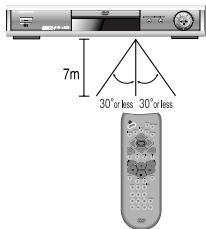
Hold the remote control within an angle range of about 30^ from either side of the remote sensor. The remote control range is about 23 feet (7m) from the DVD player.
Point the front of the remote control directly at the front of the DVD player.
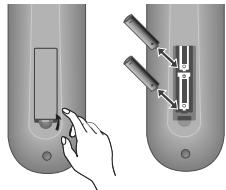
Installing the remote control batteries
1 Remove the battery compartment cover on the back of the remote control.
2 Insert the new batteries. Match the polarities (+ and -) on the Batteries with the diagram on the remote control.
3 Put the battery compartment cover back on the remote control.
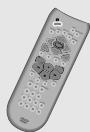
Accessories
Remote control
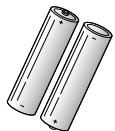
2 Batteries
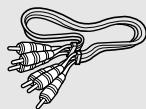
Connecting cable to Audio/Video jack
Owner's Manual

- To purchase accessories or not supplied parts additionally, contact your nearest dealer or service centre. But, owner's manual is not sold additionally.
Contents
Product Information
Important Safeguards 1
Advantage of This Product Are 4
Read Carefully before Using 5
Contents 6
Identification of Controls 7
Remote Control 10
Installation
Connecting with TV 11
Connecting with Amplifier Having 5.1-CH Analog Terminals 12
Operation
Playing Discs 13
Playing a desired scene 14
Confirming the current PLAY mode on screen 17
AUDIO language, SUBTITLE language and 3D AUDIO 18
ZOOM, Multi Angle and Digest play 19
About MP3 discs 20
About JPEG discs 21
Displaying menus in a disc 21
Setup
Language Setup 22
Video Setup. 23
Audio Setup 24
Others Setup 25
The others
About DVD 26
Before doubting about troubles 29
Specifications 31
Identification of Controls
Front Panel
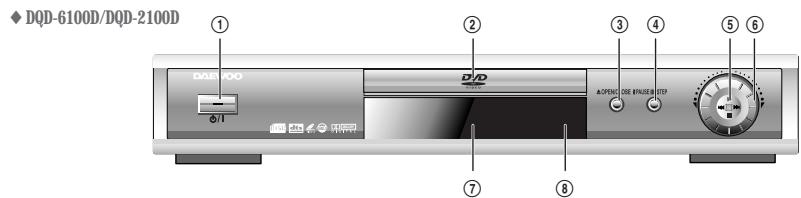
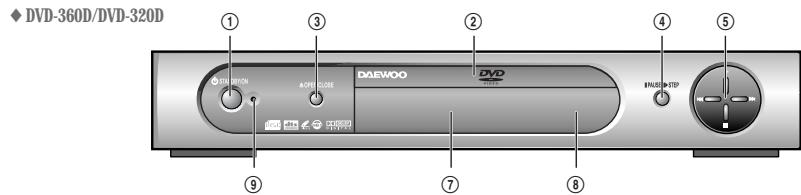
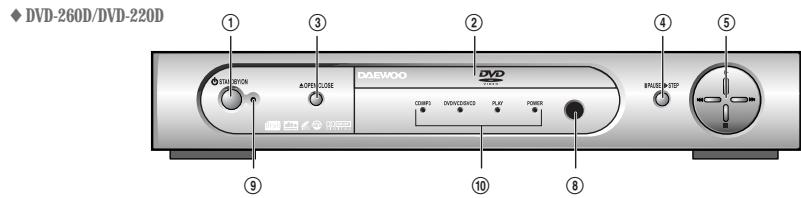
① /1 button
When switching off, the apparatus is not completely switch off from the mains. (stand-by) To disconnect it from the mains, you have to unplug mains.
② Disc tray door
③ Open/Close Tray button
④ PAUSE/STEP button
⑤ Operation button
Playback () , Stop (■), Previous (1 1) and Next ( ) operation can be selected with this button.
⑥ SHUTTLE-Ring {DQD-6100D only}
Use to wind currently being played disc, or to playback rapidly in clockwise. And use to rewind currently being played disc, or to playback back rapidly in counter-clockwise.
In Pause mode, rotating this Shuttle ring makes screen advance frame by frame.
⑦ Operation Display Window
Display operation of device. For more information, see "Operation Display Window" in the 9 page.
Remote Control Receiver
⑨ Standby indicator
10 LED indicator {DVD-260D/DVD-220D only}
CD/MP3 indicator : This LED turns on when CD or MP3 disc is inserted. If you insert bad disc, it blinks.
DVD/VCD/SVCD indicator : This LED turns on when DVD, VCD or SVCD disc is inserted. If you insert bad disc, it blinks.
PLAY indicator : This LED turns on when you playback various media.
POWER indicator : This LED turns on during operation.
Rear Panel
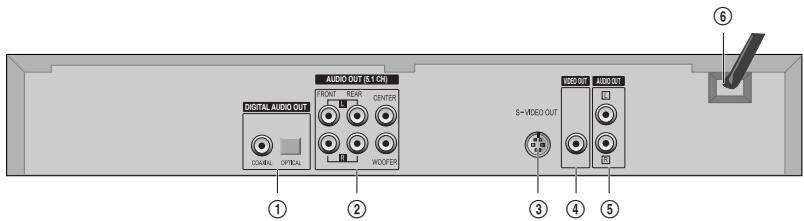
① Digital AUDIO Output (COAXIAL, OPTICAL) Jack
To enjoy sound quality of theatre level in home, connect this jack with amp or unit embedded with digital audio decoder.
② 5.1-CH Analog Audio Out Jack {DQD-6100D/DVD-360D/DVD-260D only}
For Dolby Digital and dts, total 6 channels are used; 3 channels for the front panel, 2 channels for surround, and 1 channel for subwoofer.
These channels are located in right, left, centre of front panel for 3 channels, right and left of rear panel for 2 channels, and centre of front panel for a channel. L and R means left side and right side respectively, CENTRE means central side, and WOOFER means subwoofer.
③ S-VIDEO Out Jack
To obtain better screen quality, connect and use the unit to TV or monitor inputted from S-VIDEO.
④VIDEO Output Jack
⑤ 2 CHANNEL (DOWNMIX) AUDIO OUT Jack
⑥ Power Cord
It is a jack for supplying power to the unit. Connect to outlet in a wall.
Operation Display Window {DQD-6100D/DQD-2100D/DVD-360D/DVD-320D only}
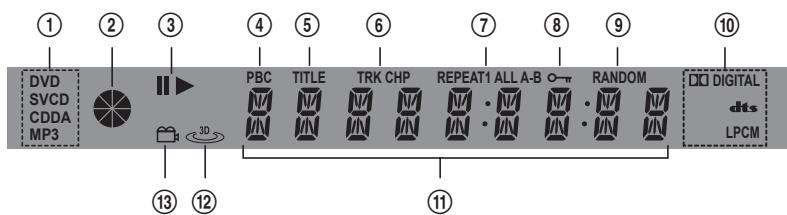
① Recognized DISC TYPE indicator
This indicator is lit up after recognizing disc.
③ PLAY/PAUSE indicator
④ VCD2.0/SVCD PBC indicator
This indicator is lit up in selecting PBC ON while this indicator disappears in selecting PBC OFF.
⑤ DVD TTTLE indicator
This indicator is lit up if title number is displayed in playing DVD.
⑥ TRACK/CHAPTER indicator
This indicator is lit up if Chapter (DVD) or track (VCD / SVCD / CDDA / MP3) number is displayed.
⑦ REPEAT MODE indicator
REPEAT 1: In case you want to repeat and play a chapter or track
REPEAT ALL : In case you want to repeat and play a title or disc
REPEAT A- : In case you want to set "A- Repeat" REPEAT A-B : In case you want to set "A-B Repeat"
⑧ PARENTAL LOCKindicator
This indicator is lit up if parental lock in "Select Function" menu is set items except "8 ADULT (RELEASE)". This indicator disappears in setting the parental lock to "8 ADULT (RELEASE)".
⑨ RANDOM indicator
DVD AUDIO STREAM indicator
DIGITAL : Dolby Digital audio
dtts : DTS audio
LPCM:LPCM audio
11 NUMBER/CHARACTER indicator
Title, chapter number, and time are displayed in loading DVD disc while track number and time are displayed in loading VCD/SVCD/CDDA/MP3 disc.
PEN:Tray is opened
CLOSE: Tray is closed
LRRDisc is loaded
N ⅡI5C:There is no disc in tray
B R B I S [ : Disc has some error
M E N U: Menu screen is displayed
SETUP:Setup menu is displayed
N :Power is ON
FF : Power is OFF
⑫ 3D SOUND indicator
This indicator is lit up in selecting 3D SOUND [3D] button.
13 ANGLE indicator
This indicator is lit up if disc contains Angle screen.
Remote Control
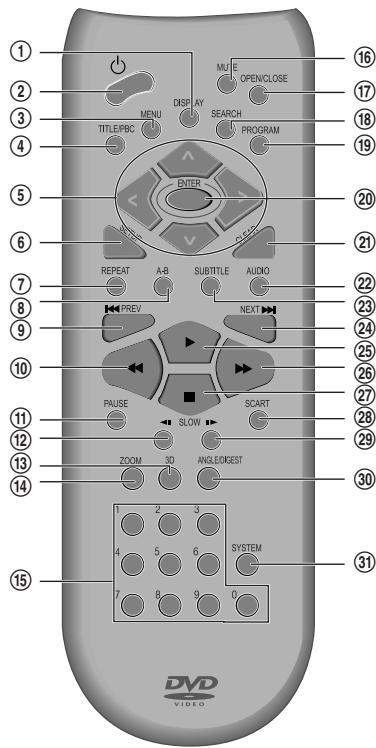
① DISC or Playback information
② STANDBY()
③ DVD ROOT MENU Playback, activates as RETURN button in SVCD PBC ON
(4) TITLE Menu in DVD, PBC (PlayBack Control) in VCD2.0/SVCD
⑤ MOVE to Up, Down, Right, Left in OSD/MENU/SETUP mode
⑥ SETUP
⑦ REPEAT (Repeat current title or chapter in DVD while repeating current track or disc in VCD/CD)
⑧ REPEAT a defined period from A to B
PREVIOUS (move into a previous chapter or track)
10 Fast Reverse Playback
1 PAUSE
SLOW Reverse
⑬ 3D Sound
⑭ ZOOM
15 Numbers
16 MUTE
⑰ OPEN/CLOSE
18 CHAPTER/TITLE/TIME SEARCH
19 PROGRAM (play in a programmed order)
20 SELECT/CONFIRMATION
21 CLEAR button in OSD/MENU/SETUP mode
② AUDIO Language Select
23 SUBTITLE Language Select
NEXT (Move into a next chapter or track)
25 PLAY
26 Fast Forward Playback
27 STOP
Not available
29 SLOW Forward
③ ANGLE/DIGEST (Screen angle select in DVD mode, Digest function in VCD mode)
③ TV Output SYSTEM (Auto, NTSC or PAL) Selection
Connecting with TV
How to Connect
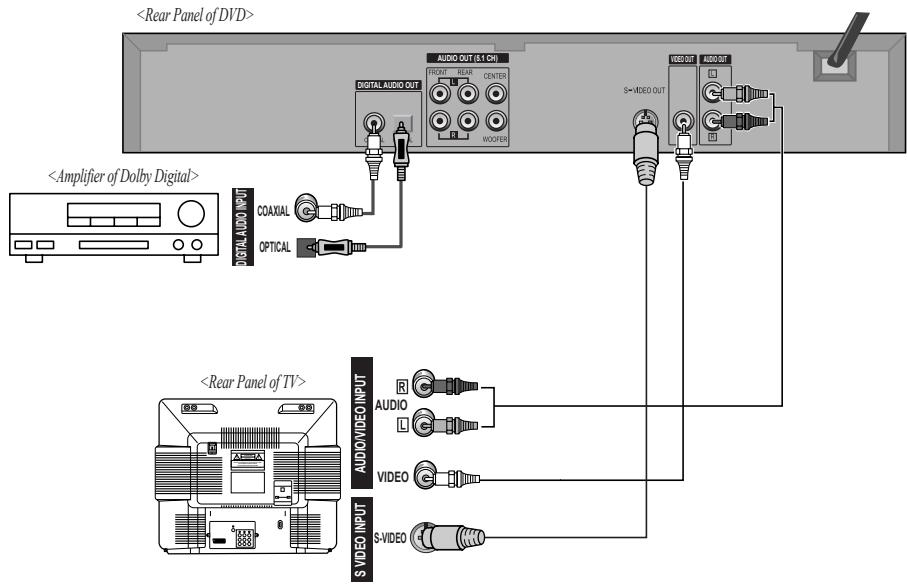
1 (If there is Audio/Video InPUT jack in TV) Connect Video Out jack in DVD player to Video In jack in TV, and AUDIO Out jack in DVD player to AUDIO IN jack in TV with connecting cable of Audio/Video jack.
2 Use in S-VIDEO or COMPONENT In jack attached in TV.
3 Select either COAXIAL or OPTICAL to connect to amp.

In/Out jack in Audio/Video terminal:
- In: A jack used to receive signal required in this unit from other units.
- Out: A jack used to send signal of this unit to other units.
Manufactured under license from Dolby Laboratories.
"Dolby", "Pro Logic", and the double-D symbol are trademarks of Dolby Laboratories.
Connecting with Amplifier Having 5.1-CH Analog Terminals
Apply this section just to an amplifier without digital audio input terminals.
Only when playing DVD disc, it is available of output.
How To Connect
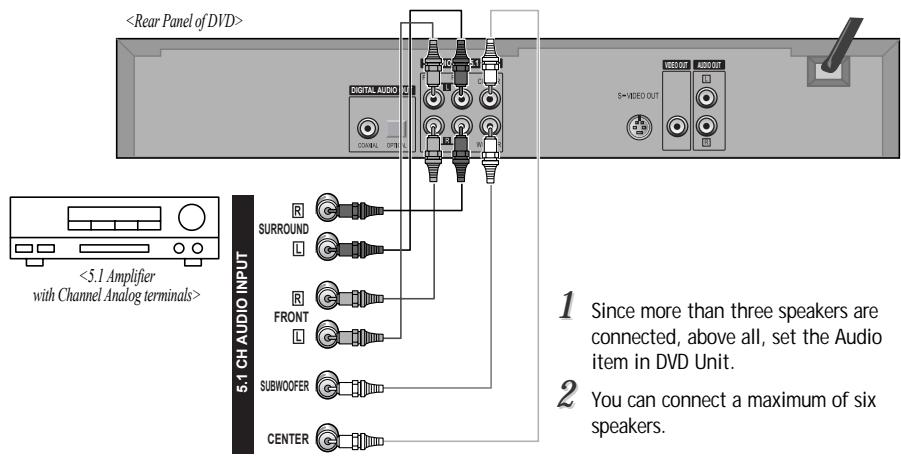
To control TV System
Press [SYSTEM] button to control TV Output System.
Every time the user presses [SYSTEM] button, Auto, NTSC and PAL are selected one by one.
Select your unit system.
Playing Discs
1 Press [ ] button to power on.
Press [OPEN/CLOSE] button to open the disc tray.
Place a disc firmly on the disc tray, making its label look upward.
3 Insert the disc and press [OPEN/CLOSE] button to close the tray.
The disc tray is closed and after checking the disc's condition, Playback or Stop function starts to operate.
To playback it, press [PLAY] button.
In the case of DVD,
DVD menus and titles are displayed on TV screen.
In the case of S-VCD and VCD2.0
the menus are displayed on TV screen and it is converted into PBC(Playback Back Control) mode
In the case of CD, VCD1.1 and MP3,
the disc plays in order of its track numbers.
5 To stop it, press [■] button.
For pause, press [PAUSE] button in playback mode.
If you press [PLAY] button, it starts playback again.
6 Press [OPEN/CLOSE] button to remove the disc.
If you press no button in 5 minutes after you are opened the tray, the player closes the tray automatically to prevent from damage.
VariousPlaybackMethods
If you want fast (or reverse) playback, press [▶] or [←] button in Playback mode. You can watch fast playing (reverse) screen.
- This reverse playback can be unavailable for certain DVD. Unavailable for MP3.
If you want slow (or reverse) playback, press [▶] or [←] button in Pause mode. You can watch the desired screen in the slow forward (reverse) playback.
- For the case of Video CD, this reverse slow playback function is unavailable. The ⊙ mark will appear.
If you want still picture, press [PAUSE] button in Playback mode. You can watch the desired screen in Pause status.
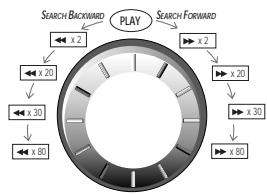
For Shuttle Ring on front panel (DQD-6100D only}
1 In playback mode, rotating this shuttle in clockwise makes the playback speed change in the below orders; x 2 x 20 x 30 x 80
2 In playback mode, rotating this shuttle in counter clockwise makes the playback speed change in the below orders;
$$ \triangleleft \times 2 \rightarrow \triangleleft \times 2 0 \rightarrow \triangleleft \times 3 0 \rightarrow $$
$$ \triangleleft \times 8 0 $$
3 In pause mode, rotating this shuttle ring make screen advance frame by frame.
Playing a desired scene
To skip scenes in a disc
DVD
VCD
CD
MP3
To move to next chapter (or track), press [NEXT] button.
The current chapter (or track) moves to the next chapter (or track).
Press [PREV] button.
The current scene moves to the previous chapter (or track) or first scene of current chapter (or track).
Directly moving to a desired title
Some movie discs may contain multiple titles. If the disc has a movie title menu recorded on it, the [TITLE] button can be used to select the movie title. Details of operation may differ depending on the disc used. * Selecting a title may not be available on certain DVD discs.
DVD
VCD
Press the [TITLE/PBC] or [MENU] button.
A list of the titles on the disc is displayed.
For the case of VCD disc, menu screen will appear only when the disc has PBC function and PBC ON is activated.
![DAEWOO DQD-6100D - Press the [TITLE/PBC] or [MENU] button. - 1](/content/2025/01/146567/images/1371b4e2fbe85860e794005830838666b39f4b54bfe9ed1e4aa90c562479e961.jpg)
Press the [ENTER] button or [PLAY] button after pressing the [< > ] button to select the desired title.
The selected title now starts playing.
![DAEWOO DQD-6100D - Press the [ENTER] button or [PLAY] button after pressing the [< > ] button to select the desired title. - 1](/content/2025/01/146567/images/cb7e44ecea6882a38d32f8c4e620fe10613bc3a9cca2d0f45acd53153ff6ce96.jpg)
![DAEWOO DQD-6100D - Press the [ENTER] button or [PLAY] button after pressing the [< > ] button to select the desired title. - 2](/content/2025/01/146567/images/f19b9fc5b6ce2e0773a08145b2dd248c91540254a445f57fe9300e7a9bbc75be.jpg)
Playing a programmed order
DVD
VCD
CD
1 While STOP or Playback, press [PROGRAM] button.
While the right figure is appearing, please input desired Title and Chapter number with NUMBER buttons. Press [ENTER] to go into next program number.
- In case of VCD and CD, please input TRACK Number.
![DAEWOO DQD-6100D - While STOP or Playback, press [PROGRAM] button. - 1](/content/2025/01/146567/images/7da57f8a16106e79a896f637d33cfb3b7fd1f4a0b7b181b4314f9f031bab7950.jpg)
After completing setting, press [PLAY] button. Then, titles and chapters (track) are played in the above-program To exit from Program Play mode, press the [SETUP] button in screen.
Repeating a defined period
DVD
VCD
CD
MP3
Each time you press [REPEAT] button in playback mode, repeat playback starts as below.
- DVD: Rep. Chapter Rep. Title Rep. Off
- VCD: Rep. One Rep. Disc Rep. Off
- CD: Rep. One Rep. Disc Rep. Random Rep. Off
- MP3: Rep. One -> Rep. Dir -> Rep. Disc -> Rep. Random -> Rep. Off
Rep. Chapter : Current chapter will be repeatedly playback.
- Rep. Title: Current title will be repeatedly playback.
- Rep. One: Current track will be repeatedly playback.
- Rep. Disc: Current disc will be repeatedly playback.
- Rep. Random: Tracks in the disc will be playback in random order.
- Rep. Dir : Current directory in MP3 disc will be repeatedly playback.
- Rep. Off: Repeat playback will be cancelled.
Repeating a defined period from A to B
You may repeat a defined period from A to B.
DVD
VCD
CD
1 At the point where you want to start the repeat playback, press [A-B] button.
The right figure appears and repeat playback start position (A) is set.
![DAEWOO DQD-6100D - At the point where you want to start the repeat playback, press [A-B] button. - 1](/content/2025/01/146567/images/ca67bb9247135f2f627e36c40440a33e4d2d023fba83f64d07be433079f68a19.jpg)
![DAEWOO DQD-6100D - At the point where you want to start the repeat playback, press [A-B] button. - 2](/content/2025/01/146567/images/41d484a46b24198fbe5db6c634d8d725a75f357c3d26d890766cf1095a919311.jpg)
A MP3 disc may
not be repeated from A to B.
![DAEWOO DQD-6100D - At the point where you want to start the repeat playback, press [A-B] button. - 3](/content/2025/01/146567/images/56948c6f87014e7f6763795e826d855bf438039bcf90c7feda22ab7fffacdab2.jpg)
At the point where you want to end the repeat playback, press [A-B] button again.
The repeat playback end position (B) is set and a defined period from A to B is playback repeatedly.
![DAEWOO DQD-6100D - At the point where you want to end the repeat playback, press [A-B] button again. - 1](/content/2025/01/146567/images/2ec59131d9a7fd0f30a34f048f968837dac041e5e3e50de2297593c387d5f659.jpg)
![DAEWOO DQD-6100D - At the point where you want to end the repeat playback, press [A-B] button again. - 2](/content/2025/01/146567/images/01b259a640c23511679e199250b2f2d555e38fccb1ace0176eaab4c987092996.jpg)
To exit from repeat playback mode, press [A-B] button.
It enters into Normal Playback mode.
![DAEWOO DQD-6100D - To exit from repeat playback mode, press [A-B] button. - 1](/content/2025/01/146567/images/d60967c3893be14c5c5aaecb47017193d5ea155828fadad32c59c4091add3c9a.jpg)
Searching DVD with a title number, a chapter number or a time

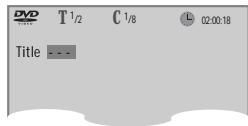
1 If you want to search with a title number, press [SEARCH] button one time.
It shows total title numbers, chapter numbers and times. Please enter the new title number to be searched using the [NUMBER] buttons.
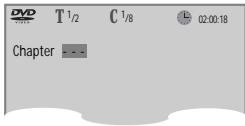
2 If you want to search with a chapter number, press [SEARCH] button twice.
Please enter the new chapter number to be searched using the [NUMBER] buttons.
3 If you want to search with a time, press [SEARCH] button three times.
Please enter the new time to be searched using the [NUMBER] buttons.
In completing entering, please press [ENTER] button.
PLAY starts from the selected time position.
Searching VCD and CD with a time or track time


If you want to search with a time, press [SEARCH] button one time.
In case of PBC OFF, the screen like the right figure appears. Please enter the new time to be searched using the [NUMBER] button.
- If it is PBC ON, pressing the time number converts PBC to OFF mode automatically.
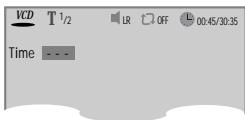
If you want to search with a track time, press [SEARCH] button twice.
In case of PBC OFF, the screen like the right figure appears. It shows current track's time. Please enter the new track time to be searched using the [NUMBER] button.
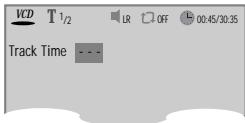
3 In completing entering, please press [ENTER]. PLAY starts from the selected position.
- In case of MP3, press [SEARCH] button one time. When it shows track , please enter the track number.
Confirming the current PLAY mode on screen
Confirming the current DVD disc mode

While in playing, press [DISPLAY] button.
It shows the disc type, current title, current chapter and time elapsed.
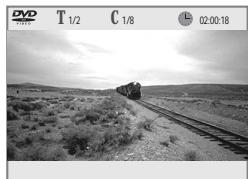
Press [DISPLAY] button again. It shows the DVD disc logo, subtitle selected, audio selected, dolby digital logo, repeat playback mode and current angle. To exit from Display mode, press [DISPLAY] button again.
Confirming the current VCD, CD disc mode

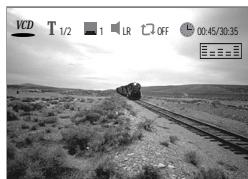
While in playing, press [DISPLAY] button. It shows the disc logo, current track, subtitle selected, audio selected, repeat playback mode, time elapsed and equalizer bar.
- In case of CD, display screen appears automatically in playback mode. But subtitle and equalizer bar indicator will not appear. To exit from Display mode, press [DISPLAY] button again.
Confirming the current MP3 disc mode

1 Display screen appears automatically in Playback mode.
It shows the MP3 File information in disc, the directory, MP3 File name and directory list.
With [< > ] buttons, you can move the cursor to directory or number of MP3 Music File.
To go to desired directory or to playback MP3 File, press [ENTER] key.
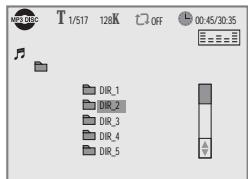
- The information of MP3 File means the disc type, current track, the bit rate of MP3 File, repeat playback mode, time elapsed and equalizer bar.
At the desired directory position, press [ENTER] button. It shows the track list.
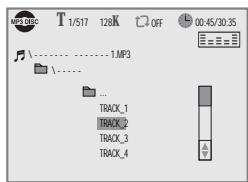
AUDIO language, SUBTITLE language and 3D AUDIO
Selecting an audio language
The user may select an audio language and subtitle language if a disc includes Multi-language.


A certain disc
may not support audio select or subtitle select.
Keep pressing [AUDIO] button till the user's preferred language appears.
If DVD disc includes audio information, every time the user presses [AUDIO] button, English (ENG), French (FRE), Spanish (SPA) and others appear one by one.
![DAEWOO DQD-6100D - Keep pressing [AUDIO] button till the user's preferred language appears. - 1](/content/2025/01/146567/images/c60ad2d30d1d0dfb13d8de83ce3bb6c67edbefa12b9d7968d70251a59aa6e6b3.jpg)
Selecting a subtitle language

Keep pressing [SUBTITLE] button till the user's preferred language appears.
If a DVD disc includes subtitle information, every time the user presses [SUBTITLE] button, English (ENG), French (FRE), Spanish (SPA) and others appear one by one.
![DAEWOO DQD-6100D - Keep pressing [SUBTITLE] button till the user's preferred language appears. - 1](/content/2025/01/146567/images/403d7618fecb950f0b53d2e6c36dd1625704d7720cf7e15969038d9b5d6e8a44.jpg)
Selecting 3D Audio


Sound Fields and Graphics Equalizer can be set.
Please press [3D] button.
If the right figure appears, move the cursor with [< > ] buttons.
The user may select a "Sound fields" among Standard, Theater, Amphitheater, Live, Concert, Church, Wide, Hall or Stadium.
Also, select a "Graphics equalizer" among Standard, Classic, Rock, Jazz, Pop or User.
- When setting graphics equalizer, sound fields changes to "Standard" automatically.
To exit from 3D mode, press [3D] button again.
![DAEWOO DQD-6100D - Please press [3D] button. - 1](/content/2025/01/146567/images/b21664562b7f569a8c0fb7c4e091275bba4dfb28560e29814e97f29e778ccfc4.jpg)
ZOOM, Multi Angle and Digest play
Using a zoom function
The user can enlarge the current screen about 1.3 or 2 times.


For the case of
VCD, only 2 times Zoom is available.
Keep pressing [Z00M] button till the preferred zoom appears.
Every time the user presses [ZOOM] button, a zoom magnification changes 1.3 times (X1.3) 2 times (X2) OFF 1.3 times (X1.3) ... one by one.
A base point to be enlarged is centre and the point can be changed with the operation of [< > ] button.
![DAEWOO DQD-6100D - Keep pressing [Z00M] button till the preferred zoom appears. - 1](/content/2025/01/146567/images/51cf61a71499607e36db5c4a6090d64b189e77f4d63237ed81d9370ec3e5717d.jpg)
![DAEWOO DQD-6100D - Keep pressing [Z00M] button till the preferred zoom appears. - 2](/content/2025/01/146567/images/f204e64af0ec795b9ac3eb7dbe493b71b4eff554fdd6210172b669d29f6b1b9f.jpg)
Different Angle
If a disc includes multi angle information, the user can watch a screen in multi angles. The function is limited to a DVD disc supporting multi angle information.

Keep pressing [ANGLE/DIGEST] button till the preferred angle appears.
Every time the user presses [ANGLE/DIGEST] button, an angle degrees changes in a consecutive order.
![DAEWOO DQD-6100D - Keep pressing [ANGLE/DIGEST] button till the preferred angle appears. - 1](/content/2025/01/146567/images/aae3e95e192cc77ad3a7b250f82636586ced592f786bead10f4d0bcf27388e89.jpg)
Digest play


Only activates
with VCD 1.0 or VCD 2.0 discs.
Press the [ANGLE/DIGEST] button in playback or stop mode.
All the contents of VCD are divided to 9 parts and the first scene of each parts are shown on the screen.
Press the [ENTER] button after moving to the desired scene with [< > ] button.
The selected scene now starts playing.
![DAEWOO DQD-6100D - Press the [ANGLE/DIGEST] button in playback or stop mode. - 1](/content/2025/01/146567/images/5b4d0ef9e655d219e4033c2ae6ea5a14d20e50defa812ffcdc763767d7debc32.jpg)
About MP3 discs
Playing a disc containing MP3 files
This unit will play MP3 files recorded on CD-R and CD-RW discs.
MP3
1 Turn on your television and select the channel assigned to this DVD player.
2 Press the DVD open [OPEN/CLOSE] button, the disc tray opens.
3 Put a disc containing MP3 files on the disc tray with the label side up.
4 Press the DVD open [OPEN/CLOSE] button, the disc tray closes.
5 The unit will take a short while to load the disc and display the directory structure.
6 Press the [< > ] navigation buttons of the remote control to select the folder, then press the [ENTER] or [PLAY] button to confirm.
7 Press the [< > ] navigation buttons of the remote control to select the file you want to listen to, then press the [ENTER] button and this selected file is located and played back.
After starting playback, the track list is on-screen. You can move the highlight onto the folder name above the track list and change folder with the [PREV] button. Press the [SEARCH] button twice in stop mode to get back to folder tree view.
Play and Pause
Press the [PLAY] or [PAUSE] button to switch between play and pause.
Search for a track
The [SEARCH] button works on MP3 discs as well as CD audio.
To stop playback
Press the [STOP ] button.
To skip to the next or previous file
- Press the [▶NEXT] button of the remote control briefly while playing, to skip ahead to the beginning of the next file. Each time you press the button consecutively, the beginning of the next file is located and played back.
- Press the [PREV (Previous)] button of the remote control briefly while playing, to skip back to the beginning of the previous file. Each time you press the button consecutively, the beginning of the previous file is located and played back.

The ability of this unit to read MP3 discs is dependent on the followings:
The Bit Rate must be within 64-256 kbps.
- The maximum number of directories should not exceed 32.
- The maximum depth level of directories should not exceed 4.
- File names should be named using 8 or fewer letters and/or numbers, and must incorporate the "MP3" file extension. EXAMPLE: ******. MP3 where each * is a letter or number.
- Use only letters and/ or numbers in file names. If you use special characters, the file and/ or folder names may not be displayed correctly on the on-screen display.
- The CD-R or CD-RW discs should be written using the 'disc at once' method.
- The disc which is made with ISO 9660 format can be playback.
About JPEG discs
Playing a disc containing JPEG files
This unit will play JPEG files recorded on CD-R and CD-RW discs.
JPEG
If your disc is detected, screen appears with the same format of MP3 file.

If JPEG file is
more than about 500KB, the playback of file by pressing [ENTER] button may be impossible, or sliding image may be skipped.

Pressing [ENTER] button in JPEG image makes the its image appear on the screen.
At this time, if you press [PLAY] button, sliding image can be viewed automatically from this image. Its viewing time can be different from the file.
- If you press [PLAY] button in JPEG image directly without pressing [ENTER] button, sliding screen will be viewed automatically.
3 To stop sliding image, press [STOP] button. Pressing [STOP] button again makes the screen go to first list.
Displaying menus in a disc
To display menus in a disc
If a disc includes menus, the user may use them.
DVD
VCD2.0
Press [TITLE/PBC] or [MENU] button.
- It shows menus in the disc. Also they are different according to discs. ("Return" will appear on the OSD with VCD2.0.)
- If it is a VCD2.0, select PBC ON mode by pressing [TITLE/PBC] button.
- CD and VCD1.1 do not support the function.
2 Move a cursor to a relative item with arrow buttons of [< > ] button and select one with [ENTER] button or [PLAY] button.
Language Setup
The user can set the language of menus in a disc, audio and subtitle.
1 While DISC STOP or Resume STOP, press [SETUP] button.
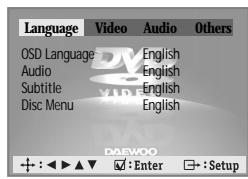
Selecting an 0SD language. Please select a language to be disp
3 Selecting an Audio language. Set it as the preferred audio language. In case the audio language is set and recorded in the DISC, it is automatically played in the set language every time it is played. For example, English is set and recorded as audio language in the DISC, it is played in English.
4 Selecting a Subtitle language. Please set it as the preferred language. In case the subtitle language is set and recorded in the DISC, it is automatically played in the set language every time it is played. For example, English is set and recorded as subtitle language in the DISC, it is played in English.
* To select another subtitle language, follow the same procedure with another audio language setting.
5 Selecting a DISC MENU language. Please set it as the preferred DISC MENU language. In case the DISC MENU language is set and recorded in the DISC, it is automatically played in the set language every time it is played. For example, English is set and recorded as a DISC MENU language in the DISC, it is played in English.
Video Setup
A user can set up a connected TV condition and screen.
1 While DISC STOP or Resume STOP, press [SETUP] button.
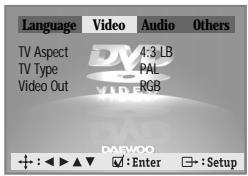
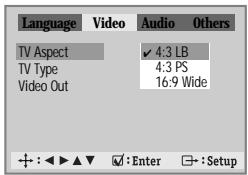
Selecting TV Aspect.
If a user selects "4:3 LB", the user can watch the original scene of "16:9", but the top and bottom of the screen look black color.
If a user selects "4:3 PS", the user can watch only a centre of the original scene of "16:9".
If a disc size is originally recorded in 4:3, the user cannot watch it in a wide screen though the user sets a size as "16:9 Wide".
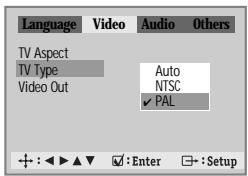
0 Selecting a TV type.
The user may select a TV type.
The user may select a type among Auto, NTSC or PAL .
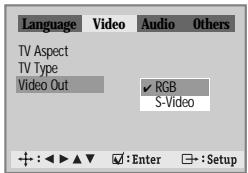
Selecting Video Out.
The user may select a Video Out between RGB and S-Video.

does not include setting languages information, the selected language does not appear.
Audio Setup
A user may select audio menu according to a user's speaker set.
1 While DISC STOP or Resume STOP, press [SETUP] button.
{DQD-6100D/DVD-360D/ - - - DVD-260D only}
![DAEWOO DQD-6100D - While DISC STOP or Resume STOP, press [SETUP] button. - 1](/content/2025/01/146567/images/53f7f8bfc29fa767feed9878ee9fec2c45b3d0d040ad6694136fb1c49aee334e.jpg)
Select a digital output.
Set output conditions to coaxial or optical terminal. You can set following two values of digital output;
- BITSTREAM: The same signal as audio signal recorded in disc goes to digital audio output terminal.
- LPCM: Decoded audio signal goes to digital output terminal.
3 Select a Front L/R Speaker. The user can select a Front L/R Spe between "Small" and "Large".
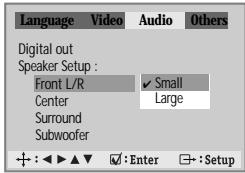
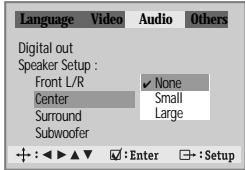
4 Select a Center Speaker. This submenu is valid when you are using an amplifier, which have the 5.1-CH analog audio input. If you have the Center speaker, please select "Small" or "Large". If not, select "None".
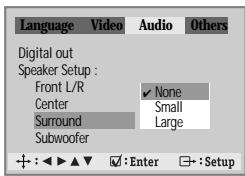
5 Select a Surround Speaker. This submenu is valid when you are using an amplifier, which have the 5.1-CH analog audio input. If you have the Rear speaker, please select "Small" or "Large". If not, select "None".
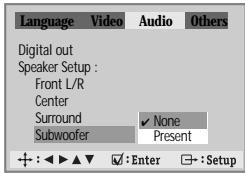
Select a Subwoofer Speaker. This submenu is valid when you are using an amplifier, which have the 5.1-CH analog audio input. If you have the Subwoofer speaker, please select "Present". If not, select "None".
Others Setup
1 While DISC STOP or Resume STOP, press [SETUP] button.
![DAEWOO DQD-6100D - While DISC STOP or Resume STOP, press [SETUP] button. - 1](/content/2025/01/146567/images/9144738fe0e1ebb992b38d5d5089f529528f5dfcddaf239bcd7ac5971f30ebdf.jpg)
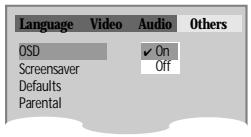
2 Select character display window. Select "On" to make OSD(On Screen Display) language displayed in screen.
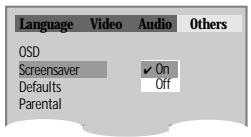
3 Select screensaver. If bright scenes continue to be displayed in screen, TV can be damaged. Set the screensaver to "On", the screensaver functions automatically and DVD logo moves continuously if the resume stop, stop, open status is maintained for about 5 minutes.
4 Select defaults. If you select defaults, every function set returns to FACTORY Defaults except Parental.
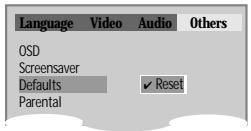
5 Entering a password. Input password display appears. Enter a user's password by pressing 4 [Digit] buttons.
![DAEWOO DQD-6100D - Entering a password. Input password display appears. Enter a user's password by pressing 4 [Digit] buttons. - 1](/content/2025/01/146567/images/98e4204c377e8348d01302398a51c3a6abcbfbce190c114f6c88703f6612e780.jpg)
6 Select Parental. Press [ENTER] button to set the selected item.
![DAEWOO DQD-6100D - Select Parental. Press [ENTER] button to set the selected item. - 1](/content/2025/01/146567/images/77b549a1e1716e058009112ab553aaf3e77925f6fc74138f9366fca534c29544.jpg)
It consists of 8 levels of parental control, violence, sexual scene, strong sexual scene and others to protect children from watching those scenes.
![DAEWOO DQD-6100D - Select Parental. Press [ENTER] button to set the selected item. - 2](/content/2025/01/146567/images/b5d2babde7ab20ca23afdcf8b0a718ea12a1c9117bb253c842ee1589929ad3f7.jpg)
7 Changing a password. For the change of a user's pa move to "Change Password"
About DVD
Playable Disc
DVD, Video CD(Version 1.1, 2.0), S-VCD and Audio CD
| Disc type | Playable | Restriction |
| DVD | Possible | Region number 2 or Region number All |
| Video CD | Possible | Version 1.0/1.1/2.0, SVCD/CVD |
| CD | Possible | PCM or dts |
| CD-G | Possible | Only Audio playback |
| CD-ROM | Possible | MP3 File |
| CD-R | Possible | Video-CD/CD/CD-ROM (MP3 File) |
| CD-RW | Possible | Video-CD/CD/CD-ROM (MP3 File) |
| DVD-R | Possible | DVD Video |
| DVD-RW | Possible | DVD Video |
| DVD+RW | Possible | DVD Video |
| DVD-ROM | Impossible | |
| DVD-RAM | Impossible | |
| Photo CD | Impossible |
REGION MANAGEMENT INFORMATION
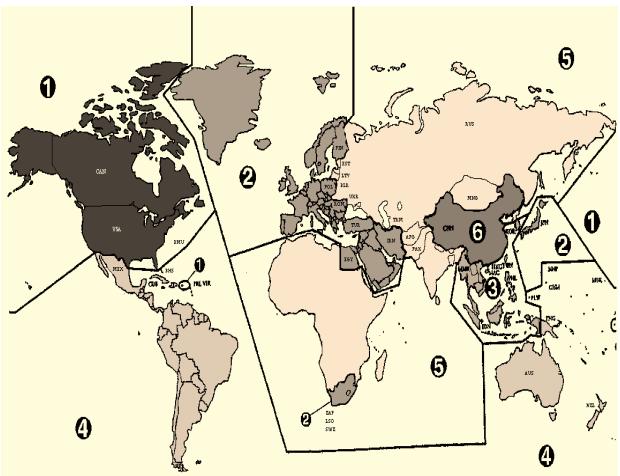
This unit is designed and manufactured to respond to the Region Management information that is recorded on a DVD disc. The region number of this player is "2". If the region number described on the DVD discs does not correspond to the Region number of this player, the player will not play this disc. This player will play DVD discs made for "ALL" regions. Therefore, this player will play DVD discs marked with labels containing the region number "2" or "ALL".

(Region 2)

(Region ALL)
Terms related with DVD
DVD A DVD (abbreviation of Digital Versatile Disc or Digital Video Disc) can include 135 minutes of video information. And for audio, it can hold up to 8 kinds of languages and 32 kinds of subtitle languages. By using MPEG-2 video compression and digital 3D surround sound, DVD realizes high-defined screen and quality sound like a movie theater.
CDDA A CDDA (abbreviation of Compact disc digital audio) is a music disc that is currently used.
MP3 Audio compression format that enables audio files to be stored and transferred on a computer with a relatively small file size. It enables you to enjoy CD quality music. (Short for MPEG-1 Layer 3)
PBC This is recorded on a Video CD 2.0, Video CD 3.0, SVCD and CVD. The scenes or information to be viewed (or listened to) can be selected interactively with the TV monitor by looking at the menu shown on the TV monitor. It stands for PlayBack Control.
CHAPTER It means the information recorded in a DVD. A title in a DVD is divided into many tracks, of which a track is called as a chapter. A certain scene of a screen can be quickly searched with the chapter number.
TITLE It means the information recorded in a DVD. A DVD can be divided into may titles.
TRACK It means the information recorded in a video CD and audio CD. A disc consists of many a track, for which a user can search a certain position.
dts Digital Theatre System is a 5.1 -channel surround sound system, which is widely used in movie theatres around the world. It enables the bit rate to be increased to provide good sound quality. "DTS" and "DTS Digital Out" are trademarks of Digital Theater Systems, Inc.
Multi Angle Some DVD discs contain the various scenes that have been simultaneously shot from a number of different angles.
PCM PCM (Pulse Code Modulation) means digital sound.
Dolby Digital Dolby Digital enables the delivery of mono through 5.1-channel audio at data rates from 32 kbps to 640 kbps, thus offering flexibility and economical performance as well as uncompromised sound quality.
Bitstream Digital audio data that is decoded into an analog signal for subsequent output to speakers.
Lt/Rt It indicates L/R of Dolby Digital 2CH Downmix Output.
L/R/C/SW/LS/RS
6 channels are using in Dolby Digital and dts. They are 3 channels for the front screen, 2 channels for surround and 1 subwoofer. The front left speaker is referred as L, right speaker as R, centre speaker as C, subwoofer as SW, left surround speaker as LS, right speaker as RS. * L/R of 6CH output like upper case is displayed as Lo/Ro.
Downmix Downmix is the technology for playing proper audio in case the recorded audio channel construction and that of output channel does not match each other. Downmix will provide 5.1 channel-audio by using 2 stereo speakers.
S-Video S-Video offers clearer and sharper screen than COMPOSITE by separately-transmitting the signal of color (C) and brightness (Y).
- Keeping a disc safety
- To keep a disc in clean condition, please do not touch the side containing play information.
- Do not attach a bit of paper or sticky tape on it.
- Do not expose a disc to a direct sunlight or electric heating systems.
After using it, please keep the disc in a case.
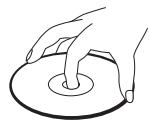
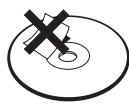
Cleaning a disc
- Please rub it from centre toward outside with clean clothe.
- Do not use thinner, benzol (benzene), commercial cleaning goods or antistatic sprays.
Region Code
The product and all DVD disc have region codes. So if both codes are not coincided each other, it does not work. Region codes are like the below.
Macrovision
This product incorporates copyright protection technology that is protected by method claims of certain U.S patents and other intellectual property rights owned by Macrovision Corporation and other rights owners. Use of this copyright protection technology must be authorized by Macrovision Corporation, and is intended for home and other limited viewing uses only unless otherwise authorized by Macrovision Corporation. Reverse engineering or disassembly is prohibited.
Before doubting about troubles
| Symptom | Checks |
| · The DVD player does not play. | · If a DVD is from overseas, it may not be played. Please check a DVD's region code whether it has the relative region code 2 or All. · Please check whether a DVD is inserted in a right direction. · CD-ROM, DVD-ROM isn't playback. (CD-ROM and DVD-ROM means the format which has simple information.) |
| · No sound comes through. | · Play mode may be "SLOW" or "PAUSE/STEP" (In abnormal speed play, no sound comes through). · Did you connect the parts in right way? · Please check the operative condition of TV or amplifier. · From "DEFAULT" SET, please check "Audio" items. |
| · A disc is playing but screen does not appear or poor screen appears. | · Did you turn on your TV sets? · Did you connect the parts in right way? · The play may be in "PAUSE". · A disc may have some contaminants or be damaged. · A disc may be bad one. |
| · Sound is irregular. | · Please check the connection with Dolby Digital amplifier. · Please check the plugs are connected with one another tightly. · Some contaminants may be remained in connection terminal. |
| · Remote control does not work. | · Please check the degree of the remote control, distance or any interruption. · Battery may be weak or exhausted. · Unplug the power plug and plug it again. |
| · Dolby Digital sound does not work. | · Dolby Digital sound can be worked in the Dolby Digital amplifier only. · Please check "Dolby Digital" mark on your DVD. · In case of playing it through digital output, while pressing [STOP], please check whether "DIGITAL OUT" is "BITSTREAM" by pressing [SETUP]. · Please check the connection is correct. |
| · [AUDIO] or [SUBTITLE] button does not work. | · If a DVD does not include language information, it does not support the function. |
| ·[ANGLE/DIGEST] button does not work while a DVD is playing. | >“ANGLE” is supported only in a DVD contains multi angle scenes. Also a user can confirm the support with the “ANGLE” mark on screen. |
| ·“MENU” does not appear while a DVD is playing. | > Please check the degree of the remote control, distance or any interruption. > Please check a battery in the remote control whether it is exhausted or not. > A DVD may not contain menu information. |
| ·Screen shakes or appears only in black and white. | > The recorder may not coincide with your TV system. Please press [SYSTEM] to match to PAL system. > A disc may have some contaminants or be damaged. > Please check a DVD's region code 2. > To watch the disc whose region code is ALL and its system is NTSC, select “PAL” in TV Type. |
| ·The file name of MP3 (CD-R) appears with strange letters. | > The file name of MP3 recognize only the Alphabet (A-Z, a-z), numbers (0-9) and a special symbol on keyboard (~, !, @, #, $...) and 10 letters can be displayed in maximum. > The letters except above case will be displayed like “- - - - ”. |
| ·Any MP3 (CD-R) file isn't displayed. | > If the surface of disk is injured, the file display and playback can be impossible. |
Specifications
| Power | AC 230V~, 50Hz | |
| Consumed electricity | 14W (supplementary 8W) | |
| Weight | 4.25 kg | |
| Dimension (WxHxD) | 420mm x 65mm x 250.3mm | |
| Operative temperature | +5℃ ~ 35℃ | |
| Installation condition | Horizontal / Relative humidity under 80% | |
| VIDEO output | VIDEO output terminal, 1.0Vp-p, 75Ω, unbalanced, RCA JACK | |
| S-VIDEO output (75Ω In load Y: 1.0Vp-p, C:0.286Vp-p), Din Jack | ||
| Euro (Scart) Jack | ||
| AUDIO output | Analogue | RCA JACK, 2.0Vrms, 75Ω, |
| Digital | 0.5V p-p, 75Ω, RCA JACK | |
| Optical Digital | Optical Cable | |
| AUDIO | 90dB (EIAJ) | |
| AUDIO dynamic range | 90dB (EIAJ) | |
| Resolution | Over 500 lines (DVD Disc play) | |
DVD Audio output standards
| Output | Disc type | ||
| DVD | Video-CD | CD | |
| Analogue Audio output | 48/96KHz sampling | 44.1KHz sampling | 44.1KHz sampling |
| 5.1-CH (R, L, C, SW, RS, LS) | 48KHz sampling | - | - |
| Digital Audio output | 48KHz sampling | 44.1KHz sampling | 44.1KHz sampling |
| Optical digital audio output | 48KHz sampling | 44.1KHz sampling | 44.1KHz sampling |