
SZC-2002 - Video editing software SONY - Free user manual and instructions
Find the device manual for free SZC-2002 SONY in PDF.


User questions about SZC-2002 SONY
0 question about this device. Answer the ones you know or ask your own.
Ask a new question about this device
Download the instructions for your Video editing software in PDF format for free! Find your manual SZC-2002 - SONY and take your electronic device back in hand. On this page are published all the documents necessary for the use of your device. SZC-2002 by SONY.
USER MANUAL SZC-2002 SONY
USER'S GUIDE English
1st Edition (Revised 4)
Overview
The SZC-2001/2001M/2001W HD CUTOUT Software, SZC-2002/2002M/2002W HD HFR Software, and SZC-4002/4002M/4002W HFR Software are optional software for the BPU4000/4500 Baseband Processor Unit. SZC-2001/2001M/2001W HD CUTOUT Software can be installed on the HDCU4300 with software version 1.20 and later, and SZC-4002/4002M/4002W HFR Software can be installed on the HDCU4300 with software version 1.00 and later (SZC-2002/2002M/2002W cannot be installed on the HDCU4300).
- Installing SZC-2001/2001M/2001W on the BPU4000/4500 or HDCU4300 allows you to cut an HD signal out of a 4K image.
- Installing SZC-2002/2002M/2002W on the BPU4000/4500 enables High Frame Rate format output, when connected to a PMW-F55 Solid-State Memory Camcorder or F65 Digital Motion Picture Camera, allowing you to transfer and perform signal processing of HFR images.
- Installing SZC-4002/4002M/4002W on the BPU4000/4500 or HDCU4300 enables High Frame Rate format output, when connected to a PMW-F55, F65, HDC4300 Color Camera, or HDC-P43 Multi Purpose Camera, allowing you to transfer and perform signal processing of HFR images.
- All functions that are added by installing SZC-2002/2002M/2002W are included in SZC-4002/4002M/4002W.
The SZC-2001M/2002M/4002M is limited to use for 30 days.
The SZC-2001W/2002W/4002W is limited to use for 7 days.
Notes
- The period of use starts counting from the day after installation, and can be checked on the
- Check that the date of the BPU4000/4500 or HDCU4300 is set correctly before installing SZC-2001M/2001W/2002M/2002W/4002M/4002W. If the date is set incorrectly, installation may not be possible.
- When installing the SZC-2001 or SZC-2002 using a .key file, check that the software version for the unit combination is as follows:
CA4000: Version 1.03 and later
BPU4000: Version 1.04 and later
BPU4500: Version 1.10 and later
- When installing the SZC-2001M/2001W or SZC-2002M/2002W using a .key file, check that the software version for the unit combination is as follows: CA4000: Version 2.12 and later
BPU4000: Version 2.16 and later
BPU4500: Version 1.10 and later
- When installing the SZC-4002/4002M/4002W using a .key file, check that the software version for the unit combination is as follows:
CA4000: Version 2.50 and later
BPU4000: Version 3.00 and later
BPU4500: Version 1.10 and later
- When installing the SZC-2001/2001M/2001W or SZC-4002/4002M/4002W using RQ_LIC.DAT, check that the software version for the unit combination is as follows:
BPU4000: Version 3.60 and later
BPU4500: Version 1.60 and later
HDCU4300: Version 1.40 and later
Installation of the SZC-2002/2002M/2002W using
RQ_LIC.DAT is not supported.
Installation
1 Prepare a key file.
There are two types of key files: .key file and RQ_LIC.DAT file. The preparation varies depending on the type of key file you have.
If installing from RQ_LIC.DAT
Do not change the contents of the RQ_LIC.DAT file. The "RQ_LIC.DAT" file name is the same for each device (BPU4000/BPU4500/HDCU4300).
Copy the file to the top level of a USB flash drive, and do not move it. The installation will fail if the file is moved.
If installing from a .key file
Create a text file that includes the software installation key and change the filename.
BPU4000: bpu4000.key
BPU4500: bpu4500.key
HDCU4300: hdcu4300.key
Note that the extension is “.key.”
Key file format
- You can describe multiple installation keys in a single key file (bpu4000.key, bpu4500.key, or hdcu4300.key). Invalid keys are ignored in the installation process.
- Describe only one installation key on a single line.
- Any description between “#” or “;” and the line break is read as a comment.
Example of bpu4000.key
# A Studio
# CAM1
c51caee92a3d1d77
# CAM2
2897f1db294d70ae
; Studio B
bd9dc931db917f25 ; CAM1
6fe3ebd3f4ba3635 ; CAM2
Note
Entering multiple keys to specify the period of use will install all the keys at the same time, and the period of use registered is the consecutive period of all keys.
Copy the created file to the specified folder on the USB flash memory.
On the BPU4000, create a \MSSONY\PRO\
CAMERA\BPU4000 folder on a USB flash drive and copy "bpu4000.key" to that folder.
On the BPU4500, create a \MSSONY\PRO\
CAMERA\BPU4500 folder on a USB flash drive and copy "bpu4500.key" to that folder.
On the HDCU4300, create a \MSSONY\PRO\
CAMERA\HDCU4300 folder on a USB flash drive and copy "hdcu4300.key" to that folder.
2 Install the key file.
The installation procedure is the same for a .key file and RQ_LIC.DAT.
Connect the USB flash drive to the USB connector on the front panel, and install the key file from the drive onto the BPU4000/4500 or HDCU4300 using the
For details on menu operations, refer to the OPERATION MANUAL of the BPU4000/4500 or HDCU4300.
| <OPTION KEY> | C12 TOP |
| →READ (USB →CAM) | |
| INSTALLED OPTION |
When the key file is installed on the BPU4000/4500 or HDCU4300, an indication of the installed options is displayed in the INSTALLED OPTION field of the
The illustrations below give an example of the indication when SZC-2001/2001M/2001W is installed. The indication will vary depending on the key file that you install.
| Model Indication | |
| SZC-2001/2001M/2001W HD | CUTOUT |
| SZC-2002/2002M/2002W F5 | 5/F65 HFR(BPU4000/4500 only) |
| SZC-4002/4002M/4002W F5 | 5/F65/HDC4300/HDC-P43 HFR(BPU4000/4500 only)HFR ADDITION(HDCU4300 only) |
For SZC-2001

For SZC-2001M/2001W
Period of use
![C12 TOP →READ (USB →CAM) INSTALLED OPTION HD CUTOUT [2016/9/21 - 2016/9/28]](/content/2026/07/1456909/images/60d53db61e7bb9f83f86723586345b486b80724ec8bdb583bcecfbfd529976f6.jpg)
The period of use is displayed for time-limited software.
Note
For time-limited software (SZC-2001M/2001W/2002M/2002W/4002M/4002W), the same key cannot be reinstalled once it has been installed. Nor can it be uninstalled once it has been installed.
SZC-2001/2001M/2001W
Installing SZC-2001/2001M/2001W on the BPU4000/4500 or HDCU4300 adds the HD-CutOut function, allowing you to cut an HD signal from 4K images.
Enabling the HD-CutOut function
Note
The HD-CutOut function is enabled when the following settings are made.
- On the BPU4000/4500
On the
- On the HDCU4300
On the
1 Display the
2 Set "HD CUTOUT" to ON (see following diagram).
“(OFF)” is displayed for formats that do not support the HD-CutOut function.
BPU4000/4500 example
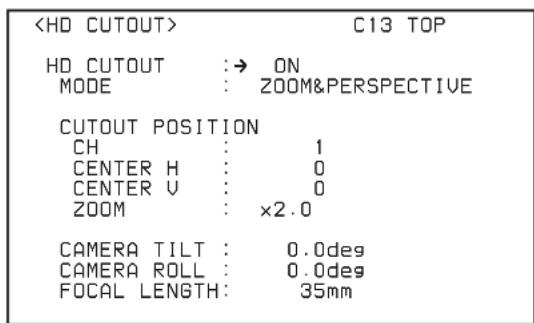
Using the HD-CutOut function
This section describes how to use the HD-CutOut function using the menu on the BPU4000/4500 or HDCU4300 (
Selecting the cut-out mode
Select one of the following for the “MODE” parameter. SIMPLE HD: Cuts out a 1920 × 1080 HD image from the 4K image for output as-is. Dual outputs are supported.
ZOOM&PERSPECTIVE: Cuts out a region of the 4K image which is then zoomed in/out to create an HD signal output. Perspective transformation is performed, according to the lens focal length, so that the output image is the same as if the camera was pointing toward the cut-out direction. Only one output is available.
For details about assigning BNC connectors for HD cut-out signal output, refer to the Operation Manual supplied with the BPU4000/4500 or HDCU4300.
Setting the cut-out position
1 Select the cut-out frame (1 or 2) to control using the "CH" parameter. In ZOOM&PERSPECTIVE mode, only CH1 is available.
2 Specify the center position of the cut-out frame.
CENTER H: Horizontal position (center is 0)
CENTER V: Vertical position (center is 0)
3 In ZOOM&PERSPECTIVE mode, specify the zoom ratio using the "ZOOM" parameter (1.0 represents a frame the same size as the 4K image).
Setting perspective transformation parameters for cut-out
In ZOOM&PERSPECTIVE mode, set the following parameters.
CAMERA TILT: Camera tilt angle (horizontal is 0 with positive angles pointing up)
CAMERA ROLL: Camera roll angle (slope of picture frame relative to horizontal, horizontal is 0 with positive angles indicating counterclockwise rotation)
FOCAL LENGTH: Lens focal length in mm units. To avoid any image deformation due to perspective transformation, increase the focal length till it reads "INFINITY."
Controlling the HD-CutOut function from a controller
You can also control the HD-CutOut function using an HD cut-out controller (such as the CNA-1) connected to the LAN port on the rear panel of the BPU4000/4500 or HDCU4300.
In this case, set the IP settings for the BPU4000/4500 on the
On the HDCU4300, set the IP settings on the
For details about operation, refer to the operation manual of the controller.
SZC-2002/2002M/2002W
Installing SZC-2002/2002M/2002W enables the following High Frame Rate format signal outputs when connected to a PMW-F55 or F65, allowing the transfer and signal processing of HFR images.
| Supported format | Connected device | |
| PMW-F55 | F65 | |
| 1080/59.94P(4×) Yes | ||
| 1080/50P(4×) Yes | ||
| 720/59.94P(4×) a) | Yes | |
| 720/50P(4×) a) | Yes | |
| 1080/59.94P(6×) Yes | ||
| 1080/50P(6×) Yes | ||
| 720/59.94P(6×) a) | Yes | |
| 720/50P(6×) a) | Yes | |
| 4096 × 2160/59.94P(2×) Yes | ||
| 4096 × 2160/50P(2×) Yes | ||
a) Selectable only when the format is set to 720P or the resolution is set to 1440 × 720 on the camera control unit (for example, HDCU2000).
The signal format can be selected in the master setup unit (MSU) menu or the BPU4000/4500 menu.
The following describes how to select 1080/59.94P(4×) when connected to a PMW-F55 as an example.
Selecting the signal format using the MSU menu
1 Display the
2 Select "System Format."
A list of signal formats that can be selected appears.
Note
If a CCU is connected to the BPU4000, only 1080/59.94P(4×), 1080/59.94P(6×), and 4096 × 2160/59.94P signal formats are displayed.
3 Select "1080/59.94P(4×)" and press Enter.
When in extension mode

When a CCU is connected

Selecting the signal format using the BPU4000/4500 menu
1 Display the
2 Set the "SYSTEM FORMAT" parameters to the following values (see following diagram).
RESOLUTION: 1920×1080
FREQUENCY: 59.94(4×)

SZC-4002/4002M/4002W
Installing SZC-4002/4002M/4002W enables the following High Frame Rate format signal outputs when connected to a PMW-F55, F65, HDC4300, or HDC-P43, allowing the transfer and signal processing of HFR images.
| Supported format | Connected device | ||
| PMW-F55a) | F65a) | HDC4300/HDC-P43 | |
| 1080/59.94P(4×) Yes Yes | |||
| 1080/50P(4×) Yes Yes | |||
| 720/59.94P(4×) b) | Yes Yes | ||
| 720/50P(4×) b) | Yes Yes | ||
| 1080/59.94P(6×) Yes Yes | |||
| 1080/50P(6×) Yes Yes | |||
| 720/59.94P(6×) b) | Yes Yes | ||
| 720/50P(6×) b) | Yes Yes | ||
| 1080/59.94P(8×) Yes | |||
| 1080/50P(8×) Yes | |||
| 720/59.94P(8×) b) | Yes | ||
| 720/50P(8×) b) | Yes | ||
| 4096 × 2160/59.94P(2×) | Yes | Yes c) | |
| 4096 × 2160/50P(2×) | Yes | Yes c) | |
a) Not supported on the HDCU4300.
b) Selectable only when the format is set to 720P or the resolution is set to 1440 × 720 on the camera control unit (for example, HDCU2000).
c) Selectable only when SZC-4001 series is installed on the HDC4300/HDC-P43, and when SZC-4002 series is installed on the BPU4000/4500.
The signal format can be selected in the master setup unit (MSU) menu or the BPU4000/4500 or HDCU4300 menu. The following describes how to select 1080/59.94P(4×) when connected to an HDC4300 as an example. (Connect a compatible camera control unit to the BPU4000/4500, and set the format of the camera control unit to 1080/59.94P.)
Selecting the signal format using the MSU menu
1 Display the
2 Select "System Format."
A list of signal formats that can be selected appears.
3 Select "1080/59.94P(4×)" and press Enter.

Selecting the signal format using the BPU4000/4500 or HDCU4300 menu
1 Display the
2 Set the "SYSTEM FORMAT" parameters to the following values (see following diagram).
RESOLUTION: 1920×1080 FREQUENCY: 59.94(4×)

On the HDCU4300, set 4K/HFR FORMAT to 4096×2160/59.94P.
SZC-2001 (WW)
SZC-2001M (WW)
SZC-2001W (WW)
SZC-2002 (WW)
SZC-2002M (WW)
SZC-2002W (WW)
SZC-4002 (WW)
SZC-4002M (WW)
SZC-4002W (WW)
4-530-800-15 (1)
Sony Corporation
http://www.sony.net/
- OVERVIEW
- NOTES
- INSTALLATION
- PREPARE A KEY FILE
- IF INSTALLING FROM RQ_LIC.DAT
- IF INSTALLING FROM A .KEY FILE
- KEY FILE FORMAT
- EXAMPLE OF BPU4000.KEY
- NOTE
- INSTALL THE KEY FILE
- FOR SZC
- FOR SZC-2001M/2001W
- SZC-2001/2001M/2001W
- ENABLING THE HD-CUTOUT FUNCTION
- BPU4000/4500 EXAMPLE
- USING THE HD-CUTOUT FUNCTION
- SELECTING THE CUT-OUT MODE
- SETTING THE CUT-OUT POSITION
- SETTING PERSPECTIVE TRANSFORMATION PARAMETERS FOR CUT-OUT
- CONTROLLING THE HD-CUTOUT FUNCTION FROM A CONTROLLER
- SZC-2002/2002M/2002W
- SELECTING THE SIGNAL FORMAT USING THE MSU MENU
- SELECTING THE SIGNAL FORMAT USING THE BPU4000/4500 MENU
- SZC-4002/4002M/4002W
- SELECTING THE SIGNAL FORMAT USING THE BPU4000/4500 OR HDCU4300 MENU
- SONY CORPORATION
Brand : SONY
Model : SZC-2002
Category : Video editing software