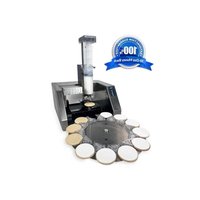
Freddie - Posting machine PRIMERA - Free user manual and instructions
Find the device manual for free Freddie PRIMERA in PDF.


Pick your language and provide your email: we'll send you a specifically translated version.
| Product Type | Posting Machine (Mailing Machine) |
| Brand | Primera |
| Model | Freddie |
| Dimensions (approx.) | 18 x 12 x 10 inches (45.7 x 30.5 x 25.4 cm) |
| Weight | Approximately 15 lbs (6.8 kg) |
| Power Supply | 120V AC, 60 Hz (or 230V for international models) |
| Power Consumption | 150 W (operating), 5 W (standby) |
| Material | High-impact plastic and metal components |
| Display | Backlit LCD screen, 2-line x 20 characters |
| Key Functions | Envelope feeding, sealing, stamping, and stacking |
| Max Envelope Size | 10 x 13 inches (legal size) |
| Speed | Up to 40 envelopes per minute |
| Stamp Types | Digital postage meter or adhesive stamps |
| Sealing Method | Moistening and pressure seal |
| Capacity | Input hopper holds up to 50 envelopes |
| Maintenance | Weekly cleaning of rollers and moistening pad |
| Safety Features | Auto shut-off after inactivity, jam detection |
| Included Accessories | Power cord, user manual, starter stamp pack |
| Repairability | Modular design; key parts replaceable by user |
| Certifications | UL, CE, RoHS compliant |
Frequently Asked Questions - Freddie PRIMERA
How do I load envelopes into the Freddie posting machine?
Open the input hopper lid, adjust the side guides to fit your envelope width, and stack envelopes face up with the flap side facing the machine. Close the lid securely before starting.
What type of stamps does the Freddie use?
The Freddie is compatible with both digital postage meters (e.g., Neopost, Pitney Bowes) and adhesive stamps. Ensure you use stamps designed for machine feeding.
How do I clear a paper jam?
Turn off the machine and open the jam access door. Gently pull out any jammed envelopes. Check the feed rollers for debris. Close the door and restart.
Can I use the Freddie for international mail?
Yes, but you must select the correct postage class and weight. The machine can be set to different currencies and rates via the settings menu.
How often should I clean the moistening pad?
Clean the moistening pad weekly with a damp cloth and mild soap. Avoid using alcohol as it may damage the pad. Replace every 6 months or when sealing becomes inconsistent.
What is the maximum envelope thickness?
The Freddie can handle envelopes up to 1/4 inch thick (6 mm). Thicker materials may cause jams or require manual feeding.
How do I replace the stamp cartridge?
Open the stamp compartment, remove the old cartridge, and insert a new one until it clicks. Follow the on-screen prompts to align the stamp.
Why is the machine not sealing envelopes properly?
Check the water reservoir level and the moistening pad condition. Ensure envelopes are not wet or curled. Clean the sealing rollers if needed.
Is the Freddie compatible with a network for postage refills?
Some models support Ethernet or Wi-Fi for remote postage refills. Check your user manual for network setup instructions.
What should I do if the screen shows an error code?
Refer to the error code list in the user manual (page 45-48). Common codes include E01 (jam), E07 (low water), or E12 (stamp alignment). Contact support if the issue persists.
User questions about Freddie PRIMERA
0 question about this device. Answer the ones you know or ask your own.
Ask a new question about this device
No questions yet. Be the first to ask one.
Download the instructions for your Posting machine in PDF format for free! Find your manual Freddie - PRIMERA and take your electronic device back in hand. On this page are published all the documents necessary for the use of your device. Freddie by PRIMERA.
USER MANUAL Freddie PRIMERA
Manual assistant
Powered by Anthropic
Waiting for your message
Product information
Brand : PRIMERA
Model : Freddie
Category : Posting machine