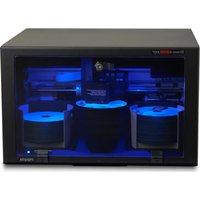
Bravo 4200 Series - Printer PRIMERA - Free user manual and instructions
Find the device manual for free Bravo 4200 Series PRIMERA in PDF.


Pick your language and provide your email: we'll send you a specifically translated version.
| Product Type | Disc Printer (Robotic Disc Publisher) |
| Brand | Primera |
| Model | Bravo 4200 Series |
| Print Technology | Thermal Inkjet (HP engined) |
| Media Support | 120mm standard discs, inkjet-printable |
| Disc Capacity | Up to 20 discs (input/output) optional expandable |
| Print Resolution | 4800 x 1200 dpi (optimized) |
| Print Speed | ~80 seconds per disc (best quality) |
| Dimensions (W x D x H) | 508 x 406 x 406 mm (20 x 16 x 16 in) |
| Weight | 15.9 kg (35 lbs) |
| Power Requirements | 100-240 VAC, 50/60 Hz |
| Power Consumption | 65 W (printing), 20 W (idle), < 2 W (standby) |
| Connectivity | USB 2.0 (high-speed) and Ethernet (10/100) |
| Ink Cartridge Type | HP 932/933 series (or compatible) |
| Robotic Disc Handling | Semi-automatic with pick-and-place mechanism |
| Supported Software | SureThing CD Labeler, Primera PTBurn, Nero |
| Operating Systems | Windows 7/8/10, macOS 10.x+ |
| Safety Certifications | CE, FCC, RoHS |
| Maintenance | Automatic printhead cleaning; replace ink and roller kit as needed |
| Spare Parts | Printhead Kit (part # 90000-001), Roller Kit (part # 90000-002) |
Frequently Asked Questions - Bravo 4200 Series PRIMERA
What type of discs can I use with the Primera Bravo 4200?
The Bravo 4200 Series prints on 120mm round standard discs that are inkjet-printable. Use discs with a white or silver thermal printable surface for best results.
How do I install the ink cartridge?
Open the top cover, slide the ink cartridge holder to the left, insert a new HP 932 or 933 series cartridge (black or color), then close the cover. The printer will automatically align the cartridge.
What software is included with the printer?
The Bravo 4200 ships with SureThing CD Labeler for disc labeling and PTBurn for disc duplication. You can also use third-party software like Nero.
How do I clean the printhead?
Run the automatic printhead cleaning utility from the printer software (Start menu > Primera > Printhead Cleaning). Repeat if streaking occurs. For manual cleaning, use a lint-free cloth slightly dampened with distilled water.
The printer is not picking up discs. What should I do?
Check that the input bin has discs loaded correctly and that the disc thickness selector is set correctly. Clean the pick-up roller with a lint-free cloth and isopropyl alcohol. If the problem persists, replace the roller kit (part # 90000-002).
How do I connect the printer to my computer?
Use the included USB cable to connect to a USB 2.0 port on your computer. For network printing, connect an Ethernet cable to the printer and configure the IP address via the printer's front panel or software.
What is the maximum number of discs I can load?
The standard input bin holds up to 20 discs. You can purchase an optional expandable bin (part # 90000-003) to increase capacity to 100 discs.
The print quality is poor with white lines. How to fix?
Perform a printhead alignment from the printer software (Start > Primera > Align Printhead). Replace the ink cartridge if it is low. Also ensure you are using inkjet-printable discs.
How do I replace the printhead?
Turn off the printer, unplug it, and wait for it to cool. Open the top cover, remove the ink cartridge holder, and unscrew the two screws holding the printhead. Disconnect the ribbon cable, insert the new printhead (part # 90000-001), and reassemble. Run the alignment utility.
Where can I find the user manual for the Bravo 4200 Series?
The user manual is available for free download in PDF format from notice-facile.com or the Primera support website. You can also request a translated version via the page.
User questions about Bravo 4200 Series PRIMERA
0 question about this device. Answer the ones you know or ask your own.
Ask a new question about this device
No questions yet. Be the first to ask one.
Download the instructions for your Printer in PDF format for free! Find your manual Bravo 4200 Series - PRIMERA and take your electronic device back in hand. On this page are published all the documents necessary for the use of your device. Bravo 4200 Series by PRIMERA.
USER MANUAL Bravo 4200 Series PRIMERA


Manual assistant
Powered by Anthropic
Waiting for your message
Product information
Brand : PRIMERA
Model : Bravo 4200 Series
Category : Printer