
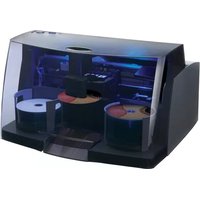
Bravo SE-3 - Printer PRIMERA - Free user manual and instructions
Find the device manual for free Bravo SE-3 PRIMERA in PDF.


| Product Type | Disc Printer (CD/DVD) |
| Brand | Primera |
| Model | Bravo SE-3 |
| Print Technology | Inkjet (HP-based) |
| Disc Capacity | Up to 20 discs per batch |
| Print Resolution | 4800 x 1200 dpi (color) |
| Print Speed | Up to 20 discs per hour (full color) |
| Supported Discs | CD-R, DVD-R, BD-R (12cm) |
| Input Tray Capacity | 20 discs |
| Output Tray Capacity | 20 discs |
| Dimensions (W x D x H) | 14.5 x 17 x 8.5 inches (368 x 432 x 216 mm) |
| Weight | 12.5 lbs (5.67 kg) |
| Power Supply | 100-240 V AC, 50/60 Hz, 52 W |
| Connectivity | USB 2.0 |
| Operating Systems | Windows 7/8/10, macOS 10.7+ |
| Ink Cartridges | HP 56 (black) and HP 57 (color) or equivalents |
| Maintenance | Periodic print head cleaning; use only specified inks |
| Safety | Avoid exposure to moisture; do not disassemble; keep away from heat sources |
| Repairability | Replacement parts available: print head, rollers, power supply |
| Software Included | SureThing CD Labeler (trial) |
Frequently Asked Questions - Bravo SE-3 PRIMERA
User questions about Bravo SE-3 PRIMERA
0 question about this device. Answer the ones you know or ask your own.
Ask a new question about this device
Download the instructions for your Printer in PDF format for free! Find your manual Bravo SE-3 - PRIMERA and take your electronic device back in hand. On this page are published all the documents necessary for the use of your device. Bravo SE-3 by PRIMERA.
USER MANUAL Bravo SE-3 PRIMERA
natural_image
3D rendering of a gray plastic container with a side panel and mounting hole (no text or symbols)User's Manual
PRIMERA
TECHNOLOGY, INC.
© 2016 All rights reserved
For the most recent version of this manual please visit
http://www.primera.com/manuals.html
Notices: The information in this document is subject to change without notice. NO WARRANTY OF ANY KIND IS MADE WITH REGARD TO THIS MATERIAL, INCLUDING, BUT NOT LIMITED TO, THE IMPLIED WARRANTIES OF MERCHANTABILITY AND FITNESS FOR A PARTICULAR PURPOSE. No liability is assumed for errors contained herein or for incidental or consequential damages in connection with the furnishing, performance, or use of this material. This document contains proprietary information that is protected by copyright. All rights are reserved. No part of this document may be photocopied, reproduced, or translated into another language without prior written consent.
Trademark Acknowledgments: Windows is a registered trademark of Microsoft Corporation. All other trademarks are the property of their respective owners.
Printing History
Edition 1.0, #071816, Copyright 2016, All rights reserved.
FCC Compliance Statement: This device complies with part 15 of the FCC rules. Operation is subject to the following two conditions: (1) this device may not cause harmful interference, and (2) this device must accept any interference received, including interference that may cause undesired operation.
For Users in the United States: This product is intended to be supplied by a UL listed Direct Plug-In Power Supply marked "Class 2" or a UL listed ITE Power Supply marked "LPS" with output rated 12VDC, 4.5A or higher. This equipment has been tested and found to comply with the limits for a Class B digital device, pursuant to Part 15 of the FCC Rules. In a domestic environment this product may cause radio interference, in which case the user may be required to take adequate measures. This equipment generates, uses, and can radiate radio frequency energy and, if not installed and used in accordance with the instructions, may cause harmful interference to radio communications. However, there is no guarantee that interference will not occur in a particular installation. If this equipment does cause harmful interference to radio or television reception, which can be determined by turning the equipment off and on, the user is encouraged to try to correct the interference by one or more of the following measures:
- Re-orient or relocate the receiving antenna.
- Increase the separation between the equipment and receiver.
- Connect the equipment into an outlet on a circuit different from that to which the receiver is connected.
- Consult the dealer or an experienced radio/TV technician for help.
Use of shielded cables is required to comply with the Class B limits of Part 15 of the FCC Rules. You are cautioned that any changes or modifications not expressly approved in this manual could void your authority to operate and/or obtain warranty service for this equipment.
THIS PRODUCT CONTAINS A LASER DIODE OF A HIGHER CLASS THAN 1. TO ENSURE CONTINUED SAFETY, DO NOT REMOVE ANY COVERS OR ATTEMPT TO GAIN ACCESS TO THE INSIDE OF THIS PRODUCT. REFER ALL SERVICING TO QUALIFIED PERSONNEL. THE FOLLOWING LABEL APPEARS INSIDE YOUR UNIT: CLASS 1 LASER PRODUCT LASER KLASSE 1
CAUTION!
USE OF CONTROLS OR ADJUSTMENTS OR PERFORMANCE OF PROCEDURES OTHER THAN THOSE SPECIFIED HEREIN MAY RESULT IN HAZARDOUS RADIATION.
Table of Contents
Section 1: Getting Started....1
A. Note on Model Differences....1
B. Choosing a Good Location....2
C. Unpacking and Inspection 2
D. Identifying the Parts....3
E. Overview of Operation....5
Section 2: Hardware Setup....7
A. Loading Media (Discs)....7
B. Installing the Ink Cartridge....8
Section 3: Creating Discs....10
A. Tutorial: Copy a Disc (PRINT ONLY FOR AUTOPRINTER USERS) .....10
B. Using PTPublisher....13
B1. Project Types ......13
B2. Steps to Any Project....15
Step 1: Add Data....15
Step 2: Add Print ....16
Step 3: Start Project (Summary - Settings)......18
B3. Publisher Status....21
B4. Backup Project (PC Disc Publisher Only) 22
B5. Rip Audio (PC Disc Publisher Only) 25
B6. PTProtect (PC Disc Publisher Only) 26
C. Creating a Print Label Using SureThing (PC)......27
D. Creating a Print Label Using Disc Cover (Mac)......28
E. Advanced Printer Driver Functions (PC) 32
F. Advanced Printer Driver Settings (Mac)......38
G. Using Other Graphics Programs 44
Section 4: Maintenance and Troubleshooting....45
A. Interpreting the Publisher's Indicator Lights....45
B. Cleaning the Publisher....45
C. Performing a Robotic Self-Test 46
D. Cleaning the Ink Cartridges....46
E. Technical Support....47
Section 5: Technical Specifications....48
Index 49
Section 1: Getting Started
THANK YOU...
...for purchasing the Bravo® Disc Publisher SE-3. Bravo is the perfect all-in-one solution for producing professional looking CD-R and DVD-R discs. A wide variety of disc formats are supported, including Audio CDs, Video CDs, data discs and more. Operation is simple and completely automatic once a job has been started.
To begin using your Disc Publisher, please read this manual carefully. This User's Manual is a complete step-by-step guide to quickly and easily create discs with your new Disc Publisher.
A separate Help file is provided with your Publisher that explains the operation of the Software. On a PC this is accessible via the software's help menu and the ? icon. On a Mac this is accessible in the Disc Publisher folder in the applications directory.
NOTE ON TERMS AND CONVENTIONS:
From this point forward, the following terms and conventions will apply:
The Bravo Disc Publisher SE-3 will be abbreviated simply as the Publisher.
Optical discs, which can include many different types of discs including CD-Rs, CD-RWs, DVD+/-Rs and more are all referred to as CDs or discs. Please note that in order to copy and record DVDs, you will need to have purchased the DVD version of the Publisher.
A. NOTE ON MODEL DIFFERENCES
The Bravo SE-3 comes in three different models which are:
- Bravo SE-3 AutoPrinter (No Drives) Print Only - See Section 3A, C and D.
- Bravo SE-3 Disc Publisher (DVD Drive) Burns and Prints CD, DVDs and DVD-DL.
- Bravo SE-3 Blu (BDR Drive) Burns and Prints CD, DVD, DVD-DL, BDR and BDR-DL.
These instructions are written to apply to all models. For example there are no special instructions for burning Blu-ray discs if you have a Blu-ray model. The software simply recognizes that you have Blu-ray capable drives and adds the BDR media type to the list of available media to burn.
B. CHOOSING A GOOD LOCATION
- Place the Publisher in a location with adequate air circulation to prevent internal heat build up. You will need at least 15.25" (38.73 cm) of over-head space to fully open the cover.
- Do not place the Publisher near heat sources such as radiators or air ducts, or in a place subject to direct sunlight, excessive dust, mechanical vibration or shock.
C. UNPACKING AND INSPECTION
While unpacking your Publisher, inspect the carton to ensure that no damage has occurred during shipping. Make sure that all supplied accessories are included with your unit.
The following items should be included:
• Disc Publisher
• Power Cord and Converter
• One Three-Color (CMY) Ink Cartridge
• Installation Disc
• USB 3.0 Interface Cable (Black)
- Warranty Card
• This User's Manual, Quick Start Guide and Other Printed Information.
Save the carton and packing materials. They will come in handy later if you ever need to transport the Publisher and/or any of its parts and accessories.

natural_image
Technical illustration of a device rear panel with cable, power cord, and CD/DVD components (no text or symbols)D. IDENTIFYING THE PARTS
Front Panel and Top
This illustration shows the Publisher and its components.

The Robotic Arm moves discs from the Input Bin, to a CD/DVD Recorder, to the printer, and finally to the Output Bin.
The CD/DVD Recorder is automatically loaded and unloaded by the Publisher's Robotic Arm.
The Recorder Tray Button manually opens or closes the Recorder Tray. In normal operation, the in/out movement of the Recorder Tray is controlled automatically and this button is not used.
With the cover closed, the Power/Ink Button turns the Publisher's power OFF if pressed and held for five seconds. Press it quickly to turn power back on. When already powered on quickly pressing the power button will open and close the printer tray.
When the front cover is open, the Power/Ink Button is used to position the Cartridge Carrier for easy ink cartridge replacement.
The Input/Output Bins are situated under the top cover of the Publisher. The right-side bin is the Input Bin for blank media. The bin will hold up to 20 discs.
The Output bin is located in front of the recorder drive. You can access the output bin by opening the front cover or by pulling the bin out. The bin can be ejected at any time while the Publisher is operating. It is recommended that you close the drawer for multiple disc projects. Leave the drawer open only for single disc dispensing.
The Front Cover is a durable plastic cover that will protect the Publisher from dust and interference.
The Ink Cartridge Carrier holds the color ink cartridge.
Rear Panel
This illustration shows the input ports found on the rear panel of the Publisher:

The USB 3.0 Port is connected to an open USB 3.0 port on your PC with the USB 3.0 cable, included with your Publisher.
Note: The included USB 3.0 cable can also be connected to USB 2.0 ports on your computer.
The Power Input Port connects to the included power cable. The power supply is a switching 100V\~240V power supply.
Your new Publisher is an automated, precision device intended for continuous-duty publishing of discs. The following is a description of the complete process of duplicating and printing a CD/DVD job on your Publisher:
- Up to 20 blank discs may be loaded at one time into the Input Bin.
- The Publisher's integrated Robotic Arm will first check your recorder drive for a disc by attempting to "pick" from the recorder. Then, the Robotic Arm will pick a disc from the Input Bin.
- The Recorder Tray opens automatically and the Robotic Arm places a disc into the recorder. After the disc is placed in the recorder, the Robotic Arm checks the input stack to "see" if two discs were picked.
- The Recorder Tray then automatically shuts. If a disc does not record properly (meaning that all or part of that disc is not recordable), the Robotic Arm picks it out of the CD Tray and sends it to the Output Bin.
- The Recorder is now writing to the disc. If you were to fully record a CD with data, audio, video or music (650 MB), recording time is about 3 12 minutes each. A full DVD records in about 7-15 minutes depending on the speed of the media to which you are recording. Most jobs don't fill the entire disc, so recording time is usually less than this.
- After recording, the Recorder Tray opens automatically. The Robotic Arm will lift the disc out of the Recorder Tray. The Recorder Tray will close, and the Printer Tray will open. The Robotic Arm will lower the disc into the Printer Tray, and the Printer Tray will then automatically close.
- If publishing more than one disc, the Robotic Arm will load the Recorder Drive with a blank disc from the Input Bin to start recording the next round.
-
Once recording has started on the next round, printing will start with the recorded disc from the previous round. This simultaneous printing and recording greatly increases the throughput of your Publisher.
-
Print time varies according to which print mode has been selected (Section 3-A). In most cases, print time takes no more than 2 minutes. After printing the first disc, the Publisher's Printer Disc Tray opens automatically. The Robotic Arm moves the finished disc to the Output Bin.
-
The Robotic Arm will now load the second recorded disc into the Printer Tray for printing.
-
The process starts over and repeats until all blank discs are gone or the number you have specified via software are copied and printed.
Section 2: Hardware Setup
Setup
This section will describe the step-by-step process of setting up your Publisher. This includes information on how to load the supplies (ink and disc media) necessary to start producing discs.
A. LOADING MEDIA (DISCS)
NOTE: Your Publisher can print directly onto virtually any brand of inkjet printable-surface CD/DVD media. However, different brands of discs have different printable coatings. Because of this, you may need to adjust the printer driver settings to accommodate your specific brand of CD/DVD media. Refer to Section 3E and 3F for further printer driver information.
Due to the wide variety of printable-surface CD/DVD media, you may find that certain brands of discs provide higher print quality than others. For maximum print quality, use CD/DVD media authorized by Primera.
Refer to the following steps when loading discs into the Publisher:
- Open the front cover of the Publisher.

natural_image
Technical line drawing of a car interior with internal compartments and a directional arrow indicating movement (no text or symbols)- The Publisher will automatically position the cartridge carrier and Robotic Arm to allow for easy access to the bin.

natural_image
Technical illustration of a mechanical device interior showing internal components and a central circular component with an arrow indicating a feature (no text or symbols present)- Load the Input Bin (the bin located on the right-hand side of the Publisher) with up to 20 blank discs.
B. INSTALLING THE INK CARTRIDGE
-
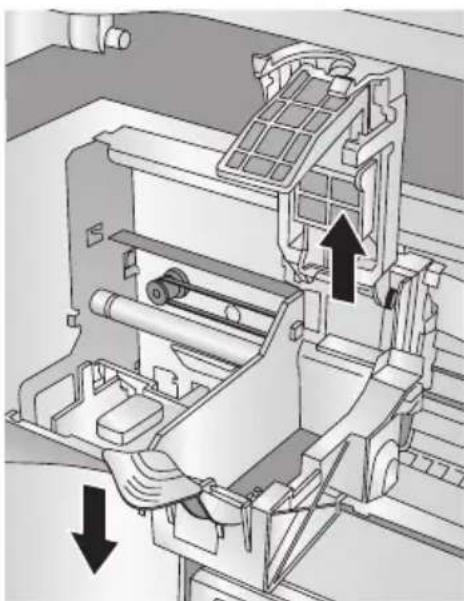
With the cover open, press the Power/Ink Button to move the Ink Cartridge Carrier to the load position.
-
Open the cartridge cover by pressing down on the tab.
natural_image
Mechanical assembly diagram showing a motor with rotating components and directional arrows indicating motion (no text or symbols)- Remove the ink cartridge from its packaging. Slowly remove the tape covering the cartridge's print head.

flowchart
graph TD
    A["Initial Cut"] --> B["Step 1"]
    B --> C["Step 2"]
    C --> D["Final Packaging"]
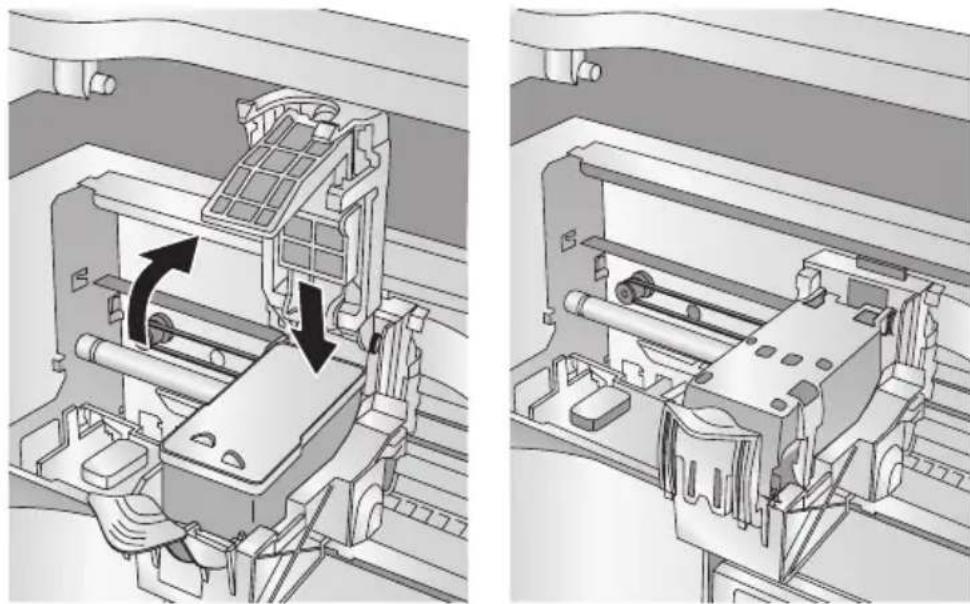
- Insert the ink cartridge into the carrier, copper end first and snap the cartridge cover in place.
natural_image
Technical illustration of a mechanical assembly showing internal components and motion arrows (no text or symbols)-
Close the Publisher's front cover.
-
You will be prompted to align the cartridge in PTPublisher as soon as the software is opened. Follow the procedures displayed on screen.
Note: An alignment print is required every time you install a new cartridge. The software will always prompt you to align the cartridges. Make sure there is an unprinted disc in the bin for this alignment.
Section 3: Creating Discs
There are two main components to creating discs, printing and burning. For PC, SureThing CD Labeler is used to design the image to print on the disc. For Mac, Disc Cover is used to design the image to print on the disc. For Mac and PC, PTPublisher controls the recording and allows you to select the image to be printed to your discs.
A. TUTORIAL: COPY A DISC (PRINT ONLY FOR AUTOPRINTER USERS)
Note: PTPublisher functions virtually the same on both Mac and PC. Every effort was made to make them look and function the same. However, due the unique benefits and limitations of both operating systems there are subtle differences. Where important, those differences will be highlighted. In general, these instructions will apply to both the Mac and PC editions.
Note for AutoPrinter Users: Start at step 4 after choosing Print Only from the project start window.
There are three basic steps to any project. 1. Add Data 2. Add a Print File. 3. Set the number of copies and adjust options (Summary). The instructions below explain how to do the most common project - A Copy Project.
A Copy Project can be used to copy any CD, DVD, DVD-DL or Blu-ray master. This job type reads the master disc from the Disc Publisher drive to the hard drive of your computer. The master is stored in the Global Image format (*.gi) in a temporary location on your computer. PTPublisher uses this temporary file to make all subsequent copies that are requested. The master disc is read only once to create the initial temporary file.
Recommended for: All CD, DVD or Blu-ray content or disc types (Audio CD, Data CD, Software Install Disc, Video CD, DVD Video, Blu-ray Video: CDR, DVD-R, DVD+R, DVD-ROM, DVD+DL, DVD-DL, BDR, BDR-DL, etc.). This is best used for single runs where you will not need to make additional copies of the master disc at a later time.
This project requires a master disc. If you do not have one use another project type. (See Section 3B)
-
Select Copy Project from the Starter Window or the New Project Panel on the left side of the screen. Step one of the Copy Disc wizard will be displayed.
-
You will be prompted to place the disc you would like to copy into the drive inside the Disc Publisher. The tray door will open automatically. Place the disc in the drive and click OK.
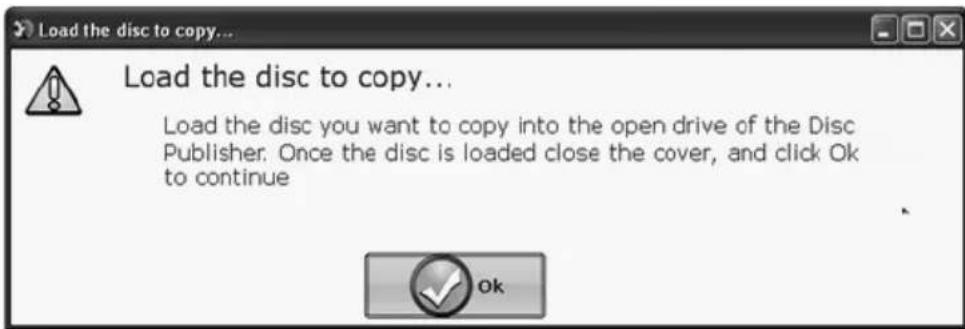
- The Publisher will close the drive and read the contents of the disc. It will display disc type (CD/DVD) and show the size of the disc in Megabytes. Verify this information is correct and click the next arrow to continue.
AutoPrinter users Start here after choosing Print Only from the Project Start Window.
- Select the print label file by clicking the select a label button. When you have selected a print label file, click the next arrow. There are several ways to select a print file. See the explanations below for more information.
For any job type you choose you will be prompted to select a label file to print. You may select an existing label, create a label or choose to print nothing. Simply click the next arrow to print nothing on the disc. Otherwise follow the steps below.
4A. Select a Label
-
Click the browse button to open a browse window to choose your print file.
-
Double Click on the file to add it to your project. You may add any BMP, JPG, TIFF, SureThing (PC) or Disc Cover (Mac) file. SureThing or Disc Cover files are automatically formatted correctly. All other file types should be 4.72" x 4.72" square. For best print quality the image resolution should be at least 300 dpi.
4B. Create a Label
-
Click the Create a Label button to open the SureThing CD Labeler or Disc Cover program. These programs will allow you to create a label.
-
Follow the instructions in Section 3 D or E to create a label using SureThing or Disc Cover.
-
Once you have designed the label, save it and close the program. A message will appear asking if you would like to use the label file you just created in your current project. Click Yes to use it in your project. Once you choose your label a preview will be displayed.
-
After selecting your label to print it is important to check the Printer Settings. These settings are dependent upon the specific discs you are using. Each disc (media) brand or type has a different sized non printable outer margin or inner diameter. It also has a different printable surface.
For Primera TuffCoat branded discs simply choose your media from the drop down list, the settings will be adjusted accordingly.
Inner Diameter and Outer Margin (Printable Area).
If you have other media, you may need to measure the unprintable outer margin and the inner diameter with a clear millimeter ruler to find the correct size to input here. For the outer margin, measure from the edge of the disc to the beginning of the white printable surface. For the inner diameter measure from one side of the unprintable hub to the other. The unprintable inner diameter will almost always be larger than the center hole of the discs (15mm).

Print Quality. All Primera media is automatically defaulted to the best print quality. Other media may also accept the best quality setting. However, with some media you may have to print at a lower print quality to eliminate smudging and bleeding. Some lower quality media cannot hold all of the ink that is printed at the highest quality settings.
Click the next arrow.
- The third and final step of any project is the summary screen. On this screen you can review the data and print selected for the project, set the number of copies, adjust burn options and name the job. Click the Options button to access burn speed and other options. If you do not adjust the project options, optimal settings will automatically be selected for you.
Click the "Go" button to start the job.

B. USING PTPUBLISHER
PTPublisher allows you to record and print CDs, DVDs, and BDRs (Blu-ray) using a variety of project types described below. When the software is opened these projects will be available from the main starter menu. At any point you can access these project by clicking the project in the New Projects area on the left.
B.1 Project Types
Note: "Print Only" Project is the only project available for AutoPrinters.
Copy Project
A Copy Project can be used to copy any CD, DVD, DVD-DL or Blu-ray master. This job type reads the master disc from the Disc Publisher drive to the hard drive of your computer. The master is stored in the Global Image format (*.gi) in a temporary location on your computer. PTPublisher uses this temporary file to make all subsequent copies that are requested. The master disc is read only once to create the initial temporary file.
Recommended for: All CD, DVD or Blu-ray content or disc types (Audio CD, Data CD, Software Install Disc, Video CD, DVD Video, Blu-ray Video: CDR, DVD-R, DVD+R, DVD-ROM, DVD+DL, DVD-DL, BDR, BDR-DL, etc.). This is best used for single runs where you will not need to make additional copies of the master disc at a later time.
This project requires a master disc. If you do not have one use another project type.
Data Project
A data disc project allows you to create a data disc on a CD, DVD or BDR using files on your hard drive. You can replicate the file structure on your hard drive or you can create your own customized file structure.
Recommended for: Creating software installation discs, or data discs containing image files, presentation files, PDFs, documents, MP3s or any other file type. Data discs can generally ONLY be read by computers.
Audio Project
This project allows you to create an audio CD using WAV, MP3, AIFF or WMA files. Note: this procedure is not for copying already created and mastered original audio CDs. If you have already created a master audio CD in another application or this application and you would like to make additional copies, please use the Copy project.
Recommended for: Creating Audio CDs.
Video Project
This project involves extracting the Audio_TS and Video_TS folders from the master DVD or directing your DVD authoring software to output into Audio_TS and Video_TS folders instead of burning a master disc. For Blu-ray Video, this method involves extracting the Blu-ray folders from the master DVD or directing your Blu-ray authoring software to output into Blu-ray folders instead of burning a master disc. Note: The PTPublisher software was not meant for authoring DVDs or Blu-ray. You must use another software to burn a master DVD first. Make sure that disc plays and the menus work on all systems. You may also copy a master DVD using Copy Project or Image Project. However, the video project is the recommended method since it is faster and more reliable.
Recommend for: Situations where you are having compatibility problems with the formatting created by the DVD/Blu-ray authoring software or with the media type of the master disc. This method removes some potentially complicating variables from the DVD/Blu-ray Video creation process. This method eliminates the need for a master disc. Error or incompatibilities can be introduced into your master by the drive burning the master, the disc the master is burned on or the software burning the master. Instead masters can be stored on a large hard drive. This allows you to burn additional copies at any time without locating the master. If a backup strategy is employed, hard drive storage is more reliable over the long term since it is not susceptible to scratching like a master disc.
Image Project
The Image Project allows you to copy any CD, DVD, or BDR master. A disc image is an exact copy of your disc that you can save on your hard drive for later use. You can use an existing image or create an image and then use it in the project. The master disc is read from the specified drive to the hard drive of your computer. The master is stored in the Global Image format (*.gi) in a user specified location on your computer. PTPublisher uses this file to make all subsequent copies that are requested. The master disc is read only once to create the initial file.
Recommended for: All CD, DVD or Blu-ray content or disc types (Audio CD, Data CD, Software Install Disc, Video CD, DVD Video, Blu-ray Video: CDR, DVD-R, DVD+R, DVD-ROM, DVD+DL, DVD-DL, BDR, BDR-DL, etc.). This is best used for jobs that are repeated on a regular basis where you will need to make additional copies of the master disc at a later time. This project type stores the master on your hard drive. This saves the time it takes to read in the master and reduces the possibility of defects being introduced into the master disc.
B.2 Steps to any Project.
Step 1: Add Data
Depending on your job type this step will be different. You may choose your master, choose data on your hard drive, choose tracks to your audio CD, choose your disc image or DVD or BDR video folders.
On most job types a volume label can also be created at this step. This is the label that will appear when this disc is inserted into a computer drive.
When you have selected the data you would like to burn click the next button.
Step 2: Add Print

If you want something printed on your disc, this is where you choose an existing label or create it. Follow these steps.
To Select an exiting label:
-
Click the browse button to open a browse window or drag and drop files to the print file box or click the drop down arrow to choose previously used labels.
-
Choose any supported file types of JPG, BMP, TIFF, SureThing (PC), or Disc Cover (Mac). Files should be 4.72"(120mm) square. For best print quality the image resolution should be at least 300 dpi. Non-conforming files will be stretched or increased in size to fill the full size of the disc.
-
Once the print file is selected a preview will be displayed.
-
At this point you may choose to move on to the next step by clicking the next arrow. However, there are print quality and print area settings that you may want to adjust.
-
Several preset media types that correspond with the media available at our webstore can be selected from the Media drop down box. When you select a media type from this box the Print Quality, Outer Margin and Inner Diameter are automatically adjusted to fit that media.
-
To manually set these settings simply edit them. The media type will automatically change to Custom. You can save your adjusted settings by typing the name of the profile and clicking Save. This name and the associated settings will now be available to choose in the media drop down box.
Below is a description of each of the available settings.
- Quality. There are several choices here that correspond to the speed of the print and the saturation of the image. Higher quality = slower print speed and more vibrant and crisp prints.
- Outer Margin. Discs from other manufacturers vary widely regarding how far the printable surface extends to the edge of the disc. Measure the distance from the edge of the disc to the start of the white printable area. This will be between 0 and 2 mm in increments of 0.1mm.
- Inner Diameter. Discs from other manufacturers vary widely regarding how far the printable surface extends to the inside of the disc. Measure the distance from one side of the inner unprintable center hub to the other. This will be between 15 mm and 50 mm displayed in increments of 0.1mm.
To Create a new label:
-
Click the Create Label button.
-
The label design application SureThing (PC) or Disc Cover (Mac) will open.
Design your label using the included backgrounds and clipart. You may also add your own image. Add text and any other design features.
-
Save your label by going to the File menu - Save as.
-
Close SureThing or Disc Cover.
- You will be asked if you would like to use the label you just created in your current project. Click Yes.
- You may now choose to adjust print settings as described above.
Step 3: Start Project (Summary - Settings)
In this step you can verify data and print information and set the number of copies. Optionally you may choose to edit burn settings. However, the default settings are optimized to give you the best quality burn. Simply click "Go" to start the job.
Below is a summary of all available options:
Project Summary
This areas displays information about the data you have chosen, a thumbnail and file name of the print file you have chosen and picture and description of the Disc Publisher Robot you have chosen. If any of this information is incorrect, use the back arrow at the bottom of the screen to go back to the appropriate window to correct it.
- Change Robot. This is only available with multiple robots connected. Click it to change the robot to which this project will be sent.
- Drives. With multiple drive units connected you can choose to burn to both drives or only the top drive or only the bottom drive. This is useful if one of the drives is starting to wear out and is producing rejected discs. You can simply stop using that drive until you are able to replace it.
- Protect Video with PTProtect (PC Only). This is only available in the DVD Video and ISO image Project with purchase of PTProtect USB dongle. See the PTProtect Section 3B.6 for more information.
- Save Project. On a Mac, at the top of the summary window you can type the name of your job and then click save to save it anywhere on your computer. For PC, you can save a project at any time by opening the file menu and choosing Save Project.
A project file is a small file that holds the locations of files to be burned, the location of the print file to be printed, and any specific project settings such as burn speed and number of copies. Note: A saved project file does not include the data to be burned or the print file to be printed. If these files are moved or deleted, the project file will need to be edited to reflect these changes.
- Schedule Project. Click this button to schedule this job to run daily weekly or monthly at a specific time. For more information on this topic see Section 3B.5.
Project Options
For any job type you can click on the Options button for additional options for that job. Below is a description of all Project Options. Not all options are available for all Project Types. If the options are not available for the chosen project type, they will be hidden. If you would like these settings to be the default for all projects of this type click "Save as Defaults".
- Recording Speed. Set the recording speed with this option. The fastest recording speed is determined by the lowest maximum speed of the blank media or the drive. For example: The "fastest" speed in a 20x max drive with 16x max media would burn at 16x. In many cases a slower speed should be selected to achieve the least number of rejected discs.
- Recording Type.
Track-at-Once. This is the default. For track at once, the laser is turned off after each track, which produces a two-second gap. The track-at-once feature, enables songs and data to be written at different intervals. The lead-in sectors that are written at the beginning of each session contain the location where additional data can be placed on the disc.
Disc-at-Once. If this option is checked, the lead-in, all the tracks and lead-out are written in same action. The laser is kept on for the entire session.
- Closed-Finalized/Open. A closed disc means no additional data can be added. If the disc is left open additional data can be added in another session.
- File System. The file system is the method by which the files and folder are arranged on the burned disc. Joliet is best for most CD burning applications. UDF 1.02 is best for DVD burning. UDF 2.6 is used for Blu-ray. The recording engine can also add a bridge which effectively adds another file system to the disc. UDF1.02 with a Joliet bridge is the default.
Most of the differences between file system types relate to file name length and character restrictions and folder level depth. ISO is the most restrictive and oldest and UDF is the least restrictive newest file type. The complete list of specifications for each is several hundred pages. Macs and PCs can read both types.
If you would like to make your burned disc compatible with very old operating systems or other less popular operating systems use the ISO system.
- Test Record. If this option is checked the recorder tests a disc for record ability before burning. The drive laser is set to read power and the entire surface is scanned for errors. This takes the same amount of time as recording. (DVD+R media cannot be tested) This option cannot be used in combination with normal recording or verify.
- Verify. If this option is checked, it compares the copy with the master bit for bit. If it finds a discrepancy it rejects the disc. Verify is an extremely high quality standard. If the disc is audio or video, the disc may still be playable and the errors may not be detectable by human eyes or ears. This operation may be useful to verify software installation discs where it is extremely important to have accurate copies of all installation files. Checking this option will double the time it takes to record each disc.
- Set Time and Date to Mastering Time. If this option is checked, all files on the disc will automatically be set to the current time and date.
B.3 Publisher Status
The status window is automatically displayed when a job starts. You may also access it at any time by clicking the More Status link under the picture and description of the robot connected. Publisher Status is only available if the Publisher is connected.
- If no errors are present, the green check button will be displayed with a Ready indication to the left.
- If errors are present a red exclamation button will be displayed with the error explained to the right. At times the entire error will not be visible. Click More Status to view the complete error.
The Status page displays Drive Status, Printer/Robot Arm Status, and Project Status.
Drive Status shows the current status of the drive during a job. The recording progress is displayed on the progress bar along with the total size of the burn and the current amount burned.
Drive Status
MATSHITA BD-MLT SW-5582 on USB 2.0
Recording 81.81 MB of 630.38 MB
New Data Project 2.ptpt Disc 1

Drive Properties
Printer/Robot Status shows the current status of the printer if it is printing or the robot if it is moving discs.
The Project Status area of the Publisher Status window shows the current status of the job such as what disc number is printing and burning of the total number of discs to produce. From here you may also view a detailed log of the current job, view a log of previous jobs and abort currently running jobs.
To abort a currently running job, click the abort button. The publisher will finish its current robotic command and then stop the job.
Queue Project. To queue another project to run after the current one is finished simply setup the project as you normally would. When you get to the third step of the project setup wizard, if a project is currently running a Queue button will appear instead of a Go button. Click it to queue the job.
B.4 Backup Project. (PC Disc Publishers Only)
To create a new backup project you must setup a data project and then schedule it. Follow these steps:
-
Choose Data Project from the project starter window.
-
Add the files or folders that you would like to backup. Typically there will be more data to back up than will fit on any one CD, DVD etc. If that happens you will receive a warning message and the data bar at the bottom of the screen will turn red.

To resolve this issue you may choose to span the data over several CDs or DVDs or change the media to a different type with more data capacity.

If you choose to check the span disc box you do not need to change media type. A Span Report button will appear which will tell you how the data will be distributed over the chosen media type.
Regardless of the media type selected for back up projects it is recommended that span discs be checked to accommodate future backups of the same files/folders which may be larger.
Important Note: It is not possible to span a single large file over multiple discs.
Using the media drop down list, you may also choose to change the media type to one with more capacity. The data bar will change from red to green.

Note: Changing the media type only changes the media that the software expects. It is up to the user to make sure the selected media is actually in the bin.
- Once you have selected the data click the next arrow to add a print file. There is a print template that has been designed for backup projects. It is recommended that this template be used. Check the "Use Print Template" box.
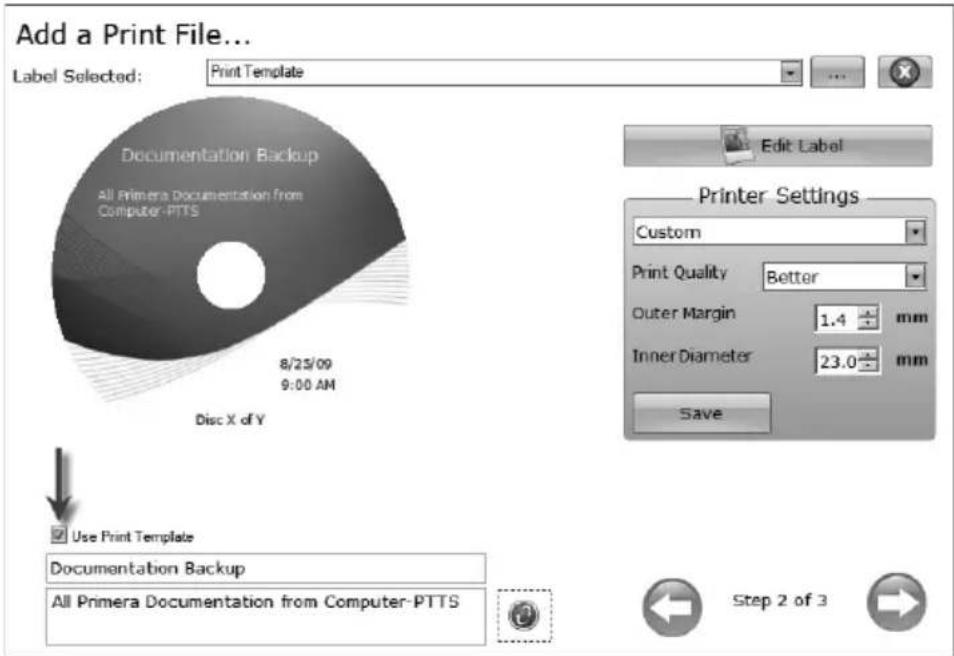
Title and description fields will appear below it. Fill out these fields with information pertaining to the backup project. Date, time and the number of discs in the backup set will automatically be printed on the disc. Click the refresh button to view your changes in the preview.
- Click the next button to display a summary of the project. Click Schedule Project to convert this data project into a backup project. You will be prompted to save your project. Do not move projects once you have saved them. Always choose only one copy even if your project will be spanned across multiple discs.
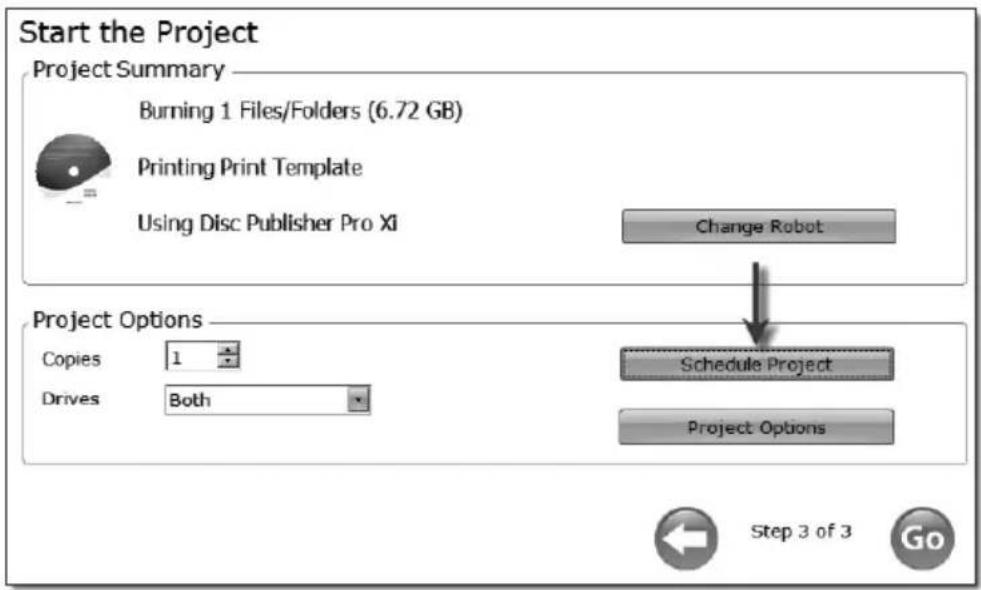
Once the project has been saved the Schedule window will appear. Set the frequency of the backup and the time of day. Click Schedule.

The Scheduled Projects window will appear. Check the box next to the backup project you would like to run. Click Run Now to run it for the first time now. Otherwise, the backup project will proceed at the scheduled time.

You must keep the PTPublisher software open, the Disc Publisher turned on and the discs loaded for the automatic scheduled backup to occur. If you would rather not do this you may also check None on the Schedule window to run the backup project when you choose. This will add the backup project to the Scheduled Projects list and allow you to run it whenever you click the Run Now button.
You can access the Scheduled Projects list at any time by choosing Advanced Project from the project starter window. Choose Backup Project from the sub menu. Here you can view all scheduled projects, edit the project or change the frequency or time of the automatic backup.
Note: All backup runs are full backups. PTPublisher does not do incremental or differential backups by searching for new or changed data.
B.5 Rip Audio CD (PC Disc Publishers Only)
This project allows you to rip music to your hard drive in MP3 or other formats using iTunes ® or Windows Media Player.
- To rip an Audio CD to your iTunes database or Windows Media Player database choose Advanced Projects - Rip Project.
- Choose whether to rip to iTunes or Media Player.
- Load the blank CDs in the right bin of the Disc Publisher.
- Click Go to start ripping CDs. Follow any onscreen prompts regarding settings that must be set before you begin.
Note: The actual ripping process is completed by iTunes or Media Player. Please set all settings regarding the rip format (mp3, wav, wma, etc.), rip location, rip quality (kpbs), etc. in Media Player or iTunes.
B.6 PTProtect (PC Disc Publishers Only - Requires separate purchase of USB dongle)
PTProtect allows you to copy-protect any DVD Video and mass produce protected discs using the PTPublisher software and a Primera Disc Publisher.
You can protect an existing Master DVD by first converting it to an ISO image using PTPublisher or you can protect a DVD that is stored on your hard drive as VIDEO_TS and AUDIO_TS folders. Instructions for each of the two methods are found in the instructions with the PTProtect dongle or in the PTPublisher software help file.
To protect DVDs you must first insert the PTProtect USB Dongle (100, 250, 500, 1000 or 5000 protections) into a USB port on the same computer that the Disc Publisher is connected to. Once you insert the dongle it will appear in My Computer as the next available drive letter with a Volume Label as "PTProtect."

When PTPublisher is launched the PTProtect option will be enabled. The number of protections enabled will be visible on the Summary screen (Step 3) of the DVD Video Project or Image Project.
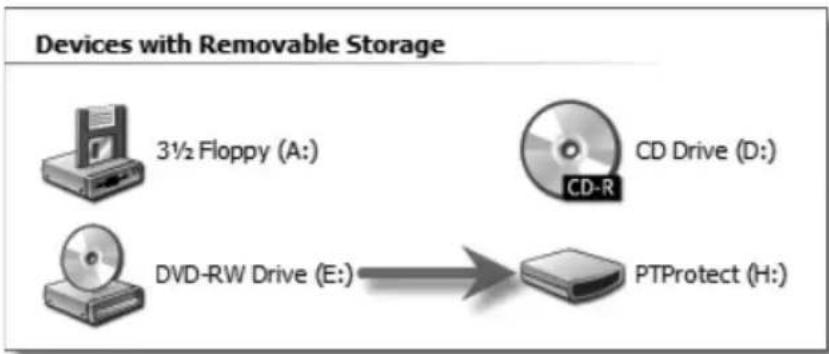
flowchart
graph LR
    A["3½ Floppy (A)"] --> B["CD Drive (D)"]
    C["DVD-RW Drive (E)"] --> D["PTProtect (H)"]
Note: You will receive 3 free protections before the USB dongle is purchased/connected. After the free protections are used the PTProtect option is still visible but not selectable.
C. CREATING A PRINT LABEL USING SURETHING (PC)
The SureThing Disc Labeler software included with your Publisher is a great tool for creating professional looking discs. You can use SureThing's Smart Designs to quickly label a disc, or easily import your own design in many popular file formats. The Help section included with the software will provide complete instructions on all the features in this package. (Go to the Help Menu - Choose Contents) The following is a tutorial on creating a basic disc design:
- Open the SureThing program. Choose the 120mm Disc Template from the window that appears.

- Open the background panel by clicking the arrow on the background button. Add your own background to the label by choosing Select Background.

3A. Browse to the location of your background image. To avoid skewed or blurry printing make sure your image is 120mm square and of sufficient resolution. We recommend 300 dpi.
3B. Instead of your own background, you can also choose from several included SureThing backgrounds. To choose one of these images click the SureThing Background button in the Browse window that appears when you click Select Background. Also, you can easily toggle through the backgrounds by using the toggle bar below the label (pictured below).

4A. Open the text panel by clicking the arrow on the text button. Add text by selecting one of the options below. To create text that follows the curve of the disc choose Add Circular Text.

4B. You may also choose from several SureThing smart designs. These design templates automatically position your text and use certain text effects to give your label a professional look. You can easily toggle through smart designs by using the middle toggle button on the toggle bar below the label.
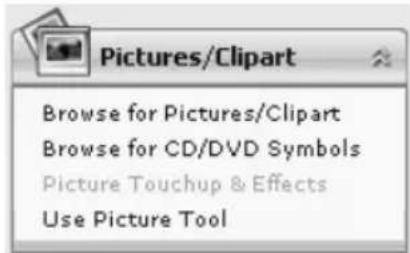
- Finally, open the picture panel by clicking the arrow on the Pictures/Clipart button. Add any logos, graphics or symbols to the label. These graphics will appear on top of the background image. You can size them appropriately by drag selected graphic.
- When you have completed design work save your label by choosing Save Project in the Actions panel.
D. CREATING A PRINT LABEL USING DISC COVER (MAC)
The Disc Cover Disc Labeler software included with your Publisher is a great tool for creating professional looking discs on a Mac. You can use Disc Cover's backgrounds and clipart to quickly label a disc, or easily import your own design in many popular file formats.
The Help section included with the software will provide complete instructions on all the features in this package. (Go to the Help Menu - Disc Cover PE Help) The following is an overview of the basic components of the software:
- Open the software by clicking the Create Label button on the Add Print File step of PTPublisher. There is no way to open Disc Cover PE outside of the PTPublisher software.

- To add a background from Disc Cover, click the Gallery button on the top tool bar. On the image above, the Gallery button is the highlighted center color wheel button on the left side of the top tool bar.
3a. Choose Backgrounds from the drop down box. Click the design that you would like as your background. Use the scroll bar to view all of the designs.
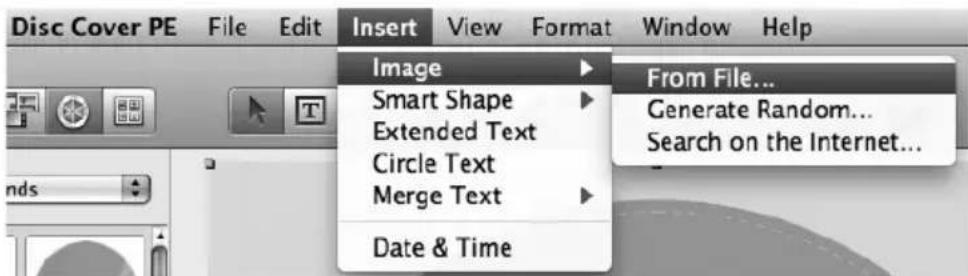
3b. You may also select an image or design from your hard drive as long as it is a supported file type such as tiff, jpg, bmp or pdf. Go to the Insert Menu - Select Image - Choose From File...
- Once your image or background has been selected you can add text or other design elements using the buttons on the tool bar or the Inspector. Below is a short description of each of the important buttons.
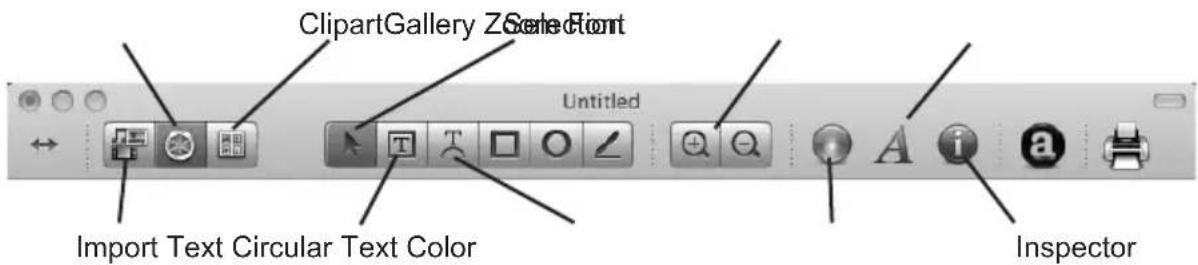
- Import - Import song titles from iTunes or pictures for a collage from iPhoto.
- Gallery - Choose a Disc Cover background or several backgrounds to make a collage. Create your own backgrounds and add them to the Gallery.
- Clipart - Choose from a wide selection of categorized clipart. After selecting this button, click the dropdown that appears to see all categories.
- Selection - Resize or move text, images or shapes with this tool.
• Text - Create a standard text box.
• Circular Text - Create circular text that follows the contour of the outside or inside of your disc.
- Zoom - Zoom out or in.
• Color - Change the color of the selected object with this tool.
- Font - Change the font of the selected text or circular text object with this tool.
- Inspector - Click this button to open or close the Inspector window. The Inspector window includes advanced options that allow you to change the properties of your template, change size or position of the objects, add effects, edit transparency, change text properties and align objects. See the next step for more information.
- Once you have several objects on screen you may choose to use the Inspector tool to edit advanced object properties. Select the objects you would like to edit and then click on one of the six buttons on the top of the inspector. Four are shown below. See the description of each to understand what options are available on each.
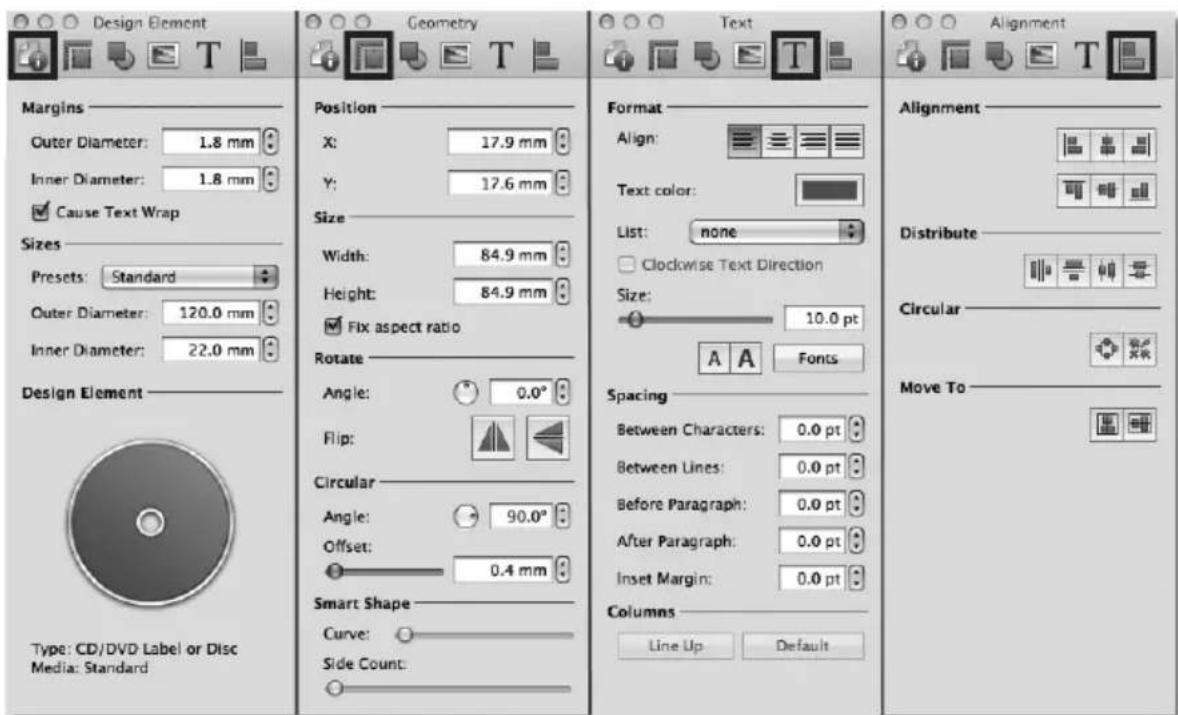
- Design Element - Switch to a new template, edit the current template, create your own.
- Geometry - Precisely move, resize or rotate selected objects.
- Fill and Shadow (not shown above) - Add shadow, change thickness or color of geometric objects.
- Image (not shown above) - Add transparency or a gradient to images, clipart or backgrounds.
- Text - Change line spacing, character spacing, fonts, size, or justifications of any selected text object.
-
Alignment - Align or distribute multiple text objects.
-
Many other options such as changing the order of objects, (send to front, send to back) and exporting in other file formats are available from the Disc Cover menus which is visible at the top of the screen when the Disc Cover application is open and has focus.
-
Finally, save the design by going to the file menu - save as. Quit Disc Cover by choosing Quit from the Disc Cover PE menu. PTPublisher will ask you if you would like to use the design you just saved in your project. Choose Yes.
E. ADVANCED PRINTER DRIVER FUNCTIONS (PC)
Once the Publisher software has been successfully installed, you will want to take a moment to familiarize yourself with the printer driver settings for your Publisher. These settings affect the print quality of your discs. The default settings of the Publisher printer driver will fit most printing needs. Please refer to the following steps to change or verify your printer driver options:
1. Click the Windows button and choose or search for Devices and Printers.
Click on the Disc Publisher SE-3 icon with the right mouse button and select Printing Preferences.

NOTE: The PTPublisher application allows you to adjust some of these settings directly through the Add a Print file screen in that application. In PTPublisher you also have the option to Use Driver Defaults. If this is selected the software will use all of the settings set via the methods described in this section.

Paper Size
The paper size option will be set to Disc 120mm for printing onto printable surface CDs and DVDs.
Non-printable Outer Margin
Adjust this value to print all the way to the outer edge of a CD. This is useful if you are printing full coverage images. The lower you set this value the farther to the outer edge of the CD you will print. Please note that with most media the printable surface does not extend all the way to the edge of the disc.
Print Quality
This setting has the most dramatic effect on the quality, speed and ink usage of the print. Color matching also affects print quality. Start with the default setting for fastest printing and the least amount of ink consumption. If the quality needs improvement move to the next highest setting.
Disc Surface Quality
This setting is a finer adjustment to each of the "Print Quality" settings in the previous paragraph.
Color Matching
Best for Graphics mode is best used for graphical images where accurate color reproduction is not as essential. Images printed in this mode will look more vibrant because more ink is being used to produce them. However, printing images of people may produce skin tones that have a reddish tint.
Best for Photos mode is best used for photographic images where accurate color reproduction is very essential. Images printed in this mode will look lighter than those printed in Graphics mode. Skin tones especially will look more natural in this mode.
NOTE: Exact color matching of the printed discs to the screen may never be possible since there are factors that affect this out of the driver's control. The surface of the disc reacts with the ink in the cartridge to produce the color. For this reason, when printing the same image to different types of discs with different surfaces the printed output can look entirely different.
Ink Saturation
This option controls the ink saturation of the printed image. When printing onto the printer manufacturer's TuffCoat CD media, this option can be left at its default setting of 100%. When printing onto other brands of printable CD media, you may need to adjust this control in order to optimize the ink saturation for the printable surface of your specific CD media. If discs do not seem to be drying completely it may be necessary to reduce this value.
Inner Diameter
This value changes the size of the non-printed center. Larger numbers cause the non-printed center to be larger and smaller numbers make the non-printed center smaller. This number is incremented by 0.1mm so a change of 10 for inner diameter changes the diameter by 1mm.
Inner Diameter Non-Printed Diameter
230 0.905" (22.0mm) (TuffCoatTM, Default)
150 0.591" (15mm) (This is the size of the hole in the center of the disc. Inner diameter cannot be adjusted lower than this.)
Cartridge Alignment
The Cartridge Alignment prints a test print and then automatically scans the print to configure your printer for bidirectional printing and to align the color cartridge. It is important to perform this calibration every time you change a cartridge. If you forget to perform this calibration you will be prompted to do so before your first print from the new cartridge.
Center The Print Image
NOTE: Your printer comes from the factory pre-calibrated to print the image in the center of the CD. You can use this adjustment if you need to fine-tune this location.
If you ever wish to verify your factory-calibrated Vertical and Horizontal calibration settings, you can run a simple calibration procedure to assure that your images will be centered when printed on a CD. To do this, refer to the following steps:
-
Verify that a disc and a color ink cartridge are installed in the Publisher. It is important to use the same disc you normally use for your publishing because different brands of discs may vary slightly in size. Also, verify that the Publisher is powered ON and that it is connected to your computer.
-
Click on Center the Print Image and then click the Properties button. The printer will begin printing the calibration test print.
-
When the print is complete, rotate the disc 180irc and put the disc back in the input bin and repeat step 2 using the same disc.
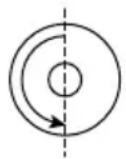
- When the second run of the print is complete, you should have a test print that looks similar to the following:

pie
| Section | Count | |---|---| | Horizontal Calibration (must be the SAME number) | 5 | | Vertical Calibration (must be the SAME number) | 5 | | Bottom (LEFT) | 0 | | Top (TOP) | 5 | | Bottom (RIGHT) | -5 | | Top (RIGHT) | 5 | | Bottom (Z-axis) | 1 | | Top (Z-axis) | -2 | | Bottom (Z-axis) | -5 | | Top (Z-axis) | 3 | | Bottom (Z-axis) | -4 | | Top (Z-axis) | 4 | | Bottom (Z-axis) | -3 | | Top (Z-axis) | 2 | | Bottom (Z-axis) | -1 | | Top (Z-axis) | 0 | | Bottom (Z-axis) | 0 | Note: After printing this image once, rotate this CD so the ARROWS point to the BACK of the printer and print again.-
Along the vertical axis of the printed disc, find the number whose lines touch. For example, in the above illustration, enter the number 2 into the Vertical box of the Calibration window and 0 for the Horizontal axis.
-
Select the OK button. Your images should now be centered when printed on a disc.
After your selections have been made, close out of the printer setup window. You are now ready to go to an application program and print. All printer driver selections will stay the same until you change them.
Details
Select this button to display the current ink levels as well as options for cleaning and changing cartridge.

Details
Select the Details button for information on the drivers, firmware, alignment and number of discs printed with your Publisher. Click Reset Factory Default to set all print centering and cartridge alignment settings back to factory defaults.
Enable Bi-di Printing
Set this option to "Yes" for faster printing that requires cartridge alignment. Set it to "No" for slower printing that does not require cartridge alignment.
F. ADVANCED PRINTER DRIVER SETTINGS (MAC)
Access the advanced printer driver setting from any printing program on the Mac. Go to file - print. Select Printer Features from the Preview Dropdown menu to change settings. Click the Presets menu to save any changed settings for use in this or other programs.
Note: The most common settings can be accessed directly from the print step of PTPublisher. If you adjust settings there you do not need to adjust them here. These settings do not typically need to be changed. They are for advanced users only.
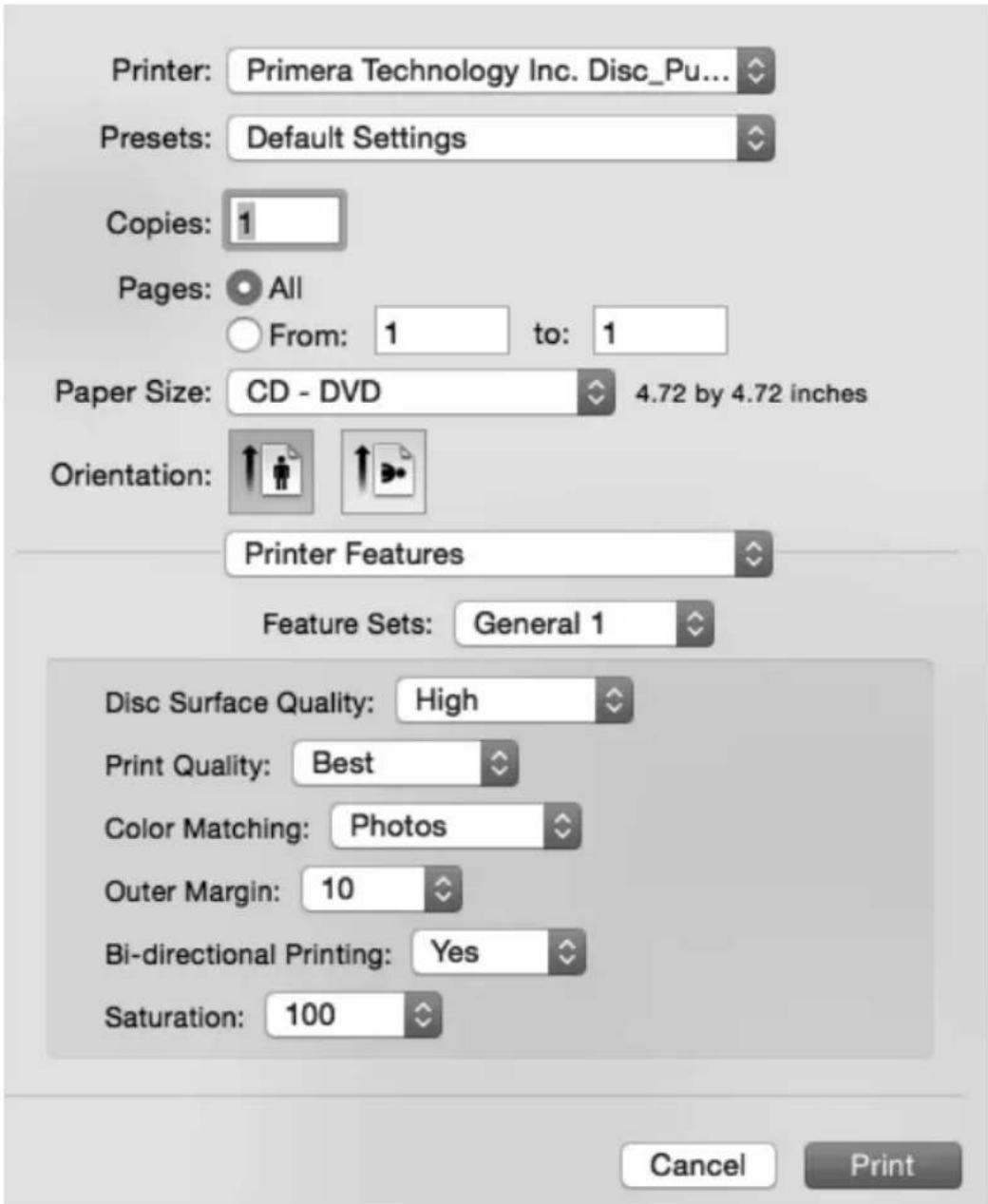
The following is a description of the printer driver settings:
Disc Surface Quality
This setting also affects the Quality of the printed image by altering the color matching profile. Start with the default setting for fastest printing and the least ink consumption. If the quality needs improvement, move to the next highest setting.
Print Quality
There are three options for image quality. Keep in mind that Normal provides the fastest print at lower quality while Best delivers the best quality at a slower print speed.
Color Matching
Graphic mode is best used for graphical images where accurate color reproduction is not as essential. Images printed in this mode will look more vibrant because more ink is being used to produce them. However, printing images of people may produce skin tones that have a reddish tint.
Photo mode is best used for photographic images where accurate color reproduction is very essential. Images printed in this mode will look lighter than those printed in Photo mode. Skin tones especially will look more natural in this mode.
NOTE: Exact color matching of the printed discs to the screen may never be possible since there are factors that affect this out of the driver's control. The surface of the disc reacts with the ink in the cartridge to produce the color. For this reason, when printing the same image to different brands of discs with different printable surfaces the printed output can look entirely different.
Outer Margin
The Outer Margin refers to where the printing will cut off around the outer edge of your disc. The size of the printable surface can vary from one type of media to the next. This setting allows you to set the outer margin in millimeters enabling you to print all the way to the edge regardless of the type of disc you are using.
Bi-directional Printing
Set this option to "Yes" for faster printing that requires cartridge alignment. Set it to "No" for slower printing that does not require cartridge alignment.
Saturation
This setting will control the amount of ink saturation on the disc. When printing onto the Primera TuffCoat discs, 96% is usually sufficient. When printing onto other brands of media, or if you would like to print darker colors, you may wish to increase the Intensity setting.
Inner Diameter (Select General 2 from the Feature Sets menu to view this setting)
The inner diameter refers to the size of the non-printed center on your disc. The size of the center hub can vary from one type of media to the next. This setting allows you to set the inner diameter in millimeters enabling you to print all the way to the center hub regardless of the type of disc you are using. For the discs that Primera sells, use the following guide for Inner Diameter:
- 23mm for Primera's Tuff-Coat CDR
- 24.9mm for the Hockey Rink Disc, Business Card Disc and 80mm CD
Configuration Utility
This utility can be accessed via the printers area in system preferences. Click the apple in the upper left of your screen - choose system preferences - Select Printers and Scanners - Select the Primera Technology Disc Publisher SE-3 - Click the Options and Supplies button - click the Utility button - Click Open Printer Utility.

You will see the Color Ink Level is displayed. The Color Ink Level represents the lowest color in your cartridge. For instance, if your cartridge has 80% cyan 50% yellow and 65% magenta ink remaining, the level reported would be 50%. You will also see the following buttons:
Clean Cartridge
A cartridge that sits idle in the Publisher for a period of time may start to experience some drying of ink in the tiny nozzles that make up the print head. Clicking the Clean Cartridge button will cause the Publisher to pick a disc and place it into the printer tray. The Publisher will then print a simple pattern that will flush ink through the nozzles. The test pattern will also show you if any nozzles are clogged. In the pattern you will see some diagonal lines which should be continuous; breaks in those lines indicate a clogged nozzle. Please note that it may require more than one cleaning to fully clear all nozzles. If the nozzles are not fully clear after a few cleaning prints, it may be necessary to remove the cartridge and actually clean the print head by gently blotting the nozzles with a moist cloth or paper towel before replacing it in the Publisher. See Section 4-D.
Change Cartridge
If you need to change the cartridge, it is a good idea to use the Change Cartridge button in the Configuration Utility. This ensures the most accurate tracking of ink levels. To change a cartridge, click the Change Cartridge button. The cartridge holder will move to the center of the Publisher to make it easier to install the cartridge. Lift the top cover and install the cartridge as described in Section 2B of this manual. You will be prompted to let the system know whether or not you are installing a new or used color cartridge. Once installed, click the OK button and the system will update your cartridge levels.
Align Cartridges
The Cartridge Alignment prints a test print and then automatically scans the print to configure your printer for bidirectional printing. It is important to perform this calibration every time you change a cartridge. If you forget to perform this calibration you will be prompted to do so before your first print from the new cartridge.
Image Centering
The Image Alignment button will allow you to nudge the image up, down, left, or right on your disc. To center the image, click the Image Centering button. You will be prompted with a choice to print a test print or simply enter values to nudge the image alignment on the disc.
If you do not know the direction and distance to move the image in order to center it on your disc, you can opt to print the centering test print. Make sure the Publisher has discs and an ink cartridge installed, and it is connected and ready to receive a print job, and then click the Yes button. The Publisher will pick a disc and print a scale of numbers on it. You will be prompted to open the Publisher's front cover, rotate the printed disc 180 degrees, reload it into the input, and close the cover. Click OK when ready and the Publisher will pick the disc and print another scale of numbers. The disc should look like this:

natural_image
Simple circular diagram with two concentric rings and an arrow indicating rotation or direction (no text or symbols)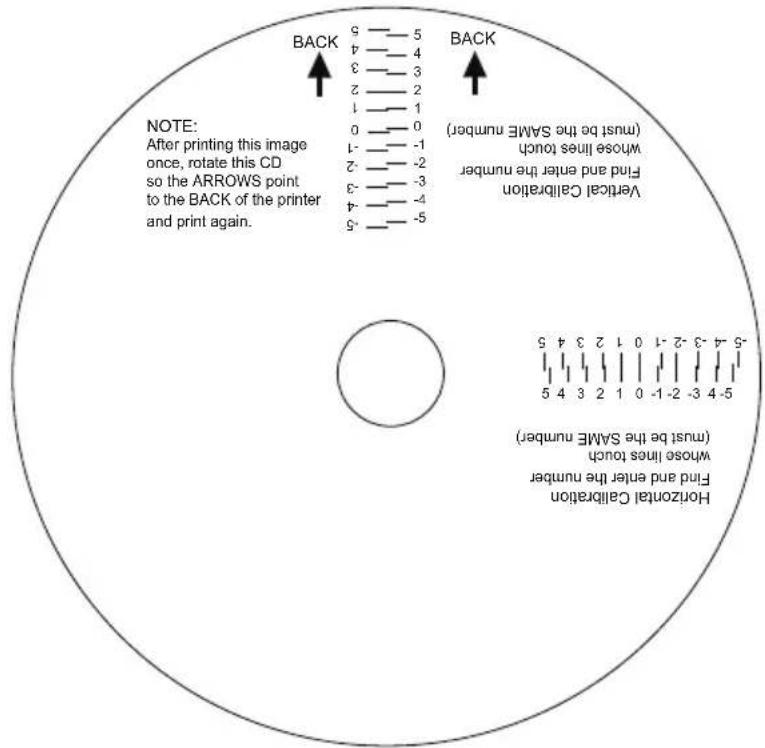
pie
| Position | Count | |---|---| | BACK | 5 | | BECK | 5 | | Before Back | 1 | | After Back | 0 | | Before Back | -1 | | After Back | -1 | | After Back | -1 | | After Back | -2 | | After Back | -2 | | After Back | -3 | | After Back | -3 | | After Back | -4 | | After Back | -4 | | After Back | -5 | Horizontal Calibration Find and enter the number whose lines touch (must be the SAME number) Vertical Calibration Find and enter the number whose lines touch (must be the SAME number) Horizontal Calibration Find and enter the number whose lines touch (must be the SAME number)Once the print has finished, you will see the following dialog box:
Now set your centering alignment values. Each value is in approximately 0.1mm. If you printed a centering test print this value can be determined by selecting the best value from the CD that was printed.
Note: The number is not an absolute offset but rather is added to the current offset value stored in the printer.

Horizontal Value
Vertical Value


Cancel
Set Values
Look at the finished alignment disc and pick the numbers that come closest to lining up with one another. For instance, on the disc shown in this manual, the vertical alignment is 2 and the horizontal alignment is 0. Enter this in the alignment dialog box.
If you choose not to print the test print, you will simply see the alignment dialog box and can enter values to move the image. The unit of measure is roughly 0.1mm. Making the Horizontal Calibration number smaller or more negative will move the image slightly to the left. Making the Horizontal Calibration a larger value, or more positive will move the image to the right. If the Vertical Calibration number is made smaller, or more negative the image will move slightly up. If the Vertical Calibration is set to a larger value, or more positive value, the image will move down on the disc.
Calibrate Last Disc
Use this calibration if you frequently receive false messages that two discs were picked. When you press this button you will be prompted to place one disc in the input bin. The Publisher will then touch the disc with the robotic arm to set the correct measurement for the last disc in the bin.
About Button
Click the About button to view the current firmware and driver version, find the serial number, Generate a service log file, and check for firmware and driver updates.
Finally, you may disable the print alignment requirement.
Note: If you do not align the cartridges, print quality may suffer.

G. USING OTHER GRAPHICS PROGRAMS
While SureThing and Disc Cover will handle most labeling needs, other graphics programs can be used if you prefer.
When printing and burning through the PTPublisher software your Publisher will support the following additional standard label image file formats: BMP, TIF, JPG, GIF, PNG and PRN. These formats can be exported from most any original graphics format such as Adobe Photoshop or Illustrator.
When creating images in other graphics programs we recommend creating a 4.72" x 4.72" square image that has a 300 dpi resolution.
Section 4: Maintenance and Troubleshooting
A. INTERPRETING THE PUBLISHER'S INDICATOR LIGHTS
The Power/Ink button can tell you what is happening inside the Publisher. Please refer to the following:
| Power/Ink Button Publisher |
| Fast Flashing The Publisher is initializing. You will see this pattern when the Publisher is first turned on.Wait until the light stops blinking before opening software or starting jobs. |
| Slow Flashing The cover is open and the ink cartridge carrier is in change position. Insert a new cartridge and close the cover. (The slow flashing light can also indicate an out of media condition, a robotic error or a picking problem. However, these conditions are always paired with an error message on screen.) |
B. CLEANING THE PUBLISHER
NOTE: Do NOT attempt to oil or grease the Publisher's Robotic Arm shaft or other components. You will likely cause more harm than good! Any moving parts are designed to operate for the life of the machine with no additional lubrication required.
Use a clean, lint-free rag with a small amount of ammonia window cleaner to clean the Publisher's outside case and trays. This type of cleaner is very effective on inks that may accumulate on the printer tray. Stronger cleaning solutions are NOT recommended because they may damage the paint and plastic materials from which the parts are manufactured. Always disconnect your Publisher's power cords before cleaning. Resume operation only after the surfaces are completely dry.
C. PERFORMING A ROBOTIC SELF-TEST
To ensure that everything is working properly, a Self-Test feature is built in to your Publisher. In this mode, the Robotic Disc Transporter will go through the motions of picking and placing a disc to ensure proper working order. This test may be performed without connecting the Publisher to the PC.
Perform the test by doing the following steps:
- Load some discs into the Input Bin.
- Open the cover.
- Press and hold the power button for five seconds. The test will start.
- To stop the test, close the cover and press the power button.
D. CLEANING THE INK CARTRIDGE
It may be necessary to clean the ink cartridge nozzles if you notice reduced print quality, or if you suspect a cartridge nozzle has become slightly dried out or clogged. If you are having print quality problems, follow the steps below:
- Remove the print cartridge.
- Moisten a lint-free cloth with water.
- Hold the cloth against the nozzles for three seconds. This will "wick" some additional ink onto the damp cloth.
- Wipe in one direction only.
- Repeat the process until print quality improves.

natural_image
Isometric illustration of a rectangular box placed on a flat surface with a shadow (no text or symbols)E. TECHNICAL SUPPORT
If you have difficulties in operating your Publisher, the procedures in this manual and the software User's Guide should, in most cases, solve the problem. If you still have difficulty, contact the technical support number listed below.
| Source | Location |
| Primera Knowledge Base www.primera.com/knowledgebase.html | |
| PTPublisher Software Help files Open the software. Click on the ? icon in the upper right corner of any screen. | |
| SureThing Software Help files Open the software. Click on the Help Menu - Contents | |
| Email Support www.primera.com/contact_tech_support.cfm | |
| Phone Support 763-475-6669 (Mon - Fri 8 a.m. - 6 p.m. CST) | |
Section 5: Technical Specifications
Configurations Blu-ray Publisher
DVD+/-R-CDR Publisher
AutoPrinter
Printing Method Ink-Jet
Printing Resolution Up to 4800 dpi
Ink Types One 3-color (CMY) cartridge
Media Types Ink-Jet Printable Surface CD-R, CD-RW,
DVD-R, DVD RAM, DVD+R, Dual Layer
DVD+R, BDR (BLU models only).
Maximum print width 4.724" (120mm)
Minimum PC System Intel Celeron® Processor or higher, 2GB
RAM or higher, 10GB or more free hard
drive space, available USB 2.0. For optimal
performance use USB 3.0.
Minimum MAC System 1 GHz Intel processor or higher, capable of
running Mac OS X v10.9 or higher, 1GB
RAM, one available USB 2.0. For optimal
performance use USB 3.0.
Disc Capacity 20 disc input, 20 disc output
Operating Systems Windows 7, 8 or 10
Mac OSX Version 10.9 or higher
Interface USB 3.0
Power Requirement 100-120VAC / 220-240VAC
Weight 17 lbs (7.7 kg)
Dimensions 15"W x 7"H x 14.75"D
(381mmW × 178mmH × 375mmD)
EMC Certifications FCC Class B, CE
Safety UL, UL-C, CE, RoHS
Warranty One year return-to-depot
Index
Abort 21
Aligning Cartridge 9,35,41
Audio Project.... 14
AUDIO_TS.... 14, 26
Backup Project.... 22
Blu-ray.... 2
BDR 2
Cartridge, Change.... 41
CD Tray 5
Centering Test Print 42
Change Robot.... 18
Closed Disc 19
Color Matching 34, 39
Connections, Rear Panel.... 4
Copy Project.... 10, 13
Data Project.... 14
Disc Cover.... 10, 28
File System.... 20
Gallery 30
Global Image 10, 13
Identifying the Parts 3
Image Project.... 15
Ink Levels and Cartridge Maintenance.... 37
Ink Saturation 34
Input Bin 4
Inner Diameter.... 12, 17, 34, 40
iTunes 25
Media Type.... 48
New Project Panel.... 11
Outer Margin.... 12, 17, 33, 39
Output Bin 4
Overview of Operation 5
Paper Size 33
Power/Ink Button.... 4, 45
Power Input 4
Print Quality.... 13, 33, 39
Print Template 23
PTProtect 18,26
Publisher Status.... 21
Queue Project 21
Recording Speed....19
Recording Type 19
Resolution 48
Rip Audio 25
Save Project.... 18
Schedule Project 19
Set Time and Date to Mastering Time 20
Span Discs.... 22
Specifications 48
System Requirements.... 5
Technical Support 47
Test Record.... 20
Verify.... 20
Video Project 14
VIDEO_TS 14,26
Windows Media Player 25

- PRIMERA
- Printing History
- CAUTION!
- Table of Contents
- Section 1: Getting Started....1
- Section 2: Hardware Setup....7
- Section 3: Creating Discs....10
- Section 4: Maintenance and Troubleshooting....45
- Section 5: Technical Specifications....48
- Index 49
- Section 1: Getting Started
- THANK YOU...
- NOTE ON TERMS AND CONVENTIONS:
- NOTE ON MODEL DIFFERENCES
- CHOOSING A GOOD LOCATION
- UNPACKING AND INSPECTION
- IDENTIFYING THE PARTS
- Front Panel and Top
- Rear Panel
- Section 2: Hardware Setup
- Setup
- LOADING MEDIA (DISCS)
- INSTALLING THE INK CARTRIDGE
- Section 3: Creating Discs
- TUTORIAL: COPY A DISC (PRINT ONLY FOR AUTOPRINTER USERS)
- AutoPrinter users Start here after choosing Print Only from the Project Start Window.
- Inner Diameter and Outer Margin (Printable Area).
- USING PTPUBLISHER
- B.1 Project Types
- Copy Project
- Data Project
- Audio Project
- Video Project
- Image Project
- B.2 Steps to any Project.
- Step 1: Add Data
- To Select an exiting label:
- To Create a new label:
- Step 3: Start Project (Summary - Settings)
- Project Summary
- Project Options
- B.3 Publisher Status
- B.4 Backup Project. (PC Disc Publishers Only)
- B.5 Rip Audio CD (PC Disc Publishers Only)
- B.6 PTProtect (PC Disc Publishers Only - Requires separate purchase of USB dongle)
- CREATING A PRINT LABEL USING SURETHING (PC)
- CREATING A PRINT LABEL USING DISC COVER (MAC)
- ADVANCED PRINTER DRIVER FUNCTIONS (PC)
- Click the Windows button and choose or search for Devices and Printers.
- Paper Size
- Non-printable Outer Margin
- Print Quality
- Disc Surface Quality
- Color Matching
- Ink Saturation
- Inner Diameter
- Inner Diameter Non-Printed Diameter
- Cartridge Alignment
- Center The Print Image
- Details
- Enable Bi-di Printing
- ADVANCED PRINTER DRIVER SETTINGS (MAC)
- Outer Margin
- Bi-directional Printing
- Saturation
- Inner Diameter (Select General 2 from the Feature Sets menu to view this setting)
- Configuration Utility
- Clean Cartridge
- Change Cartridge
- Align Cartridges
- Image Centering
- Calibrate Last Disc
- About Button
- USING OTHER GRAPHICS PROGRAMS
- Section 4: Maintenance and Troubleshooting
- INTERPRETING THE PUBLISHER'S INDICATOR LIGHTS
- CLEANING THE PUBLISHER
- PERFORMING A ROBOTIC SELF-TEST
- CLEANING THE INK CARTRIDGE
- TECHNICAL SUPPORT
- Section 5: Technical Specifications
- Index
Brand : PRIMERA
Model : Bravo SE-3
Category : Printer