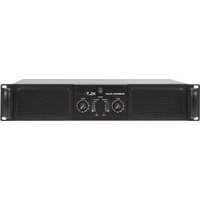
XLT2000 - Audio Equipment American Audio - Free user manual and instructions
Find the device manual for free XLT2000 American Audio in PDF.


Pick your language and provide your email: we'll send you a specifically translated version.
| Product Type | Powered Mixer |
| Brand | American Audio |
| Model | XLT2000 |
| Power Output | 2000W (peak) |
| Number of Channels | 6 |
| Frequency Response | 20Hz - 20kHz |
| Input Impedance | 10kΩ (line), 600Ω (mic) |
| Output Impedance | 4Ω (speaker) |
| Dimensions (W x D x H) | 19" x 15" x 5.25" (rack mountable) |
| Weight | 25 lbs (11.3 kg) |
| Power Supply | AC 120V / 60Hz (US) |
| Main Functions | Built-in amplifier, multiple inputs, EQ controls, effects loop |
| Cooling System | Internal fan, forced air |
| Maintenance | Clean with dry cloth; avoid liquids |
| Safety Precautions | Operate in dry environment; ensure proper ventilation; disconnect when not in use |
| Spare Parts & Repairability | Contact American Audio authorized service centers for parts and repairs |
| General Information | Professional audio mixer/amplifier for DJs and live sound |
Frequently Asked Questions - XLT2000 American Audio
How do I connect my microphone to the XLT2000?
Use a balanced XLR cable and plug it into one of the microphone input jacks (channels 1-4). Ensure the gain knob is set to minimum before connecting.
What should I do if there is no sound from the speakers?
Check that the power is on, the master volume is up, and the speaker cables are properly connected to the speakON or 1/4" outputs. Also verify that the channel faders are not muted.
Can I use the XLT2000 with passive speakers only?
Yes, the XLT2000 has a built-in amplifier and is designed to power passive speakers directly. Connect them to the speaker outputs.
How do I clean the XLT2000?
Use a soft, dry cloth to wipe the exterior. Do not use any liquids or sprays, as they may damage the electronics.
What is the maximum power output of the XLT2000?
The XLT2000 delivers up to 2000W peak power, providing ample headroom for live performances.
Does the XLT2000 have built-in effects?
Yes, it features a built-in digital effects processor with reverb, delay, and chorus. You can adjust the effect level per channel.
How do I reset the XLT2000?
Turn off the unit, wait 10 seconds, then turn it back on. This will reset the internal processor. For a factory reset, consult the manual.
Is the XLT2000 rack-mountable?
Yes, the unit is designed to fit a standard 19" rack and includes rack ears for mounting.
What type of cables do I need for the speaker outputs?
Use heavy-gauge speaker cables (12-14 AWG) with speakON connectors for a secure and reliable connection.
Where can I find the user manual?
You can download the PDF manual for free from the American Audio website or from notice-facile.com.
User questions about XLT2000 American Audio
0 question about this device. Answer the ones you know or ask your own.
Ask a new question about this device
No questions yet. Be the first to ask one.
Download the instructions for your Audio Equipment in PDF format for free! Find your manual XLT2000 - American Audio and take your electronic device back in hand. On this page are published all the documents necessary for the use of your device. XLT2000 by American Audio.
USER MANUAL XLT2000 American Audio
Manual assistant
Powered by Anthropic
Waiting for your message
Product information
Brand : American Audio
Model : XLT2000
Category : Audio Equipment