
MMA130 - Metronome KORG - Free user manual and instructions
Find the device manual for free MMA130 KORG in PDF.



| Product type | Active mobile floor monitor (monitoring amplifier) with 4-channel mixer |
| Dimensions (W x D x H) | 320 x 285 x 485 mm (vertical) / 485 x 345 x 336 mm (horizontal) |
| Weight | 12.3 kg (with stabilizer 13.7 kg) |
| Power supply | Mains (AC) or 6/12 alkaline C-type batteries |
| Battery life | Up to 24 h (ECO mode, 12 batteries); 16 h (MAX mode, 12 batteries) |
| Amplifier power | 30 W RMS (MAX) / 5 W RMS (ECO) at 4 ohms |
| Speaker | 6.5" woofer (4 ohms) + 1" dome tweeter (4 ohms) |
| Inputs | CH1/2: MIC/LINE (XLR/TRS balanced), CH3/4: LINE (1/4" jack unbalanced), AUX IN (RCA, mini jack, 1/4" jack) |
| Outputs | LINE OUT (1/4" jack unbalanced), DC9V OUT (500 mA) |
| Equalizer | 3-band (HIGH, MIDDLE, LOW) |
| Anti-feedback | Yes, with ON/OFF adjustment |
| Supplied accessories | Mains cable, DC-DC cable (1.5 m), stabilizer |
| Options | Percussion stand ST-WD, speaker stand JS-TS50-1 |
| Power consumption | 25 W |
| Cleaning | Soft, dry cloth |
| Indicators | CLIP indicator per channel, power indicator (battery status) |
| GROUND LIFT switch | Yes (on CH3/4 inputs) |
| Stand mounting | Possible (with stabilizer or speaker stand) |
| Usage | Horizontal (floor monitor) or vertical (speaker) |
Frequently Asked Questions - MMA130 KORG
User questions about MMA130 KORG
0 question about this device. Answer the ones you know or ask your own.
Ask a new question about this device
Download the instructions for your Metronome in PDF format for free! Find your manual MMA130 - KORG and take your electronic device back in hand. On this page are published all the documents necessary for the use of your device. MMA130 by KORG.
USER MANUAL MMA130 KORG
Names and Functions 4
Setting Up 6
Attaching the stabilizer. 7
Using a WAVEDRUM stand. 8
Using a speaker stand 9
Specifications 10
Français
Introduction 12
IMPORTANT SAFETY INSTRUCTIONS
- Read these instructions.
- Keep these instructions.
Heed all warnings. - Follow all instructions.
- Do not use this apparatus near water.
- Mains powered apparatus shall not be exposed to dripping or splashing and that no objects filled with liquids, such as vases, shall be placed on the apparatus.
- Clean only with dry cloth.
- Do not block any ventilation openings. Install in accordance with the manufacturer's instructions.
- Do not install near any heat sources such as radiators, heat registers, stoves, or other apparatus (including amplifiers) that produce heat.
- Do not defeat the safety purpose of the polarized or grounding-type plug. A polarized plug has two blades with one wider than the other. A grounding type plug has two blades and a third grounding prong. The wide blade or the third prong are provided for your safety. If the provided plug does not fit into your outlet, consult an electrician for replacement of the obsolete outlet. (for USA and Canada)
- Protect the power cord from being walked on or pinched particularly at plugs, convenience receptacles, and the point where they exit from the apparatus.
- Only use attachments/accessories specified by the manufacturer.
- Unplug this apparatus during lightning storms or when unused for long periods of time.
- Turning off the power switch does not completely isolate this product from the power line so remove the plug from the socket if not using it for extended periods of time.
- Install this product near the wall socket and keep the power plug easily accessible.
- WARNING—This apparatus shall be connected to a mains socket outlet with a protective earthing connection.
- Refer all servicing to qualified service personnel. Servicing is required when the apparatus has been damaged in any way, such as power-supply cord or plug is damaged, liquid has been spilled or objects have fallen into the apparatus, the apparatus has been exposed to rain or moisture, does not operate normally, or has been dropped.
- Do not install this equipment on the far position from wall outlet and/or convenience receptacle.
- Do not install this equipment in a confined space such as a box for the conveyance or similar unit.
- Battery shall not be exposed to excessive heat such as sunshine, fire or the like.
- Excessive sound pressure from earphones and headphones can cause hearing loss.
- Use only with the cart, stand, tripod, bracket, or table specified by the manufacturer, or sold with the apparatus. When a cart is used, use caution when moving the cart/apparatus combination to avoid injury from tip-over.

WARNING: TO REDUCE THE RISK OF FIRE OR ELECTRIC SHOCK DO NOT EXPOSE THIS PRODUCT TO RAIN OR MOISTURE.

CAUTION
RISK OF ELECTRIC SHOCK DO NOT OPEN

AVERTISSEMENT: RISQUE DE CHOC ÉLECTRIQUE—NE PAS OUVRIR.
注意
感電の恐い、マフトをあけるな
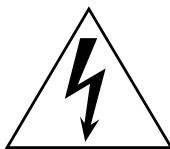
The lightning flash with arrowhead symbol within an equilateral triangle, is intended to alert the user to the presence of uninsulated "dangerous voltage" within the product's enclosure that may be of sufficient magnitude to constitute a risk of electric shock to persons.

The exclamation point within an equilateral triangle is intended to alert the user to the presence of important operating and maintenance (servicing) instructions in the literature accompanying the product.
THE FCC REGULATION WARNING (for USA)
This equipment has been tested and found to comply with the limits for a Class B digital device, pursuant to Part 15 of the FCC Rules. These limits are designed to provide reasonable protection against harmful interference in a residential installation. This equipment generates, uses, and can radiate radio frequency energy and, if not installed and used in accordance with the instructions, may cause harmful interference to radio communications. However, there is no guarantee that interference will not occur in a particular installation. If this equipment does cause harmful interference to radio or television reception, which can be determined by turning the equipment off and on, the user is encouraged to try to correct the interference by one or more of the following measures:
- Reorient or relocate the receiving antenna.
- Increase the separation between the equipment and receiver.
- Connect the equipment into an outlet on a circuit different from that to which the receiver is connected.
- Consult the dealer or an experienced radio/TV technician for help.
Unauthorized changes or modification to this system can void the user's authority to operate this equipment.
Notice regarding disposal (EU only)

When this "crossed-out wheeled bin" symbol is displayed on the product, owner's manual, battery, or battery package, it signifies that when you wish to dispose of this product, manual, package or battery you must do so in an approved manner. Do

not discard this product, manual, package or battery along with ordinary household waste. Disposing in the correct manner will prevent harm to human health and potential damage to the en
vironment. Since the correct method of disposal will depend on the applicable laws and regulations in your locality, please contact your local administrative body for details. If the battery contains heavy metals in excess of the regulated amount, a chemical symbol is displayed below the "crossed-out wheeled bin" symbol on the battery or battery package.
*All product names and company names are the trademarks or registered trademarks of their respective owners.
Introduction
Thank you for purchasing the Korg MMA130 Mobile Monitor Amplifier.
For trouble-free enjoyment of the amp's full potential, please read this manual carefully and use the amplifier as directed. After reading the manual, please keep it in a safe place for future reference.
Main Features
The MMA130 is a powered monitor amplifier that features a built-in four-channel mixer. It accepts two different power sources (AC power and batteries) to accommodate various playing styles and environments.
Built-in four-channel mixer.
A built-in four-channel mixer features two mic/line switchable channels (1 & 2), and two line channels (3 & 4). You can connect vocal microphones and electronic musical instruments simultaneously for mixing and playback. The AUX IN jacks enable you to connect your CD or MP3 player for jam sessions or practices.
Two-way power uses AC or batteries (six or twelve C batteries), and a DC9V output ( C- ) jack is provided to supply power.
Even in locations without AC outlets, the MMA130 provides powerful, loud output using batteries. This feature can be very useful for street performances. The built-in DC9V OUT jack will supply power to a connected WAVEDRUM, PS60, microSTATION, microKORG XL, microSAMPLER, microPIANO, KAOSS PAD Quad, KAOSSILATOR PRO, monotoribe or other electronic musical instruments that accept DC9V.
A newly-developed amplifier power circuit and high-efficiency speaker provide sound pressure levels of 100dB or higher, even during battery operation (when the POWER MODE switch is set to MAX).
o Flexible sound creation thanks to a three-band equalizer and an anti-feedback function that eliminates feedback immediately.
Different positions for different occasions.
You can position the MMA130 in various orientations. For example, you can lay it flat (horizontal) to use it as a stage monitor. Or, you can install it on an optional stand (Ultimate Support JS-TS50-1) to use it as a powered monitor speaker.
Names and Functions
Control panel
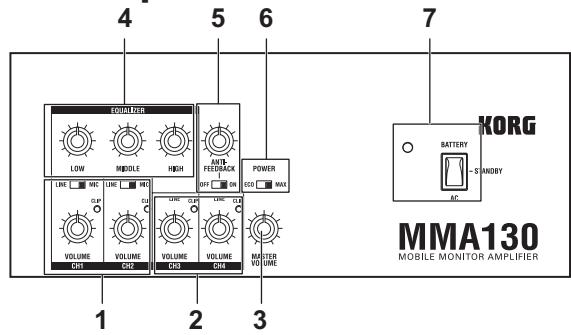
- CH1, CH2 (Channels 1 and 2)
VOLUME knob
Use this knob to set the volume level of the corresponding channel.
LINE/MIC switch
Use this switch to select the input level of the device that's connected to the corresponding channel (1 or 2). If you connect a microphone to one of these channels, set the MIC/LINE switch to MIC. If you connect an electronic musical instrument or audio player, set the switch to LINE.
Both MIC and LINE inputs are balanced.
CLIP (Peak) indicator
Adjust the VOLUME knob for each channel so that the CLIP indicator does NOT light up at the maximum volume of the devices that are connected to the channels.
Note: If the CLIP indicator lights up, the sound may distort or be interrupted. As the batteries begin to run low, the peak level will decline, and the CLIP indicator will begin to light up. When this occurs, lower the VOLUME knob to adjust the setting until the CLIP indicator does not light up.
- CH3, CH4 (channels 3 and 4)
VOLUME knob
Adjust the volume level of channels 3 and 4.
CLIP (Peak) indicator
(see CH1 and CH2)
- MASTER VOLUME knob
Use this knob to adjust the overall volume level of the MMA130.
- EQUALIZER
HIGH knob
Boosts or cuts the high range of the MMA130's sound.
MIDDLE knob
Boosts or cuts the mid range of the MMA130's sound. LOW knob
Boosts or cuts the low range of the MMA130's sound.
5. ANTI-FEEDBACK knob, ON/OFF switch
If the volume level of the MMA130 is very high, feedback may occur between the microphones and the musical instruments that are connected to channels 1-4. If this happens, set the ANTI-FEEDBACK switch to ON, then rotate the ANTI-FEEDBACK knob slowly to eliminate the feedback.
6. POWER MODE switch
Set the switch to ECO to set the amplifier power output to 5W during battery operation in order to reduce battery power consumption.
7. STANDBY switch
This is the power switch of the MMA130.
When set to the BATTERY position, the unit will operate on batteries. If you're using AC power, turn on the POWER switch, and then set this switch to the AC position to turn on the power.
Power indicator
The power indicator will light up when you turn on the STANDBY switch. When running on batteries, the brightness of this LED indicates the remaining amount of battery life. When the power indicator becomes dim, it's time to replace the batteries.
Rear panel
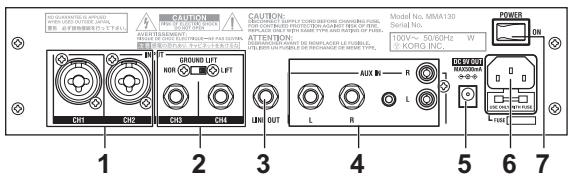
1. INPUT CH1, CH2 jacks
These balanced input jacks accept either XLR plugs or TRS 1/4" phone plugs.
2. INPUT CH3, CH4 jacks
These input jacks accept standard 1/4" phone plugs for LINE connection.
Connect electronic musical instruments or audio players here.
GROUND LIFT switch
In some cases when using the MMA130's DC9V OUT jack, a ground loop may occur, causing noise. If this occurs, you may be able to solve the problem by using the channel 3 and 4 input jacks, and setting the GROUND LIFT switch to the LIFT position.
3. LINE OUT jack
This connector outputs audio that combines channels 1-4 pre-EQ signals.
4. AUX IN (stereo) jacks
These jacks support RCA plugs (L/R), 1/8" mini stereo plugs, and standard 1/4" phone plugs (L/R).
Connect the analog audio outputs from your audio devices to these jacks. These are useful if you want to connect a CD or MP3 player to play back music, and play along on your instrument.
Note: The MASTER VOLUME knob and EQUALIZER knobs do not affect the sound of a device connected to the AUX input jacks.
5. DC9V OUT (DC9V power output connector)
This connector supplies power to a connected Korg product that operates on DC9V (max. 500 mA, polarity: ), such as a WAVEDRUM. Use the dedicated DC-DC cable that's included in the package.
Supported Korg products
WAVEDRUM, PS60, microSTATION, microKORG XL, microSAMPLER, microPIANO, KAOSS PAD Quad, KAOSSILATOR PRO, monotoribe
Note: The output from the DC9V OUT jack may be cut off in order to prevent overcurrent or battery exhaustion. This means that the power supply to the connected device might be interrupted without warning. Please be aware of this, particularly if using the DC9V OUT jack while operating the MMA130 on batteries.
Note: If an unsupported device is connected, you might experience noise or other problems, even if the device meets the recommended specifications.
Note: Pay attention to the polarity of this connector when you connect a device.
Caution: Never connect an AC adapter here.
6. AC power connector
Connect the included power cable.
7. POWER switch
This supplies power when using the MMA130 on AC power. Connect the power cable to the AC inlet, and turn on this switch to supply power.
Note: The MMA130 does not feature a battery charging function.
Tip: If the unit is connected to an AC power outlet, battery power will not be consumed.
Setting Up
This section describes preparation and basic procedure for using the MMA130.
Turn on the power
- Set the MASTER VOLUME knob on the MMA130 to minimum.
- Connect the included power cable to the AC power connector, and then connect the cable to an AC outlet. For battery operation, please refer to the "Installing batteries" section for information on how to insert batteries.
- Connect one side of a cable to the output jack of your electronic musical instrument and connect the other side to the INPUT jack.
Refer to the "Connecting other equipment" section for information on how to connect your equipment.
- Turn on the power to the connected device(s).
Note: The device being supplied with power from the MMA130's DC9V jack must be powered-on after step 5. - Turn on the STANDBY switch.
If you want to use batteries, set the STANDBY switch to the BATTERY position; the MMA130 will run on battery power. If you want to use AC power, turn on the rear panel POWER switch, and then set the STANDBY switch to the AC position to turn on the power. - Use the channel 1-4 VOLUME knobs and the MASTER VOLUME knob to adjust the volume.
To turn off the power
To turn off the power, first minimize the MMA130's MASTER VOLUME knob, then set the STANDBY switch to the STANDBY position, and finally turn off the POWER switch.
Connecting other equipment
Here's how to connect your equipment to the input jacks and adjust the volume.
- Connect the cables coming from the output jacks of your electronic musical instruments or other equipment to the channel 1-4 input jacks.
Use the channels that provide the appropriate input level for your device.
Connect mic-level devices to channels 1 or 2, and set their LINE/MIC select switch to MIC.
Connect line-level devices to channels 1-4.
If you connect a line-level device to channel 1 or 2, set its LINE/MIC select switch to LINE.
If you're using a CD or MP3 player, connect it to the AUX IN jacks.
- Use the channel 1-4 VOLUME knobs to adjust the volume balance of each device.
Adjust each VOLUME knob so that the corresponding
peak indicator does not light up even when peaks occur on the device connected to each channel.
To adjust the input level of the device connected to the AUX IN jacks, use the volume control of the connected device to adjust its output.
- Slowly raise the MASTER VOLUME knob to adjust the overall volume.
Installing batteries
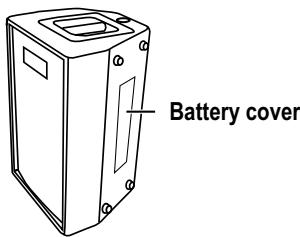
Remove the battery cover from the cabinet.
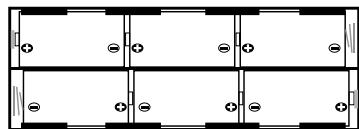
Install six or twelve alkaline C batteries, making sure to observe the correct polarity shown in the illustration.
Note: Make sure that each battery is oriented in the correct polarity.
Tip: If you're using twelve batteries, install six more in the same way.
Choose the number of batteries according to the operating time that you require.
The following table shows the available operating time.
| Number of batteries | Power mode | Operating time | DC9V OUT in use* |
| Six batteries | MAX | 8 hours | 1 hours |
| ECO | 12 hours | 2.5 hours | |
| Twelve batteries | MAX | 16 hours | 4 hours |
| ECO | 24 hours | 6 hours |
- With a WAVEDRUM connected
Replacing the batteries
Replace the batteries when the power indicator becomes dim.
Note: As the batteries run low, you might hear noise or interruptions in the sound.
Note: Remove batteries immediately when they are no longer usable. Leaving depleted batteries installed may cause malfunctions (such as battery electrolyte leakage). You should also remove the batteries if you won't be using the MMA130 for an extended period of time.
Note: You must replace the batteries in sets of six. Do not mix fresh and used batteries in the same set.
Attaching the stabilizer
You can use the MMA130 in an upright position (handle on top). You can also attach part of a Korg ST-WD percussion stand (sold separately), and place a WAVEDRUM on the MMA130 for performance. In this case, please attach the included stabilizer to ensure stability during performance. * You'll need a Philips head screwdriver (no.2) to attach the stabilizer.
Note: Never remove any screws other than directed in the following explanation.
- Use your screwdriver to remove the three stabilizer attachment screws from the bottom of the MMA130.
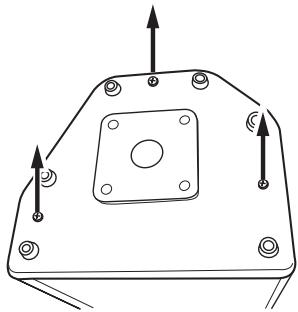
- Place the included stabilizer on the bottom of the MMA130, and securely fasten it using the three screws that you removed.
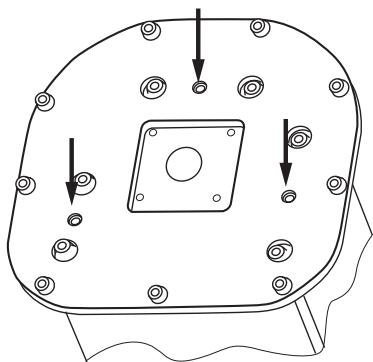
- Place the MMA130 so that the stabilizer is on the bottom, and verify that the unit does not wobble.
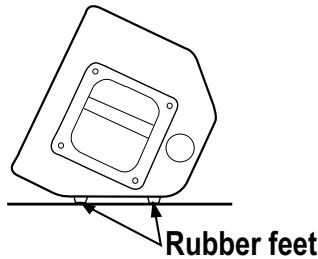
Using the MMA130 on its side
Place the MMA130 so that the surface with the rubber feet is on the bottom (the operating panel will be upward).
Note: You must remove the stabilizer if you're using the MMA130 on its side.
Using a WAVEDRUM stand
You can attach the basket section of the Korg ST-WD percussion stand to the MMA130, and place a Korg WAVE-DRUM on it.
Caution
Make sure that you fully understand the following information before you attach a WAVEDRUM to the MMA130.
- Do not attach anything other than the ST-WD to the MMA130's ST-WD socket. Doing so may damage the ST-WD socket, or cause the system to fall over and cause injury.
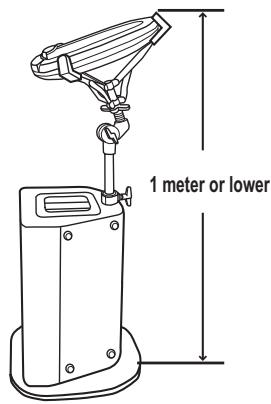
- Adjust the height so that the highest point does not exceed 1 meter (approximately 3.3 feet) when the WAVE-DRUM is placed on the basket section of the ST-WD. If the height is greater than 1 meter (approximately 3.3 feet), the system may fall over and cause injury.
- Attach the included stabilizer to the MMA130 when using the WAVEDRUM. If this part is not attached, the system may fall over and cause injury.
- Do not transport the MMA130 with the ST-WD attached, and do not lift or transport the system by grasping the ST-WD attached to the MMA130.
If you do so, the WAVEDRUM might fall, causing injury or damage.
Attaching the ST-WD
- You'll need a Philips head screwdriver (no.2) to attach the ST-WD.
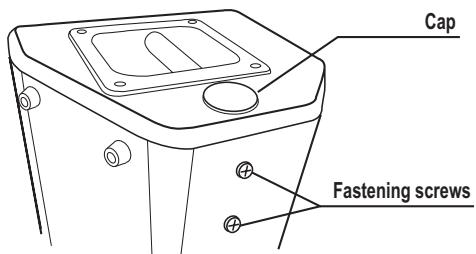
- Remove the cap that covers the ST-WD socket.
Note: Take care not to let screws or other objects fall into the hole. It may be impossible to remove the object you dropped, or the object might damage components inside the MMA130.
Note: Leave the cap attached when you're not using the STWD. - Loosen the two fastening screws located on the rear of the MMA130 so that the ST-WD can pass through.
- Remove the base from the ST-WD, and insert it all the way into the ST-WD socket.
Note: Insert the ST-WD all the way in until the thick part with the knob touches the MMA130. If it is not fully inserted, the system may tip over and cause injury.
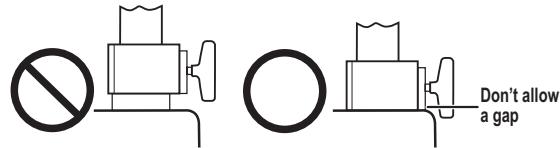
- Position the ST-WD's knob toward the rear of the MMA130, and firmly tighten both of the MMA130's fastening screws to ensure that the ST-WD is secure.
- Make sure that each movable part of the MMA130 is firmly fastened, and then place the WAVEDRUM on the basket. Rotate the nut below the basket to fasten the WAVEDRUM so that it cannot move.
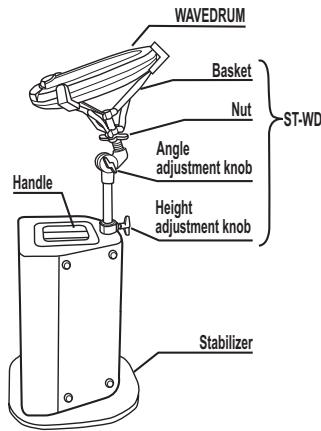
- Adjust the height and angle of the ST-WD basket, and firmly tighten each of the ST-WD's knobs.
Note: Use caution to make sure that the WAVEDRUM does not fall.
Note: Adjust the height to 1 meter (approximately 3.3 feet) or lower.
Using a speaker stand
You can mount the MMA130 on a JS-TS50-1 speaker stand made by the Ultimate Support, and use it at the optimal height for a monitor or PA.
Caution
Make sure that you fully understand the following information to ensure that you use this product correctly.
- Do not use any stand other than the JS-TS50-1 with the MMA130.
- Use the speaker stand at a height of 144~cm (approximately 4' 8'' ) or lower (see illustration). If you use the stand at any greater height, the system may tip over and cause injury or damage.
- Open the tripod legs at least 120~cm (approximately 3^ 11^ ) apart (see illustration). If the legs are any closer together, the system may tip over and cause injury or damage.
- Do not use the speaker stand in an unstable location or on a slope. If you use the stand on an unstable location, it may tip over and cause injury or damage.
- Carefully route the cables that are connected to the MMA130 to keep them out of the way. If someone trips over a cable, the system may tip over and cause injury or damage.
- Do not place anything on the MMA130 that is mounted on the speaker stand. The object may fall down, or the stand may tip over and cause injury or damage.
- Do not use the speaker stand with the ST-WD or anything else attached to the MMA130's ST-WD socket. The stand may tip over and cause injury or damage.
Setting up the stand and attaching the MMA130
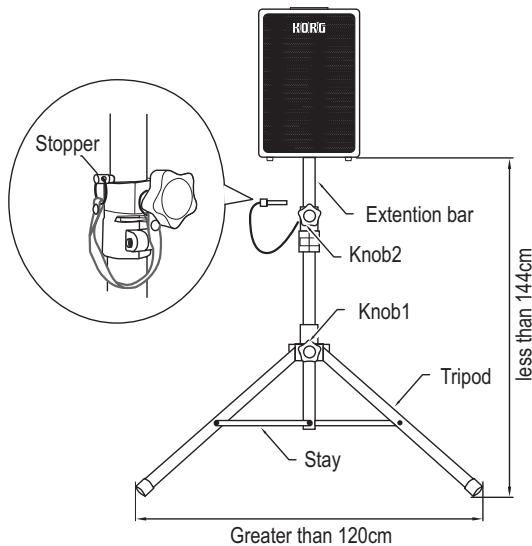
- Loosen knob 1 and open the tripod sufficiently. Verify that the legs of the tripod are 120cm (approximately 3'11'' ) or more apart.
- Firmly tighten knob 1.
- Loosen knob 2 and extend the extension bar.
- Insert the stopper into the hole of the extension bar.
Note: Be careful not to pinch your fingers.
Note: You must insert the stopper when using the stand.
- Lower the extension bar until it is stopped by the stopper.
-
Firmly tighten knob 2.
-
Insert the extension bar into the MMA130.
Note: Observe the following cautions when mounting the MMA130 on the speaker stand.
- You must have at least one other person help you when mounting the MMA130 on a stand.
- Be careful not to pinch your fingers.
Do not tilt the stand with the MMA130 mounted on it. - Never change the height of the stand while the MMA130 is mounted on it.
- Make sure that the height from the floor to the bottom of the MMA130 (see illustration) is 144~cm (approximately 4^8^ ) or less.
Specifications
| INPUT: | CH1, 2 2x MIC/LINE (XLR/TRS "balanced") Input source impedance: 10kΩ Nominal input level: -40dBu (MIC) / -15dBu (LINE) CH3, 4 2x LINE (1/4 phone jack "unbalanced") Input source impedance: 100kΩ Nominal input level: -15dBu AUX IN 2x RCA, stereo phone jack, 2x phone jack Input source impedance: 20kΩ Nominal input level: -15dBu |
| OUTPUT: | LINE OUT 1/4 phone jack "unbalanced" Output source impedance: 1kΩ Nominal output level: -15dBu DC9V OUT DC9V: 500mA, polarity: ◆-◎-◇ |
| Power amp output: | MAX setting: Maximum 30W RMS into 4 ohms ECO setting: Maximum 5W RMS into 4 ohms |
| Speaker: | 1x woofer (6.5 inch 4 ohm) 1x dome tweeter (1 inch 4 ohm) |
| Power supply: | Six or twelve alkaline C batteries or local AC voltage |
| Battery life: | Approximately 24 hours maximum (POWER MODE: ECO, using 12 batteries) |
| Power consumption: | 25W |
| Dimensions (W x D x H): | 320 x 285 x 485mm / 12.60" x 11.22" x 19.09", when horizontal: 485 x 345 x 336 mm / 19.09" x 13.58" x 13.23" stabilizer: 400 x 390 x 25 mm / 15.75" x 15.35" x 0.98" |
| HORIG 485 336 320 285 | |
| Weight: | 12.3kg / 27.12lbs., when using stabilizer: 13.7kg / 30.20lbs. |
| Included items: | Power cable, DC-DC cable (1.5m—approximately 6'), stabilizer |
| Option (sold separately): | ST-WD percussion stand, Ultimate Support JS-TS50-1 Speaker Stand |
- Specifications and appearance are subject to change without notice for improvement.
INFORMATIONS IMPORTANTES DE SECURITE
WARNING: TO REDUCE THE RISK OF FIRE OR ELECTRIC SHOCK DO NOT EXPOSE THIS PRODUCT TO RAIN OR MOISTURE.
CAUTION
RISK OF ELECTRIC SHOCK DO NOT OPEN

AVERTISSEMENT: RISQUE DE CHOC ÉLECTRIQUE—NE PAS OUVRIR.
注意
感電の恐れあ、�はトをあけるな
- Commande MASTER VOLUME
"Les jacks 1/4" TRS.
2. Prises INPUT CH3, CH4
WARNING: TO REDUCE THE RISK OF FIRE OR ELECTRIC SHOCK DO NOT EXPOSE THIS PRODUCT TO RAIN OR MOISTURE.

CAUTION
RISK OF ELECTRIC SHOCK DO NOT OPEN

AVERTISSEMENT: RISQUE DE CHOC ÉLECTRIQUE—NE PAS OUVRIR.
注意
感電の恐い、チビートを付けるな
This product has been manufactured according to strict specifications and voltage requirements that are applicable in the country in which it is intended that this product should be used. If you have purchased this product via the internet, through mail order, and/or via a telephone sale, you must verify that this product is intended to be used in the country in which you reside.
WARNING: Use of this product in any country other than that for which it is intended could be dangerous and could invalidate the manufacturer's or distributor's warranty. Please also retain your receipt as proof of purchase otherwise your product may be disqualified from the manufacturer's or distributor's warranty.
REMARQUE IMPORTANTE POUR LES CLIENTS
- Français
- IMPORTANT SAFETY INSTRUCTIONS
- CAUTION
- THE FCC REGULATION WARNING (for USA)
- Notice regarding disposal (EU only)
- Introduction
- Main Features
- Names and Functions
- Control panel
- ANTI-FEEDBACK knob, ON/OFF switch
- POWER MODE switch
- STANDBY switch
- Power indicator
- INPUT CH1, CH2 jacks
- INPUT CH3, CH4 jacks
- GROUND LIFT switch
- LINE OUT jack
- AUX IN (stereo) jacks
- DC9V OUT (DC9V power output connector)
- Supported Korg products
- AC power connector
- POWER switch
- Setting Up
- Turn on the power
- To turn off the power
- Connecting other equipment
- Installing batteries
- Replacing the batteries
- Attaching the stabilizer
- Using the MMA130 on its side
- Using a WAVEDRUM stand
- Attaching the ST-WD
- Using a speaker stand
- Setting up the stand and attaching the MMA130
- INFORMATIONS IMPORTANTES DE SECURITE
- WARNING: TO REDUCE THE RISK OF FIRE OR ELECTRIC SHOCK DO NOT EXPOSE THIS PRODUCT TO RAIN OR MOISTURE.
- Prises INPUT CH3, CH4
- AVERTISSEMENT: RISQUE DE CHOC ÉLECTRIQUE—NE PAS OUVRIR.
- 注意
- REMARQUE IMPORTANTE POUR LES CLIENTS
Brand : KORG
Model : MMA130
Category : Metronome