
KM202 - Musical instrument KORG - Free user manual and instructions
Find the device manual for free KM202 KORG in PDF.



| Product Type | Dynamic DJ Mixer |
| Brand | KORG |
| Model | KM202 |
| Power Supply | Mains power |
| Frequency Response | 20 Hz - 20 kHz ± 1.0 dB (LINE) |
| Signal-to-Noise Ratio | 90 dB (IHF-A, typ.) |
| Load Impedance | Greater than 10 kΩ |
| Inputs | 2x LINE (RCA), 1x PHONO (RCA), 1x MIC (TRS 6.35 mm jack) |
| Outputs | MASTER OUT (RCA), BOOTH OUT (RCA), Headphones (Stereo 6.35 mm jack) |
| Main Functions | 2-channel mixing, 3-band equalizer (HI/MID/LOW), crossfader, monitoring control (CUE/MASTER), touch KAOSS PAD effect with 100 programs, BPM Tap, program memory |
| Equalizer | Types KM-Q, ISO, EQ BOOST, EQ ATTACK, EQ TRAP, EQ PROGRESSIVE |
| KAOSS Touchpad | X/Y pad for real-time control, Hold function |
| Maintenance and Cleaning | Clean with a soft, dry cloth. Do not use liquid or abrasive products. |
| Safety | Do not expose to moisture, unplug during storms or extended non-use, use a grounded outlet, avoid heat sources |
| Repairability | All repairs should be entrusted to qualified service personnel |
| Included Accessories | Power cord, user manual |
| Manual | Available as free PDF on notice-facile.com |
Frequently Asked Questions - KM202 KORG
User questions about KM202 KORG
0 question about this device. Answer the ones you know or ask your own.
Ask a new question about this device
Download the instructions for your Musical instrument in PDF format for free! Find your manual KM202 - KORG and take your electronic device back in hand. On this page are published all the documents necessary for the use of your device. KM202 by KORG.
USER MANUAL KM202 KORG
IMPORTANT SAFETY INSTRUCTIONS
- Read these instructions.
- Keep these instructions.
Heed all warnings. - Follow all instructions.
- Do not use this apparatus near water.
- Mains powered apparatus shall not be exposed to dripping or splashing and that no objects filled with liquids, such as vases, shall be placed on the apparatus.
- Clean only with dry cloth.
- Do not block any ventilation openings. Install in accordance with the manufacturer's instructions.
- Do not install near any heat sources such as radiators, heat registers, stoves, or other apparatus (including amplifiers) that produce heat.
- Do not defeat the safety purpose of the polarized or grounding-type plug. A polarized plug has two blades with one wider than the other. A grounding type plug has two blades and a third grounding prong. The wide blade or the third prong are provided for your safety. If the provided plug does not fit into your outlet, consult an electrician for replacement of the obsolete outlet. (for USA and Canada)
- Protect the power cord from being walked on or pinched particularly at plugs, convenience receptacles, and the point where they exit from the apparatus.
- Only use attachments/accessories specified by the manufacturer.
- Unplug this apparatus during lightning storms or when unused for long periods of time.
- Turning off the power switch does not completely isolate this product from the power line so remove the plug from the socket if not using it for extended periods of time.
- Install this product near the wall socket and keep the power plug easily accessible.
- WARNING—This apparatus shall be connected to a mains socket outlet with a protective earthing connection.
- Refer all servicing to qualified service personnel. Servicing is required when the apparatus has been damaged in any way, such as power-supply cord or plug is damaged, liquid has been spilled or objects have fallen into the apparatus, the apparatus has been exposed to rain or moisture, does not operate normally, or has been dropped.
- Do not install this equipment on the far position from wall outlet and/or convenience receptacle.
- Do not install this equipment in a confined space such as a box for the conveyance or similar unit.
- Excessive sound pressure from earphones and headphones can cause hearing loss.
- Use only with the cart, stand, tripod, bracket, or table specified by the manufacturer, or sold with the apparatus. When a cart is used, use caution when moving the cart/apparatus combination to avoid injury from tip-over.
WARNING:
TO REDUCE THE RISK OF FIRE OR ELECTRIC SHOCK DO NOT EXPOSE THIS PRODUCT TO RAIN OR MOISTURE.
CAUTION
RISK OF ELECTRIC SHOCK DO NOT OPEN

AVERTISSEMENT:
RISQUE DE CHOC ÉLECTRIQUE—NE PAS OUVRIR.
注意
感電の恐い、チビートをあけるな
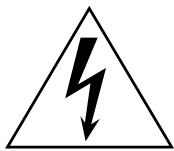
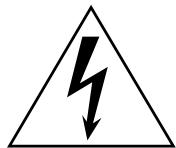
The lightning flash with arrowhead symbol within an equilateral triangle, is intended to alert the user to the presence of uninsulated "dangerous voltage" within the product's enclosure that may be of sufficient magnitude to constitute a risk of electric shock to persons.
The exclamation point within an equilateral triangle is intended to alert the user to the presence of important operating and maintenance (servicing) instructions in the literature accompanying the product.
THE FCC REGULATION WARNING (for USA)
This equipment has been tested and found to comply with the limits for a Class B digital device, pursuant to Part 15 of the FCC Rules. These limits are designed to provide reasonable protection against harmful interference in a residential installation. This equipment generates, uses, and can radiate radio frequency energy and, if not installed and used in accordance with the instructions, may cause harmful interference to radio communications. However, there is no guarantee that interference will not occur in a particular installation. If this equipment does cause harmful interference to radio or television reception, which can be determined by turning the equipment off and on, the user is encouraged to try to correct the interference by one or more of the following measures:
- Reorient or relocate the receiving antenna.
- Increase the separation between the equipment and receiver.
- Connect the equipment into an outlet on a circuit different from that to which the receiver is connected.
- Consult the dealer or an experienced radio/TV technician for help.
Unauthorized changes or modification to this system can void the user's authority to operate this equipment.

Notice regarding disposal (for EU)
If this "crossed-out wheeled bin" symbol is shown on the product or in the operating manual, you must dispose of the product in an appropriate way. Do not dispose of this product along with your household trash. By disposing of this product correctly, you can avoid
environmental harm or health risk. The correct method of disposal will depend on your locality, so please contact the appropriate local authorities for details.
Table of Contents
1. Introduction 4
Parts and their functions 4
2. Getting ready 7
Connections 7
Turning the power on 8
Turning the power off 8
3. Using the mixer 9
Basic operation 9
Monitoring 9
Equalizer 10
4. Using the KAOSS PAD 11
Applying the KAOSS PAD effect to the channel 11
Operating the touch pad 11
Selecting an effect program 11
Using the PROGRAM MEMORY buttons 11
Setting the BPM 12
Restoring the factory settings 12
5. Appendix 13
Troubleshooting 13
Adjusting the crossfader 13
Specifications 14
1. Introduction
Thank you for purchasing the Korg KM-402/KM-202 DYNAMIC DJ MIXER.
To ensure full enjoyment of your new purchase, please read this owner's manual carefully and use the product as directed.
Parts and their functions
Top panel
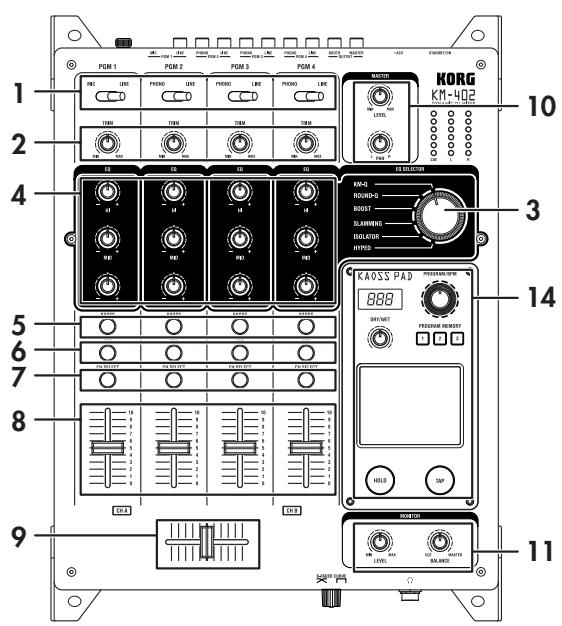
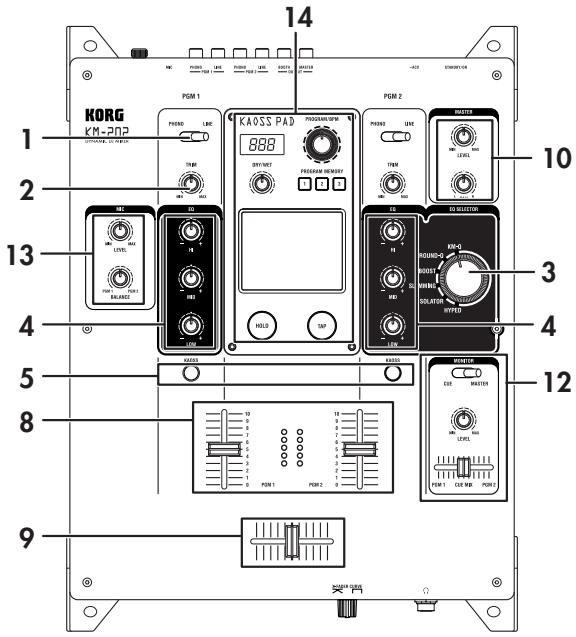
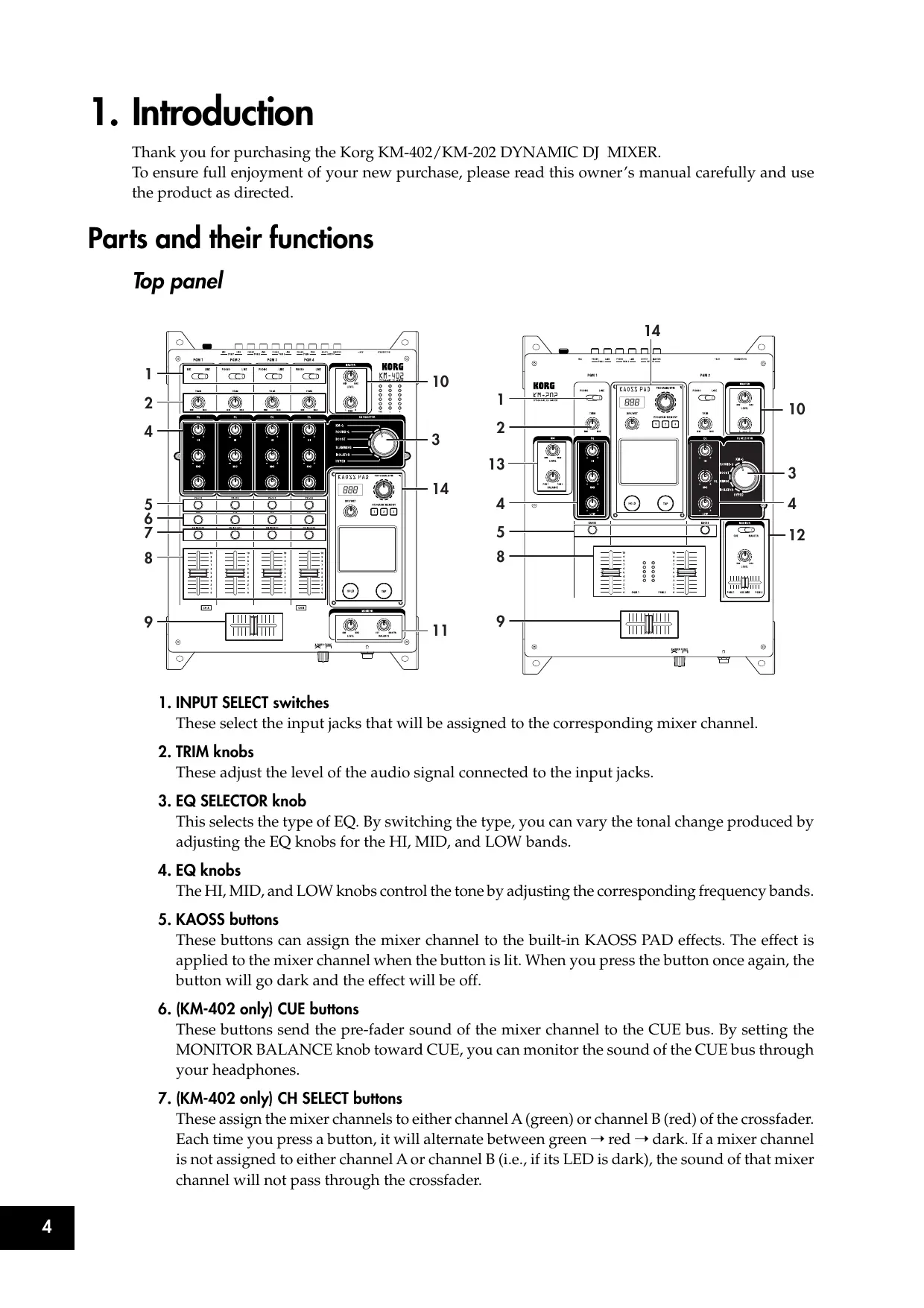
1. INPUT SELECT switches
These select the input jacks that will be assigned to the corresponding mixer channel.
2. TRIM knobs
These adjust the level of the audio signal connected to the input jacks.
3. EQ SELECTOR knob
This selects the type of EQ. By switching the type, you can vary the tonal change produced by adjusting the EQ knobs for the HI, MID, and LOW bands.
4. EQ knobs
The HI, MID, and LOW knobs control the tone by adjusting the corresponding frequency bands.
5. KAOSS buttons
These buttons can assign the mixer channel to the built-in KAOSS PAD effects. The effect is applied to the mixer channel when the button is lit. When you press the button once again, the button will go dark and the effect will be off.
6. (KM-402 only) CUE buttons
These buttons send the pre-fader sound of the mixer channel to the CUE bus. By setting the MONITOR BALANCE knob toward CUE, you can monitor the sound of the CUE bus through your headphones.
7. (KM-402 only) CH SELECT buttons
These assign the mixer channels to either channel A (green) or channel B (red) of the crossfader. Each time you press a button, it will alternate between green red dark. If a mixer channel is not assigned to either channel A or channel B (i.e., if its LED is dark), the sound of that mixer channel will not pass through the crossfader.
8. Channel faders
These adjust the level of each mixer channel. Use them to adjust the volume balance between channels.
9.Crossfader
You can use the crossfader to switch between two program sources, or to crossfade between them for DJ-style performances.
(For the KM-402) This will crossfade between the audio signals assigned to channel A and channel B by the CH SELECT buttons.
(For the KM-202) This will crossfade between PGM1 and PGM2.
10. MASTER LEVEL knob, MASTER PAN knob
These adjust the output level from the MASTER OUT jacks. Use the MASTER PAN knob to adjust the L/R balance of the sound.
11. (KM-402 only) MONITOR BALANCE knob, MONITOR LEVEL knob
MONITOR BALANCE knob: If you turn this toward CUE, your headphones will monitor the sound sent from each channel to the CUE bus. If you turn this toward MASTER, your headphones will monitor the sound sent from the MASTER OUT jacks.
MONITOR LEVEL knob: This adjusts the volume output from the headphone jack.
12. (KM-202 only) CUE/MASTER select switch, CUE MIX fader, MONITOR LEVEL knob
CUE/MASTER select switch: If this is in the CUE position, your headphones will monitor the sound of the CUE bus. If this is in the MASTER position, your headphones will monitor the same sound as the MASTER OUT jacks.
CUE MIX fader: This adjusts the volume balance of the CUE bus between PGM1 and PGM2.
MONITOR LEVEL knob: This adjusts the volume that is output from the headphone jack.
13. (KM-202 only) MIC LEVEL knob, MIC BALANCE knob
MIC LEVEL knob: This adjusts the input level from the MIC jack.
MIC BALANCE knob: This adjusts the balance of the MIC jack signal between PGM1 and PGM2.
14. KAOSS PAD section
15. Display
This display shows the KAOSS PAD's effect program number, and the BPM.
16. DRY/WET knob
This adjusts the depth of the effect.
17.PROGRAM/BPM knob
Use this to select an effect program for the KAOSS PAD, or to specify the BPM.
18.PROGRAM MEMORY buttons
You can store an effect program number in each of the three Program Memory buttons, and then press one of the buttons to instantly recall the stored program.
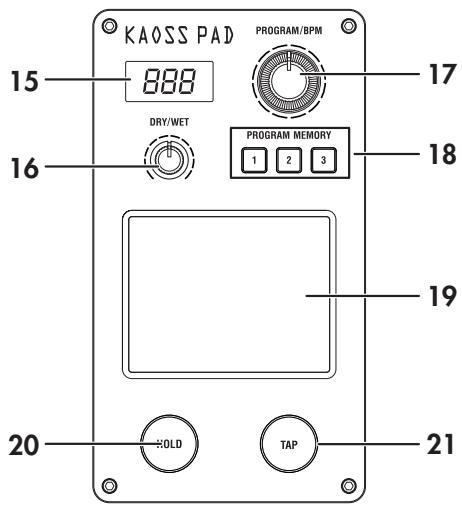
19. TOUCH PAD
This X/Y KAOSS pad can control two different parameters at once; one using the X-axis, and one using the Y-axis—for inspired realtime control.
20. PAD HOLD button
The Hold feature memorizes the current position of your finger on the pad, so that you can take your finger from the pad, and the effect will remain unchanged. Use this button to switch the Hold feature on and off.
21. TAP button
You can specify the BPM value by pressing this button at the desired interval.
Front panel
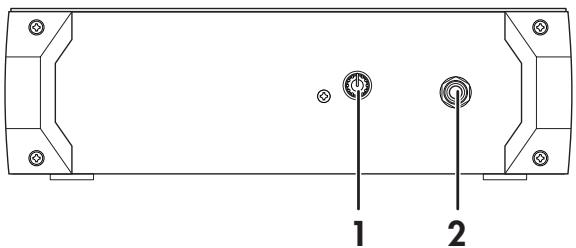
1. X-FADER CURVE knob
This specifies the curve of the crossfader. Turn this knob to the right produces a "switch" effect, turn the knob to the left produces a smoother transition. Please refer to the appendix for directions on how to change the crossfader settings.
2. Headphone jack
Rear panel
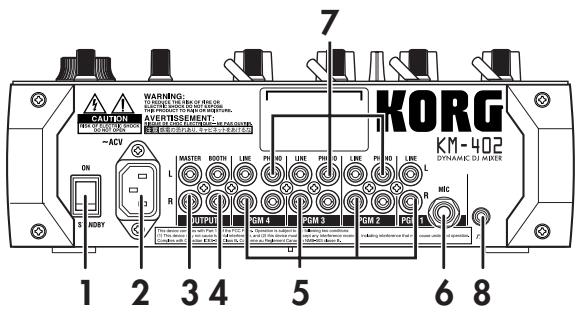
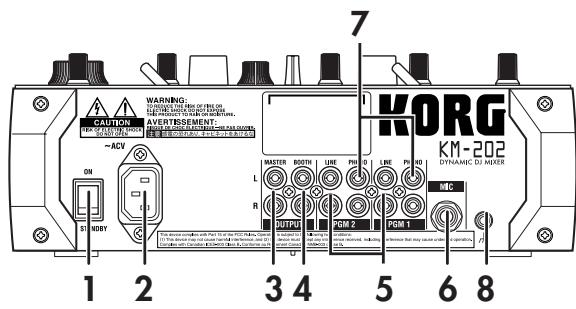
1. Power switch
Turns the power on/off.
2. Power inlet
Connect the included power cable to this connector.
3. MASTER OUT jacks
These output the master bus' audio signal. They are RCA-type output jacks.
4. BOOTH OUT jacks
These output the same audio signal as the MASTER OUT jacks. However, their volume is not affected by the MASTER LEVEL knob. They are RCA-type output jacks.
5. INPUT (LINE) jacks
You can connect line level equipment to these jacks. They are RCA-type input jacks.
6. MIC jack
You can connect a mic to this jack. This is a 1/4'' phone-type unbalanced input jack.
7. INPUT (PHONO) jacks
You can connect turntables to these jacks. They are RCA-type input jacks.
8. GND terminal
This is a grounding terminal for connecting your turntables. If you use the PHONO jacks, you must connect the ground wire(s) of your turntable(s) to this GND terminal.
2. Getting ready
Before you connect your equipment, you must turn off the power switches and disconnect the power cables from the outlet.
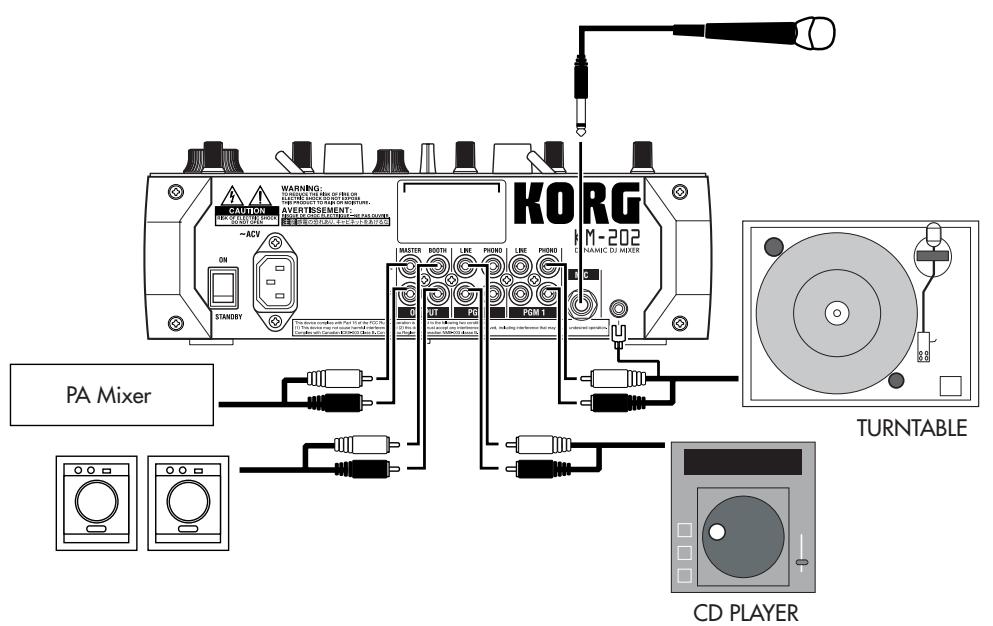
Connections
Use the jacks that are appropriate for the equipment you're connecting.
KM-402
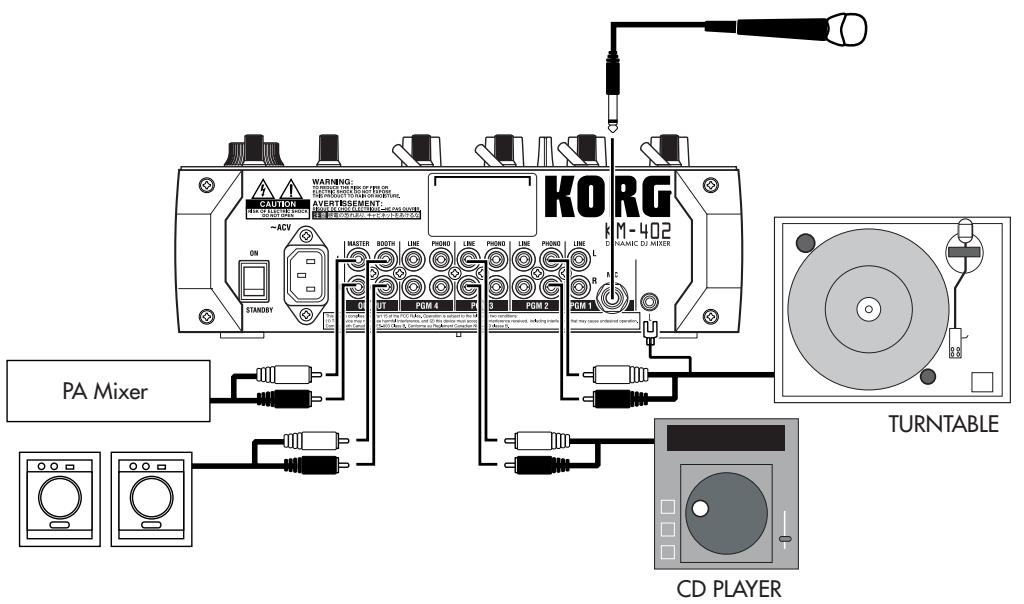
KM-202
Turning the power on
When powering-on this Mixer, you must observe the following procedure.
- Connect the power cable.
Connect the included power cable to the power inlet. - Power-on the external devices connected to the mixer's input jacks.
- Turn down all of the Mixer's channel faders and the MASTER VOLUME knob.
- Turn on the power switch located on the rear panel of the mixer.
Power-on the equipment connected to the MASTER OUT jacks, such as your monitor amp.
Turning the power off
- Turn down all of the Mixer's channel faders and the MASTER VOLUME knob.
- Turn off the power of your monitor amp or other equipment connected to the MASTER OUT jacks.
- Turn off the power switch located on the rear panel of the Mixer.
3. Using the mixer
Basic operation
Selecting the inputs
Use the top panel INPUT SELECT switch to select the desired inputs.
Adjusting the input levels
Use the TRIM knobs to adjust the input level of each mixer channel.
Adjust the TRIM knob so that the level indicator lights yellow with the channel fader at the maximum position, and when the level from the source is being input at its maximum level.
For the KM-202
Use the MIC LEVEL knob to adjust the input level of the mic connected to the MIC jack. Use the MIC BALANCE knob to adjust the level balance that is sent to mixer channels PGM1 and PGM2.
Mixing the sound
Use the channel faders to adjust the volume level of each mixer channel.
Using the crossfader
The audio mixed by the crossfader is output to the master bus or the FX bus.
Use the front panel X-FADER CURVE knob to adjust the curve (response) of the crossfader.
For the KM-402
Use the CH SELECT button to assign the corresponding mixer channel to one of the two crossfader channels (A or B).
Each time you press a CH SELECT button, it will alternate between channel A (lit green) channel B (lit red), and unselected (dark).

lit green

lit red
For the KM-202
The crossfader will crossfade between PGM1 and PGM2.
Adjusting the master level
Use the MASTER LEVEL knob to adjust the overall volume level being sent from the MASTER OUT jacks.
Monitoring
Connect your headphones to the headphone so that you can monitor the audio inputs or the sound you're mixing.
CUE
This is a function that lets you monitor (hear through headphones) the sound at a point before the channel faders, separately from the sound that is output from the MASTER OUT jacks, giving you a way to check the sound or "cue up" material while you're performing. The sound of the CUE bus can be monitored through headphones. This means that with the faders lowered, you can use headphones to check the audio input and EQ settings, and then when you're satisfied, raise the channel fader so that the desired sound will be sent from the master outputs.
Monitoring via CUE
For the KM-402
- Press the CUE button of the mixer channel you want to monitor.
- Use the MONITOR BALANCE knob to adjust the volume balance between the master output sound and the CUE bus sound.
Use the MONITOR LEVEL knob to adjust the overall volume.
For the KM-202
- Use the CUE/MONITOR select switch to select CUE.
- Use the CUE MIX fader to adjust the volume balance between PGM1 and PGM2. Use the MONITOR LEVEL knob to adjust the overall volume.
Equalizer
Using the equalizer to adjust the sound
You can use the equalizer (EQ) to cut or boost the low, mid or high frequency range as a creative sound-shaping tool.
- Use the EQ SELECT knob to select the desired equalizer type.
- Control the EQ that you selected as the EQ type. Use the HI/MID/LO knobs of each channel to modify the tone as desired.
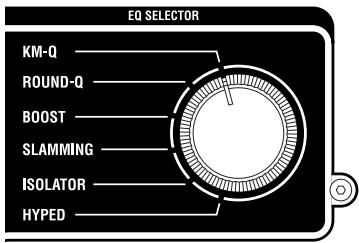
EQ type list
KM-Q
This is an equalizer that has been improved on the basis of opinions from numerous well-known artists who are devoted users of the first-generation KAoss mixer.
HI: -25dB-+15dB
MID: -25dB-+15dB
LO: -25dB-+15dB
ROUND-Q
This is an all-around EQ that is a good choice for all styles of music.
HI: -28dB-+12dB
MID: -28dB-+12dB
LO: -28dB-+12dB
BOOST
This is effective when used as a booster. The mid- and high-frequency ranges of change are broad, letting you create powerful sounds.
HI: -20dB-+18dB
MID: -12dB-+12dB
LO: -20dB-+18dB
SLAMMING
In order to aggressively modify the mid-range sound, the HI is set to a frequency range that is lower than normal and the MID to a range that is higher than normal. LO uses a special curve that changes gently in the "+" direction and steeply in the "-" direction, letting you apply high expressive equalization.
Hl: -30dB-+6dB
MID: -30dB+6dB
LO: -60dB-+6dB
ISOLATOR
This uses a trapezoidal curve, and applies equally to the sound within each frequency band. It can be used as an isolator that completely cuts the sound, and is able to instantly cut the sound of a specific part.
Hl: - dB - + 9dB
MID: - dB - + 9dB
LO: - dB + + 9dB
HYPED
This EQ has a gradual curve. It is useful for modifying the atmosphere of the entire song, as well as for tonal adjustments.
Hl: - dB - + 9dB
MID: - dB - + 9dB
LO: - dB - + 9dB
4. Using the KAOSS PAD
Applying the KAOSS PAD effect to the channel
Press the KAOSS button of the mixer channel to make it light, the KAOSS PAD effect will be applied to the sound from that mixer channel.
SOLO effect
If you press and hold the KAoss button (for approximately two seconds), the KAoss button you pressed will blink, and the effect will be applied only to that Channel (KM-402) or PGM (KM-202).
Operating the touch pad
Control the effect by using your finger to rub or tap the touch pad.
Hold
If you press the HOLD button the HOLD indicator will light; in this state, you can take your finger off the touch pad, and the sound of the effect immediately prior to that moment will be maintained.
Selecting an effect program
Turn the PROGRAM/VALUE knob to select an effect program 00-99. Use the DRY/WET knob to adjust the depth of the effect.
Turning FX RELEASE on/off
- While holding down the PROGRAM MEMORY 2 button, press the TAP key.
- Use the PROGRAM/BPM knob to select "r.On" (FX RELEASE on) or "r.Of" (FX RELEASE off).
- Once again, hold down the PROGRAM MEMORY 2 button and press the TAP key; you will return to the program selection state.
Alternatively, you will return to the program selection state if you don't perform any setting operation for three seconds.
What is FX RELEASE?
This produces a delay effect synchronized to the current BPM /tempo, and will begin the instant you release your hand from the touch pad (i.e., the instant you turn off the effect), and then decay gradually.
Using the PROGRAM MEMORY buttons
Each of the PROGRAM MEMORY buttons can memorize an effect program, the HOLD button's on/off status, and the position of the touch pad when HOLD is active.
By pressing a PROGRAM MEMORY button, you can instantly recall the memorized state.
To store the current settings to a PROGRAM MEMORY button
- Before you continue, select the program that you want to memorize.
If you want to memorize the Hold status, press the HOLD button to turn the Hold function on.
The position at which you last touched the touch panel will be memorized.
- While holding down the PROGRAM MEMORY button in which you want to memorize the current state, press the HOLD button; the current state will be memorized in the PROGRAM MEMORY button you're pressing.
Setting the BPM
- When you press the TAP button, the currently-specified BPM value is shown in the display.
- If you press the TAP button several times in rhythm with the song tempo, the corresponding BPM value will be detected, and the appropriate BPM value will be specified.
- When the BPM value is displayed, you can turn the PROGRAM/BPM knob to modify the BPM value.
- If you hold down the TAP button, you will switch from the BPM setting back to the program selection.
Alternatively, you will return to the program selection state if you don't perform any setting operation for five seconds.
Restoring the factory settings
To restore the factory settings, set the EQ SELECTOR knob to the "KM-Q" position, and then turn on the power while holding down the TAP button and the PROGRAM MEMORY 1 button. All settings of the KAOSS PAD will be restored to their factory-set state.
5. Appendix
Troubleshooting
Power does not turn on
- Is the power cable connected to a functioning electrical outlet?
- Is the rear panel power switch turned on?
No sound
- Is the KM-402/KM-202 powered-on? Are the connected devices powered-on?
- Are the channel faders or the MASTER LEVEL knob turned down?
- Is the volume level of the channel turned down?
- Is the TRIM knob raised to an appropriate level?
- After connecting your audio source to the input jacks, did you select it for the corresponding mixer channel?
Set the INPUT SELECT switch appropriately for each mixer channel.
- Make sure that audio is being input.
Use the level meter to verify that audio is being received into each mixer channel.
Too much noise or distortion
- The sound will distort if the TRIM knob is set too high, and there will be more noise if the TRIM knob is set too low.
To obtain the ideal setting, set the TRIM knob as high as possible without allowing the level meter to light red at the maximum level. If the indicator lights red, the signal will clip, distorting the sound.
- Could you be using the KAOSS PAD function?
Some of the KAOSS PAD effects intentionally add distortion or noise. Check whether noise or distortion are still present even when you're not using an effect.
- If the sound is distorting at the EQ, make the following adjustment.
Adjust the gain value of the EQ.
Adjusting the crossfader
You can adjust the left and right transition points of the crossfader.
The Left setting determines where on the crossfader's travel Channel B (KM-402) or PGM 2 (KM-202) will completely cease to sound. Likewise, the Right setting determines where on the crossfader's travel CH A (KM-402) or PGM A (KM-202) will cease to sound.
Perform this adjustment if the sound does not transition correctly at the edge of the fader, or if you want to shorten the fader stroke. Remember, the X-fader curve knob on the front panel will affect how you perceive these settings.
-
Turn off the power.
-
Set the EQ SELECTOR knob to the "KM-Q" position, and then turn on the power while holding down the PROGRAM MEMORY 3 button and the TAP button.
The display will indicate "AdJ", indicating that you're in Crossfader Adjust mode.
- Move the crossfader to the point at which you want it to begin taking effect.
When you move the fader to the left side, the display will indicate "L". When you move the fader to the right side, the display will indicate "r". Each "**" can be adjusted in a range of 00-50.
Note: In some cases, the display may indicate "01" or "02" when the fader is all the way to one side.
- At the point that you want to assign as the left and right edge, press the TAP button.
The decimal point for the "L." or "r." in the display will light, and the setting will be assigned at that point. Repeat this step for the opposite side of the crossfader. (You can't assign a point that is shown as "--".)
- When you've specified the left and right points, hold down the HOLD button and press the PROGRAM MEMORY 3 button.
The display will blink "SET", and the settings will be stored. When the settings have been stored, the display will indicate "End".
- To finish the setting, turn off the power, and then turn the power on again in the normal way. Note: If you initialize the KAOSS PAD function to the factory-set state, the crossfader adjustment setting will also be initialized.
Specifications
Power supply: AC Local Voltage
Power consumption: KM-402: 23W
KM-202: 20W (120V), 17W (220-230V)
Dimensions: 288mm (W) 384mm (D) 107mm (H) / 11.34" (W) 15.12" (D) 4.21" (H)
Weight: 5.0kg / 11.02lbs
Frequency response: 20Hz - 20kHz± 1.0 dB (Typ.)(LINE)
S/N: 90 dB @IHF-A (Typ.)(LINE)
INPUT (LINE)
Connectors: RCA jacks L/R
Input impedance: 10k
Nominal level: 0 dBu
PHONO
Connectors: RCA jacks
Input impedance: 40k
PHONO RIAA compliant
MIC INPUT
Connectors: 1 / 4'' mono phone jack
Input impedance: 50k
Nominal level: -50 dBu
MASTER OUTPUT L/R
Connector: RCA jacks L/R
Nominal level: 0 dBu
Load impedance: greater than 10k
BOOTH OUTPUT L/R
Connector: RCA jacks L/R
Nominal level: 0 dBu
Load impedance: greater than 10k
PHONES OUTPUT
Connector: 1/4" stereo phone jack
Output impedance: 32Ω
Maximum level: 80mW + 80mW @32Ω
Included items
Power cable
Owner's manual
- Appearance and specifications of this product are subject to change without notice.
INFORMATIONS IMPORTANTES DE SECURITE
WARNING: TO REDUCE THE RISK OF FIRE OR ELECTRIC SHOCK DO NOT EXPOSE THIS PRODUCT TO RAIN OR MOISTURE.
CAUTION
RISK OF ELECTRIC SHOCK DO NOT OPEN

AVERTISSEMENT: RISQUE DE CHOC ÉLECTRIQUE—NE PAS OUVRIB.
注意
感電の恐い、チ�トをあけるな
6. (KM-402subsection) Touches CUE
13. (KM-202subsection) Bouton MIC LEVEL, bouton MIC BALANCE
Consummation: KM-402: 23W
KM-202: 20W (120V), 17W (220~230V)
Dimensions: 288mm (L) 384mm (P) 107mm (H)
Poids: 5,0kg
Prises: Prises RCA L/R
Impedance d'entree: 10k
Niveau nominal: 0 dBu
PHONO
Prises: Prises RCA
Impedance d'entree: 40k
Conforme PHONO RIAA
MIC INPUT
Prise: Jack 6,35 mono
Impedance d'entree: 50k
Niveau nominal: -50 dBu
MASTER OUTPUT L/R
Prises: Prises RCA L/R
Niveau nominal: 0 dBu
Prises: Prises RCA L/R
Niveau nominal: 0 dBu
TO REDUCE THE RISK OF FIRE OR ELECTRIC SHOCK DO NOT EXPOSE THIS PRODUCT TO RAIN OR MOISTURE.

CAUTION
RISK OF ELECTRIC SHOCK DO NOT OPEN

AVERTISSEMENT:
RISQUE DE CHOC ÉLECTRIQUE—NE PAS OUVRIR.
注意
感電の恐い、マッチをあけるな
KM-202: 20 W (120 V), 17 W (220–230 V)
This product has been manufactured according to strict specifications and voltage requirements that are applicable in the country in which it is intended that this product should be used. If you have purchased this product via the internet, through mail order, and/or via a telephone sale, you must verify that this product is intended to be used in the country in which you reside.
WARNING: Use of this product in any country other than that for which it is intended could be dangerous and could invalidate the manufacturer's or distributor's warranty. Please also retain your receipt as proof of purchase otherwise your product may be disqualified from the manufacturer's or distributor's warranty.
REMARQUE IMPORTANTE POUR LES CLIENTS
- IMPORTANT SAFETY INSTRUCTIONS
- WARNING:
- CAUTION
- AVERTISSEMENT:
- 注意
- THE FCC REGULATION WARNING (for USA)
- Notice regarding disposal (for EU)
- Table of Contents
- Introduction 4
- Getting ready 7
- Using the mixer 9
- Using the KAOSS PAD 11
- Appendix 13
- Introduction
- Parts and their functions
- Top panel
- INPUT SELECT switches
- TRIM knobs
- EQ SELECTOR knob
- EQ knobs
- KAOSS buttons
- (KM-402 only) CUE buttons
- (KM-402 only) CH SELECT buttons
- Channel faders
- 9.Crossfader
- MASTER LEVEL knob, MASTER PAN knob
- (KM-402 only) MONITOR BALANCE knob, MONITOR LEVEL knob
- (KM-202 only) CUE/MASTER select switch, CUE MIX fader, MONITOR LEVEL knob
- (KM-202 only) MIC LEVEL knob, MIC BALANCE knob
- KAOSS PAD section
- Display
- DRY/WET knob
- 17.PROGRAM/BPM knob
- 18.PROGRAM MEMORY buttons
- TOUCH PAD
- PAD HOLD button
- TAP button
- Front panel
- X-FADER CURVE knob
- Headphone jack
- Rear panel
- Power switch
- Power inlet
- MASTER OUT jacks
- BOOTH OUT jacks
- INPUT (LINE) jacks
- MIC jack
- INPUT (PHONO) jacks
- GND terminal
- Getting ready
- Connections
- Turning the power on
- Turning the power off
- Using the mixer
- Basic operation
- Selecting the inputs
- Adjusting the input levels
- For the KM-202
- Mixing the sound
- Using the crossfader
- For the KM-402
- Adjusting the master level
- Monitoring
- CUE
- Monitoring via CUE
- Equalizer
- Using the equalizer to adjust the sound
- EQ type list
- KM-Q
- ROUND-Q
- BOOST
- SLAMMING
- ISOLATOR
- HYPED
- Using the KAOSS PAD
- Applying the KAOSS PAD effect to the channel
- SOLO effect
- Operating the touch pad
- Hold
- Selecting an effect program
- Turning FX RELEASE on/off
- What is FX RELEASE?
- Using the PROGRAM MEMORY buttons
- To store the current settings to a PROGRAM MEMORY button
- Setting the BPM
- Restoring the factory settings
- Appendix
- Troubleshooting
- Power does not turn on
- No sound
- Too much noise or distortion
- Adjusting the crossfader
- Specifications
- INPUT (LINE)
- PHONO
- MIC INPUT
- MASTER OUTPUT L/R
- BOOTH OUTPUT L/R
- PHONES OUTPUT
- Included items
- INFORMATIONS IMPORTANTES DE SECURITE
- WARNING: TO REDUCE THE RISK OF FIRE OR ELECTRIC SHOCK DO NOT EXPOSE THIS PRODUCT TO RAIN OR MOISTURE.
- AVERTISSEMENT: RISQUE DE CHOC ÉLECTRIQUE—NE PAS OUVRIB.
- (KM-402subsection) Touches CUE
- (KM-202subsection) Bouton MIC LEVEL, bouton MIC BALANCE
- REMARQUE IMPORTANTE POUR LES CLIENTS
Brand : KORG
Model : KM202
Category : Musical instrument