
AX3A - Effect pedal KORG - Free user manual and instructions
Find the device manual for free AX3A KORG in PDF.



| Product type | Multi-effects pedal |
| Brand | KORG |
| Model | AX3A |
| Dimensions (W x D x H) | 178 mm x 142 mm x 43 mm |
| Weight | 340 g |
| Power supply | 4 AA alkaline batteries (8 hours continuous use) or DC 9V AC adapter (optional) |
| Number of programs | 80 (40 user + 40 presets) |
| Effect types | Pre FX, Mic & Body, Tone, Modulation, Delay/Reverb |
| Modeling technology | REMS (Resonant Structure and Electronic circuit Modeling System) |
| A/D and D/A conversion | 24-bit |
| Sampling frequency | 31.25 kHz |
| Built-in chromatic tuner | Range C1-E6, calibration A=438-445 Hz |
| Input | 1/4" mono phone jack (guitar) |
| Output | 1/4" stereo phone jack (headphones) |
| Expression pedal jack | For Korg EXP-2 or XVP-10 |
| Special functions | Bypass, Mute, anti-feedback Notch filter |
| Included accessories | Owner's manual |
| Maintenance and cleaning | Wipe with a clean, dry cloth; do not use liquid cleaners |
| Safety | Avoid exposure to humidity, strong vibrations, extreme temperatures |
| Spare parts and repairability | Optional AC adapter (KA181); contact your dealer for any repairs |
| General information | Compliant with European directives (CE mark) |
Frequently Asked Questions - AX3A KORG
User questions about AX3A KORG
0 question about this device. Answer the ones you know or ask your own.
Ask a new question about this device
Download the instructions for your Effect pedal in PDF format for free! Find your manual AX3A - KORG and take your electronic device back in hand. On this page are published all the documents necessary for the use of your device. AX3A by KORG.
USER MANUAL AX3A KORG
Front and rear panel 5
Front panel 5
Rear panel 6
Setup 6
Installing batteries 6
Basic connections 7
Example of a connection to a guitar amp 7
Example of a connection to a mixer or recorder 7
Program mode 7
Selecting a program 8
Creating your sound (Edit mode) 8
Signal flow 8
Selecting effects and adjusting the main parameters 8
Selecting and adjusting sub-parameters and [TONE] parameters 9
Saving a program (Write mode) 9
Checking the values saved in a program (Original Value) .. 10
Bypass and Mute 10
Bypassing the AX3A 10
Muting the AX3A 10
Tuner 10
Tuning procedure 10
Adjusting the tuning calibration 11
Restoring the factory preset programs 11
Troubleshooting 11
Specifications 12
Precautions
Location
Using the unit in the following locations can result in a malfunction.
- In direct sunlight
- Locations of extreme temperature or humidity
- Excessively dusty or dirty locations
- Locations of excessive vibration
- Close to magnetic fields
Power supply
Please connect the designated AC adapter to an AC outlet of the correct voltage. Do not connect it to an AC outlet of voltage other than that for which your unit is intended.
Interference with other electrical devices
Radios and televisions placed nearby may experience reception interference.
Operate this unit at a suitable distance from radios and televisions.
Handling
To avoid breakage, do not apply excessive force to the switches or controls.
Care
If the exterior becomes dirty, wipe it with a clean, dry cloth. Do not use liquid cleaners such as benzene or thinner, or cleaning compounds or flammable polishes.
Keep this manual
After reading this manual, please keep it for later reference.
Keeping foreign matter out of your equipment
Never set any container with liquid in it near this equipment. If liquid gets into the equipment, it could cause a breakdown, fire, or electrical shock.
Be careful not to let metal objects get into the equipment. If something does slip into the equipment, unplug the AC adapter from the wall outlet. Then contact your nearest Korg dealer or the store where the equipment was purchased.
THE FCC REGULATION WARNING (for U.S.A.)
This equipment has been tested and found to comply with the limits for a Class B digital device, pursuant to Part 15 of the FCC Rules. These limits are designed to provide reasonable protection against harmful interference in a residential installation. This equipment generates, uses, and can radiate radio frequency energy and, if not installed and used in accordance with the instruc
tions, may cause harmful interference to radio communications. However, there is no guarantee that interference will not occur in a particular installation. If this equipment does cause harmful interference to radio or television reception, which can be determined by turning the equipment off and on, the user is encouraged to try to correct the interference by one or more of the following measures:
- Reorient or relocate the receiving antenna.
- Increase the separation between the equipment and receiver.
- Connect the equipment into an outlet on a circuit different from that to which the receiver is connected.
- Consult the dealer or an experienced radio/TV technician for help.
Unauthorized changes or modification to this system can void the user's authority to operate this equipment.
CE mark for European Harmonized Standards
CE mark which is attached to our company's products of AC mains operated apparatus until December 31, 1996 means it conforms to EMC Directive (89/336/EEC) and CE mark Directive (93/68/EEC).
And, CE mark which is attached after January 1, 1997 means it conforms to EMC Directive (89/336/EEC), CE mark Directive (93/68/EEC) and Low Voltage Directive (73/23/EEC).
Also, CE mark which is attached to our company's products of Battery operated apparatus means it conforms to EMC Directive (89/336/EEC) and CE mark Directive (93/68/EEC).
IMPORTANT NOTICE TO CONSUMERS
This product has been manufactured according to strict specifications and voltage requirements that are applicable in the country in which it is intended that this product should be used. If you have purchased this product via the internet, through mail order, and/or via a telephone sale, you must verify that this product is intended to be used in the country in which you reside.
WARNING: Use of this product in any country other than that for which it is intended could be dangerous and could invalidate the manufacturer's or distributor's warranty.
Please also retain your receipt as proof of purchase otherwise your product may be disqualified from the manufacturer's or distributor's warranty.
Company names, product names, and names of formats etc. are the trademarks or registered trademarks of their respective owners.
- Company names, product names, and names of formats etc. are the trademarks or registered trademarks of their respective owners.
Introduction
Welcome!
Thank you for adding the TONEWORKS AX3A Modeling Signal Processor to your rig. Whether you're playing live or in the studio, or practicing with headphones, the AX3A will give you countless hours of great sounds! To ensure a long and trouble-free relationship with your AX3A, please read this manual carefully, and use it as directed. When you've finished reading this manual, please keep it for future reference.
Main features
Detailed and powerful modeling sounds delivered by Korg's IEMs modeling technology.
What is Items?
HEIMS (Resonant Structure and Electronic circuit Modeling System) is Korg's proprietary sound modeling technology which digitally simulates a wide range of factors that affect the sound, including the sound-producing mechanism of acoustic, electric, and electronic instruments, the body and cabinet resonances of these sounds, their acoustical sound field, the electrical and electronic response of the mics and speakers that propagate, these sounds, and even electronic circuit components such as vacuum tubes and transistors.
43 different modeling effect variations are built-in, and you can use up to seven different effects simultaneously (including noise reduction and notch filter).
All parameters of the effects in the five effect categories (pre-effect, mic & body, tone, modulation, delay/reverb) can be fully edited.
- Use these modeling effects to create your own sounds and store them in internal memory as one of 40 user programs. In addition, 40 more programs are provided as presets for immediate use.
The built-in notch filter lets you eliminate unwanted acoustic feedback.
- Connect an optional Korg EXP-2 foot controller or XVP-10 expression/volume pedal, and use it as a wah pedal or volume pedal.
The delay sound is preserved when you switch between programs that have the same delay type and TIME parameter [P1] setting. Similarly, the reverberation is preserved when switching between programs that have the same reverb type.
A built-in auto chromatic tuner lets you tune while bypassed or muted.
Front and rear panel
This section explains the switches and connectors on the AX3A's front and rear panels.
Front panel
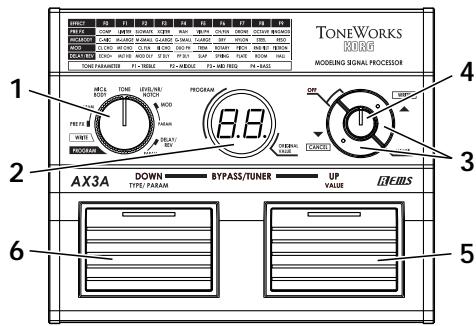
1. Function selector
The operation of the up/down buttons and value knob will depend on the mode that's chosen by this selector. You're in Program mode when this selector is at the [PROGRAM] position, Write mode when at the [WRITE]
position, and Edit mode when at the [PRE FX]-[DELAY/REV-PARAM] positions.
2. Program/Value display
In Edit mode, this display indicates the effect type (F0-F9, LE, nr, nF), the parameter (P1-P4) or its setting (value).
In Write mode or Program mode, the display indicates the program number. When BYPASS/MUTE is active, the display indicates the name of the note you're tuning.
3. [▲(WRITE)], [▼(CANCEL)] buttons
In Effect mode, use these buttons to switch effect types or parameters. By pressing the two buttons simultaneously, you can turn each effect on/off. In Write mode, use these buttons to write a program.
In Program mode, you can press these buttons to increment or decrement the program number in steps of 10. When you're using the tuner, use these buttons to adjust the calibration setting.
4. Value knob
In Edit mode, use this knob to adjust the value of a parameter. In Write mode, you can use this knob to specify the writing-destination for the program. In Program mode, this knob acts as the master volume.
5. Program Up switch
In Program mode, use this to select programs. The program number will increase each time you press the switch. In Edit mode, press this to make the parameter value appear in the program/value display. In this case, the LED above the pedal will light, indicating that the program/ value display is showing the value of the effect parameter.
6. Program Down switch
In Program mode, use this to select programs. The program number will decrease each time you press the switch. In Edit mode, press this to make the effect or parameter type appear in the program/value display. In this case, the LED above the pedal will light, indicating that the program/value display is showing the type of effect or parameter.
Rear panel
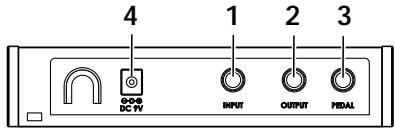
1. Input jack
Connect your guitar to this jack.
2. Output jack
Connect this jack to your guitar amp or headphones.
3. Pedal jack
You can connect an optional Korg EXP-2 foot controller or XVP-10 expression/volume pedal to this jack.
A pedal connected here will function as a wah pedal if you're using WAH in [PRE FX], or as a volume pedal otherwise.
4. Power supply
\~DC9V
You can connect an optional AC adapter to this jack.
Setup
Installing batteries
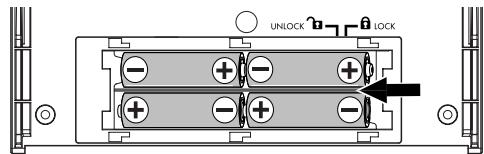
- Slide the cover of the battery case in the direction of the arrow, and open the cover.
Insert four separately sold AA-size alkaline batteries, being sure to observe the correct polarity ("+ and "- markings), and close the battery case. - When using batteries, the power will turn on when you insert a guitar cable into the AX3A's INPUT jack. While the power is on, the display will indicate the program number or other information.
The power will turn off when you remove the cable from the INPUT jack.
Basic connections

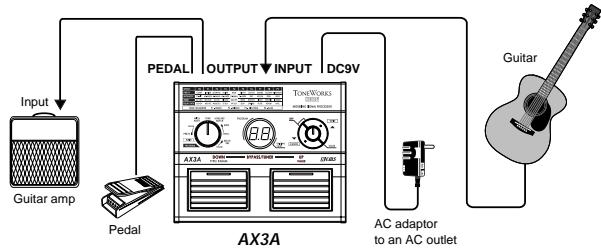
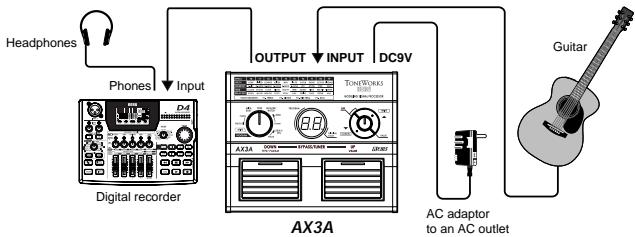
Be sure to make all connections with the power turned off. If you fail to use caution when making connections, you could damage your guitar amp or speaker system, or cause malfunctions.
- Use a cable to connect the AX3A's OUTPUT jack to your guitar amp, mixer or recorder.

When making connections or turning on the power, lower the volume of your amp or mixer so that you don't hear noise

If you're using headphones, plug them into the OUTPUT jack.
- Connect your guitar to the rear panel INPUT jack.

If you're using batteries, this will turn the power on.
- If you're using the optional AC adapter, connect it to the rear panel DC9V power supply jack, and then plug the adapter into an AC outlet to turn the power on.
- Raise the volume of your amp or mixer to the appropriate volume.
Example of a connection to a guitar amp
Example of a connection to a mixer or recorder
Program mode
Settings for each effect are collectively called a "program."
The AX3A has 80 programs which 40 (01-40) of them are rewritten.
Programs 41-80 contain preset programs for immediate use.
In Program mode you can instantly switch between sounds by pressing the Program Up/Down switches to change programs.
To enter Program mode, set the function selector to [PROGRAM]. (The LEDs in the upper part of the Program Up/Down switches will light.)
Selecting a program
- Make sure that the function selector is set to [PROGRAM].
In Program mode, the LEDs of both the Program Up and Program Down switches will be lit.

When you turn on the power, you'll be in Program mode regardless of the position of the function selector.
- Turn the value knob to adjust the master volume.
If you've connected the AX3A to a guitar amp, set the master volume to 50.
- Press the Program Up or Program Down switch to select a program. The program/value display shows the number of the program you selected.
Creating your sound (Edit mode)
Signal flow


VOLUME PEDAL is available only if a pedal is connected to the PEDAL jack.
Edit mode is when the function selector is in one of the [PRE FX]-[DE-LAY/REV PARAM] positions.
You can change the effect type for each category ([PRE FX], [DRIVE/AMP], [LEVEL/NR/NOTCH], [MOD], [DELAY/REV]), and edit the parameters to create your sound.
Selecting effects and adjusting the main parameters
[PRE FX], [MIC&BODY], [MOD], [DELAY/REV]
To select the effect you want to use in each of the categories [PRE FX], [MIC&BODY], [MOD], and [DELAY/REV], set the function selector to the appropriate position and use the [][] buttons.
The program/value display will indicate a value of F0-F9, and the LED at the top of the Program Down switch will light to indicate that the program/value display is showing the effect type.If the function select knob is set to [TONE], the P1-P4 values are displayed.
![KORG AX3A - [PRE FX], [MIC&BODY], [MOD], [DELAY/REV] - 1](/content/2019/11/143906/images/2bc6827109b22e3393415aac5675115c5a571240f680d20e66e7bc093ff88c6f.jpg)
The effect list printed on the panel tells you the effect type that is selected.
You can turn the value knob to adjust the "main" parameter for the selected effect. At this time the program/value display will indicate the value of the parameter, and the LED at the top of the Program Up switch will light to indicate that the program/value display is showing the parameter value.
![KORG AX3A - [PRE FX], [MIC&BODY], [MOD], [DELAY/REV] - 2](/content/2019/11/143906/images/c00c293ca63640c9ba80356c588782bec6e8712df1c1fae77d18e5a66e4cad8b.jpg)
To switch [TONE] on/off, press both of the [][] switches simultaneously. The parameter type or value is shown if this is switched on, and an “oF” indication if this is off.
Quick guide
When you select an effect, the AX3A automatically sets the parameters of that effect to their most effective values. In other words, you can create great sounds just by choosing an effect for each of the categories PRE FX, MIC&BODY, MOD, and DELAY/REV, without having to make detailed parameter settings.
By adjusting the main parameters, you can tweak your sound to what you have in mind.
Selecting and adjusting sub-parameters and [TONE] parameters
[PRE FX-PARAM], [TONE], [MOD-PARAM], [DELAY/REV-PARAM]
Here's how to edit the sub-parameters for the effect selected in [PRE FX], [MOD], and [DELAY/REV], as well as the parameters for [TONE]. When you press the [] or [] buttons, the program/value display will indicate a value of P1-P4, and the LED at the top of the Program Down switch will light to indicate that the program/value display is showing the parameter type.
![KORG AX3A - [PRE FX-PARAM], [TONE], [MOD-PARAM], [DELAY/REV-PARAM] - 1](/content/2019/11/143906/images/9ba506bf6cf134bed14db0b8a9401bf230229ebb6c79e6ef1a96bf0d3c5df2e6.jpg)
For the sub-parameters that correspond to P1-P4, refer to p.44 "Appendices".
Now you can use the value knob to adjust each sub-parameter to your taste.
At this time, the program/value display indicates the value of the parameter, and the LED at the top of the Program Up switch will light to indicate that the program/value display is showing the parameter value.
![KORG AX3A - [PRE FX-PARAM], [TONE], [MOD-PARAM], [DELAY/REV-PARAM] - 2](/content/2019/11/143906/images/5ed3e1a35693bcdc6fa79981f9e7477c95ecad41fa7d8ea3a412c07ba4fa6c57.jpg)
If an effect other than [TONE] is turned off, the program/value display will indicate "oF" when you turn the function select knob to [PARAM] for that category. If you want to edit the parameters of that effect, simultaneously press both [] and [] buttons to turn the effect on.
Quick guide
When you want to make adjustments to the sound of the effect you've selected, you should start by adjusting the main parameter, and then adjust the P1 sub-parameter. In most cases, adjusting these two parameters will give you the sound you want. ([TONE] is an exception to this.)
[LEVEL/NR/NOTCH]
Select this position when you want to select or adjust the program level, noise reduction, or notch filter. Then press the [▲] or [▼] buttons to
cycle the display through LE (program level), nr (NR sensitivity), and nF (notch filter). Use the value knob to adjust each parameter.
LE: Use the value knob to adjust the program level (0-10). A setting of 7.0 is the standard value. Some effect settings may cause clipping. If this occurs, lower the program level.
nr: Adjust the noise reduction sensitivity (0-10) so that you don't hear noise (hiss) when you're not playing your guitar.
![KORG AX3A - [LEVEL/NR/NOTCH] - 1](/content/2019/11/143906/images/3228e1901943983c8ba0179b2ac956c5fc2bc55a5c54c2a28f57f81196599e0c.jpg)
Depending on the guitar you're using, notes may be cut off if you raise the noise reduction value excessively. Adjust this so notes ring out naturally.
nF: This adjusts the notch filter (oF, 1-63) that reduces acoustic feedback. Turn the knob to set the cutoff frequency at which acoustic feedback will be reduced. The notch filter will be off if you turn the knob all the way to the left. Turn the knob toward the right to move the cutoff frequency from low to high, and find the point at which the acoustic feedback is occurring.
Effect/parameter type and parameter value display
When you press the Program Down switch in Edit mode, the program/ value display will indicate the effect type or parameter type (F0-F9, P1-P4). When you press the Program Up switch, the program/value display will indicate the parameter value. This gives you a convenient way to check the current settings.
Saving a program (Write mode)
Here's how to save (write) a sound that you've created.

If you switch to a different program in Program mode or turn off the power without writing your settings into memory, the changes you made will be lost.
-
Set the function selector to [WRITE].
-
Press the [▲(WRITE)] button. The program number will blink.
-
Use the value knob or the Program Up/Down switches to select the program in which you want to save your settings.
- Press the [▲(WRITE)] button once again. The program will be saved, and the program/value display will indicate “ ^ ” briefly.
The newly saved program will overwrite (i.e., replace) the existing settings, so that the previous program in that location will be lost.
Note If you decide not to save the new program, press the [CANCEL] button to cancel the operation.
Checking the values saved in a program (Original Value)
The Original Value LED in the program/ value display lets you check the parameter values of a saved program.
When you use the knob or switches to modify the value of a parameter, the Original Value LED will light when that value matches the value that's already been saved in the program (i.e., the original value).

In Program mode, the Original Value LED will light if the values of all parameters match the values that are saved in the program.
Bypass and Mute
Bypass (which turns off all effects including noise reduction) and Mute (which mutes the AX3As output) are convenient functions for use while you're adjusting your guitar amp, tuning during a live performance, or switching guitars. Here's how to use Bypass or Mute.
Bypassing the AX3A
Simultaneously press the Program Up and Program Down switches; all effects will be bypassed. At this time, the program/value display will indicate "---".
Muting the AX3A
Simultaneously press and hold down the Program Up and Program Down switches for about one second and the output will be muted. At this time, the program/value display will indicate " - - ".
When bypassed or muted, the Auto Chromatic Tuner will be active. To cancel the bypass or mute function, press the Program Up or Program Down switch (this will not change the program).
In the bypassed state, the value knob acts as the master volume.
Tuner
The AX3A has a built-in Auto Chromatic Tuner.
You can calibrate the reference pitch (the note "A") of the tuner in a range of A438 Hz-A445 Hz.
Tuning procedure
- The Auto Chromatic Tuner will be activated when the AX3A is bypassed or muted.
Note If you want to tune silently, such as during a live performance, simply mute the AX3A.
- Play a note on your guitar and the program/value display will indicate the name of the closest note.
Note names are indicated as follows.
| Note name | C | C# | D | D# | E | F | F# | G | G# | A | A# | B |
| Display | C | C0 | d | d0 | E | F | F0 | G | G0 | R | R0 | b |
- If your guitar is sharp (pitch too high), the Program Up switch LED will blink. If your guitar is flat (pitch too low), the Program Down switch LED will blink. In either case, more rapid blinking indicates that your
guitar is farther from the correct pitch.
When in tune, both the Program Up and Down LEDs will light.
Adjusting the tuning calibration
When you turn on the power, the built-in tuner is set to a reference pitch of A 440 Hz (concert pitch). You can calibrate this reference pitch in a range of 438 Hz-445 Hz. You can use the [] / [] buttons to calibrate this in the range of 438 Hz-445 Hz. When doing so, the program/value display will indicate a value of 38-45.

When you turn off the power, the calibration adjustment you made will be discarded and the AX3A will automatically be set to 440Hz .
Restoring the factory preset programs
Here's how to restore (reload) the AX3A's programs back to factory preset programs.

When you execute this operation, all the programs you created and stored inside the AX3A will be erased, and replaced by the factory programs.
- While holding down both the Program Up and Down switches as well as the [▼(CANCEL)] button, turn on the power. The program/ value display will indicate "rL", and the LEDs in the upper part of the Program Up/Down switches will blink. Take your hand off both switches and the button you had been pressing.
- If you decide to cancel the reload operation at this point, press the [▼(CANCEL)] button.
- If you wish to reload the factory settings press the [▲(WRITE)] button. The program/value display will indicate "Ld" and reloading will begin. When reloading is completed, the program/value display will indicate "CP", and the AX3A will automatically enter Program mode.

Never turn off the power while reloading.
Troubleshooting
If you suspect a malfunction, please check the following points. If this does not resolve the problem, please contact a nearby dealer.
1. Power does not turn on
Have the batteries have run down? When the batteries run low, the display will blink "L o". We recommend that you replace the batteries as soon as possible. If batteries become unusable, remove them immediately. Leaving drained batteries in the unit can cause malfunctions (such as battery leakage). You should also remove the batteries if you won't be using the AX3A for an extended time.
Have you have inserted a stereo cable into the INPUT jack? When operating the AX3A on batteries, the power will not turn on if you insert a stereo cable. Be sure to use a mono cable.
Is the AC adapter connected to the rear panel DC9V jack?
Is the AC adapter plugged into an AC outlet?
Could the AC adapter be damaged?
2. No sound
Is the volume of your guitar turned down?
Is your guitar cable connected correctly?
Is your guitar cable broken?
Are the TONE or PROGRAM LEVEL (LEVEL/NR/NOTCH) parameters be turned to a low value?
Is the volume turned down for another effect?
If an expression pedal is connected, is it turned down?
Is the Mute function activated? Refer to "Bypass and Mute" (p.10) and cancel the Mute function.
Is the master volume turned down? Set the function selector to [PROGRAM], and turn the value knob to adjust the master volume.
3. Effects don't apply
Could an effect be bypassed?
Is the modulation "DEPTH" or the delay/reverb "MIX" set to a low value?
Could the [MIC&BODY] DEPTH be set to 0?
Is the AX3A in Bypass mode? Refer to "Bypass and Mute" (p.10) and cancel the Bypass function.
4. High frequencies are distorted when using [MIC&BODY]
Depending on the guitar you're using, the high frequencies may distort if the [TONE] TREBLE or XCITER effect parameter values are raised excessively. If this occurs, lower the settings.
5. Sound connected to the guitar amp is distorted, or sounds wrong
Could the [TONE] values or the PROGRAM LEVEL (LEVEL/NR/ NOTCH) be excessively high?
Specifications
| Number of effects: | Pre-effect types: 10 Mic&Body Model types: 10 Tone: 1 Notch Filter: 1 Modulation Effect types: 10 Delay Effect types: 5 Reverb Effect types: 5 Noise Reduction: 1 |
| Number of programs: | 80 (40 user/40 preset) |
| Audio input: | INPUT (mono) |
| Audio output: | OUTPUT (stereo) |
| Signal processing: | A/D conversion: 24 bit D/A conversion: 24-bit |
| Sampling frequency: | 31.25 kHz |
| Tuner: | Detection range : C1-E6 |
| Calibration: | A=438-445 Hz |
| Power supply: | Four alkaline AA batteries (contir of eight hours) or DC9V (separa AC adapter |
| Dimensions (W × D × H): | 178 × 142 × 43 mm / 7.0 × 5.6 × 1.7 inches |
| Weight: | 340 g / 11.99 oz. |
| Included items: | Owner's manual |
| Options (separately sold): | ⊕⊕⊕ DC9V AC adapter EXP-2 foot controller XVP-10 expression/volume ped |
- Specifications and appearance are subject to change without notice for improvement.
AX3A MODELING SIGNAL PROCESSOR
Types Pre-effect: 10
Types Mic&Body Model: 10
Type Tonel: 1
Type Notch Filter: 1
Types Modulation Effect: 10
Types Delay Effect: 5
Types Reverb Effect: 5
Noise Reduction: 1
Preset program chart
| Program No. | Program name | Body type |
| 41 | FOLK1 | C-MIC |
| 42 | FOLK2 | M-LARGE |
| 43 | FOLK3 | G-SMALL |
| 44 | CONFESSOR | T-LARGE |
| 45 | LOWRIDER | C-MIC |
| 46 | BLUES1 | G-LARGE |
| 47 | BLUES2 | BODY |
| 48 | BLUES3 | STEEL |
| 49 | EC OOO | M-SMALL |
| 50 | DRONE | STEEL |
| 51 | MY CHORUS | C-MIC |
| 52 | BI CHORUS | T-LARGE |
| 53 | EQ & MT CHO | Body OFF/EQ ON |
| 54 | DUO PHSE | G-SMALL |
| 55 | TREM RESO | RESO |
| 56 | SLOWATK | NYLON |
| 57 | MOD DLAY | G-LARGE |
| 58 | BOSSA | NYLON |
| 59 | AC ECHO+ | M-LARGE |
| 60 | WATERFILTER | STEEL |
| Program No. | Program name | Body type |
| 61 | AC FLNG | T-LARGE |
| 62 | BEN RESO | RESO |
| 63 | DRY HOLLOW | M-SMALL |
| 64 | FILTRON | M-LARGE |
| 65 | OCTAVE | DRY |
| 66 | AC SOLO | T-LARGE |
| 67 | CHORD FX | C-MIC |
| 68 | SMALL ROOM | G-SMALL |
| 69 | U-VIB | G-LARGE |
| 70 | ROTARY | T-LARGE |
| 71 | PP DELAY | OFF |
| 72 | SUPER MOD | M-SMALL |
| 73 | AC PRE AMP | Body OFF/EQ ON |
| 74 | C-MIC | C-MIC |
| 75 | M-LARGE | M-LARGE |
| 76 | G-LARGE | G-LARGE |
| 77 | DRY | DRY |
| 78 | NYLON | NYLON |
| 79 | STEEL | STEEL |
| 80 | RESO | RESO |
KORG KORG INC. 4015-2 Yanokuchi, Ina
4015-2 Yanokuchi, Inagi-city, Tokyo 206-0812 Japan
- Precautions
- Location
- Power supply
- Interference with other electrical devices
- Handling
- Care
- Keep this manual
- Keeping foreign matter out of your equipment
- THE FCC REGULATION WARNING (for U.S.A.)
- CE mark for European Harmonized Standards
- IMPORTANT NOTICE TO CONSUMERS
- Introduction
- Welcome!
- Main features
- Front and rear panel
- Front panel
- Function selector
- Program/Value display
- [▲(WRITE)], [▼(CANCEL)] buttons
- Value knob
- Program Up switch
- Program Down switch
- Rear panel
- Input jack
- Output jack
- Pedal jack
- Power supply
- Setup
- Installing batteries
- Basic connections
- Example of a connection to a guitar amp
- Example of a connection to a mixer or recorder
- Program mode
- Selecting a program
- Creating your sound (Edit mode)
- Signal flow
- Selecting effects and adjusting the main parameters
- [PRE FX], [MIC&BODY], [MOD], [DELAY/REV]
- Quick guide
- Selecting and adjusting sub-parameters and [TONE] parameters
- [PRE FX-PARAM], [TONE], [MOD-PARAM], [DELAY/REV-PARAM]
- [LEVEL/NR/NOTCH]
- Effect/parameter type and parameter value display
- Saving a program (Write mode)
- Checking the values saved in a program (Original Value)
- Bypass and Mute
- Bypassing the AX3A
- Muting the AX3A
- Tuner
- Tuning procedure
- Adjusting the tuning calibration
- Restoring the factory preset programs
- Troubleshooting
- Power does not turn on
- No sound
- Effects don't apply
- High frequencies are distorted when using [MIC&BODY]
- Sound connected to the guitar amp is distorted, or sounds wrong
- Specifications
- AX3A MODELING SIGNAL PROCESSOR
- KORG KORG INC. 4015-2 Yanokuchi, Ina
Brand : KORG
Model : AX3A
Category : Effect pedal