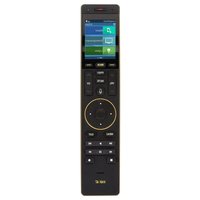
Total Control TRC-1120 - Remote control URC - Free user manual and instructions
Find the device manual for free Total Control TRC-1120 URC in PDF.


Pick your language and provide your email: we'll send you a specifically translated version.
| Product Type | Remote Control |
| Brand | URC |
| Model | Total Control TRC-1120 |
| Dimensions (approx.) | 20 x 5 x 2.5 cm |
| Weight (approx.) | 180 g |
| Power Source | 2 x AA batteries (not included) |
| Battery Life | Up to 6 months typical use |
| Wireless Technology | Infrared (IR) |
| Range | Up to 10 meters (30 feet) |
| Number of Keys | 50+ programmable keys |
| Backlit Keypad | Yes |
| Supported Devices | TV, Cable/Satellite, Audio, DVD/Blu-ray, Streaming |
| Programming Method | Pre-loaded codes and learning function |
| Macro Capability | Yes, programmable macro sequences |
| Compatible Brands | Over 500 brands |
| Cleaning | Wipe with a soft, dry cloth |
| Safety Precautions | Keep away from liquids, extreme temperatures |
| Spare Parts / Repairability | Batteries replaceable; no other user-serviceable parts |
| Manufacturer | URC (Universal Remote Control) |
| Warranty | 1 year limited |
Frequently Asked Questions - Total Control TRC-1120 URC
How do I program the remote for my TV?
Use the pre-loaded code method: find your TV brand code from the manual, press and hold the Setup key, enter the code, then release Setup. If that doesn't work, try the automatic search or learning function.
What should I do if the remote is not responding?
First, check the batteries and replace if needed. Ensure nothing is blocking the IR emitter on the remote and the device. Also, verify the remote is in the correct mode (TV, AUDIO, etc.).
How can I reset the remote to factory settings?
To reset, remove the batteries, press and hold any key for 10 seconds to discharge capacitors, then reinstall batteries. This will clear all programmed codes.
Does the remote support streaming devices like Roku or Apple TV?
Yes, the TRC-1120 supports many streaming devices. You can either use the pre-loaded codes or learn commands from the original remote.
What is the range of the remote?
The remote has an infrared range of up to 10 meters (30 feet) under normal conditions. Obstacles may reduce this range.
Can I control multiple devices with one remote?
Yes, the remote can control up to 8 devices (TV, SAT, AUDIO, etc.) using the device selector keys at the top.
How do I set up a macro to turn on multiple devices?
Press and hold the Setup key until it blinks, then press the macro key (e.g., M1). Enter the sequence of keys (e.g., TV power, SAT power, AUDIO power) and press Setup again to save.
Is the remote compatible with LED/LCD TVs?
Yes, it works with LED, LCD, and plasma TVs as long as they accept IR commands. Most modern TVs are compatible.
How do I replace the batteries?
Slide the battery cover off the back. Insert two AA batteries with correct polarity (+/-), then replace the cover. The remote will retain codes during battery change.
What does the 'Learn' button do?
The Learn function allows the remote to copy commands from another remote. Point the original remote IR at the TRC-1120 and press the corresponding key to program.
User questions about Total Control TRC-1120 URC
0 question about this device. Answer the ones you know or ask your own.
Ask a new question about this device
No questions yet. Be the first to ask one.
Download the instructions for your Remote control in PDF format for free! Find your manual Total Control TRC-1120 - URC and take your electronic device back in hand. On this page are published all the documents necessary for the use of your device. Total Control TRC-1120 by URC.
USER MANUAL Total Control TRC-1120 URC
Manual assistant
Powered by Anthropic
Waiting for your message
Product information
Brand : URC
Model : Total Control TRC-1120
Category : Remote control