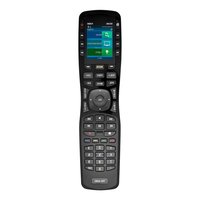
Total Control TRC-1080 - Remote control URC - Free user manual and instructions
Find the device manual for free Total Control TRC-1080 URC in PDF.


Pick your language and provide your email: we'll send you a specifically translated version.
| Product Type | Universal Remote Control |
| Brand | URC |
| Model | Total Control TRC-1080 |
| Display | Full-color LCD touchscreen |
| Power Source | Built-in rechargeable lithium-ion battery |
| Battery Life | Up to 30 days (typical use) |
| Connectivity | IR, RF (433 MHz), Bluetooth |
| Control Range | IR: up to 30 ft; RF: up to 100 ft |
| Supported Devices | TVs, audio receivers, streaming players, cable/satellite boxes, and more |
| Device Capacity | Up to 50 devices |
| Activity Control | Custom macro sequences with one-touch operation |
| Dimensions | 6.5 x 2.0 x 0.8 in (165 x 51 x 20 mm) |
| Weight | 7.0 oz (198 g) |
| Charging | Micro USB (adapter not included) |
| Mounting | Tabletop or wall mount (optional accessory) |
| Cleaning | Wipe with a soft, dry cloth; avoid solvents |
| Safety | Keep away from moisture and extreme temperatures |
| Spare Parts | Battery and charger available from URC authorized dealers |
| Warranty | 1 year limited warranty |
Frequently Asked Questions - Total Control TRC-1080 URC
How do I set up the URC Total Control TRC-1080?
To set up, first charge the remote fully. Then follow the on-screen prompts to select your devices and configure activities. For detailed steps, refer to the manual.
How to program the remote to control my TV?
From the home screen, tap 'Add Device', select TV, and enter your TV brand. The remote will try IR codes automatically. If unsuccessful, use the RF pairing method described in the manual.
How to change the battery?
The battery is built-in and not user-replaceable. If battery life significantly decreases, contact URC support for replacement options.
How to charge the remote?
Connect the provided micro USB cable to the remote's charging port and plug into a USB power adapter (5V, 1A). Charging time is about 3 hours.
Why is my remote not responding?
First, ensure the battery is charged. Then check if the remote is in RF or IR mode. For IR, aim directly at the device. For RF, verify the base station is powered and paired.
How to reset the remote to factory settings?
Go to Settings > System > Factory Reset. Confirm the reset. This will erase all programmed devices and activities.
Can I control devices in another room?
Yes, using RF mode (requires the optional URC RF base station). The remote can control devices up to 100 feet away through walls.
How to create a macro (activity)?
Tap 'Activities' > 'Create New Activity'. Follow the wizard to sequence commands (e.g., 'Watch Movie' turns on TV, receiver, and dims lights). Macros can be triggered with one button.
Is the remote compatible with smart home devices?
The TRC-1080 can control IP-based devices such as smart lights or thermostats through the Total Control system. Check URC compatibility for your specific device.
How to update the firmware?
Connect the remote to your home Wi-Fi (via the base station). Go to Settings > System > Update. Follow on-screen instructions. Do not power off during update.
User questions about Total Control TRC-1080 URC
0 question about this device. Answer the ones you know or ask your own.
Ask a new question about this device
No questions yet. Be the first to ask one.
Download the instructions for your Remote control in PDF format for free! Find your manual Total Control TRC-1080 - URC and take your electronic device back in hand. On this page are published all the documents necessary for the use of your device. Total Control TRC-1080 by URC.
USER MANUAL Total Control TRC-1080 URC
Manual assistant
Powered by Anthropic
Waiting for your message
Product information
Brand : URC
Model : Total Control TRC-1080
Category : Remote control