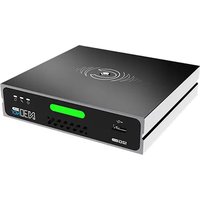
N30 - Audio/video converter Kiloview - Free user manual and instructions
Find the device manual for free N30 Kiloview in PDF.


Pick your language and provide your email: we'll send you a specifically translated version.
| Product Type | Audio/Video Converter |
| Brand | Kiloview |
| Model | N30 |
| Dimensions (W x D x H) | 150 mm x 100 mm x 30 mm |
| Weight | Approx. 300 g |
| Power Supply | 5V DC via USB-C (included) |
| Power Consumption | 5 W max |
| Input Interfaces | HDMI, 3.5mm audio jack |
| Output Interfaces | HDMI, 3.5mm audio jack, USB-C data |
| Video Resolution Support | Up to 1080p 60fps |
| Audio Sample Rate | 48 kHz, 16-bit |
| Main Functions | Video scaling, audio embedding/de-embedding, signal conversion |
| Maintenance & Cleaning | Wipe with dry cloth, avoid liquids |
| Safety Precautions | Do not expose to moisture or extreme temperatures |
| Spare Parts & Repairability | Contact Kiloview support for replacement adapters |
| Operating Temperature | 0°C to 40°C |
| Warranty | 1 year limited |
Frequently Asked Questions - N30 Kiloview
What does the Kiloview N30 do?
The Kiloview N30 is an audio/video converter that can scale video signals and embed or extract audio from HDMI streams.
What input and output ports does the N30 have?
It features HDMI input and output, as well as a 3.5mm audio jack for analog audio and a USB-C port for power and data.
How do I power the device?
Power it via the USB-C port using the included 5V adapter or a standard USB power source.
What video resolutions are supported?
The N30 supports resolutions up to 1080p at 60 frames per second.
Does it support audio extraction?
Yes, you can de-embed audio from HDMI to the 3.5mm output, or embed audio from the 3.5mm input into HDMI.
Is the device plug-and-play?
Yes, it is plug-and-play with no drivers required for basic operation.
Can I use it with gaming consoles?
Yes, it works with any HDMI source, including gaming consoles, cameras, and computers.
How do I clean the N30?
Use a soft dry cloth to wipe the casing. Avoid moisture or cleaning agents.
What should I do if the device overheats?
Ensure proper ventilation. If overheating occurs, disconnect power and let it cool. Contact support if persistent.
Where can I find spare parts?
Contact Kiloview support for replacement cables or power adapters. The device itself is not user-serviceable.
User questions about N30 Kiloview
0 question about this device. Answer the ones you know or ask your own.
Ask a new question about this device
No questions yet. Be the first to ask one.
Download the instructions for your Audio/video converter in PDF format for free! Find your manual N30 - Kiloview and take your electronic device back in hand. On this page are published all the documents necessary for the use of your device. N30 by Kiloview.
USER MANUAL N30 Kiloview

Manual assistant
Powered by Anthropic
Waiting for your message
Product information
Brand : Kiloview
Model : N30
Category : Audio/video converter