
Power Magic Ultra Battery B-130X - Battery BlackVue - Free user manual and instructions
Find the device manual for free Power Magic Ultra Battery B-130X BlackVue in PDF.


| Product Type | Battery Pack for Dashcam |
| Brand | BlackVue |
| Model | Power Magic Ultra Battery B-130X |
| Battery Chemistry | LiFePO4 (Lithium Iron Phosphate) |
| Capacity | 12,500 mAh |
| Input Voltage | 12V / 24V DC |
| Output Voltage | 12.8V DC |
| Max Output Power | 100W |
| Charging Time | Approximately 4 hours |
| Operating Temperature | -20°C to 60°C (-4°F to 140°F) |
| Dimensions (W x H x D) | 150 mm x 98 mm x 28 mm |
| Weight | 1 kg (2.2 lbs) |
| Safety Features | Overcharge, over-discharge, short circuit, and temperature protection |
| Compatibility | All BlackVue dashcams and most 12V dashcams |
| Installation | Hardwire kit required (sold separately) |
| Warranty | 2 years |
| Maintenance | Keep in dry, cool place; avoid full discharge |
| Accessories Included | DC power cable, fuse, mounting tape |
| Certification | CE, FCC, RoHS |
Frequently Asked Questions - Power Magic Ultra Battery B-130X BlackVue
User questions about Power Magic Ultra Battery B-130X BlackVue
0 question about this device. Answer the ones you know or ask your own.
Ask a new question about this device
Download the instructions for your Battery in PDF format for free! Find your manual Power Magic Ultra Battery B-130X - BlackVue and take your electronic device back in hand. On this page are published all the documents necessary for the use of your device. Power Magic Ultra Battery B-130X by BlackVue.
USER MANUAL Power Magic Ultra Battery B-130X BlackVue
ENGLISH / NEDERLANDS /
NORSK / SUOMI / SVENSKA /
العربية/الن hyp
www.blackvue.com
BLACKVUE
For the latest version of the manual and customer support go to www.blackvue.com
FCC Part 15.19 Statements
This device complies with Part 15 of the FCC Rules. Operation is subject to the following two conditions:
(1) This device may not cause harmful interference, and
(2) this device must accept any interference received, including interference that may cause undesired operation.
FCC Part 15.105 Statement (Class B)
This equipment has been tested and found to comply with the limits for a Class B digital device, pursuant to part 15 of the FCC Rules.
These limits are designed to provide reasonable protection against harmful interference in a residential installation. This equipment generates, uses and can radiate radio frequency energy and, if not installed and used in accordance with the instructions, may cause harmful interference to radio communications. However, there is no guarantee that interference will not occur in a particular installation. If this equipment does cause harmful interference to radio or television reception, which can be determined by turning the equipment off and on, the user is encouraged to try to correct the interference by one or more of the following measures:
- Increase the separation between the equipment and receiver.
- Connect the equipment into an outlet on a circuit different from that to which the receiver is connected.
- Consult the dealer or an experienced radio/TV technician for help.
FCC Part 15.21 Statement
Any changes or modifications not expressly approved by the party responsible for compliance could void the user's authority to operate this equipment.
MPE
The antenna(s) must be installed such that a minimum separation distance of at least 20 cm is maintained between the radiator (antenna) and all persons at all times. This device must not be co-located or operating in conjunction with any other antenna or transmitter.
BlackVue Power Magic Ultra Battery B-130X
The Power Magic Ultra Battery is designed to power your BlackVue dashcam in Parking Mode for extended periods of time without using your vehicle's battery.
![graph TD A["Camera"] --> B["Device"] C["Cigarette lighter socket (Output cable for dashcam)"] --> B D["Cigarette lighter plug power cable"] --> B B --> E["Output cable for dashcam"] B --> F["or cable"] B --> G["with power cable"] style A fill:#f9f,stroke:#333 style C fill:#f9f,stroke:#333 style D fi…](/content/2026/07/1435197/images/375262c8bd9268bb6843009eedee9c757c7565f9217c61a2de675d1c81881ffc.jpg)
Safety instructions
Incorrect use of the Power Magic Ultra Battery can lead to poor performance and may cause overheating, ignition, explosion, etc. To use the product correctly please observe the following directions:
• Familiarize yourself with the contents of the user manual before using the product.
- Only use original BlackVue cables provided by the manufacturer. For replacements contact customer support or your nearest distributor.
• Only use the product to power a dashcam.
- Do not expose the product to direct sunlight or heat.
• Do not expose to high temperatures.
- Do not use a cigarette lighter multi-socket splitter (adapter) with the product.
- Do not put the product in a microwave oven or place it in a high-pressure environment.
- Do not repair or modify the product yourself.
- Do not throw the battery or subject it to any physical shock.
- Do not disassemble, compress or puncture the product.
- Do not use the product in an electrostatic environment as it can affect the operation of the battery protection circuitry.
4 BLACKVUE
- If the product emits an unusual odor during use, unplug it immediately and contact customer support or your nearest distributor.
• If the battery swells up, immediately discontinue using the product. Contact customer support or your nearest distributor. - Keep the product away from children and pets.
• Do not allow metal objects to contact the terminals of the power and output cables. - Ensure the battery does not come into contact with water or other liquids.
• Pittasoft Co., Ltd. is not liable for damage resulting from disassembling, opening or modifying the product.
> Disposal of your battery pack
- All electrical and electronic products should be disposed of separately from the municipal waste stream via designated collection facilities appointed by the government or the local authorities. Contact local authorities to learn about disposal and recycling options available in your area.
- Do not incinerate or expose to fire. Exposure to excess heat may result in fire or an explosion.
Components
Check the box for each of the following items before installing the Power Magic Ultra Battery B-130X.

Power Magic Ultra Battery B-130X

User Manual
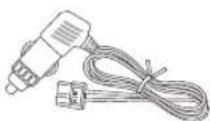
Cigarette lighter plug power cable

Output cable for dashcam (Cigarette lighter socket)
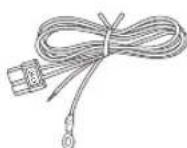
Hardwiring power cable
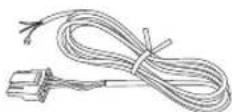
Output cable for dashcam (Hardwiring power cable)

Velcro strips (2 EA) Fuse tap kit (3 types)
At a glance


> LED indicators and beeps
| LEDs Sound alert | |||
| Powered on All 3 LEDs turn on together and then | turn off one by one. | Welcome chime | |
| Started charging Red LED blinks for 5 seconds Beeps once | |||
Charging Red LED is on  | |||
| Fully charged Green LED is on [IMAGE] | |||
Bluetooth connected Blue LE  | |||
| Low input voltage warning/High input voltage warning |  | Red and Green LED blink together Beeps twice (Repeated) | |
| Overheated warning Red LED and Green LED blink one | after another | Beeps twice (Repeated) | |
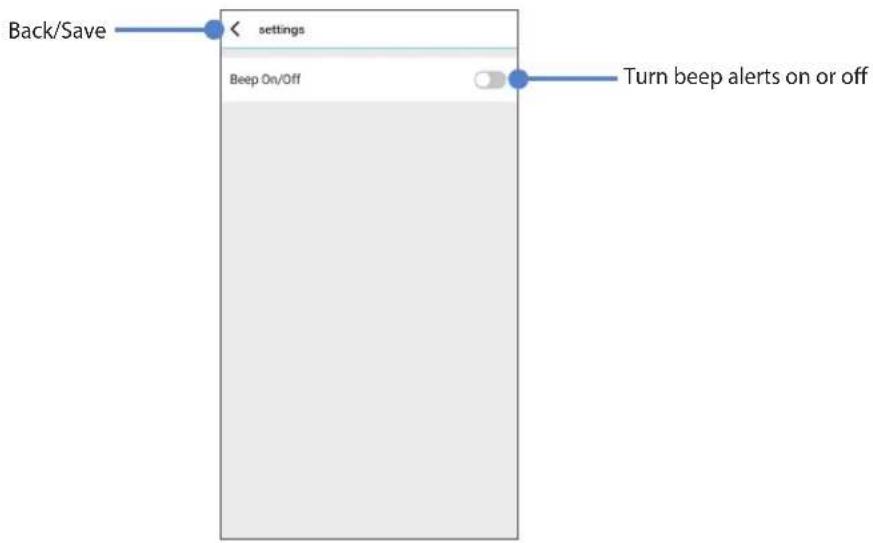
* Beeping can be activated over Bluetooth using the BlackVue app.
* Welcome chime and beeping sound for overheated warning cannot be muted for safety reasons.
Product features
- Approximately 30 hours of power from 50 minutes of charging by hardwired installation / 90 minutes of charging by plugin installation (based on a dashcam that uses 3 W).
-
Compatible with 2 installation methods:
-
Plug-in installation: Simply plug-in cigarette lighter plug power cable (standard 5A charging); or
- Hardwired installation: Connect the hardwiring power cable for faster charge (rapid 9 A charging).
- Configure settings via Bluetooth with the BlackVue app.
• Compatible with both car (12 V) and heavy vehicle (24 V) electrical systems.
• Battery protection circuitry for increased safety and extended battery life.
• Simultaneously charge your Ultra Battery and power your dashcam while driving.
• Power output automatically switches to draw power from the Ultra Battery when the engine is off.
• Battery cycle life: Designed to retain more than 80% of its original capacity at 1,500 complete charge/discharge cycles.
• Temperature Cut-off functions:
- High Temperature: Shuts down the battery's charging power if the internal temperature reaches 80°C (176°F) or above.
- Low Temperature: Shuts down the battery's charging power if the internal temperature reaches below 0°C (32°F).
- 1 USB port (5 V) allows you to simultaneously charge another device (smartphone, mobile Wi-Fi hotspot, etc.) while powering the dashcam.
Installation guide
Set the power switch to the OFF position before installation.

Caution
Make sure to use the genuine power cables included in the package. Otherwise, it may result in product failure, overheating, ignition, etc.
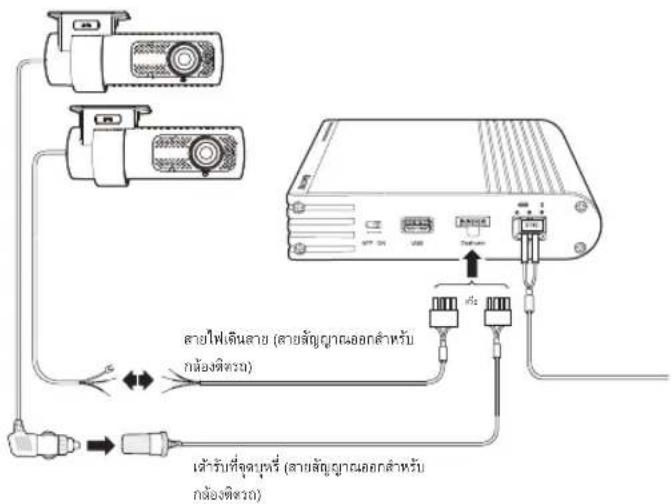
1. For a plug-in installation using a cigarette lighter plug power cable:
a. Plug the cigarette lighter plug power cable into the Ultra Battery's DC in port. Plug the other end of the power cable into the vehicle's cigarette lighter socket.

b. Proceed to step 2.
or
1. For a hardwired installation using a hardwiring power cable:
a. Plug the hardwiring power cable into the Ultra Battery's DC in port.
8
BLACKVUE
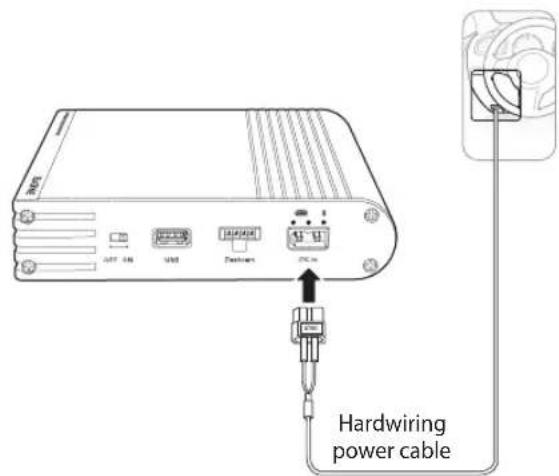
b. Referring to your vehicle Owner's Manual, identify a Switched (accessory power) fuse of 10A or less in your interior fuse panel. Typical examples are the cigarette lighter and car stereo fuse slots.

Caution
If you connect the Ultra Battery to a Constant Power (BATT) fuse it may result in depletion of your vehicle's battery.
c. Remove the identified Switched fuse and match its type with one of the 3 fuse taps.
d. Insert the ACC wire into the connector end of the fuse tap. Use a crimping tool or pliers to crimp the connector onto the wire.

e. Insert the fuse you removed from the fuse panel into the slot closest to the blades on the fuse tap.

Note
If the original fuse is a low-profile mini type, use the new 10A mini type fuse instead (included).
f. Insert a new 20A fuse into the slot furthest away from the fuse tap blades.

g. Insert the fuse tap into the empty Switched fuse slot in the fuse panel.

Caution
Refer to the diagram and insert the fuse tap in the correct orientation. In the correct orientation the new fuse (f.) gets power directly from the fuse slot without putting an additional load on the original fuse (e.). If you insert the fuse tap in the reversed orientation the additional load on the original fuse may cause it to blow.
h. Connect the ground wire (ring) to a ground point, such as a bolt, that is directly on a bare metal part of the vehicle's frame. Secure the ground wire to the bare metal frame (for example by securing it under the bolt).

- Plug the 'Output cable' into the port labeled Dashcam on the Ultra Battery.
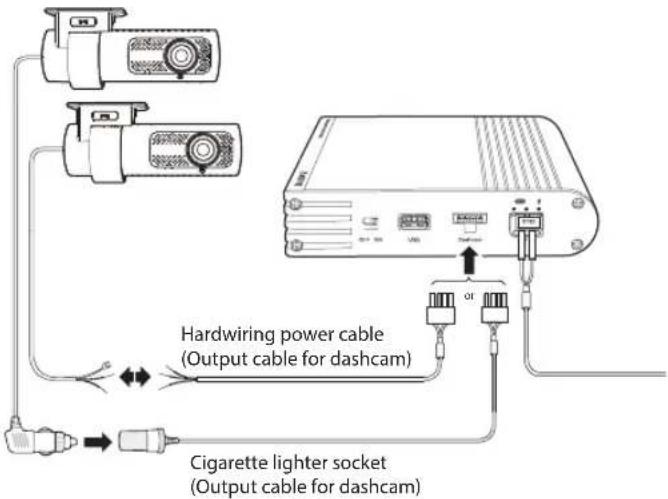
- Plug your dashcam's power plug into the cigarette lighter socket or attach it to the hardwiring power cable on the Ultra Battery's 'Output cable.'

Note
To ensure good electrical contact you can use electrical tape to tape the plug and socket together.
-
Set the power switch to the ON position.
-
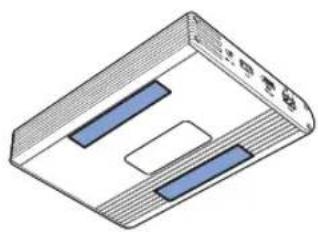
Use a pry tool to lift the edges of the windshield trim/molding and tuck in the power cord. Use the supplied Velcro strips to fix the Ultra Battery in place


Caution
Do not expose the product to direct sunlight and/or heat.
> Checking the battery status and changing settings
- Turn on the Ultra Battery.
- Go to your smartphone's Settings and turn on Bluetooth.
- Search for the BlackVue app in the Google Play Store or Apple App Store and install it on your smartphone. If you are not a BlackVue dashcam user, download BlackVue Battery app and skip to Ⓗ
Connecting Ultra battery to the BlackVue app (BlackVue dashcam user only)
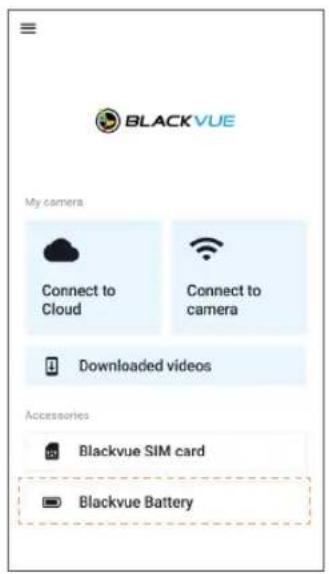
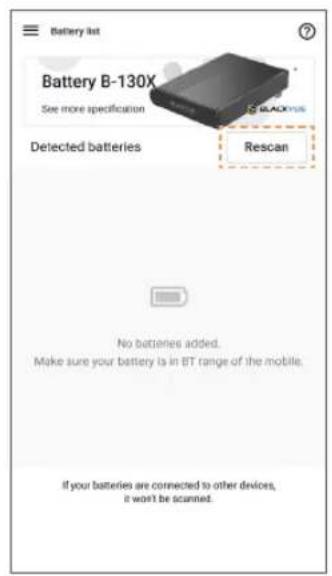
a. Open the BlackVue app and tap BlackVue Battery.
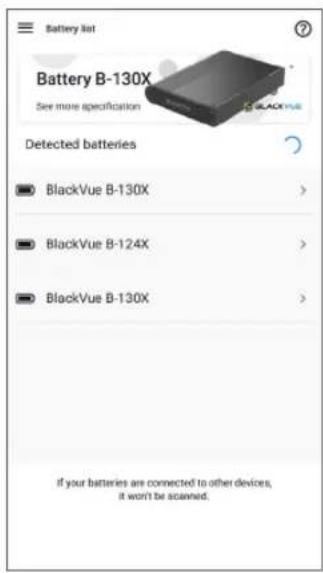
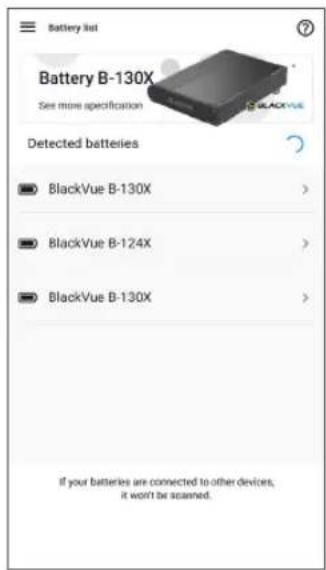
b. Select your Ultra Battery from the list. If your Ultra Battery is not shown in 15\~20 seconds, Rescan button will appear. Tap it to refresh the list.


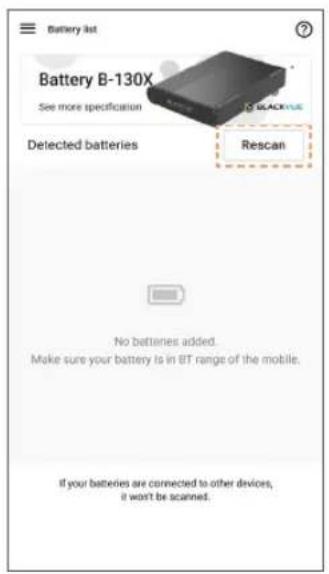
Battery information screen

Battery settings screen

Caution
- Under low temperature environment, the efficiency of Ultra battery's cell may decrease, however, this condition is temporary. Once the battery's temperature returns to its normal operating range, its efficiency will return to normal as well.

Note
• All images shown are for illustration purpose only. Actual app may differ from images shown.

Connecting Ultra battery to the BlackVue Battery app
a. Open the BlackVue Battery app.
b. Select your Ultra Battery from the list. If your Ultra Battery is not shown, tap Scan to refresh the list.
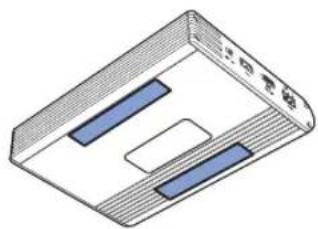
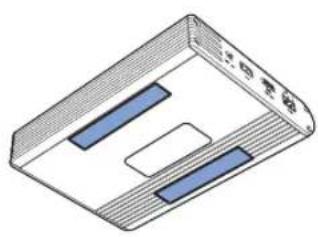
- A sticker with the unique Bluetooth ID is attached to each Ultra Battery.
Product specifications
| Model Power Magic Ultra Battery B-130X | |
| Color / Size / Weight Black / 152.7 mm (W) x 206 | 0 mm (L) x 33.6 mm (H) / 1,537 g |
| Battery Cell Type LiFePO4 | |
| Input Voltage / Current | 12V system:- Cigarette lighter plug: 11 V–18 V / 7.2 A (max)- Hardwired: 11 V–18 V / 13.0 A (max) |
| 24V system:- Cigarette lighter plug: 22.5 V–30 V / 3.6 A (max)- Hardwired: 22.5 V–30 V / 6.4 A (max) | |
| Charging Voltage / Current | Cigarette lighter plug: 14.2 V / 5 AHardwired: 14.2 V / 9 A |
| Charging Time | Cigarette lighter plug (standard 5 A charging): Approx. 90 minsHardwired (rapid 9 A charging): Approx. 50 mins |
| Hours of Use | Approx. 30 hours (based on a single dashcam that consumes 3 W) |
| Operating Temperature | Charging Temperature: 0°C – 45°C (32°F – 113°F) |
| Discharging Temperature: -10°C – 60°C (14°F – 140°F) | |
| Storage Temperature | -20°C – 45°C (-4°F – 113°F) |
| Temperature Cut-Off | High temperature: Approx. 80°C (176°F) / Low temperature: Below 0°C (32°F) |
| Capacity 12.8 V / 7,500 mAh / 96 Wh | |
| Output Voltage / Current | Dashcam port: 11.0V - 14.2V / 2 A (max) |
| USB port: 4.75V - 5.2V / 2 A (max) |
Customer Support
For customer support, manual and any updates please visit www.blackvue.com.
You can also email a Customer Support expert at cs@pittasoft.com.
Limited Warranty
• The warranty period of this product is 1 year from the purchase data.
- If the product fails during normal and correct use within the warranty period, our service center will repair the product free of charge.
• Any disassembly, modification or alteration of the product will void the warranty.
- The cost to repair or fix any malfunction or problem caused by incorrect usage during the warranty period may be charged to the consumer.
• The manufacturer shall not be responsible or liable for any loss or damage caused by incorrectly using the product.
BlackVue Power Magic Ultra Battery B-130X

Let op



Batterijinformatiescherm

b. Gå til etappe 2.
eller


Advarsel




Huomio


Akun tietonäyttö

! Försiktighet



Dashcam 10 Ultra Battery

ข้อควรระวัง


. Power Magic Ultra Battery B-130X youth men who are doing a business in the Canadian States, and you are doing it as a business in the United States.





The term of this product warranty is 1 year from the purchase date.
We, PittaSoft Co., Ltd., provide the product warranty according to the Consumer Dispute Settlement Regulations (drawn up by the Fair Trade Commission). PittaSoft or designated partners will provide the warranty service upon request.
| Circumstances | Warranty | |||
| Within the Term | Outside of the Term | |||
| For performance/functional problems under normal use conditions | For serious repair required within 10 days of purchase | Exchange/Refund | N/A | |
| For serious repair required within 1 month of purchase Exchange | ||||
| For serious repair required within 1 month of exchange | Exchange/Refund | |||
| When not exchangeable Refund | ||||
| Repair(If Available) | For Defect Free Repair | Paid Repair/Paid Product Exchange | ||
| Repeated problem with the same defect (up to 3 times) | Exchange/Refund | |||
| Repeated trouble with different parts (up to 5 times) | ||||
| Repair(If Unavailable) | For the loss of a product while being serviced/ repaired | Refund after depreciation plus an additional 10% (Maximum: purchase price) | ||
| When repair is unavailable due to lack of spare parts within the component holding period | ||||
| When repair is unavailable even when spare parts are available | Exchange/Refund after depreciation | |||
| 1) Malfunction due to customer fault- Malfunction & damage caused by user negligence (fall, shock, damage, unreasonable operation, etc.) or careless use- Malfunction & damage after being serviced/ repaired by an unauthorized third party, and not through Pittasoft's Authorized Service Center.- Malfunction & damage due to the use of unauthorized components, consumables, or separately sold parts2) Other Cases- Malfunction due to natural disasters (fire, flood, earthquake, etc.)- Expired life span of a consumable part- Malfunction due to external reasons | Paid Repair Paid Repair | |||
This warranty is only valid in the country where you purchased the product.

FCC E UK CA


XH100141-22036 R-R-PTA-B-130X

R 217-220693
Product | Battery Pack
Model Name I Power Magic Ultra Battery B-130X
Address I 4F ABN Tower, 331, Pangyo-ro, Bundang-gu, Seongnam-si, Gyeonggi-do, Republic of Korea, 13488
Customer Support | cs@pittasoft.com
Product Warranty | One-Year Limited Warranty
Designed by Pittasoft Co., Ltd.
Manufactured by EGEN Inc.
facebook.com/BlackVueOfficial
instagram.com/blackvueofficial
www.blackvue.com
Made in Korea
COPYRIGHT©2022 Pittasoft Co., Ltd. All rights reserved.



- BLACKVUE
- FCC PART 15.19 STATEMENTS
- FCC PART 15.105 STATEMENT (CLASS B)
- FCC PART 15.21 STATEMENT
- MPE
- BLACKVUE POWER MAGIC ULTRA BATTERY B-130X
- SAFETY INSTRUCTIONS
- 4 BLACKVUE
- DISPOSAL OF YOUR BATTERY PACK
- COMPONENTS
- AT A GLANCE
- LED INDICATORS AND BEEPS
- PRODUCT FEATURES
- INSTALLATION GUIDE
- CAUTION
- FOR A PLUG-IN INSTALLATION USING A CIGARETTE LIGHTER PLUG POWER CABLE
- FOR A HARDWIRED INSTALLATION USING A HARDWIRING POWER CABLE
- NOTE
- CHECKING THE BATTERY STATUS AND CHANGING SETTINGS
- CONNECTING ULTRA BATTERY TO THE BLACKVUE APP (BLACKVUE DASHCAM USER ONLY)
- CONNECTING ULTRA BATTERY TO THE BLACKVUE BATTERY APP
- CUSTOMER SUPPORT
- LIMITED WARRANTY
- LET OP
- ELLER
- ADVARSEL
- HUOMIO
- FÖRSIKTIGHET
Brand : BlackVue
Model : Power Magic Ultra Battery B-130X
Category : Battery