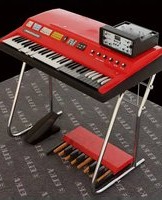
Elka Panther - Audio software MARTINIC - Free user manual and instructions
Find the device manual for free Elka Panther MARTINIC in PDF.


Pick your language and provide your email: we'll send you a specifically translated version.
| Product Type | Virtual Instrument (VST/AU/AAX) |
| Developer | MARTINIC |
| Model | Elka Panther |
| Category | Audio Software (Synthesizer Emulation) |
| Version | 1.0 (approximate) |
| System Requirements (Windows) | Windows 7 or later, 2 GHz CPU, 4 GB RAM, 100 MB free disk |
| System Requirements (macOS) | macOS 10.12 or later, 2 GHz CPU, 4 GB RAM, 100 MB free disk |
| Plugin Formats | VST2, VST3, AU, AAX (64-bit) |
| License Type | Commercial (paid license) |
| Year Released | 2020 (estimated) |
| Main Features | Authentic emulation of Elka Panther 60s synthesizer, dual VCO, resonant filter, envelope generators, built-in effects (chorus, reverb), polyphonic mode |
| Presets | Over 200 factory presets |
| Standalone Operation | Yes |
| Manual Language | English (PDF, 26 pages) |
| Cleaning Instructions | Not applicable (software) |
Frequently Asked Questions - Elka Panther MARTINIC
What is the Elka Panther software?
The Elka Panther is a virtual instrument plugin that emulates the classic Elka Panther 60s synthesizer, developed by MARTINIC.
What plugin formats are supported?
It supports VST2, VST3, AU, and AAX (all 64-bit).
What are the minimum system requirements?
Windows 7+ or macOS 10.12+, 2 GHz CPU, 4 GB RAM, 100 MB free disk space.
Can I use it as a standalone application?
Yes, the Elka Panther can run as a standalone application without a DAW.
How do I install the software?
Download the installer from the MARTINIC website, run it, and follow the on-screen instructions. Activate with your license key.
How many presets are included?
There are over 200 factory presets covering a wide range of vintage synth sounds.
Does it require an internet connection?
An internet connection is required only for installation and license activation. After that, offline use is possible.
Is there a demo version available?
Yes, MARTINIC offers a fully functional 14-day trial on their website.
Can I resize the user interface?
Yes, the GUI is scalable and supports up to 200% size for high-resolution displays.
Where can I find the user manual?
The manual is available as a free PDF download on the MARTINIC website or via notice-facile.com.
User questions about Elka Panther MARTINIC
0 question about this device. Answer the ones you know or ask your own.
Ask a new question about this device
No questions yet. Be the first to ask one.
Download the instructions for your Audio software in PDF format for free! Find your manual Elka Panther - MARTINIC and take your electronic device back in hand. On this page are published all the documents necessary for the use of your device. Elka Panther by MARTINIC.
USER MANUAL Elka Panther MARTINIC

Manual assistant
Powered by Anthropic
Waiting for your message
Product information
Brand : MARTINIC
Model : Elka Panther
Category : Audio software