
CM650ET - Computer monitor HITACHI - Free user manual and instructions
Find the device manual for free CM650ET HITACHI in PDF.


User questions about CM650ET HITACHI
0 question about this device. Answer the ones you know or ask your own.
Ask a new question about this device
Download the instructions for your Computer monitor in PDF format for free! Find your manual CM650ET - HITACHI and take your electronic device back in hand. On this page are published all the documents necessary for the use of your device. CM650ET by HITACHI.
USER MANUAL CM650ET HITACHI
EasyMenu is HITACHI's On Screen Display function for easy operation.
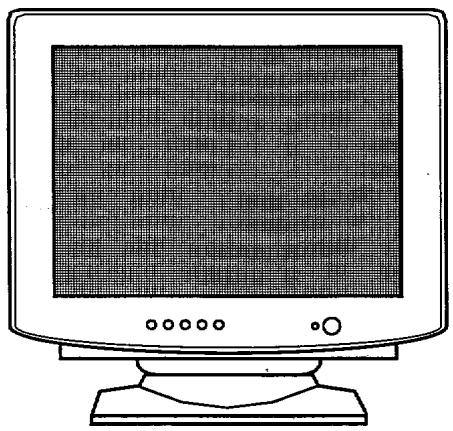
READ THE INSTRUCTIONS INSIDE CAREFULLY. KEEP THIS USER MANUAL FOR FUTURE REFERENCE.
For future reference, record the serial number of your colour monitor.
SERIAL No.
The serial number is located on the rear of the monitor.
This monitor is ENERGY STAR® compliant when used with a computer equipped with VESA DPMS.
The ENERGY STAR@ emblem does not represent EPA endorsement of any product or service.
As an ENERGY STAR@ Partner, Hitachi,Ltd. has determined that this product meets the ENERGY STAR® guidelines for energy efficiency.



NOTE:
The information in this manual is subject to change without notice. The manufacturer assumes no responsibility for any errors that may appear in this manual.
TRADEMARK ACKNOWLEDGEMENT
VGA is a registered trademark of International Business Machines Corporation.
VESA is a trademark of a nonprofit organisation, Video Electronics Standard Association
ENERGY STAR® is a trademark of Environmental Protection Agency (EPA).
REMARQUE:
You have just purchased a TCO'99 approved and labelled product! Your choice has provided you with a product developed for professional use. Your purchase has also contributed to reducing the burden on the environment and also to the further development of environmentally adapted electronics products.
Why do we have environmentally labelled computers?
In many countries, environmental labelling has become an established method for encouraging the adaptation of goods and services to the environment. The main problem, as far as computers and other electronics equipment are concerned, is that environmentally harmful substances are used both in the products and during their manufacture. Since it is not so far possible to satisfactorily recycle the majority of electronics equipment, most of these potentially damaging substances sooner or later enter nature.
There are also other characteristics of a computer, such as energy consumption levels, that are important from the viewpoints of both the work (internal) and natural (external) environments. Since all methods of electricity generation have a negative effect on the environment (e.g. acidic and climate-influencing emissions, radioactive waste), it is vital to save energy. Electronics equipment in offices is often left running continuously and thereby consumes a lot of energy.
What does labelling involve?
This product meets the requirements for the TCO'99 scheme which provides for international and environmental labelling of personal computers. The labelling scheme was developed as a joint effort by the TCO (The Swedish Confederation of Professional Employees), Svenska Naturskyddsforeningen (The Swedish Society for Nature Conservation) and Statens Energimyndighet (The Swedish National Energy Administration).
Approval requirements cover a wide range of issues: environment, ergonomics, usability, emission of electric and magnetic fields, energy consumption and electrical and fire safety.
The environmental demands impose restrictions on the presence and use of heavy metals, brominated and chlorinated flame retardants, CFCs (freons) and chlorinated solvents, among other things. The product must be prepared for recycling and the manufacturer is obliged to have an environmental policy which must be adhered to in each country where the company implements its operational policy.
The energy requirements include a demand that the computer and/or display, after a certain period of inactivity, shall reduce its power consumption to a lower level in one or more stages. The length of time to reactivate the computer shall be reasonable for the user.
Labelled products must meet strict environmental demands, for example, in respect of the reduction of electric and magnetic fields, physical and visual ergonomics and good usability.
Below you will find a brief summary of the environmental requirements met by this product. The complete environmental criteria document may be ordered from:
TCO Development
SE-114 94 Stockholm, Sweden
Fax:+4687829207
Email (Internet): development@tco.se
Current information regarding TCO'99 approved and labelled products may also be
obtained via the Internet, using the address: http://www.tco-info.com/
Environmental requirements
Flame retardants
Flame retardants are present in printed circuit boards, cables, wires, casings and housings. Their purpose is to prevent, or at least to delay the spread of fire. Up to 30% of the plastic in a computer casing can consist of flame retardant substances. Most flame retardants contain bromine or chloride, and those flame retardants are chemically related to another group of environmental toxins, PCBs. Both the flame retardants containing bromine or chloride and the PCBs are suspected of giving rise to severe health effects, including reproductive damage in fish-eating birds and mammals, due to the bio-accumulative* processes. Flame retardants have been found in human blood and researchers fear that disturbances in foetus development may occur.
The relevant TCO'99 demand requires that plastic components weighing more than 25 grams must not contain flame retardants with organically bound bromine or chlorine. Flame retardants are allowed in the printed circuit boards since no substitutes are available.
Cadmium*
Cadmium is present in rechargeable batteries and in the colour-generating layers of certain computer displays. Cadmium damages the nervous system and is toxic in high doses. The relevant TCO'99 requirement states that batteries, the colour-generating layers of display screens and the electrical or electronics components must not contain any cadmium.
Mercury"
Mercury is sometimes found in batteries, relays and switches. It damages the nervous system and is toxic in high doses. The relevant TCO'99 requirement states that batteries may not contain any mercury. It also demands that mercury is not present in any of the electrical or electronics components associated with the labelled unit.
CFCs (freons)
The relevant TCO'99 requirement states that neither CFCs nor HCFCs may be used during the manufacture and assembly of the product. CFCs (freons) are sometimes used for washing printed circuit boards. CFCs break down ozone and thereby damage the ozone layer in the stratosphere, causing increased reception on earth of ultraviolet light with e.g. increased risks of skin cancer (malignant melanoma) as a consequence.
Lead"
Lead can be found in picture tubes, display screens, solders and capacitors. Lead damages the nervous system and in higher doses, causes lead poisoning. The relevant TC0'99 requirement permits the inclusion of lead since no replacement has yet been developed.
FEATURES 1-1
CAUTIONS 1-2
INSTALLATION 1-6
STANDARD SETTINGS. 1-7
OPERATION 1-8
AUTOMATIC SIGNAL CHECK. 1-11
POWER MANAGEMENT SYSTEM. 1-11
PLUG & PLAY 1-11
SPECIFICATIONS. 1-12
FEATURES
The following features are provided by the Colour Monitor.
Sharpest Focus and Highest Contrast
Flat screen Enhanced Dot Pitch (EDP) CRT with FS double focus and AR-ASC coating gives the sharpest focus and highest contrast to minimise eye fatigue.
Wide-range Multi-Scanning
Automatic scanning and automatic adjustment to conform with a wide range of scanning frequencies and user requirements.
Digital Picture Control Function
Position, size, pincushion, trapezoid, parallelogram, pin balance and rotation are adjustable by digital controls.
Geometry setting can be stored for different H/V frequencies. Microprocessor-based preset functions can store 26 sets of geometry settings including the standard factory settings.
Digital Colour Control Function
Red, green, and blue colour balance is adjustable by digital control.
An adjusted colour setting can be stored and recalled by the colour select button.
Moire Reduction
This monitor has horizontal and vertical moirre reduction function.
Power Saving System
The Environmental Protection Agency (EPA) has established a voluntary program by which manufacturers enable computer products to go into low power states while not being used. This monitor has a low power "sleep" mode, which is compliant with the EPA requirements for the ENERGY STAR program, and will assist you in conserving energy.
Please refer to the section of "POWER SAVING SYSTEM" for details.
EasyMenu
An On Screen Display function that allows direct access to adjust all operations from the front panel.
PLUG & PLAY
This monitor is VESA DDC1/2B compliant when used with a computer compliant with VESA DDC (Display Data Channel).


NEVER REMOVE THE REAR COVER!
The rear cover MUST be removed only by authorised service personnel. This colour monitor contains high voltage components.
THE POWER POINT SHOULD BE CLOSE TO THE MONITOR AND EASILY ACCESSIBLE!
INSTALL THE UNIT IN AN SUITABLE ENVIRONMENT!
DO NOT expose this monitor to rain or moisture to prevent electric shock or fire hazard. This unit is designed to be used in an office or business environment. DO NOT subject the unit to vibrations, dust, or corrosive gases.
- KEEP IN A WELL VENTILATED PLACE!
DO NOT cover this monitor or place anything against any sides (not only the top, right and left side but also the rear and bottom side) of unit. Ventilation holes are provided at all sides of the rear cover to prevent the temperature from rising.
- KEEP AWAY FROM HEAT SOURCES!
AVOID placing the unit in direct sunshine or near a heating appliance.
BE CAREFUL OF MAGNETIC FIELDS!
DO NOT place a magnet, loudspeaker system, floppy disk drive, printer, or anything which will generate magnetism near the unit. A magnetic field may cause blurred colours or distortion of the displayed pattern.
BE CAREFUL OF GENERATED MAGNETISM!
After the power has been turned on or "DEGAUSS" button has been pressed, the CRT is demagnetised for approximately 10 seconds. This generates a strong magnetic field around the front cover which may affect the data stored on magnetic tape or disks near the front cover. Place such magnetic recording equipment and tapes/disks away from this unit.
Avoid direct rays of the sun or room lighting onto the CRT screen in order to prevent eye fatigue.
THE ENCLOSED POWER CORD MUST BE USED!
In Europe, a proper European standard approved power cord is to be used with this monitor. For a rated current up to 6 A, a type not lighter than H05VV-F 3G 0.75 mm² or H05VVH2-F 3G 0.75 mm² must be used.
In USA/Canada, use a UL LISTED/CSA LABELLED or CERTIFIED power cord set meeting the following specifications
Rating: min. 125V, 7A
Length: max. 3.0 m
Type: SVT or SJT
Plug type: NEMA 5-15P figure, Parallel blade, Grounding type
Failure to do so may cause fire or electric shock hazard.
■ USE ONLY THE CORRECT VOLTAGE POWER OUTLET WITH SAFETY GROUND CONNECTION !
100 - 120 V for USA, Canada, etc.
200 - 240 V for Europe, etc.
(This monitor will automatically adjust to the input voltage 100 - 240V.)
CAUTION for 200 - 240V operation only
This equipment relies on the protective devices in the building installation for short-circuit and over-current protection. Refer to the following table for the suitable number and location of the protective devices which should be provided in the building installation.
PROTECTIVE DEVICES IN SINGLE - PHASE EQUIPMENT OR SUB -ASSEMBLIES
| Protection against | Minimum number of fuses or circuit - breaker poles | Location | |
| Equipment to be connected to POWER SYSTEMS with earthed neutral reliably identified | Earth faults | 1 | Both conductors |
| Over-current | 1 | Either of the two conductors | |
| Equipment to be connected to any supply, including IT POWER SYSTEMS and supplies with reversible plugs | Earth faults | 2 | Both conductors |
| Over-current | 1 | Either of the two conductors |
Verify that the protective devices in the building installation meets the conditions in the table prior to installing the equipment.
BE CAREFUL OF POWER CORD CONNECTION!
Before inserting the plug of the power cord into a power point of the correct voltage, check that the connection portion of the power cord is clean (with no dust). Then, insert the plug of power cord to a power point firmly, otherwise it may cause electrical shock or fire.
■REMOVE THE POWER CORD FOR COMPLETE SEPARATION !
For complete separation from the power source, remove the power cord from the monitor or from the wall outlet.
AVOID FREQUENT POWER ON-OFF SWITCHING!
DO NOT repeat OFF and ON in a short period. It may cause blurred colours or distortion of the displayed pattern.
■ BE CAREFUL OF STATIC ELECTRICITY ON CRT SURFACE!
To prevent electrical shock by the static electricity on the CRT surface, disconnect the power cord at least 30 seconds after turning off the power.
ABOUT CLEANING
This monitor has a non-glare and anti-electrostatic treatment on the surface of the screen. Use water or alcoholic solvent with soft cloth like gauze to clean the surface of the screen.
NEVER use abrasive, glass cleaner containing highly concentrated ammonia and strong base chemicals since they damage the surface treatment.
Clean the cabinet and controls with a lightly moistened soft cloth.
DO NOT use aerosol sprays, solvents or abrasive cleaners.
FCC (Federal Communications Commission) STATEMENT WARNING
WARNING : This equipment has been tested and found to comply with the limits for a Class B digital device, pursuant to Part 15 of the FCC Rules. These limits are designed to provide reasonable protection against harmful interference in a residential installation. This equipment generates, uses, and can radiate radio frequency energy and, if not installed and used in accordance with the instructions, may cause harmful interference to radio communications. However, there is no guarantee that interference will not occur in a particular installation. If this equipment does cause harmful interference to radio or television reception, which can be determined by turning the equipment off and on, the user is encouraged to try to correct the interference by one or more of the following measures:
- Reorient or relocate the receiving antenna.
- Increase the separation between the equipment and receiver.
- Connect the equipment into an outlet on a circuit different from that to which the receiver is connected.
- Consult the dealer or an experienced radio / TV technician for help.
Instructions to Users : This equipment complies with the requirements of FCC (Federal Communication Commission) equipments provided that following conditions are met.
(1) Power cord: Unshielded power cord must be used.
(2) Video inputs: The input signal amplitude must not exceed the specified level.
CAUTION : Changes or modifications not expressly approved by the party responsible for compliance could void the user's authority to operate the equipment.
Declaration of Conformity
According to 47CFR, Part 2 and 15 for
Class B Personal Computers and
Peripherals; and / or
CPU Boards and Power Supplies used
with Class B Personal Computers:
We: Nissei Sangyo America, Ltd.
Located at: 200 Lowder Brook Drive Suite 2200, Westwood. MA.
02090-1124 U.S.A.
Declare under sole responsibility that the product identified herein, complies with 47CFR Part 2 and 15 of the FCC rules as a Class B digital device. Each product marketed, is identical to the representative unit tested and found to be compliant with the standards. Records maintained continue to reflect the equipment being produced can be expected to be within the variation accepted, due to quantity production and testing on a statistical basis as required by 47CFR 2.909. Operation is subject to the following two conditions: (1) This device may not cause harmful interference, and (2) This device must accept any interference received, including interference that may cause undesired operation. The above named party is responsible for ensuring that the equipment complies with the standards of 47CFR 15.101 to 15.109.
Tradename: Color Monitor(With USB HUB)
Model Number:CM650(With_DUB-01)
Signature of Party Responsible:
Printed name of Party Responsible: Satoshi Tanabe
Executed on (Date), at (Place): November 24, 1998, MA., U. s.A.
FOR THE CUSTOMERS IN THE U.K.
THIS PRODUCT IS SUPPLIED WITH A TWO PIN MAINS PLUG FOR USE IN MAINLAND EUROPE. FOR THE U.K. PLEASE REFER TO THE NOTES ON THIS PAGE.
IMPORTANT FOR UNITED KINGDOM
WORDING FOR CLASS I EQUIPMENT INSTRUCTION BOOKS AND LABELS
The mains lead on this equipment is supplied with a moulded plug incorporating a fuse, the value of which is indicated on the pin face of the plug. Should the fuse need to be replaced, an ASTA or BSI approved BS 1362 fuse must be used of the same rating. If the fuse cover is detachable never use the plug with the cover omitted. If a replacement fuse cover is required, ensure it is of the same colour as that visible on the pin face of the plug. Fuse covers are available from your dealer.
DO NOT cut off the mains plug from this equipment. If the plug fitted is not suitable for the power points in your home or the cable is too short to reach a power point, then obtain an appropriate safety approved extension lead or consult your dealer.
Should it be necessary to change the mains plugs, this must be carried out by a competent person, preferably a qualified electrician.
If there is no alternative to cutting off the mains plug, ensure that you dispose of it immediately, having first removed the fuse, to avoid a possible shock hazard by inadvertent connection to the mains supply.
WARNING: THIS EQUIPMENT MUST BE EARTHED
IMPORTANT
The wires in the mains lead are coloured in accordance with the following code:
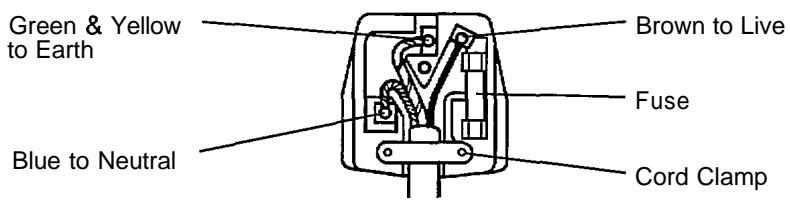
Green and Yellow = Earth, Blue = Neutral, Brown = Live.
As these colours may not correspond with the coloured markings identifying the terminals in your plug, proceed as follows:
The wire which is coloured GREEN and YELLOW must be connected to the terminal in the plug which is marked with the letter E or by the earth symbol ① or coloured GREEN or GREEN and YELLOW.
The wire coloured BLUE must be connected to the terminal marked with the letter N or coloured BLUE or BLACK. The wire coloured BROWN must be connected to the terminal marked with the letter L or coloured BROWN or RED.
Install the monitor in the following way, taking care to maintain safety
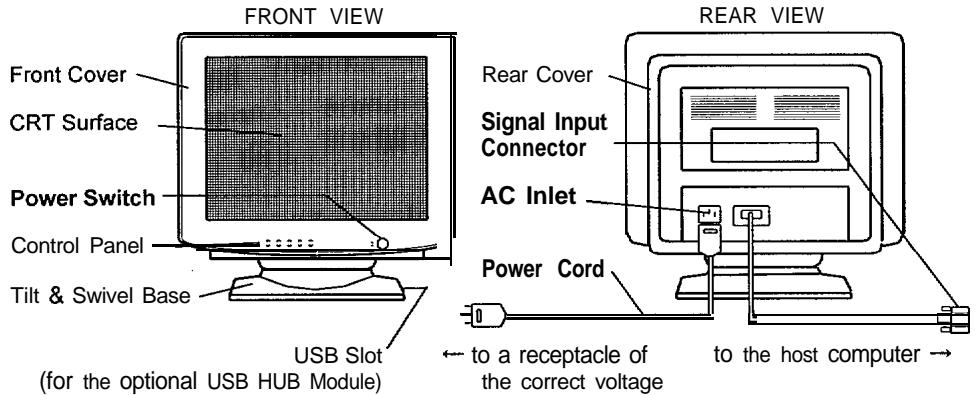
1. Installation
Install the monitor on a horizontal base.
2. Power Cord Connection
① Make sure of using the power cord meeting the safety standard of the country in which you are using the monitor.
② Insert the connector of a power cord to the AC Inlet of the monitor.
③ Insert the plug of the power cord to a power point of the correct voltage.
3. Signal Cable Connection
Insert the Signal Input Connector of the monitor to the host computer, with attention to it's suitability, and secure the screws on the connector shell firmly.
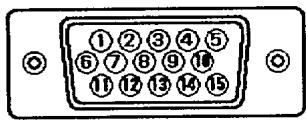
D-Sub Mini 1 B-pin Connector
4. Power On
Turn on the Power Switch of the monitor first, then the computer.
Refer to Page 1-8 "POWER ON/OFF".
| Pin No. | Signal |
| 1 | Red Video |
| 2 | Green Video |
| 3 | Blue Video |
| 4 | Ground |
| 5 | DDC Ground |
| 6 | Red Ground |
| 7 | Green Ground |
| 8 | Blue Ground |
| 9 | No connection |
| 10 | Ground |
| 11 | Ground |
| 12 | Bi-directional Data [SDA] |
| 13 | H.Sync. (or H/V) |
| 14 | V.Sync. [VCLK] |
| 15 | Data Clock [SCL] |
Microprocessor-based preset functions can store 26 sets of geometry settings including the standard settings. The following industrial standard settings have been preprogrammed by the factory.
| No. | Video Mode Name(with Resolution and Vertical Frequency) | Horizontal Frequency | Video Mode |
| 1 | VGA 640 × 400- 70 Hz | 31.47 kHz | VGA |
| 2 | VESA 640 × 400- 85 Hz | 37.86 kHz | VESA |
| 3 | VESA 800 × 600- 85 Hz | 53.67 kHz | VESA |
| 4 | VESA 1024 × 768- 75 Hz | 60.02 kHz | VESA |
| 5 | VESA 1024 × 768- 85 Hz | 68.68 kHz | VESA |
| 6 | VESA 1152 × 864- 75 Hz | 67.50 kHz | VESA |

NOTE :
■ Input signals with approximately the same frequencies may be regarded as the same signal.
The following horizontal timing conditions are recommended (at sync. H, V separate or H/V composite).
for 31kHz - 45kHz horizontal frequency: Horizontal front porch should be more than 0.1~ s . Horizontal sync. width should be within 1.0 - 3.8~ s . Horizontal back porch should be more than 1.2~ s . Horizontal blanking width should be more than 3.5~ s .
for 45kHz - 69kHz horizontal frequency: Horizontal front porch should be more than 0.1~ s . Horizontal sync. width should be within 1.0 - 3.0~ s . Horizontal back porch should be more than 1.1 s . Horizontal blanking width should be more than 3.0~ s .
The following vertical timing conditions are recommended. Vertical front porch should be more than 10~ s Vertical sync. width should be less than 200~ s Vertical back porch should be more than 400~ s Vertical blanking width should be more than 500~ s
In case the front or back porch is extremely long, or the data display time is extremely short, it may not be able to set the expected size and position.
Standard settings are subject to change without notice.
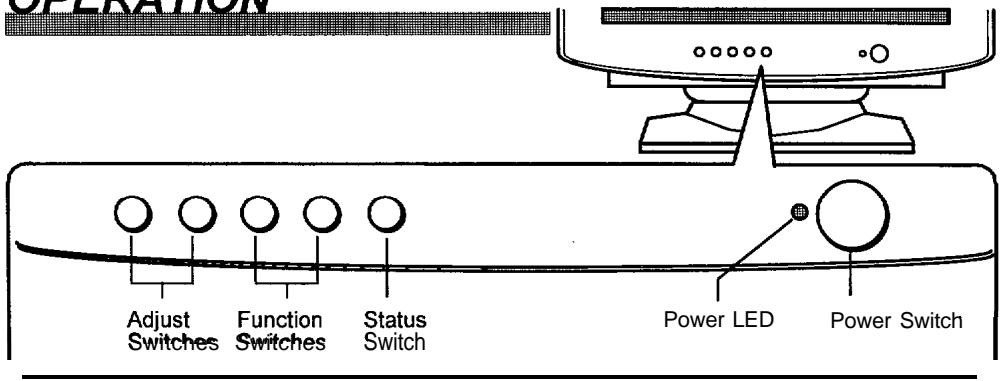
POWER ON/OFF
Press the Power switch, to switch the power ON or OFF.
When power is ON, the power LED lights.
After turning OFF the switch, wait at least 5 seconds before restarting the monitor. Otherwise the monitor may operate incorrectly.
If the picture doesn't appear, turn OFF the power switch, make sure of the following and wait at least 30 seconds before restarting the monitor. Make sure the power switch of the computer, power cord connection, signal cable connection and the input sync. signal are correct.
CONTROL
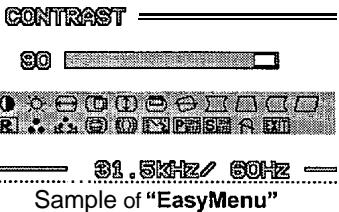
① Press the Status switch. The On Screen Display function of "EasyMenu" then shows the selected function, its condition, the function menu and the input signal frequencies.
- You can select the EasyMenu language. Use the function "LANGUAGE SELECT".
② To select the function, use the Function switches.
③ To execute the selected function, use the Adjust Switches in the Table-I overleaf.
You can save the your geometry and colour settings. Refer to "SAVE" below.
To clear the EasyMenu, either push the status switch again or wait for 10 seconds.
SAVE
If the function "AUTO SAVE" is ON, you can save automatically at clearing the EasyMenu.
Table-I
| Function | - | + | |
| CONTRAST | makes the Contrast intensity weaker. | makes the Contrast intensity stronger. | |
| BRIGHTNESS | makes Brightness darker. | makes Brightness brighter. | |
| H.SIZE | shrinks horizontally. | expands horizontally. | |
| H POSITION | moves the position to the left. | moves the position to the right. | |
| V.SIZE | shrinks vertically. | expands vertically. | |
| V POSITION | moves the position down. | moves the position up. | |
| ROTATION | rotates counter clockwise. | rotates clockwise. | |
| PINCUSHION | curves the left/right sides inward. | curves the left/right sides outwards. | |
| TRAPEZOID | shrinks the top side, and expands the bottom side. | expands the top side, and shrinks the bottom side. | |
| PIN BALANCE | curves the lift/right sides to the left. | curves the left/right sides to the right. | |
| PARALLELOGRAM | tilts to the right. | tilts to the left. | |
| RECALL | recalls the factory preset modes. (Refer to Page 1-7 "STANDARD SETTINGS"). | ||
| COLOR SELECT | changes the colour to the previous mode. USER→6500K→9300K | changes the colour to the next mode. 9300K→6500K→USER | |
| COLOR BALANCE | R | makes the Green and Blue stronger. When the Green or Blue reaches the upper limit, it makes the Red weaker. | makes the Red stronger. When the Red reaches the upper limit, it makes the Green and Blue weaker. |
| G | makes the Blue and Red stronger. When the Blue or Red the reaches the upper limit, it make the Green weaker. | makes the Green stronger. When the Green reaches the upper limit, it makes the Blue and Red weaker. | |
| B | makes the Red and Green stronger. When the Red or Green reaches the upper limit, it make the Blue weaker. | makes the Blue stronger. When the Blue reaches the upper limit, it makes the Red and Green weaker. | |

Table-I (continued)
| Function | - | + |
| H.MOIRE | makes the operation of horizontal moire circuit weaker. | makes the operation of horizontal moire circuit stronger. |
| V.MOIRE | makes the operation of vertical moire circuit weaker. | makes the operation of vertical moire circuit stronger. |
| LANGUAGE SELECT | changes the EasyMenu language to the previous mode.FRANÇAIS (French)ITALIANO (Italian)ESPANOL (Spanish)DEUTSCH (German)ENGLISH | changes the EasyMenu language to the next mode.ENGLISH↓DEUTSCH (German)↓ESPANOL (Spanish)↓ITALIANO (Italian)↓FRANÇAIS (French) |
| POWER MANAGEMENT | disables (OFF) the Power Saving System.Refer to Page I-I 1“POWER MANAGEMENT SYSTEM” | enables (ON) the Power Saving Systems.Refer to Page I-I 1“POWER MANAGEMENT SYSTEM”. |
| AUTO SAVE | disables (OFF) the Auto Save function.Refer to Page I-8“SAVE”. | enables (ON) the Auto Save function.Refer to Page I-8“SAVE”. |
| DEGAUSS | degauss.Use this function only when you see colour impurities on the screen after turning ON the monitor.Wait for about 10 minutes before repeating the function.Remember, the monitor is automatically degaussed during initial power on. | |
| EXIT | quitts the functions of EasyMenu. | |
AUTOMATIC SIGNAL CHECK
When the monitor has detected the change of the signal input condition, the monitor will indicate the condition automatically, as follows.
| Indication | Sample of EasyMenu | Condition |
| The EasyMenu indicates the horizontal frequency and vertical frequency. Precision frequency, Horizontal ±2kHz approx. Vertical ±2Hz approx. | CONTRAST S0 1 2 3 4 5 6 7 8 9 10 11 12 13 14 15 16 17 18 19 20 21 22 23 24 25 26 27 28 29 30 31 32 33 34 35 36 37 38 39 40 41 42 43 44 45 46 47 48 49 50 51 52 53 54 55 56 57 58 59 60 61 62 63 64 65 66 67 68 69 70 71 72 73 74 75 76 77 78 79 80 81 82 83 84 85 86 87 88 89 90 91 92 93 94 95 96 97 98 99 100 101 102 103 104 105 106 107 108 109 110 111 112 113 114 115 116 117 118 119 120 121 122 123 124 125 126 127 128 129 130 131 132 133 134 135 136 137 138 139 140 141 142 143 144 145 146 147 148 149 150 151 152 153 154 155 156 157 158 159 160 161 162 163 164 165 166 167 168 169 170 171 172 173 174 175 176 177 178 179 180 181 182 183 184 185 186 187 188 189 190 191 192 193 194 195 196 197 198 199 200 201 202 203 204 205 206 207 208 209 210 211 212 213 214 215 216 217 218 219 220 221 222 223 224 225 226 227 228 229 230 231 232 233 234 235 236 237 238 239 240 241 242 243 244 245 246 247 248 249 250 251 252 253 254 255 256 257 258 259 260 261 262 263 264 265 266 267 268 269 270 271 272 273 274 275 276 277 278 279 280 281 282 283 284 285 286 287 288 289 290 291 292 293 294 295 296 297 298 299 300 301 302 303 304 305 306 307 308 309 310 311 312 313 314 315 316 317 318 319 320 321 322 323 324 325 326 327 328 329 330 331 332 333 334 335 336 337 338 339 340 341 342 343 344 345 346 347 348 349 350 351 352 353 354 355 356 357 358 359 360 361 362 363 364 365 366 367 368 369 370 371 372 373 374 375 376 377 378 379 380 381 382 383 384 385 386 387 388 389 390 391 392 393 394 395 396 397 398 399 400 401 402 403 404 405 406 407 408 409 410 411 412 413 414 415 416 417 418 419 420 421 422 423 424 425 426 427 428 429 430 431 432 433 434 435 436 437 438 439 440 441 442 443 444 445 446 447 448 449 450 451 452 453 454 455 456 457 458 459 460 461 462 463 464 465 466 467 468 469 470 471 472 473 474 475 476 477 478 479 480 481 482 483 484 485 486 487 488 489 490 491 492 493 494 495 496 497 498 499 500 501 502 503 504 505 506 507 508 509 510 511 512 513 514 515 516 517 518 519 520 521 522 523 524 525 526 527 528 529 530 531 532 533 534 535 536 537 538 539 540 541 542 543 544 545 546 547 548 549 550 551 552 553 554 555 556 557 558 559 560 561 562 563 564 565 566 567 568 569 570 571 572 573 574 575 576 577 578 579 580 581 582 583 584 585 586 587 588 589 590 591 592 593 594 595 596 597 598 599 600 601 602 603 604 605 606 607 608 609 610 611 612 613 614 615 616 617 618 619 620 621 622 623 624 625 626 627 628 629 630 631 632 633 634 635 636 637 638 639 640 641 642 643 644 645 646 647 648 649 650 651 652 653 654 655 656 657 658 659 660 661 662 663 664 665 666 667 668 669 670 671 672 673 674 675 676 677 678 679 680 681 682 683 684 685 686 687 688 689 690 691 692 693 694 695 696 697 698 699 700 701 702 703 704 705 706 707 708 709 710 711 712 713 714 715 716 717 718 719 720 721 722 723 724 725 726 727 728 729 730 731 732 733 734 735 736 737 738 739 740 741 742 743 744 745 746 747 748 749 750 751 752 753 754 755 756 757 758 759 760 761 762 763 764 765 766 767 768 769 770 771 772 773 774 775 776 777 778 779 780 781 782 783 784 785 786 787 788 789 790 791 792 793 794 795 796 797 798 799 800 801 802 803 804 805 806 807 808 809 810 811 812 813 814 815 816 817 818 819 820 821 822 823 824 825 826 827 828 829 830 831 832 833 834 835 836 837 838 839 840 841 842 843 844 845 846 847 848 849 850 851 852 853 854 855 856 857 858 859 860 861 862 863 864 865 866 867 868 869 870 871 872 873 874 875 876 877 878 879 880 881 882 883 884 885 886 887 888 889 890 891 892 893 894 895 896 897 898 899 900 901 902 903 904 905 906 907 908 909 910 911 912 913 914 915 916 917 918 919 920 921 922 923 924 925 926 927 928 929 930 931 932 933 934 935 936 937 938 939 940 941 942 943 944 945 946 947 948 949 950 951 952 953 954 955 956 957 958 959 960 961 962 963 964 965 966 967 968 969 970 971 972 973 974 975 976 977 978 979 980 981 982 983 984 985 986 987 988 989 990 |
POWER MANAGEMENT SYSTEM
This monitor meets the ENERGY STAR®, VESA DPMS (Display Power Management Signalling) standard specifications. The monitor has a built-in power management system that automatically reduces power consumption when the PC is not in use. This power management system is effective only when used with VESA DPMS compliant PC or Video Card.
| APM State | Signal Requirement | Monitor Action | Power Consumption | Power LED |
| Standby | H.Sync. OFF | Switches to saving mode & screen darkens | 15W max. | Orange |
| Suspend | V.Sync. OFF | 15W max. | Orange | |
| Off | H.Sync. OFF and V.Sync. OFF | 3W max. | Orange |
NOTE : Once the monitor receives the first signal from the PC and initiate the power management system.
PLUG & PLAY
This monitor complies with VESA DDC 1/2B specifications. Plug & Play is a system with computer, peripherals (including monitors), and operating system. It works when the monitor is connected to DDC ready computer that is running an operating system software that is capable for the plug & play.

CRT
17 inch picture tube,
0.22 mm horizontal dot pitch
(0.21 mm horizontal mask pitch)
100^ deflection, FS double focus, AR-ASC coating.
input Signal
Video : 0.7 Vp-p, analogue
Sync. : Separate H/V, TTL level
Composite H/V, TTL level
Synchronisation
Horizontal : 31 - 69 kHz
Vertical : 50 - 130 Hz
Resolution
Horizontal : 1280 dots (max.)
Vertical : 1024 lines (max.)
Video Clock frequency
110 MHz (typical)
Viewable Image Size
16.0 inches (406 mm), diagonal (typical)
Viewable Image Area
Horizontal : 326 mm (typical)
Vertical : 245 mm (typical)
Colour Temperature
9300K : Standard colour balance, 9300K
6500K : Standard colour balance, 6500K
USER :Userdefined
Warm-up Time
30 minutes to reach optimum performance level.
Power Supply
AC 100 - 240 V (automatically selected)
50/60 Hz, 2.5 A (max.)
Power Consumption : 110 W (typical)
(provided with power save circuit.)
Dimensions
412 (W) × 431 (H) × 373 (D) mm
(including Tilt & Swivel Base)
Weight
17.0 kg (approx.)
(including Tilt & Swivel Base)
Environmental
Temperature
Humidity
Operation
5^ C to 40^ C
10% to 80%
Storoe
-20°C to 60°C
10% to 90%
USB HUB (optional)
USB HUB Module
with 4 downstream and 1 upstream ports
Specification and Design are subject to change without notice.