Bolero Aguazero 6700 Dark B - Dishwasher CECOTEC - Free user manual and instructions
Find the device manual for free Bolero Aguazero 6700 Dark B CECOTEC in PDF.


Pick your language and provide your email: we'll send you a specifically translated version.
| Brand | Cecotec |
| Model | Bolero Aguazero 6700 Dark B |
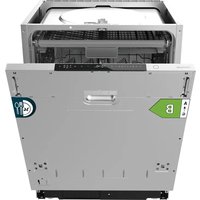
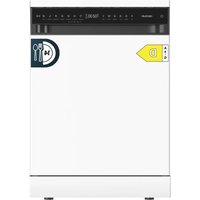
| Product type | Built-in dishwasher |
| Dimensions (W x D x H) | 60 cm x 55 cm x 85 cm |
| Net weight | 40 kg |
| Power supply | 220-240 V, 50 Hz, 10 A |
| Maximum power | 1900 W |
| Capacity | 12 place settings |
| Energy class | D |
| Water consumption per cycle | 9.5 L |
| Energy consumption per cycle | 0.92 kWh |
| Noise level | 46 dB(A) |
| Number of programs | 6 programs (Eco, Intensive, Quick, Glass, Prewash, Auto) |
| Special functions | Half load, Delayed start, Extra drying, Child lock |
| Drying type | Condensation |
| Tub material | Stainless steel |
| Filters | Self-cleaning filter, fine filter |
| Maintenance and cleaning | Regular cleaning of filters, spray arms and door seal |
| Safety | Leak protection, child safety, door lock |
| Spare parts and repairability | Parts available on Cecotec website and from authorized dealers |
| General information | User and installation manual included, 2-year warranty |
Frequently Asked Questions - Bolero Aguazero 6700 Dark B CECOTEC
How to install the Bolero Aguazero 6700 Dark B dishwasher?
Make sure the appliance is level and stable. Connect the cold water supply (pressure 0.04-1 MPa) and the drain. Plug the power cord into a grounded outlet. Refer to the installation diagram in the manual.
What to do if the dishwasher does not start?
Check that the door is properly closed, the program is selected, and the water is turned on. Make sure the water inlet filter is not clogged. If the problem persists, contact technical support.
How to clean the dishwasher filters?
Remove the lower basket, unscrew the cylindrical filter and rinse it under running water. Clean the flat filter as well. Reassemble everything at least once a month.
Why is my dishwasher making noise?
An abnormal noise may be caused by metal objects in the basket, improperly placed dishes, or a blockage in the spray arm. Check and rearrange the load.
How to use the delayed start function?
Select a program, then press the 'Delayed start' button to choose the number of hours delay (1-24h). Close the door, the appliance will start automatically at the scheduled time.
What does error code E1 on the display mean?
Code E1 indicates a water inlet problem. Check that the tap is open and the hose is not kinked. If the code persists, clean the inlet filter.
How much dishwasher detergent to use?
Use specific dishwasher detergent. Fill the main compartment according to the soiling level (15-30 g). For rinse aid, adjust the dispenser according to water hardness.
How to activate the child lock?
Press the 'Start/Pause' and 'Delayed start' buttons simultaneously for 3 seconds until the lock symbol appears. To deactivate, repeat the operation.
The dishwasher leaves residues on the dishes. Why?
This may be due to too tight loading, a dirty filter, insufficient rinsing, or poor quality detergent. Make sure to use regenerating salt and rinse aid.
Where to find spare parts for this model?
Spare parts are available on the official Cecotec website (www.cecotec.com) and from authorized dealers. Use the model number Bolero Aguazero 6700 Dark B to identify the parts.
User questions about Bolero Aguazero 6700 Dark B CECOTEC
0 question about this device. Answer the ones you know or ask your own.
Ask a new question about this device
No questions yet. Be the first to ask one.
Download the instructions for your Dishwasher in PDF format for free! Find your manual Bolero Aguazero 6700 Dark B - CECOTEC and take your electronic device back in hand. On this page are published all the documents necessary for the use of your device. Bolero Aguazero 6700 Dark B by CECOTEC.
USER MANUAL Bolero Aguazero 6700 Dark B CECOTEC
Manual assistant
Powered by Anthropic
Waiting for your message
Product information
Brand : CECOTEC
Model : Bolero Aguazero 6700 Dark B
Category : Dishwasher