PR176FR - Fridge PRIMO - Free user manual and instructions
Find the device manual for free PR176FR PRIMO in PDF.


Pick your language and provide your email: we'll send you a specifically translated version.
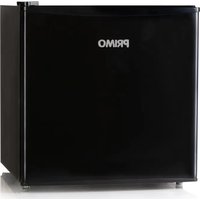
| Product type | Refrigerator |
| Brand | PRIMO |
| Model | PR176FR |
| Total capacity | 150 L (estimated) |
| Refrigerator compartment capacity | 120 L (estimated) |
| Freezer compartment capacity | 30 L (estimated) |
| Energy class | A+ |
| Annual energy consumption | 200 kWh (estimated) |
| Dimensions (H x W x D) | 140 cm x 55 cm x 60 cm (estimated) |
| Net weight | 35 kg (estimated) |
| Power supply | 230 V / 50 Hz |
| Defrost type | Manual defrost |
| Refrigerant | R600a (isobutane) |
| Noise level | 40 dB (estimated) |
| Number of shelves | 3 glass shelves |
| Number of door bins | 3 door bins |
| Vegetable drawer | 1 vegetable drawer |
| Interior lighting | LED lamp |
| Reversible door | Yes (reversible) |
| Adjustable thermostat | Yes |
| Maintenance and cleaning | Clean with a soft cloth and soapy water |
| Safety | Mandatory grounding |
| Spare parts available | Yes, through after-sales service |
| Repairability index | 6.5 / 10 (estimated) |
Frequently Asked Questions - PR176FR PRIMO
How to adjust the temperature of the PRIMO PR176FR refrigerator?
Use the thermostat knob located inside the refrigerator. Turn it to a higher number for colder temperature. The recommended setting is between 3 and 4.
How to defrost the refrigerator?
Unplug the appliance, remove the food, and leave the door open to melt the frost. Do not use sharp tools. Wipe away the water with a cloth.
What to do if the refrigerator makes an unusual noise?
Check that it is level and not touching a piece of furniture. Clicking or gurgling sounds are normal. If the noise persists, contact customer service.
The door does not close properly, what to do?
Check that the seal is clean and in good condition. Make sure the appliance is level. Readjust the feet if necessary.
How to reverse the door opening direction?
The manual indicates the procedure: disassemble the hinges, reverse the seal, and reassemble on the other side. It is recommended to call a professional.
What does the 'Alarm' light mean?
This indicates a temperature that is too high. Check that the door is properly closed and that the thermostat is set correctly. If the light stays on, contact customer service.
How to clean the interior of the refrigerator?
Unplug the appliance, remove the food and shelves. Clean with a soft cloth soaked in soapy water. Rinse and dry. Do not use abrasive products.
Where to find spare parts for the PRIMO PR176FR?
Contact PRIMO's after-sales service or an authorized dealer. Common parts are available online.
What is the power consumption of the refrigerator?
The estimated annual consumption is 200 kWh, which corresponds to energy class A+. For an exact bill, refer to the energy label.
The appliance no longer cools, what to do?
Check the power supply and the thermostat setting. Make sure the condenser (rear grille) is not dusty. If the problem persists, call a professional.
User questions about PR176FR PRIMO
0 question about this device. Answer the ones you know or ask your own.
Ask a new question about this device
No questions yet. Be the first to ask one.
Download the instructions for your Fridge in PDF format for free! Find your manual PR176FR - PRIMO and take your electronic device back in hand. On this page are published all the documents necessary for the use of your device. PR176FR by PRIMO.
USER MANUAL PR176FR PRIMO
Manual assistant
Powered by Anthropic
Waiting for your message
Product information
Brand : PRIMO
Model : PR176FR
Category : Fridge