
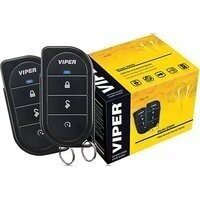
3108V - Car alarm Viper - Free user manual and instructions
Find the device manual for free 3108V Viper in PDF.


Pick your language and provide your email: we'll send you a specifically translated version.
| Product Type | Car Alarm System |
| Brand | Viper |
| Model | 3108V |
| Dimensions (Control Unit) | 4.3 x 2.8 x 1.2 inches |
| Weight | 0.5 lbs (225 g) |
| Power Supply | 12V DC vehicle battery |
| Current Draw (Standby) | Less than 15 mA |
| Siren Output | 120 dB |
| Remote Start Range | Up to 1 mile (1.6 km) |
| Keyless Entry | Yes, with two 4-button remotes |
| Shock Sensor | Adjustable dual-zone impact sensor |
| Anti-Carjacking Mode | Yes, programmable |
| Valet Mode | Yes, temporary disable alarm |
| Immobilizer | Starter kill relay included |
| Two-Way Confirmation | LCD remote with vibration and beep |
| Maintenance | Wipe surfaces with dry cloth; check battery in remote annually |
| Safety Features | Over-rev protection, turbo timer, parking light flash |
| Spare Parts Available | Remote transmitters, shock sensor, siren, wiring harness |
| Repairability | Replaceable fuses, modular components |
| Warranty | Limited lifetime on components, 1 year on labor |
Frequently Asked Questions - 3108V Viper
How do I install the Viper 3108V car alarm?
Installation requires connecting the main unit to the vehicle's 12V battery, ground, and specific wires for door triggers, ignition, and siren. It is recommended to have it professionally installed to avoid damage to the vehicle's electrical system.
Can I program the remote to control multiple vehicles?
Each remote is paired to a specific receiver. To pair a remote, enter programming mode by turning the ignition on/off a specified number of times, then press a button on the remote. Check the manual for exact steps.
What does the shock sensor do and how do I adjust it?
The shock sensor detects impacts to the vehicle. It has a dual-zone system: a light impact triggers a warning chirp, a heavy impact triggers the full alarm. Adjust sensitivity via a small screw on the sensor.
How do I activate valet mode?
Valet mode disables the alarm temporarily, useful when handing the car to a valet. To activate, press the valet button inside the car or use a specific remote sequence (e.g., press Lock and Unlock simultaneously). The LED will stay solid.
The remote is not working. What should I do?
First, check the remote battery (replace with CR2032). If that doesn't work, re-sync the remote by pressing the lock button five times quickly. If still not working, the remote may need to be reprogrammed.
How do I start my car remotely?
Press the remote start button on the remote twice within three seconds. The parking lights will flash, and the engine will start. Ensure the car is in park and doors are locked.
What are the features of the two-way LCD remote?
The LCD remote displays the vehicle status (armed, disarmed, triggered), battery level, and range indicator. It vibrates and beeps to confirm commands. Range is up to 1 mile.
Why does the alarm go off randomly?
Common causes include a faulty door trigger (e.g., door ajar switch), an overly sensitive shock sensor, or interference from nearby radio signals. Adjust the shock sensor sensitivity or check door pin switches.
Can I add additional sensors to the system?
Yes, the Viper 3108V supports optional sensors like glass break, tilt, and proximity sensors. They connect to the expansion port on the main unit.
What should I do if I lose my remote?
You can order a replacement remote from Viper. It will need to be programmed to your system. Also, consider using the valet button to disarm the alarm manually until a new remote is paired.
User questions about 3108V Viper
0 question about this device. Answer the ones you know or ask your own.
Ask a new question about this device
No questions yet. Be the first to ask one.
Download the instructions for your Car alarm in PDF format for free! Find your manual 3108V - Viper and take your electronic device back in hand. On this page are published all the documents necessary for the use of your device. 3108V by Viper.
USER MANUAL 3108V Viper



Manual assistant
Powered by Anthropic
Waiting for your message
Product information
Brand : Viper
Model : 3108V
Category : Car alarm