P2510G - Monitor Titan Army - Free user manual and instructions
Find the device manual for free P2510G Titan Army in PDF.


Pick your language and provide your email: we'll send you a specifically translated version.
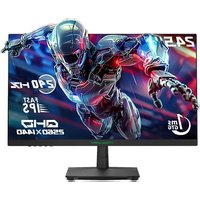
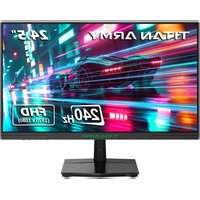
| Brand | Titan Army |
| Model | P2510G |
| Product type | Gaming monitor |
| Screen size | 24.5 inches |
| Resolution | 1920 x 1080 (Full HD) |
| Refresh rate | 165 Hz |
| Response time | 1 ms (MPRT) |
| Panel type | IPS |
| Brightness | 300 cd/m² |
| Static contrast ratio | 1000:1 |
| Viewing angle | 178° / 178° |
| Connectivity | 1x HDMI 2.0, 1x DisplayPort 1.4, 1x headphone jack |
| Supported technologies | FreeSync Premium, HDR10, Flicker-Free, Low Blue Light |
| Dimensions (with stand) | 558 x 418 x 230 mm |
| Weight (with stand) | 4.5 kg |
| Power supply | External power adapter (19V, 2.1A) |
| Power consumption | 28 W (typical), <0.5 W (standby) |
| VESA mounting | 100 x 100 mm |
| Adjustments | Tilt (-5° ~ 20°), swivel (left/right 15°), height (130 mm) |
| Built-in speakers | 2 x 2 W |
| Care and cleaning | Use a soft, dry cloth. Do not use solvents. |
| Safety | Do not expose to moisture, turn off before cleaning. |
| Spare parts and repairability | Power adapter and cables included. Repairs by authorized center. |
| Warranty | 2 years (depending on country) |
Frequently Asked Questions - P2510G Titan Army
How to adjust brightness and contrast?
Use the buttons under the bottom bezel. Press the Menu button, navigate to 'Brightness/Contrast' and adjust with the arrows.
Can I use a VESA mount?
Yes, the monitor is VESA 100x100 mm compatible. Remove the original stand and attach the appropriate mount.
How to enable FreeSync?
Go to OSD menu > 'Game' > 'FreeSync' and set to 'On'. Make sure to use a DisplayPort cable and a compatible graphics card.
What to do if the screen stays black?
Check that the power cable and video cable are properly connected. Test with another source. If the problem persists, contact customer support.
How to clean the screen?
Turn off the monitor and unplug it. Use a slightly damp microfiber cloth (clean water). Never use chemical products.
Which cables are included?
The monitor comes with an HDMI cable, a DisplayPort cable, and a power adapter.
How to adjust the height?
Hold the monitor with both hands and apply vertical pressure on the stand. The height can be adjusted by 130 mm.
Does the monitor have built-in speakers?
Yes, it has two 2 W speakers. The sound can be adjusted via the OSD menu or directly from the system.
What is the native resolution?
The native resolution is 1920 x 1080 pixels (Full HD). Use this resolution for optimal image.
How to reset to factory settings?
In the OSD menu, go to 'Setup' > 'Reset' and confirm. All settings will return to default values.
User questions about P2510G Titan Army
0 question about this device. Answer the ones you know or ask your own.
Ask a new question about this device
No questions yet. Be the first to ask one.
Download the instructions for your Monitor in PDF format for free! Find your manual P2510G - Titan Army and take your electronic device back in hand. On this page are published all the documents necessary for the use of your device. P2510G by Titan Army.
USER MANUAL P2510G Titan Army

Manual assistant
Powered by Anthropic
Waiting for your message
Product information
Brand : Titan Army
Model : P2510G
Category : Monitor