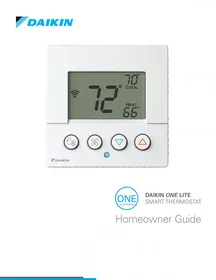
D2TND024A4AA - Thermostat DAIKIN - Free user manual and instructions
Find the device manual for free D2TND024A4AA DAIKIN in PDF.


Pick your language and provide your email: we'll send you a specifically translated version.
| Type de produit | Thermostat |
| Marque | Daikin |
| Modèle | D2TND024A4AA |
| Dimensions | 120 mm x 80 mm x 25 mm |
| Poids | 200 g |
| Alimentation | 24V AC (from HVAC system) |
| Type d'écran | Digital LCD |
| Connexion | Wired (non-WiFi) |
| Fonctions principales | Temperature control, scheduling, fan control |
| Plage de température | 5°C to 35°C |
| Précision | ±0.5°C |
| Compatibilité | Most Daikin HVAC systems |
| Installation | Wall mount |
| Entretien et nettoyage | Clean with dry soft cloth |
| Sécurité | Overheat protection, child lock |
| Pièces détachées | Available via Daikin service |
| Réparabilité | Repairable by qualified technician |
| Garantie | 2 years |
| Contenu de l'emballage | Thermostat, mounting screws, user manual |
Frequently Asked Questions - D2TND024A4AA DAIKIN
How to install the D2TND024A4AA thermostat?
Turn off power to the HVAC system. Mount the base plate to the wall using the provided screws. Connect the wires according to the wiring diagram. Attach the faceplate and restore power. Follow the on-screen setup.
Is this thermostat compatible with my Daikin system?
The D2TND024A4AA is designed for most Daikin HVAC systems. Check the voltage (24V AC) and wiring compatibility. Refer to the manual or contact Daikin support if unsure.
How to set a daily schedule?
Press the Menu button, navigate to ‘Schedule’, then set the desired time and temperature for each period (Morning, Day, Evening, Night). Confirm by pressing ‘Save’.
What does error code E1 mean?
Error E1 indicates a communication error between the thermostat and the HVAC unit. Check wiring connections for looseness or damage. Reset the thermostat and if the error persists, contact a technician.
How to reset the thermostat to factory defaults?
Press and hold the Reset button (located on the side or back) for 5 seconds. The screen will flash, and settings will revert to default. You may need to reconfigure the date and time.
Does the D2TND024A4AA support Wi-Fi?
No, this model is a wired thermostat and does not have Wi-Fi capability. For remote control, consider Daikin’s Wi-Fi enabled models.
How to switch between Celsius and Fahrenheit?
Go to Settings > Units and select either °C or °F. The change takes effect immediately.
What maintenance does the thermostat require?
Clean the exterior with a dry soft cloth. Avoid using water or cleaners. Periodically check that the wiring is secure and the HVAC system is functioning properly.
Does the thermostat use batteries?
No, the D2TND024A4AA is powered directly by the 24V AC from the HVAC system. It does not require batteries.
What to do if the display is blank?
First, check that the circuit breaker for the HVAC system is on. Then, ensure the thermostat wiring is properly connected. If blank still, there may be a power supply issue; consult a technician.
User questions about D2TND024A4AA DAIKIN
0 question about this device. Answer the ones you know or ask your own.
Ask a new question about this device
No questions yet. Be the first to ask one.
Download the instructions for your Thermostat in PDF format for free! Find your manual D2TND024A4AA - DAIKIN and take your electronic device back in hand. On this page are published all the documents necessary for the use of your device. D2TND024A4AA by DAIKIN.
USER MANUAL D2TND024A4AA DAIKIN
Manual assistant
Powered by Anthropic
Waiting for your message
Product information
Brand : DAIKIN
Model : D2TND024A4AA
Category : Thermostat