BRC1D528 - Thermostat DAIKIN - Free user manual and instructions
Find the device manual for free BRC1D528 DAIKIN in PDF.


Pick your language and provide your email: we'll send you a specifically translated version.
| Type | Programmable Thermostat |
| Brand | Daikin |
| Model | BRC1D528 |
| Dimensions (W x H x D) | 120 mm x 80 mm x 25 mm |
| Weight | 200 g |
| Power Supply | 24 VAC |
| Display | LCD with backlight |
| Operating Modes | Cool, Heat, Auto, Fan Only |
| Fan Speeds | Auto, Low, Medium, High |
| Programmability | 7-day, 4 periods per day |
| Temperature Range | 10°C to 30°C (50°F to 86°F) |
| Temperature Accuracy | ±0.5°C |
| Filter Reminder | Yes |
| Keypad Lock | Yes (child lock) |
| Language Support | English, French, Spanish, etc. |
| Maintenance | Clean with soft, dry cloth; no liquids |
| Security | No specific security features |
| Repairability | Professional servicing required |
Frequently Asked Questions - BRC1D528 DAIKIN
How do I set the temperature on the Daikin BRC1D528 thermostat?
Press the Up or Down arrow buttons to adjust the desired temperature. The set temperature will flash on the display.
How do I change the operating mode (Cool/Heat/Auto/Fan)?
Press the Mode button repeatedly to cycle through Cool, Heat, Auto, and Fan Only modes. The selected mode icon will appear on the screen.
How do I program a weekly schedule?
Press the Schedule button, then use the arrow buttons to set the time and temperature for each period (Morning, Day, Evening, Night). Confirm each entry with Set. Repeat for each day if desired.
Why is my thermostat display blank?
Check if the HVAC system is powered on. The thermostat is wired to the system and does not use batteries. If the system is on and display remains blank, contact a professional technician.
How should I clean the Daikin BRC1D528 thermostat?
Use a soft, dry cloth to gently wipe the surface. Do not use water, cleaning agents, or sprays, as they may damage the electronics.
Is the BRC1D528 compatible with all Daikin HVAC systems?
The BRC1D528 is designed for use with Daikin split systems and heat pumps. Check your system's compatibility in the user manual or consult a Daikin dealer.
How do I reset the thermostat to factory settings?
Press and hold the Mode and Fan buttons simultaneously for about 5 seconds until the display resets. This clears all custom settings.
What do the error codes on the display mean?
Error codes indicate system issues (e.g., E1 for communication error). Refer to the user manual for a full list. If the problem persists, contact a qualified technician.
Can I use the Daikin BRC1D528 with non-Daikin HVAC equipment?
No, the BRC1D528 is specifically designed for Daikin systems. Using it with other brands may cause malfunction or damage.
Does the thermostat require batteries?
No, the BRC1D528 is powered directly by the HVAC system via 24 VAC wires. There is no battery compartment.
User questions about BRC1D528 DAIKIN
0 question about this device. Answer the ones you know or ask your own.
Ask a new question about this device
No questions yet. Be the first to ask one.
Download the instructions for your Thermostat in PDF format for free! Find your manual BRC1D528 - DAIKIN and take your electronic device back in hand. On this page are published all the documents necessary for the use of your device. BRC1D528 by DAIKIN.
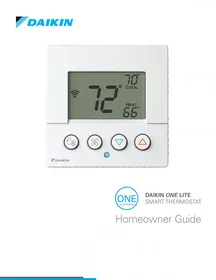
USER MANUAL BRC1D528 DAIKIN
Manual assistant
Powered by Anthropic
Waiting for your message
Product information
Brand : DAIKIN
Model : BRC1D528
Category : Thermostat