BRC1HHDAK - Thermostat DAIKIN - Free user manual and instructions
Find the device manual for free BRC1HHDAK DAIKIN in PDF.


Pick your language and provide your email: we'll send you a specifically translated version.
| Product Type | Thermostat / Wired Remote Controller |
| Brand | Daikin |
| Model | BRC1HHDAK |
| Communication | Wired (4-wire bus) |
| Display | LCD with backlight |
| Power Supply | 12V DC from indoor unit |
| Dimensions (W x H x D) | 120 mm x 80 mm x 20 mm |
| Weight | Approximately 150 g |
| Temperature Range | 16°C to 30°C |
| Operating Modes | Cool, Heat, Fan, Auto, Dry |
| Fan Speeds | Auto, Low, Medium, High |
| Timer | 24-hour on/off timer |
| Clock | Yes, with day of week |
| Key Lock | Yes (child lock) |
| Language | English (and other languages) |
| Installation | Wall-mounted, flush or surface |
| Connection | 4-wire cable to indoor unit |
| Compatibility | Daikin FTX/FTXS series and other compatible models |
| Maintenance | Clean with soft dry cloth |
| Safety | No user-serviceable parts; disconnect power before cleaning |
| Spare Parts | Available from Daikin authorized dealers |
| Repairability | Contact qualified service technician |
| Energy Efficiency | Helps optimize HVAC usage |
Frequently Asked Questions - BRC1HHDAK DAIKIN
How do I set the temperature?
Press the up or down arrow buttons to adjust the desired temperature. The set temperature will be displayed on the screen.
How do I change the operation mode?
Press the MODE button to cycle through available modes: Cool, Heat, Fan, Auto, and Dry. The selected mode will be indicated on the display.
How do I set the timer?
Press the TIMER button to enter timer setting. Use the up/down arrows to set the on and off times. The timer can be set for up to 24 hours.
What does an error code on the display mean?
Error codes indicate a system fault. Refer to the user manual for specific code meanings. Common codes include E0 (communication error) and E1 (sensor error). Contact a qualified technician if needed.
How do I reset the thermostat to factory settings?
Use a small pin to press the RESET button located on the front panel. This will restore default settings.
Is the BRC1HHDAK compatible with my Daikin air conditioner?
This thermostat is compatible with many Daikin split systems, including FTX and FTXS series. Check the compatibility list in the manual or contact Daikin support.
How do I lock the thermostat to prevent tampering?
Press and hold the MODE and FAN buttons simultaneously for 3 seconds to activate the key lock. Repeat to unlock.
How should I clean the thermostat?
Wipe the surface with a soft, dry cloth. Do not use water, solvents, or abrasive cleaners. Ensure the power is off before cleaning.
The display is blank or unresponsive. What should I do?
Check the wiring connections to the indoor unit. Ensure the power supply is active. If the issue persists, there may be a communication fault; contact a technician.
Does this thermostat require batteries?
No, the BRC1HHDAK is powered directly from the indoor unit via the communication cable. No batteries are needed.
User questions about BRC1HHDAK DAIKIN
0 question about this device. Answer the ones you know or ask your own.
Ask a new question about this device
No questions yet. Be the first to ask one.
Download the instructions for your Thermostat in PDF format for free! Find your manual BRC1HHDAK - DAIKIN and take your electronic device back in hand. On this page are published all the documents necessary for the use of your device. BRC1HHDAK by DAIKIN.
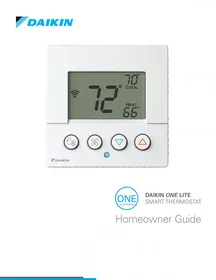
USER MANUAL BRC1HHDAK DAIKIN
Manual assistant
Powered by Anthropic
Waiting for your message
Product information
Brand : DAIKIN
Model : BRC1HHDAK
Category : Thermostat